Rego Renewal Excel Template – Free (2026)
0
Free download
Track lot owners, admin and capital works levies, payments, overdue balances and fund budgets for an Australian strata plan.
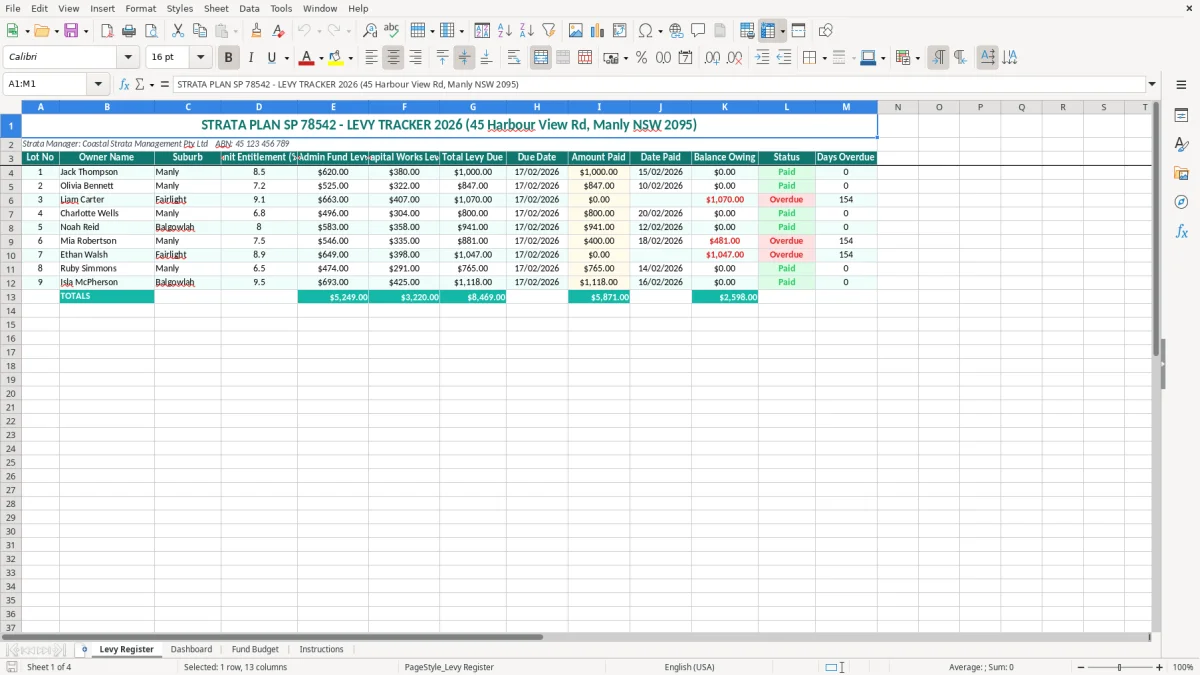
This strata levy tracker is an Excel workbook for recording lot owners, unit entitlements, admin fund levies, capital works levies, payments, balances and overdue days. It includes a Levy Register, Dashboard, Fund Budget and Instructions sheet, making it suitable for strata committees and managers tracking a 2026 levy year.
Enter each lot's levy charge and payment against the supplied register, then use the summary sheets to see what is outstanding and how the two main strata funds are tracking. The example property is Strata Plan SP 78542 at 45 Harbour View Rd, Manly NSW 2095, managed by Coastal Strata Management Pty Ltd.
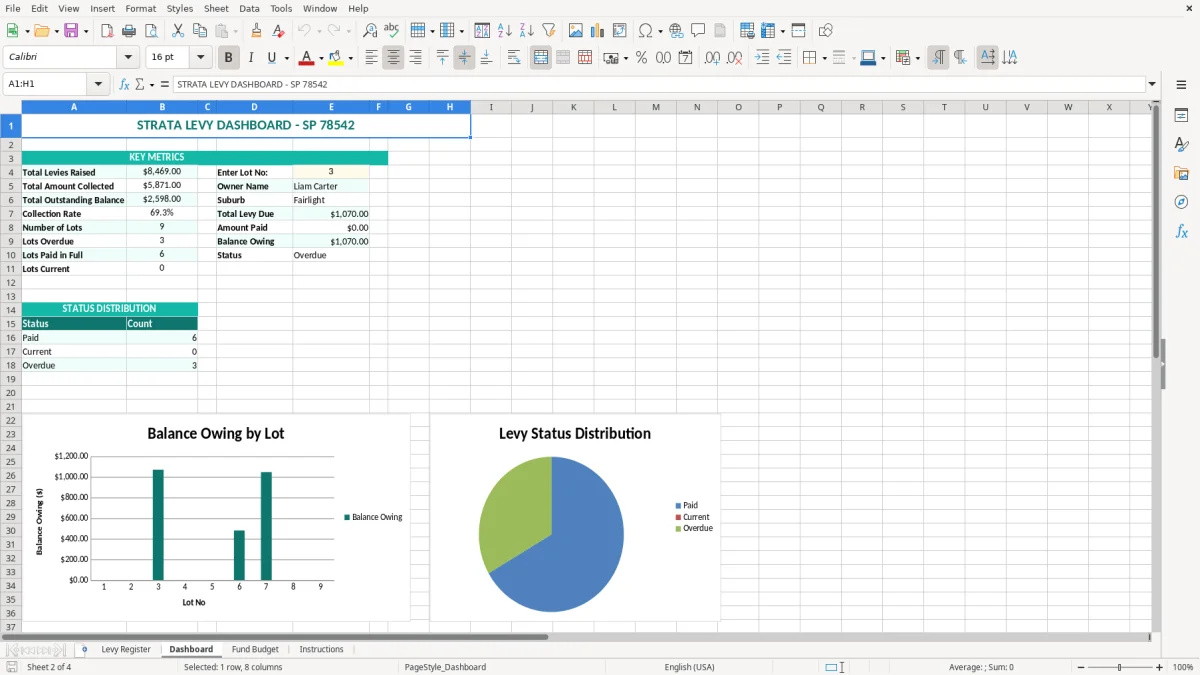
A strata levy tracker is most useful when a committee or strata manager needs a clean list of who owes what, rather than relying on bank descriptions or scattered email approvals. The Levy Register in this workbook is set up for Strata Plan SP 78542, with the property address, manager and ABN across the top and one row per lot underneath.
A strata manager can update the register after each quarterly levy notice and payment run. A committee treasurer can then review the same figures before a meeting, particularly when the plan is deciding whether it can fund painting, lift servicing or an urgent plumbing job.
Image 1 shows the Levy Register's 13 columns: Lot No, Owner Name, Suburb, Unit Entitlement (%), Admin Fund Levy, Capital Works Levy, Total Levy Due, Due Date, Amount Paid, Date Paid, Balance Owing, Status and Days Overdue. That layout keeps the original charge beside the payment record, which is much safer than replacing the levy amount when an owner makes a part-payment.
Take lot 1 in the example: $620.00 for the admin fund plus $380.00 for capital works gives a total levy due of $1,000.00. If the owner pays $600.00 on 15/02/2026 against a $17/02/2026 due date, the remaining balance is $400.00 and the committee has a clear follow-up item.
The workbook also suits a smaller self-managed scheme. A six-lot block may only need 15 minutes after each payment batch, while a 60-lot plan can use the same structure as a review register alongside its accounting system. It is a tracking tool, not a substitute for the strata roll, trust-account records or levy notices.
For longer-term projects such as a lift replacement or roof renewal, a sinking fund planner can sit alongside this levy register to forecast capital works and future contributions.
Strata levies are contributions owners make towards the scheme's approved costs. In New South Wales, the example address means the Strata Schemes Management Act 2015 (NSW) and associated regulations are the starting point for meeting, budgeting, fund and levy processes; other states use different legislation and terminology.
NSW schemes generally maintain an administrative fund for day-to-day expenses and a capital works fund for longer-term repairs and replacement. The workbook keeps those amounts separate. For example, a quarterly charge of $620.00 admin plus $380.00 capital works is $1,000.00 per lot, but it should not be treated as if the entire amount is available for routine cleaning.
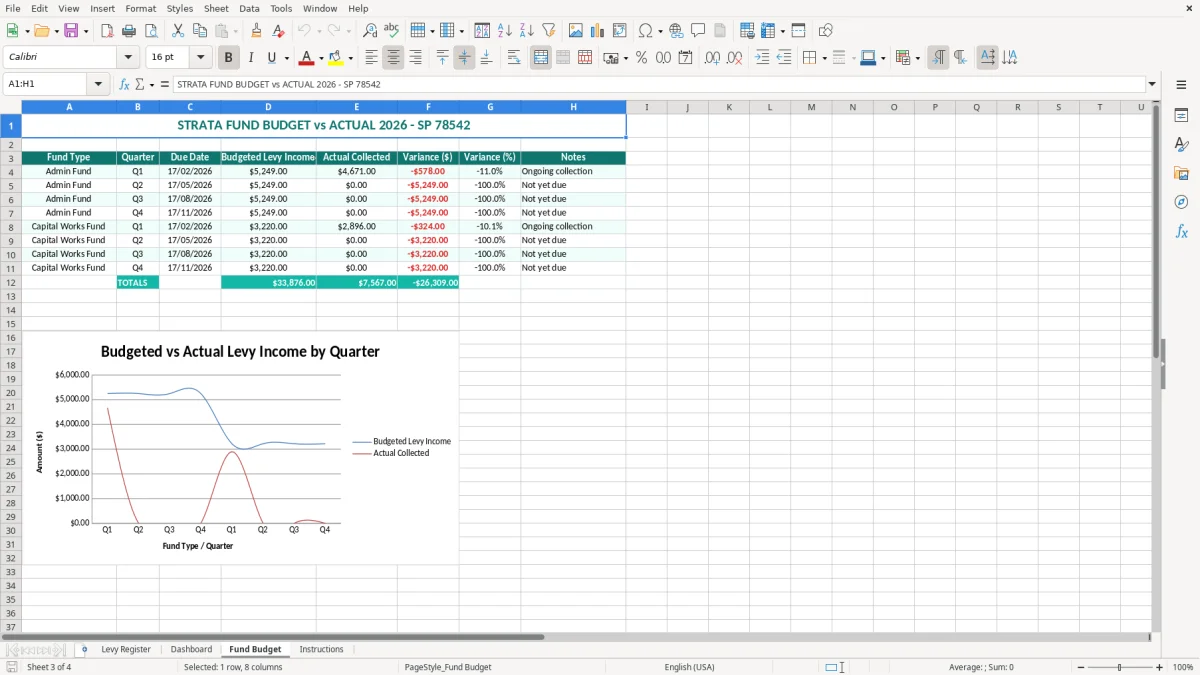
The capital works plan is important for larger future costs, and NSW schemes must prepare and maintain one under the strata legislation. Use the Fund Budget sheet to compare expected levy income with approved spending; do not use a positive tracker balance as authority to spend without the required committee or owners corporation approval.
The levy notice and owners corporation resolutions establish the amount and due date to track. A levy not paid by its due date becomes an arrears issue, and NSW legislation provides processes for interest and recovery. Record the actual date and amount received, preserve the notice and bank evidence, and avoid backdating a payment merely to make the status look current.
There is no GST calculation built into the visible Levy Register fields. Strata managers should retain financial records and supporting documents under the applicable state requirements and Australian tax rules, while owners should keep their own records for any rental-property deduction. The ABN printed at the top identifies the manager; it does not by itself prove that every levy transaction carries GST.
When preparing the annual figures, a body corporate budget can help compare planned shared-property costs with actual spending and levy funding.
The biggest problems I see are not usually difficult Excel errors. They are small changes made at the wrong point in the levy cycle: a part-payment typed over the original charge, a new owner left under the previous owner's name, or a due date changed because a bank transfer arrived late.
Suppose a lot owes $1,000.00 and pays $400.00 first, then $600.00 later. If the register is edited to show only the latest $600.00, the apparent balance becomes $400.00 even though the owner is fully paid. If both payments are pasted into a single amount-paid cell as $1,000.00, the total may be right but the payment trail is lost. Keep the register aligned with the agreed data-entry method and reconcile it to the trust account.
Another common error is charging the admin and capital works amounts into one column. On 20 lots, a $100.00 allocation error can misstate a fund by $2,000.00. That matters when the committee approves a repair believing the capital works fund has more cash than it really does.
A changed lot owner, missing lot or mistyped unit entitlement can distort notices and committee reporting. If a 7.2% entitlement is entered as 72%, a budget allocation based on entitlements can be ten times too high. Check the strata roll and approved levy schedule before copying last period's rows.
Dates entered as text may sort incorrectly, especially when one row uses 17/02/2026 and another uses an unrecognised text value. A payment received on 20/02/2026 for a 17/02/2026 due date is three days late; it should not be marked paid on time simply because the amount matches. Review the Days Overdue result and retain evidence for recovery action.
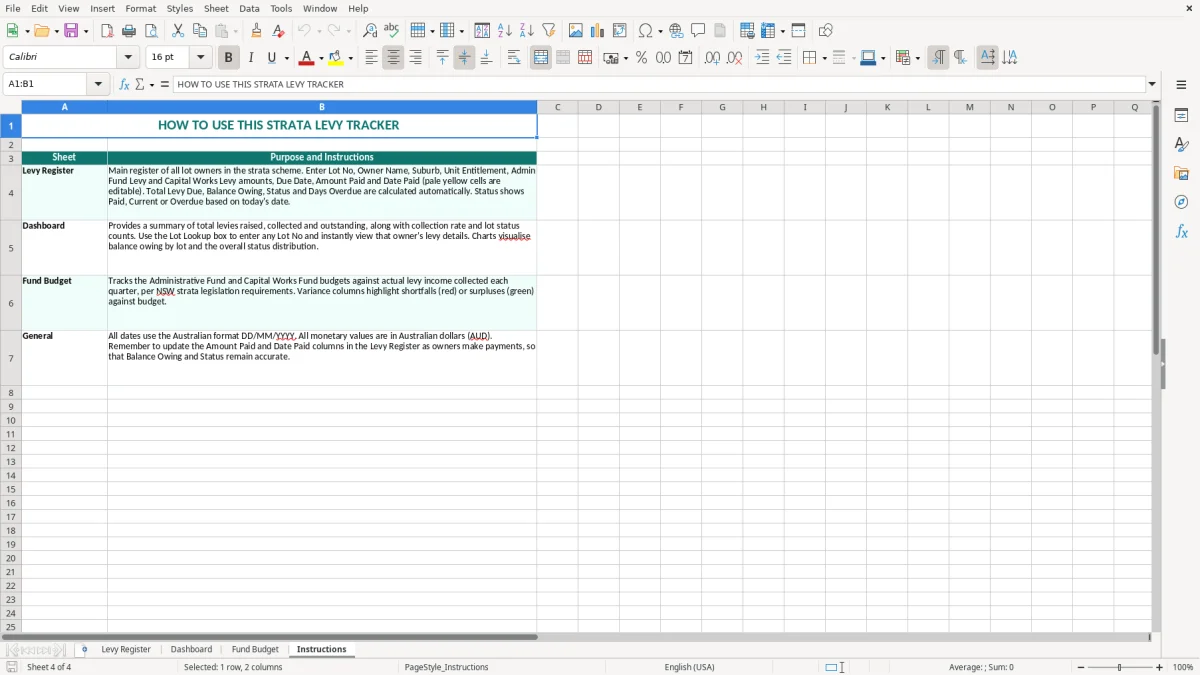
The workbook works best as a short reconciliation routine, not as a file opened only when an owner complains. Set a fixed time after the bank transaction export or payment batch, update received amounts and dates, then review the Dashboard before the committee's monthly or quarterly meeting.
Save a dated copy such as Levy Tracker - March 2026.xlsx after each completed review. Keep one controlled master file and restrict editing of formula cells; a committee email attachment can quickly become an outdated second version.
For a larger scheme, add data validation to fields such as Status and use conditional formatting to highlight balances above $0.00 or days overdue greater than 0. Keep dates as real Excel dates in DD/MM/YYYY format. If you extend the register, copy formulas down consistently and test a $1,000.00 levy with a $400.00 payment so the expected $600.00 balance still appears.
A spreadsheet is reasonable for a small self-managed scheme with 10 or 20 lots and one regular operator. Once you have hundreds of lots, instalment arrangements, separate trust accounts, automated notices or frequent ownership changes, move the operational record into strata management software or an accounting platform. Keep this template as a review schedule rather than forcing it to become a fragile database.