Camping Gear Checklist Excel – Free Template (2026)
8
Free download
Track NLIS-tagged cattle, weight gain, ADG, target performance and estimated sale value across paddocks in an Australian Excel log.
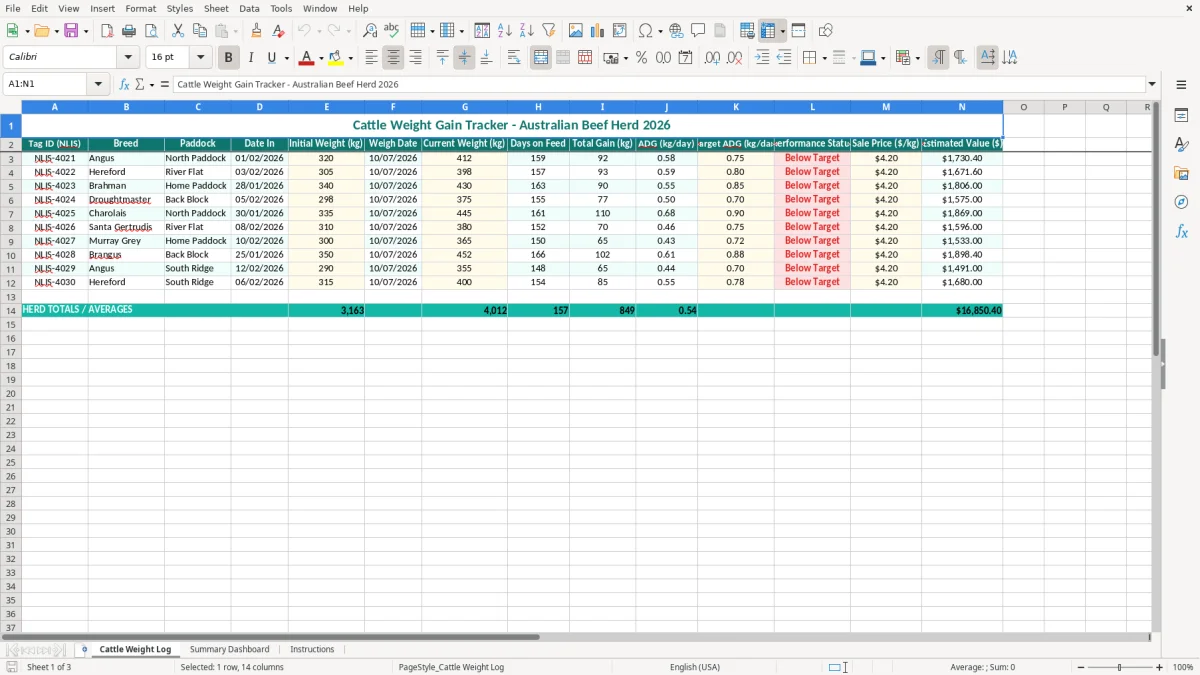
This cattle weight gain tracker Excel template records each animal's NLIS tag, breed, paddock, starting and current weight, days on feed, total gain, ADG, target ADG, performance status and estimated sale value. It is designed for Australian beef producers monitoring herd performance between weigh-ins.
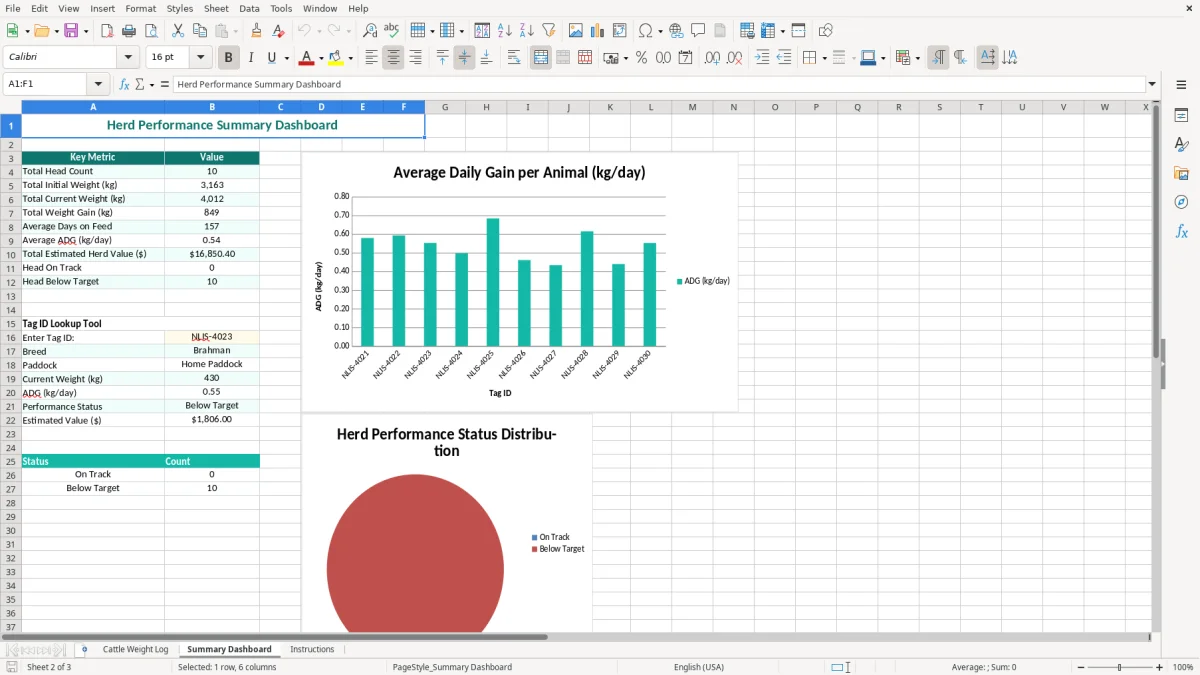
Enter the yellow input cells on the Cattle Weight Log sheet and use the Summary Dashboard to review results across the mob. Image 1 shows the log's 14 columns, while image 2 shows the dashboard layout for a quick management view.
A cattle producer usually opens this spreadsheet on weigh day, not at tax time. It suits a family beef operation checking a backgrounding mob, a feedlot manager reviewing induction groups, or a station overseer comparing paddocks before the next rotation. The useful question is whether the cattle are converting feed and pasture into saleable kilograms at the rate you expected.
Image 1 shows the Cattle Weight Log with Tag ID (NLIS), Breed, Paddock, Date In, Initial Weight (kg), Weigh Date and Current Weight (kg) across the first part of the table. The later columns calculate or record Days on Feed, Total Gain (kg), ADG (kg/day), Target ADG (kg/day), Performance Status, Sale Price ($/kg) and Estimated Value ($).
For example, a steer entering at 320 kg and weighing 412 kg has gained 92 kg. If the period is 160 days, the ADG is 0.575 kg/day; at an assumed $3.80/kg, its estimated value is $1,565.60. That is a more useful management figure than simply saying the animal is going well.
A small producer can sort the log by Paddock and see whether North Paddock is outperforming the Back Block. A manager with 300 cattle can use the same row structure, provided each animal has one consistent record and weigh dates are entered correctly.
Image 2, the Summary Dashboard, is the place to look for the broad result after entry. Use the individual log when deciding what to do with one animal; use the dashboard when reviewing a mob, feeding period or paddock. For a four-employee chippie there is a roster; for a cattle business, this is the practical weekly or fortnightly performance check.
This spreadsheet is a management tool, not a replacement for Australia's livestock traceability records. Cattle generally need an approved electronic NLIS ear tag before they leave a property, and movements must be recorded on the NLIS database using the relevant property identification details. The exact process is handled through the state or territory NLIS system.
The Tag ID (NLIS) column should contain the tag number exactly as shown on the animal's electronic tag. Do not use a paddock name as the identifier. If NLIS-4021 moves from North Paddock to River Flat, update the management record carefully, but retain the movement evidence required by your state system and property records.
When cattle are consigned, the National Vendor Declaration (NVD) carries information about the animals, treatments and food-safety declarations. A weight tracker does not prove an NVD was completed, a movement was uploaded or a chemical withholding period was met. Keep those records with your livestock paperwork and the spreadsheet as supporting management information.
Estimated Value ($) is a calculation, not a guaranteed invoice amount. A 450 kg animal at $3.60/kg gives $1,620 before any adjustments, deductions, freight, dressing percentage or grid penalties. Liveweight, carcase weight and saleable value are different measures, so do not treat the cell as a final market settlement.
For a defensible comparison, weigh cattle under a repeatable routine and record the date. A 20 kg change over a two-day gap may reflect gut fill rather than real growth. The technical preference here is to compare groups over a meaningful interval, such as 30 to 60 days, rather than making a management decision from one noisy reading.
The most expensive mistakes are often small entry errors repeated across a mob. A swapped digit in an NLIS tag can attach a strong animal's history to the wrong row, while entering 45 instead of 445 kg can make one animal look catastrophically underweight and distort the group review.
ADG relies on both the weight change and the number of days between Date In and Weigh Date. If a 320 kg steer reaches 412 kg in 160 days, the result is 0.575 kg/day. Entering 16 days instead produces 5.75 kg/day, which could prompt a manager to increase feed or hold cattle that are already on track.
Another common problem is mixing scales or weighing conditions. A mob weighed straight off lush pasture may show a different result from the same mob after yarding and a controlled wait. If a 100-head group is overestimated by 15 kg each and the assumed value is $3.80/kg, the paper value is overstated by $5,700. That can affect sale timing and cash-flow planning.
Entering an optimistic $4.20/kg when the likely price is $3.60/kg adds $270 to the estimate of a 450 kg animal. Across 80 head, that gap is $21,600. Use a conservative working price and change it when your agent, processor or market report gives you a better basis.
Do not delete poor performers just because they make the dashboard look untidy. A low-status row is useful evidence: check health, teeth, genetics, water, pasture allocation and tag accuracy before deciding whether to cull, move or treat. The spreadsheet flags a result; it does not diagnose the cause.
The template works best when it is attached to an existing yard routine. Choose one person to enter weights on the same day the cattle are drafted or weighed, then save a dated copy after the figures have been checked. A five-minute review of 40 rows is easier than reconstructing six months of figures from notebooks and sale dockets.
For one or several mobs, Excel is a sensible low-cost starting point. Use filters and, if you extend the workbook, data validation for Breed and Paddock so entries stay consistent. A 300-head operation with monthly weigh-ins creates 3,600 animal records a year if you keep one row per animal per month, so disciplined file naming and backups matter.
Move to livestock software or a system such as Xero alongside a dedicated herd platform when multiple staff need simultaneous access, you require automatic NLIS integration, or you are maintaining thousands of historical measurements. Keep this workbook as an export or review tool rather than forcing a simple log to handle traceability, treatments, feed costs and sales all at once.
That simple log still pairs well with a head count sheet when you need a quick cross-check on animals, treatments, feed costs and sales without turning it into full herd software.