Camping Gear Checklist Excel – Free Template (2026)
8
Free download
Track shearers, runs, sheep per hour and piece rates across Australian sheds with a tally sheet and dashboard.
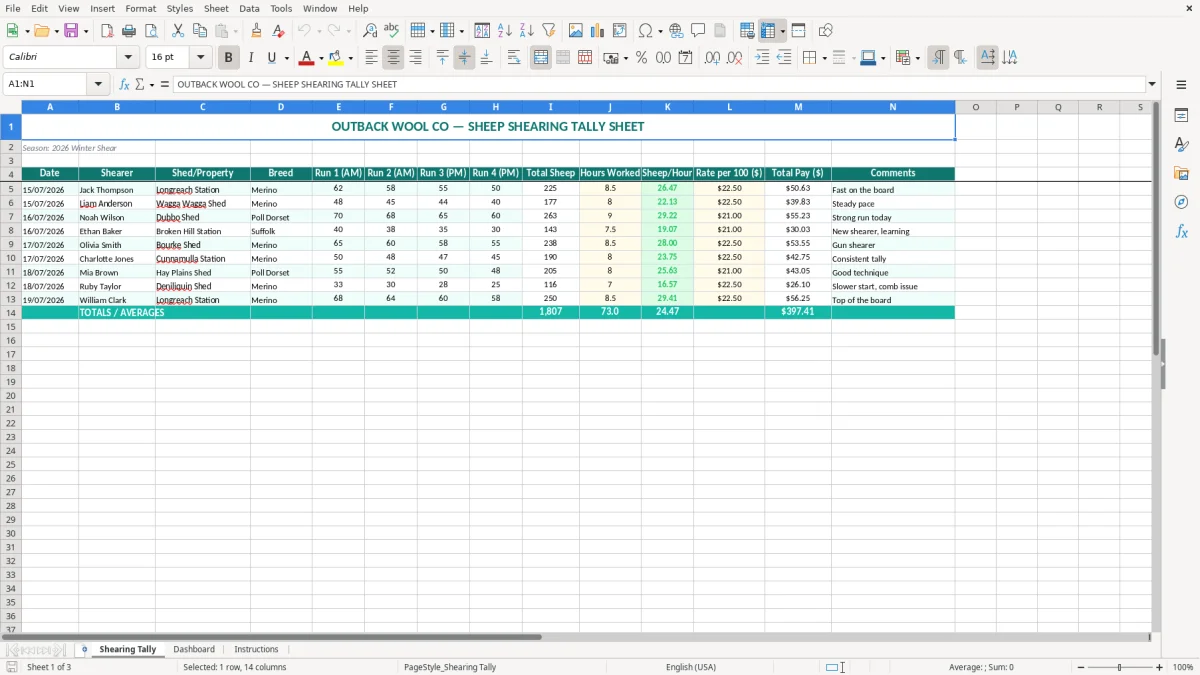
A sheep shearing tally Excel spreadsheet records each shearer's date, shed, breed, four shearing runs, total sheep, hours, sheep per hour, rate per 100 and total pay. This template includes a Shearing Tally sheet for entry, a Dashboard for reviewing results and an Instructions sheet.
It suits station managers, shed hands, contractors and bookkeepers who need a consistent record across a busy Australian shearing season. Enter the run numbers and working details once, then use the calculated totals to check production and prepare the pay information.
A station manager usually sits down with a tally like this at the end of each day, when the shed crew’s paper figures need to become a reliable production record. A shearing contractor may use it across several properties, while an office manager enters the figures for payroll and keeps the original daily sheets with the job paperwork.
The layout is built around the way a shed actually runs. Image 1, the Shearing Tally sheet, has Date, Shearer, Shed/Property and Breed on the left, four run columns in the middle, then Total Sheep, Hours Worked, Sheep/Hour, Rate per 100 ($), Total Pay ($) and Comments. That means you can see both the production count and the payment calculation on one line.
Suppose Jack works at Longreach Station on 15/07/2026 and records 62 sheep in Run 1, 58 in Run 2, 55 in Run 3 and 50 in Run 4. The total is 225 sheep. At $22.50 per 100, the piece-rate calculation is 225 ÷ 100 × $22.50, or $50.63 when rounded to cents.
If Jack worked 8.5 hours, the pace is 225 ÷ 8.5 = 26.47 sheep per hour. Compare that with another shearer who completed 177 sheep in 8 hours: the second worker is at 22.13 sheep per hour, but the number alone does not explain training, sheep type, pen movement or equipment delays. The Comments column gives you somewhere to record that context.
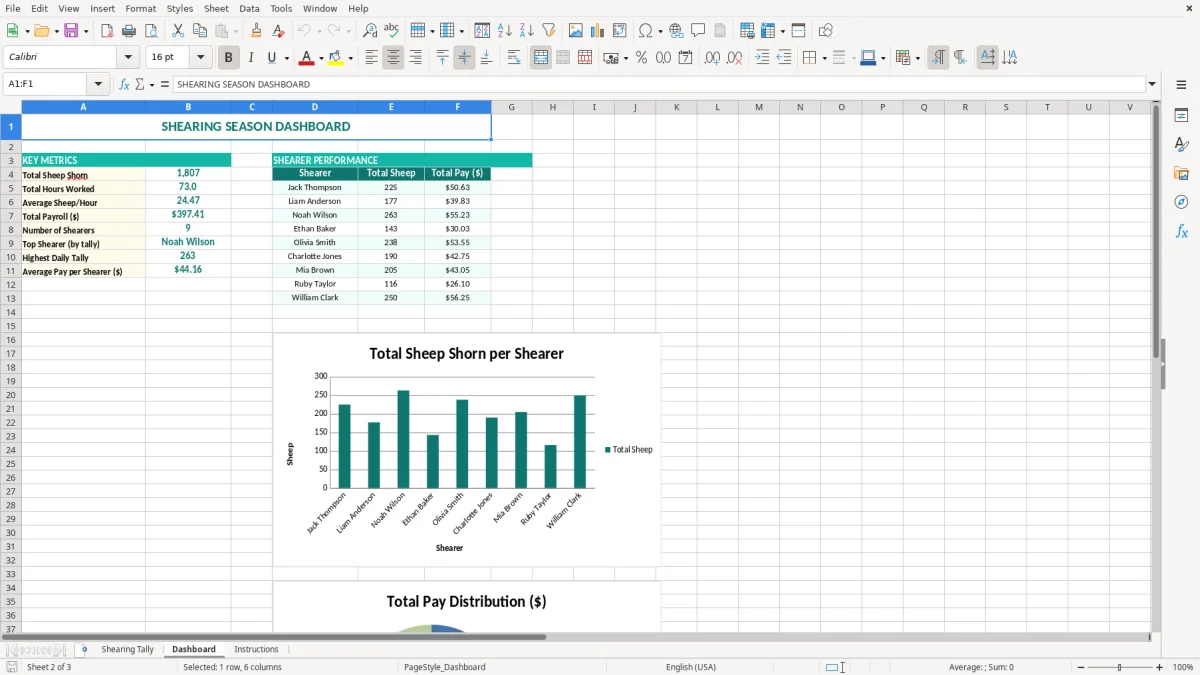
Image 2 shows the Dashboard sheet, which is useful after several entries have been added rather than after a single run. A contractor with 4 shearers working across 3 properties can use it to spot which days or sheds produced the strongest numbers before reviewing the underlying tally.
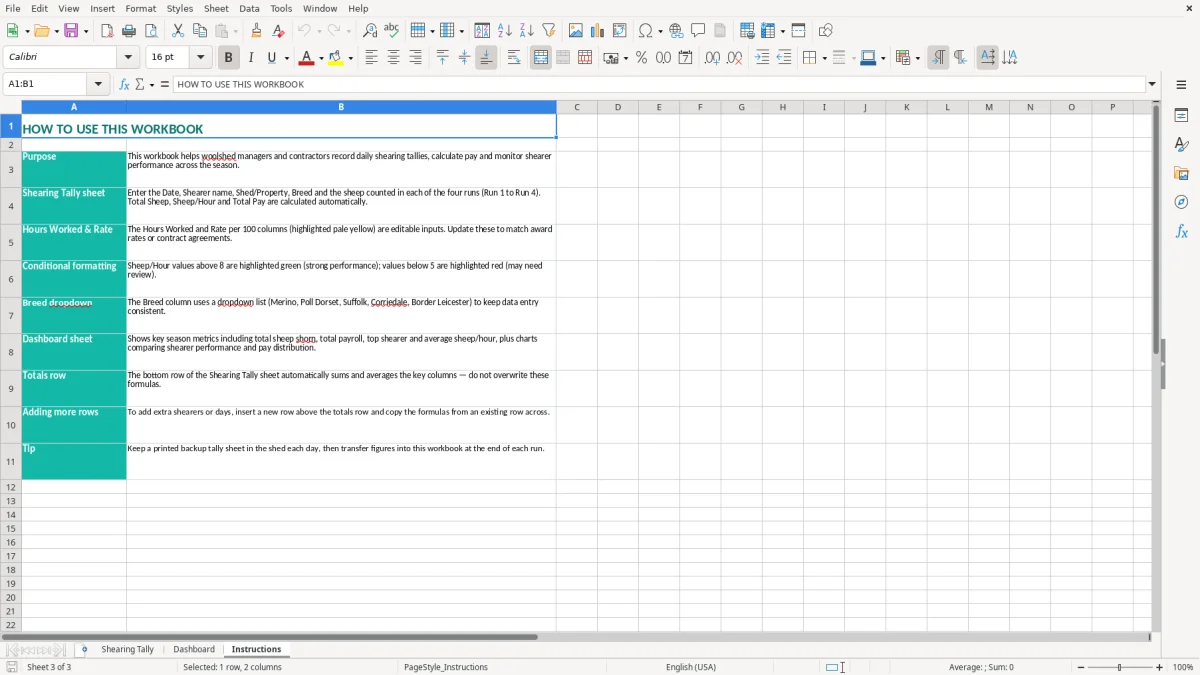
At the end of a busy week, the dashboard can also support a short conversation with the shed manager: 1,080 sheep across 5 working days may look acceptable, but 2 shearers with materially different sheep-per-hour results deserve a closer look. Image 3 is the Instructions sheet, useful when a relief office worker needs to enter the next day's figures without changing the structure.
A sheep shearing tally is a practical source document for calculating piece-rate earnings, but it does not replace the employment records required for workers. If shearers are employees, the business still needs to apply the relevant Fair Work award or enterprise agreement, the National Employment Standards, PAYG withholding and superannuation obligations.
The rate per 100 in this spreadsheet is an input, not a legal recommendation. For example, 400 sheep at $21.00 per 100 gives $84.00 in the simple piece-rate column. Before paying that amount, the employer must check that the agreed arrangement satisfies the applicable minimum payment and record-keeping requirements for the worker and classification.
Enter dates as DD/MM/YYYY and keep the tally with the shed diary, contractor invoice, employment records and any timesheet used to establish Hours Worked. If 4 employees each work 8 hours on 15/07/2026, the daily hours should reconcile to 32 hours before you investigate breaks, travel or a partial day.
For employees, payroll data must also flow through Single Touch Payroll (STP), with PAYG withholding calculated using the current ATO tax tables. The tally's Total Pay ($) is therefore best treated as the production-based amount that feeds your payroll review, not as a substitute for a compliant payslip or STP report.
The ATO generally requires business records to be kept for 5 years, while employment records have their own Fair Work requirements. Retain the dated tally, the rate agreement, pay calculation, timesheet evidence and payment confirmation together. That trail is stronger than an unexplained total copied into a bank payment.
Superannuation is currently 11.5% of ordinary time earnings for eligible workers and is paid to a complying fund on the required quarterly cycle. A piece-rate tally will not by itself identify every component of ordinary time earnings, so use it alongside payroll settings. A $1,000 eligible earnings amount would produce $115 of super at 11.5%, subject to the worker's circumstances and payroll treatment.
That same level of traceability is useful when the work shifts from pay to materials, and a materials estimate sheet keeps the mix, quantities and cost assumptions tied to the job total.
The most common failure I see is a single daily total copied from a board without the four run figures behind it. A shearer might be entered as completing 250 sheep, while the run notes actually show 62, 58, 55 and 50 — a total of 225. At $22.50 per 100, that 25-sheep error overstates pay by $5.63 for one person.
That does not sound large until it happens to 8 shearers over 12 days. The same error becomes $540.48 across the run, before the time spent retracing dockets and correcting payroll. Entering each AM and PM run in the separate columns makes the discrepancy visible while the crew is still on site.
A second problem occurs when a manager copies yesterday's rate into a new property or enters one shearer's hours beside another shearer's name. If 6 people are recorded at $22.50 instead of the agreed $21.00, each 300-sheep tally is overstated by $4.50. Across 10 days, that is $270 to reverse and explain.
Hours Worked also needs a sensible definition. Using 9 hours for one worker and 7.5 hours for another without recording why can make Sheep/Hour look like a performance problem when one person had travel, equipment downtime or a training role. Use Comments for the reason, rather than relying on memory at the end of the month.
Typing Bourke Shed, Bourke shed and Bourke into separate rows can split your review into three labels. The same happens with Merino and merino, or a shearer's shortened name and full name. You may then think the dashboard is missing production when the records are simply inconsistent.
Finally, do not delete the original row when a figure is corrected. Enter the corrected tally clearly, keep the supporting paper or message, and note the reason. A clean correction trail takes minutes; explaining an unexplained $8,000 seasonal difference to a bookkeeper or auditor takes considerably longer.
The best routine is to update the spreadsheet before the shed closes, while the board and tally sheets are still in front of you. Set aside 10 minutes after the final run: enter the four run counts, check Total Sheep, add Hours Worked and rate, then write one useful comment where the day was unusual.
For a 4-shearer crew, that small habit can prevent 20 or more separate figures being reconstructed from memory later. Have one person responsible for entering the data and another person compare the totals with the shed board before the file is saved.
This template is a good fit for a small contractor or station with a manageable number of daily entries. If you have 20 crews, hundreds of properties or several seasons being reported at once, move the source records into Xero, MYOB or a dedicated workforce system and keep the spreadsheet as an export or checking tool.
Excel remains useful when the key task is a quick shed tally. It becomes risky when several people overwrite the same file, rates change frequently, or payroll and super need to be reconciled automatically across thousands of lines.
For a quick shed tally, the next step is a livestock tally sheet that keeps each head count clear before payroll or reconciliation is pushed into a larger system.