Property Depreciation Excel Template – Free (2026)
23
Free download
Track GST sales and purchases, quarter by quarter, with BAS Data, BAS Summary and Instructions sheets.
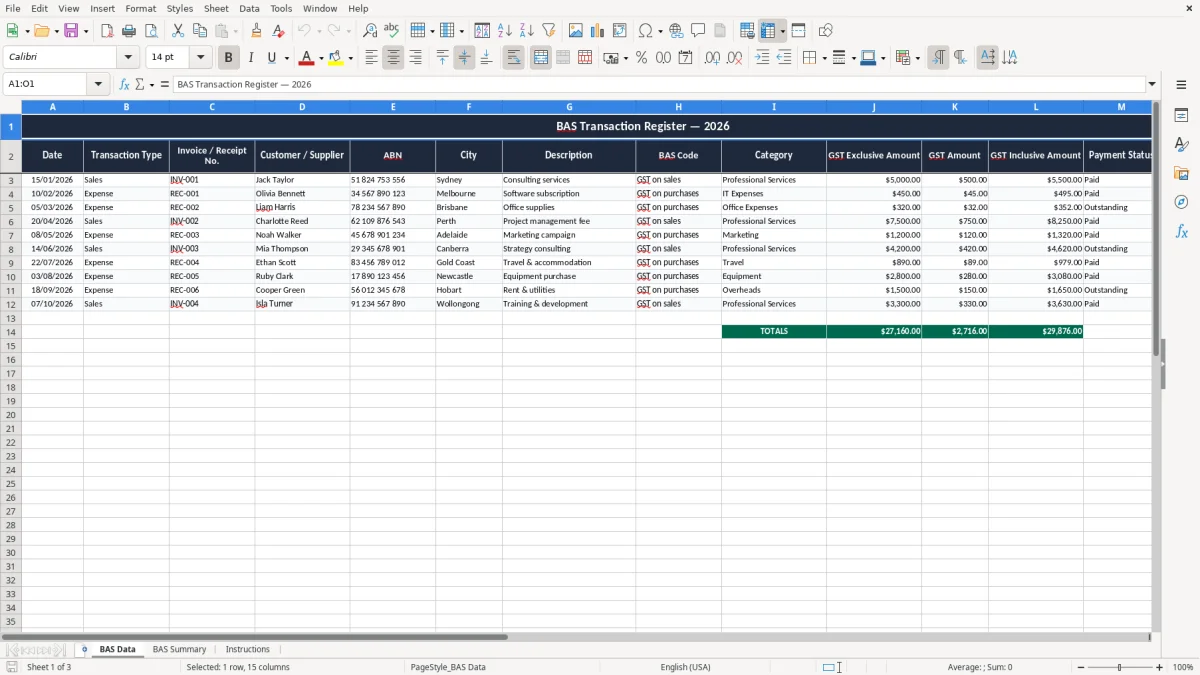
This BAS Statement Excel template tracks GST sales and purchases, then rolls the figures into a simple quarterly summary you can use for your BAS. It includes a BAS Data sheet, a BAS Summary sheet and an Instructions sheet.
If you’re doing your own GST work or helping a small business keep the books straight, this gives you a clean place to enter transactions, code them to BAS categories and check the totals before you lodge. The workbook is set up for Australian dates, currency and quarter-by-quarter reporting.
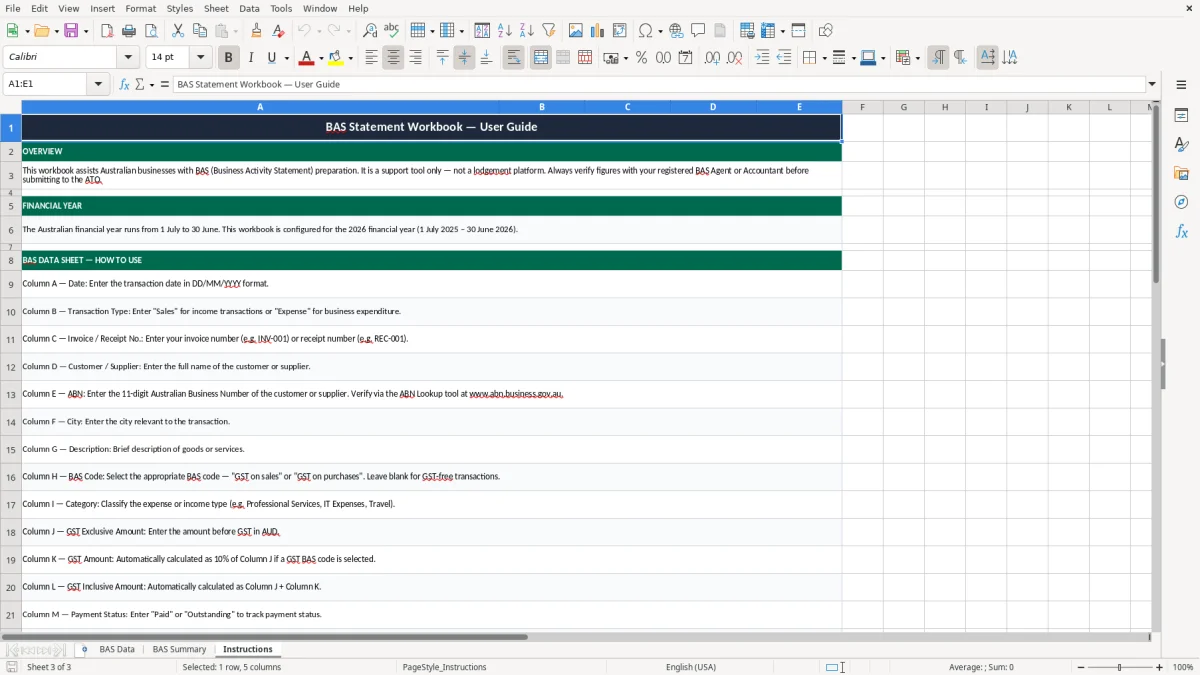
The screenshots show the register layout, the summary view and the setup notes, so you can see the structure before you start typing. It’s built for practical bookkeeping, not fiddly formatting.
This workbook is built for the person who has to get the BAS sorted without wasting half a day in the accounting file. A sole trader, office manager or bookkeeper can use it to capture sales, purchases and GST as they happen, then check the quarter total before lodging.
Image 1 shows the BAS Data sheet, and that is where the work starts. You enter the date, transaction type, invoice or receipt number, customer or supplier, ABN, city, description, BAS code and amount fields, then use the summary sheet to see what needs attention.
A chippie with 4 employees might run $28,000 a month through the register, split between progress claims, tool purchases and fuel. A sole trader doing their own books can use the same layout for a quarterly BAS deadline without opening a full accounting package.
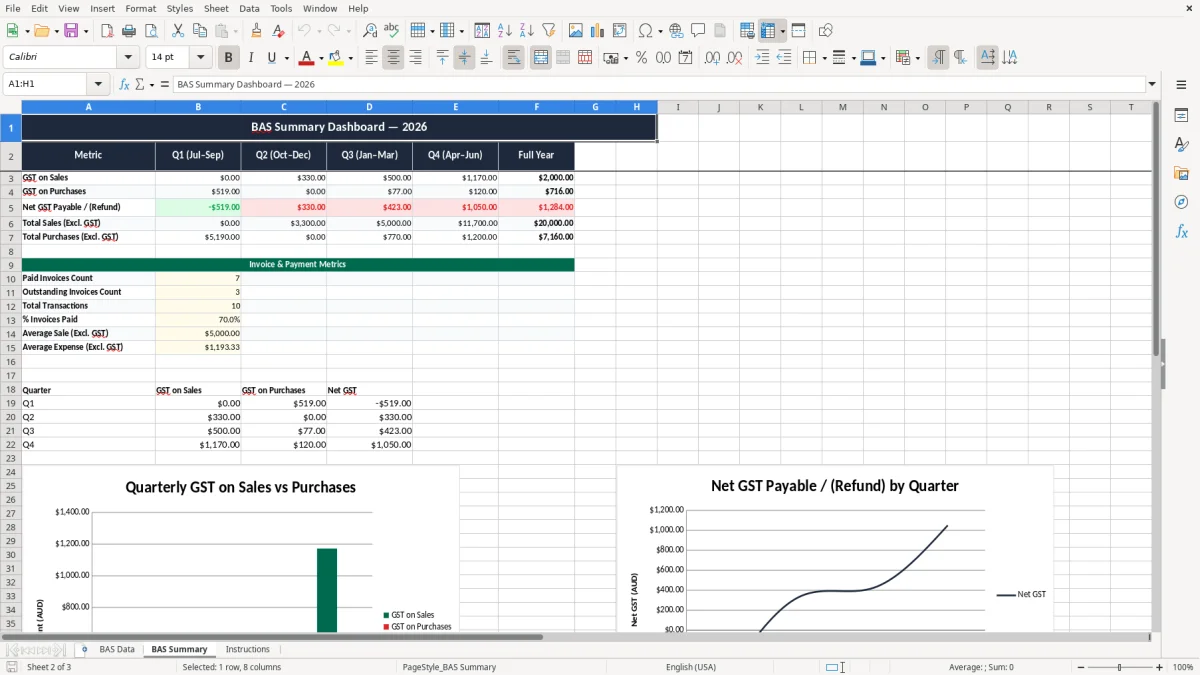
The useful bit is not just the total. It is whether the GST on sales, GST on purchases and payment status line up with the bank and the invoices, so you are not guessing at quarter end.
Image 2 shows the BAS Summary sheet, which is the quick-check page when you want to compare the register against the numbers you are about to lodge. For a business with 300 invoices a month, that saves you from scrolling through every line when only the quarter totals matter.
In Australia, GST is 10%, and you must register once turnover hits $75,000 a year, or $150,000 for a not-for-profit. That is why this spreadsheet matters: it gives you a clean way to separate GST on sales from GST on purchases before your BAS goes in.
For most small businesses, BAS lodgement is quarterly. If your turnover goes above $20 million, the ATO expects monthly lodgement, so a register like this becomes more of a live control sheet than a once-a-quarter tidy-up.
The ATO expects a tax invoice to show the supplier’s identity, the ABN, the words Tax Invoice, the date, and a clear description of what was sold. If the invoice is over $82.50 including GST, GST must be shown separately.
If you sell a service for $1,100 including GST, the GST-exclusive amount is $1,000 and the GST is $100. If you buy laptop software for $440 including GST, the GST component is $40, which may be claimable as an input tax credit if it relates to your business.
You need to keep business records for 5 years. That includes invoices, receipts and working papers, so a register like this is handy when you are asked to explain a figure months later.
The most common mess is simple: the GST is entered twice, or not at all. On a quarter with $80,000 in GST-inclusive sales, a 10% mistake is $8,000 in the wrong bucket, and that can turn into a painful correction once you notice it.
Another regular problem is mixing up cash and accruals. If you record the sale when the invoice is issued but only pay GST when the customer pays, your BAS can drift off by thousands, especially in a business with $40,000 in unpaid debtors at quarter end.
GST on sales and GST on purchases are not interchangeable, and private expenses should not be in the BAS at all. I have seen people dump every bank transaction into one line, then spend 3 hours untangling fuel, subscriptions and owner drawings.
If the invoice has no ABN or no clear GST detail, you can lose the input tax credit. On a stack of 50 bills a month, even 5 missing receipts at $220 each means $100 in GST you may not be able to claim.
Without reconciliation, you do not know whether a payment was duplicated, reversed or simply not allocated. That is how a $1,320 supplier bill turns into a double payment that only gets found when cash flow is already tight.
Fehlende Belege und die Abstimmung des Registers mit der Bank gehören zusammen: Die GST reconciliation Excel template Australia sorgt dafür, dass doppelte Zahlungen, fehlende Quittungen und nicht zugeordnete Buchungen schneller auffallen.
The spreadsheet works best when you tie it to a routine you already do. Most small businesses will get more out of it if they update it weekly, then do a proper check at the end of the month or before the quarterly BAS deadline.
If you are handling 10,000+ lines a year, the file will still work, but the manual checking starts to bite. At that point, Xero or MYOB is usually the better move because bank feeds, rules and audit trails do more of the heavy lifting for you.
For a smaller business with one or two staff and modest GST volume, this template is often enough to keep the BAS under control. Once the register is taking you more than an hour a week, it is time to look at a proper system rather than stretching Excel past its comfort zone.
Bei einer kleinen Firma mit ein oder zwei Mitarbeitenden gehört die ABN-Rechnungsvorlage für Excel in Australien oft zum nächsten sauberen Schritt, weil sie Rechnungsstellung und BAS-Abgleich in einem einfachen Format zusammenhält.