Rego Renewal Excel Template – Free (2026)
0
Free download
Plan fuel, caravan parks, groceries and repairs with an Australian grey nomad trip budget Excel template and dashboard.
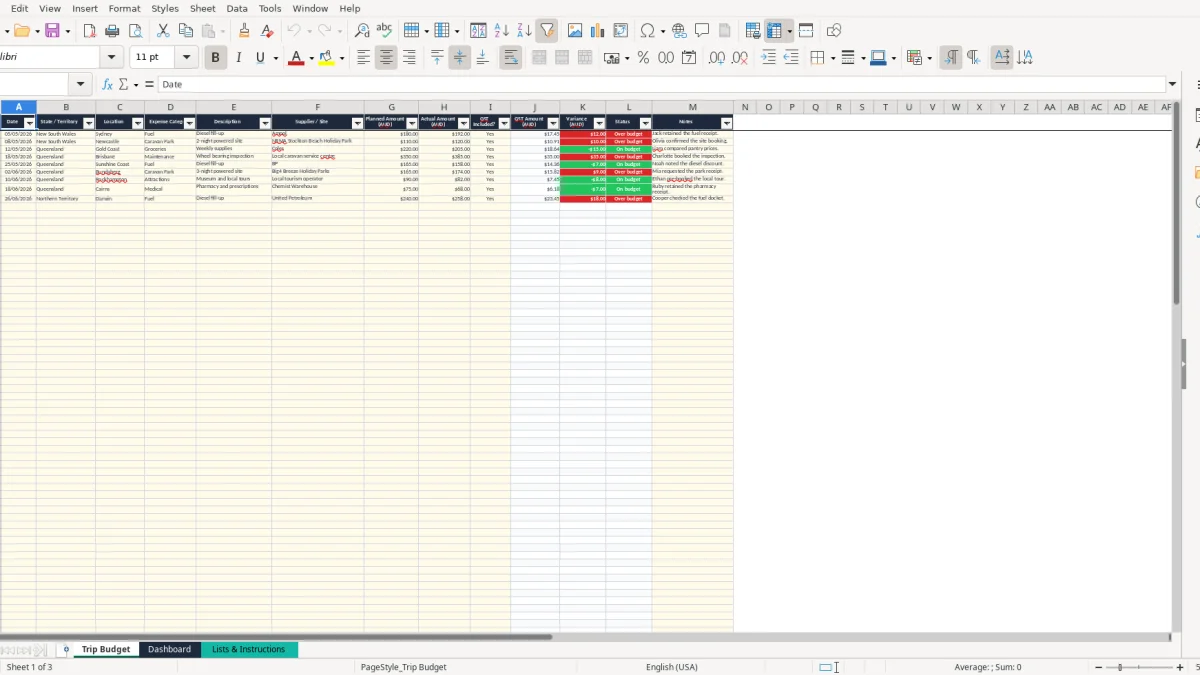
This grey nomad trip budget Excel template records planned and actual Australian travel costs in one table. It includes fields for dates, states, locations, fuel, caravan parks, groceries, maintenance, GST, variances and notes, plus a dashboard summarising your trip.
Use it for a caravan or motorhome journey across Australia, whether you are planning before departure or entering receipts on the road. The Trip Budget sheet has 100 prepared expense rows, while the Dashboard turns those entries into useful totals and category comparisons.
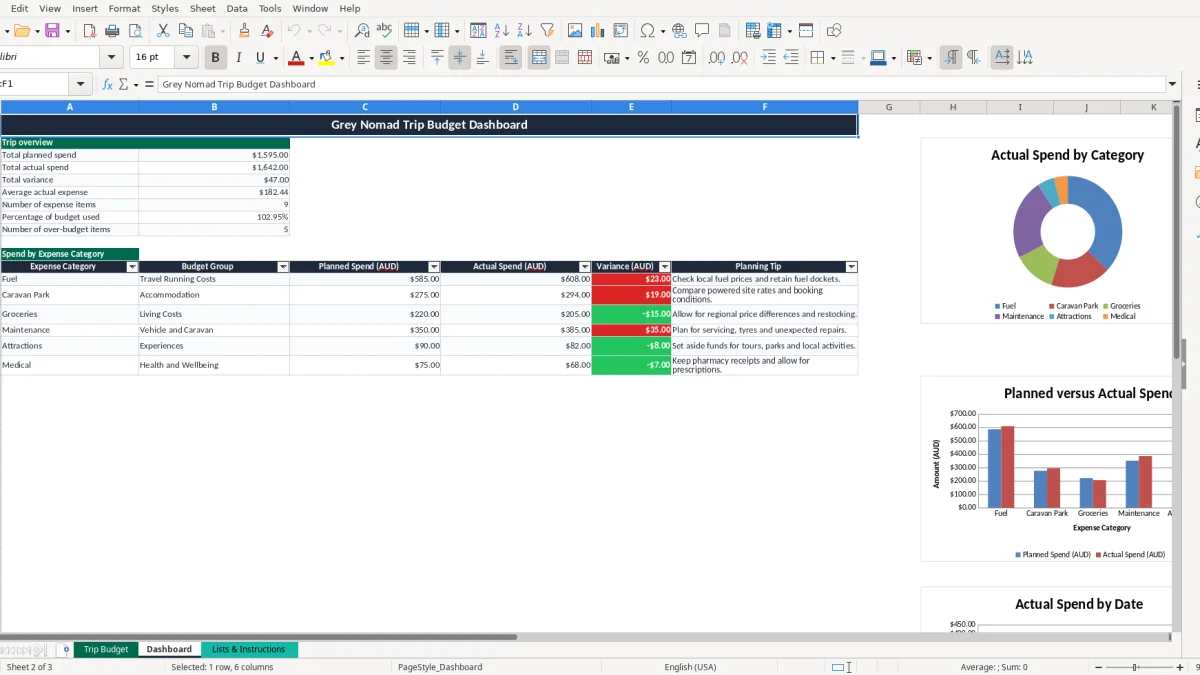
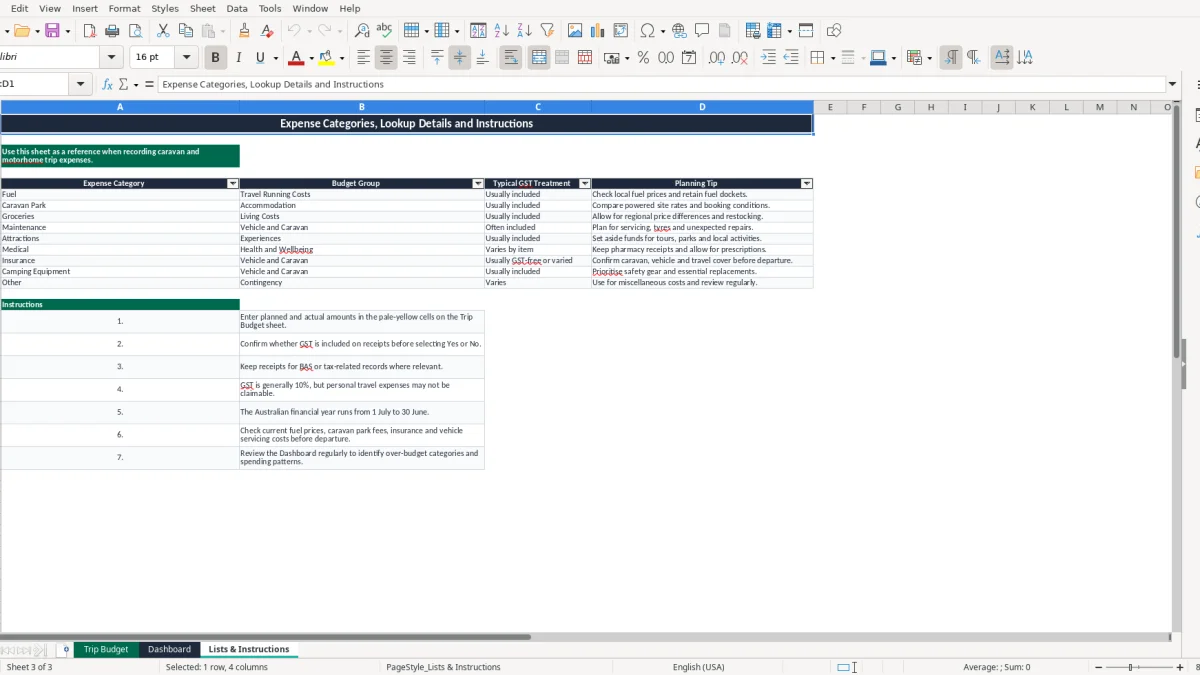
Image 1 shows the Trip Budget table, image 2 shows the dashboard, and image 3 shows the Lists & Instructions reference sheet. The workbook uses Australian dollars and DD/MM/YYYY dates, with sample entries that you can replace.
A grey nomad usually needs a different sort of budget from a weekend tourist. You may be managing diesel, powered sites, groceries, caravan repairs and attractions across several states, with costs arriving on different days and from different suppliers. This workbook gives you one place to record both the estimate and the receipt amount.
Start with the route and enter likely stops in the Trip Budget sheet. A couple travelling 4,000 kilometres might budget $1,600 for fuel, $2,400 for 30 powered-site nights and $1,200 for groceries. Those are planning figures, not workbook limits, but they give you a useful starting point before bookings are made.
Use State / Territory and Location to distinguish, for example, Newcastle from the Gold Coast. The sample layout already demonstrates New South Wales and Queensland entries. The Lists & Instructions sheet (image 3) groups Fuel as Travel Running Costs and Caravan Park as Accommodation, which helps you see where the money is going.
The office manager in a small business might update the file weekly; a travelling couple can do the same every second evening while receipts are still in the glovebox. Enter the actual amount, select whether GST is included, and add a note such as fuel docket retained or site booking confirmed.
For a four-month trip with 300 expense entries, this workbook's prepared 100-row table would not be enough without extending the table and formulas. For a shorter trip, however, the 100 prepared rows cover roughly 25 entries a month, and the Dashboard gives a quick view without sorting the transactions manually.
At the end of each week, compare actual spend with the planned amount. If a $180 diesel budget becomes $192, the variance is $12 over budget; if $220 of groceries costs $205, the variance is -$15. That makes a rising fuel bill visible before it quietly consumes the funds set aside for attractions.
GST is generally charged at 10% on taxable Australian supplies, but a personal grey nomad trip is not automatically a business tax record. The GST column in this workbook is a budgeting aid: it estimates the GST component as actual amount divided by 11 when you select Yes. It does not create an input tax credit or replace an ATO assessment.
If a caravan park receipt is $120 including GST, the workbook calculates $10.91 as the GST component. If a medical cost is marked No, the calculated GST amount is $0.00. The Lists & Instructions sheet sensibly describes Medical as Varies by item and Insurance as Usually GST-free or varied, so do not assume every receipt contains GST.
Basic food can be GST-free, while many prepared foods, accommodation and vehicle-related supplies are taxable. Check the receipt rather than relying only on the category. For business-related travel, keep a valid tax invoice showing the supplier's identity and ABN, the words Tax Invoice, invoice date, description and GST amount where required; the $82.50 threshold is important for tax invoices that must show GST separately.
GST registration is generally required once business turnover reaches $75,000 a year, or $150,000 for a not-for-profit. Most registered small businesses lodge a BAS quarterly, while businesses above $20 million turnover generally lodge monthly. Those thresholds relate to business activity, not ordinary private holiday expenses.
If part of a trip is for earning business income, keep the travel purpose, dates and receipts separate from private costs. The ATO generally expects relevant records to be retained for 5 years. A spreadsheet can organise the evidence, but it cannot turn private fuel, campsite or grocery costs into deductible business expenses.
Enter the receipt date, supplier or site and a clear description, then retain the original receipt. Choosing Yes for a $55 fuel receipt produces a calculated GST component of $5.00; that is a mathematical split, not proof that the supplier charged GST.
The most expensive budgeting mistake is treating the daily campsite rate as the whole accommodation cost. A site advertised at $45 a night costs $1,350 over 30 nights before booking fees, extra power charges or a second night added after a delay. Entering the planned amount first gives you somewhere to see that drift.
Fuel estimates often use the best-case consumption figure rather than the loaded rig's real result. If a vehicle and caravan combination travels 4,000 kilometres at 18 litres per 100 kilometres, it uses about 720 litres. At $2.10 a litre that is $1,512, before detours, idling or price changes; a $1,200 plan would already be $312 short.
Record each fill-up instead of entering one large fuel total at the end. The workbook then calculates a variance per transaction and the Dashboard counts over-budget items with COUNTIF. One large unexplained total hides whether the problem was fuel price, route length or an incorrect starting estimate.
Maintenance is another area where optimism hurts. A $300 service allowance can disappear when a tyre costs $420 or a wheel-bearing inspection leads to a $950 repair. The Lists & Instructions sheet specifically suggests allowing for servicing, tyres and unexpected repairs; use the Other category for genuine costs that do not fit the prepared list, rather than forcing a misleading category.
Medical spending also needs care. A $38 prescription, a $160 consultation and a $24 pharmacy purchase may have different GST treatment. Marking every receipt Yes can overstate the GST column, while marking everything No removes useful information. Read the receipt and keep the pharmacy or medical note in column M.
The Dashboard reports what has been entered. It does not know about cash withdrawals, unpaid bookings or receipts sitting in a wallet. If actual spend is $5,400 against a $5,000 plan, the $400 variance is useful only when all material expenses have been captured and the sample rows have not been left in place.
For a more detailed fuel estimate by route leg, the road trip fuel cost spreadsheet can complement this workbook's transaction-level budget review.
A spreadsheet works best when updating it is attached to something you already do. Set aside 10 minutes after refuelling or before leaving a caravan park: enter the date, location, category, supplier and actual amount while the receipt is in your hand. That is more reliable than trying to reconstruct six weeks of travel from bank transactions.
For example, if the Dashboard shows $2,750 actual spend against $2,500 planned spend, you are $250 over at that point. If the trip has 10 weeks remaining, reducing discretionary attractions by $25 a week is a clear response; guessing is not.
Use the drop-down lists instead of typing variations such as Fuel, fuel and Diesel. The category validation keeps the six Dashboard summary rows aligned with the lookup list. Do not overwrite calculated columns J, K or L, because those formulas supply the GST amount, variance and status.
Copy the finished workbook before starting a new journey so the original structure remains available. This file has 100 operational rows, so extend the table and copy formulas carefully if you expect more than 100 expense items. Once several people are entering thousands of transactions, or you need bank feeds and receipt capture, move to software such as Xero or MYOB rather than relying on a growing manual workbook.