Rego Renewal Excel Template – Free (2026)
0
Free download
Plan Australian road trip fuel, tolls and parking costs across 100 legs with vehicle efficiency lookup, GST estimate and budget tracking.
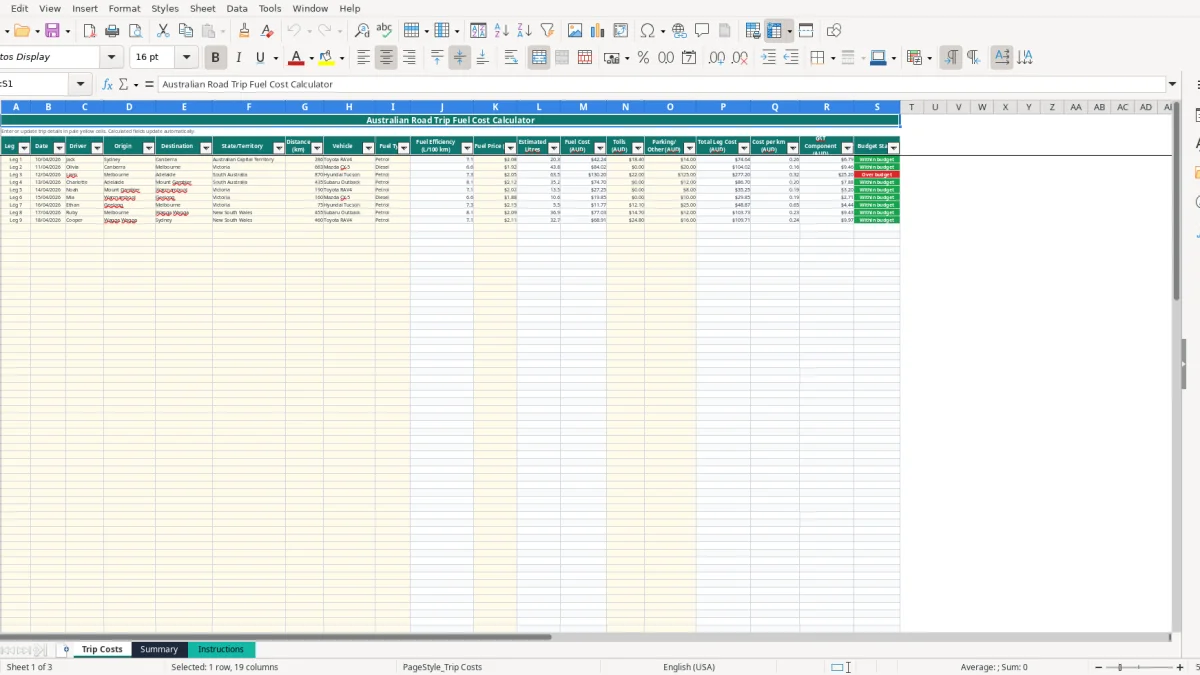
This road trip fuel cost Excel spreadsheet calculates estimated litres, fuel cost, tolls, parking and total cost for each Australian trip leg. It includes 100 prepared rows, vehicle fuel-efficiency lookups, cost-per-kilometre calculations, GST estimates and budget status tracking.
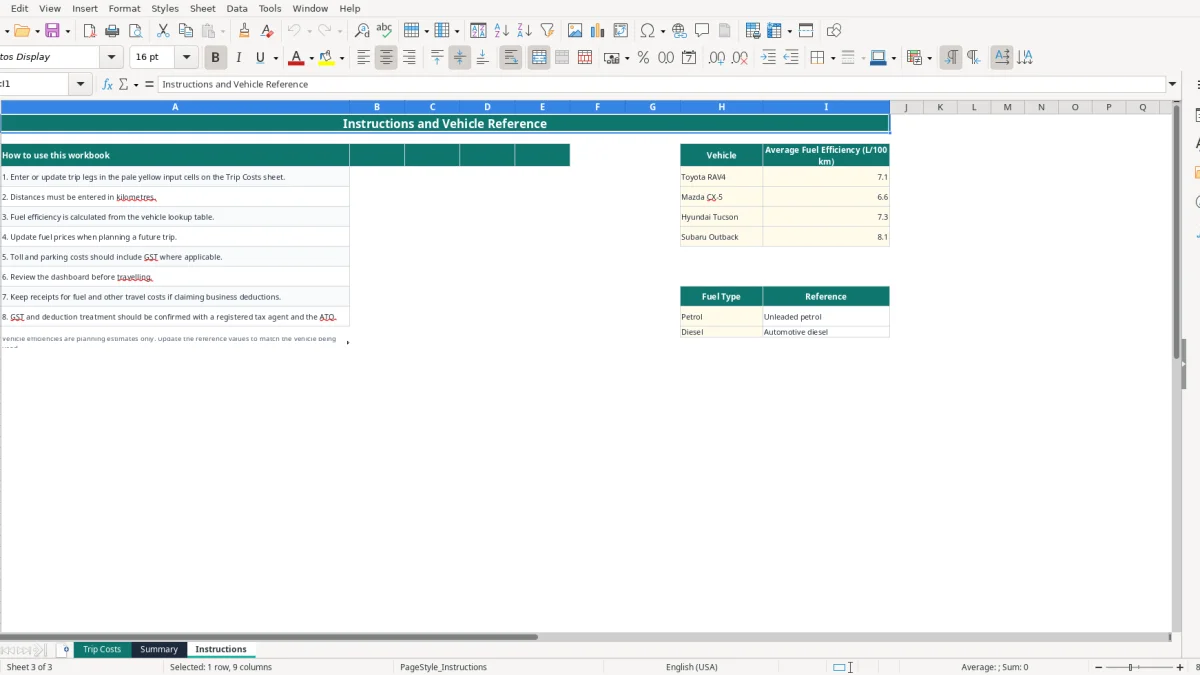
Enter your route and travel details on the Trip Costs sheet, then review the Summary dashboard. The workbook also includes an Instructions sheet with vehicle reference values for Toyota RAV4, Mazda CX-5, Hyundai Tucson and Subaru Outback.
A road trip fuel cost spreadsheet suits anyone who needs a defensible estimate before the wheels start turning: a family planning a Sydney-to-Adelaide holiday, a touring business sending staff between regional sites, or a volunteer club organising transport to a carnival. The useful point is that you can break a long journey into actual legs rather than guessing one large fuel figure.
On the Trip Costs sheet, each row records a leg, date, driver, origin, destination and state or territory. A chippie travelling from Sydney to Canberra might enter 286 km for one leg, select a Toyota RAV4 and record $2.08 per litre. At 7.1 L/100 km, the workbook estimates 20.31 litres and about $42.24 of fuel before tolls and parking.
That structure is handy when four employees share a vehicle roster. You can assign Jack, Olivia or another driver to each leg, then see whether a return run, detour or overnight stop is pushing the plan above the $250 starting budget per leg.
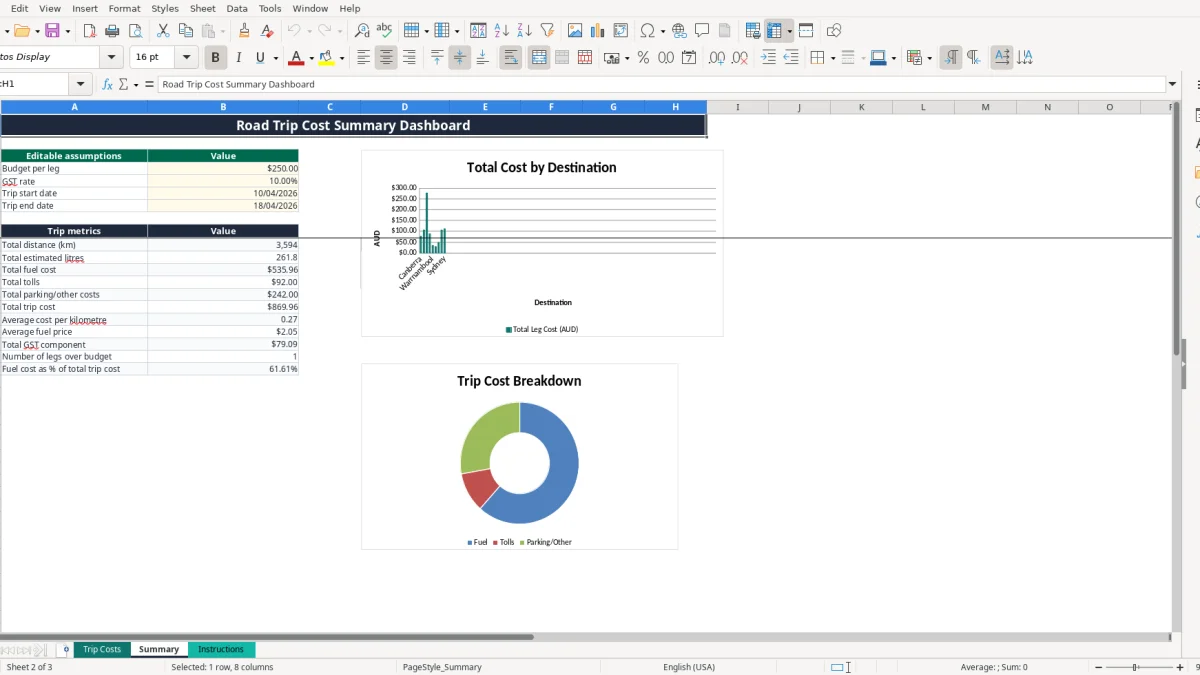
A household travelling 2,400 km over eight legs can enter each day separately and add accommodation-related parking or other costs where relevant. The Summary sheet then reports total distance, estimated litres, fuel cost, tolls, parking or other costs and total trip cost, instead of leaving you to add receipts on the back of an envelope.
A footy club treasurer can use the same layout for a weekend carnival. If three minibuses make different runs, record each route as a leg and use Driver and Vehicle to show who was responsible for the entry. The workbook has 100 prepared operational rows, so a large itinerary can be recorded without creating extra sheets.
Use the Summary dashboard before the trip starts, not after the money has gone. Its charts compare leg costs, the fuel-toll-parking breakdown and entered fuel prices by date, giving you a quick view of where the estimate is concentrated.
This is a planning model, not a live fuel-price feed or GPS distance calculator. Replace the sample dates, routes and prices with your own figures, and treat the vehicle efficiencies as estimates: 6.6 L/100 km for the sample Mazda CX-5 will not match every load, speed or road condition.
For a caravan or motorhome journey where fuel is only one part of the budget, a grey nomad trip budget can help track planned and actual travel costs.
The workbook starts with a 10% GST assumption and calculates a GST Component column from each total leg cost. That is a planning estimate, not an automatic claim entitlement. Fuel, tolls and parking can have different tax evidence and business-use outcomes, so retain the relevant receipts and classify the trip correctly.
A GST-registered business generally accounts for 10% GST on taxable supplies and may claim eligible input tax credits when it holds the required tax invoice or other evidence. GST registration is generally required once Australian business turnover reaches $75,000 a year, or $150,000 for a not-for-profit organisation. The spreadsheet does not decide whether a cost is taxable, private or deductible.
For a simple illustration, if a leg total is $220 including GST and the entire amount is taxable at 10%, the GST component embedded in the total is $20: $220 × 10% ÷ 110%. That is why the workbook formula divides by 1 plus the GST rate rather than simply taking 10% of the GST-inclusive total.
The Instructions sheet specifically says to keep receipts for fuel and other travel costs if claiming business deductions. The ATO record-keeping period is generally five years. A fuel entry of $180 without a receipt, trip purpose or business-use record may be difficult to support later, even if the arithmetic in Excel is perfect.
For a sole trader, business travel usually needs to be separated from private holiday kilometres. The cents-per-kilometre method has a kilometre limit set by the ATO for each income year, while the logbook method requires detailed records over the required logbook period. Do not use this workbook to apply a tax rate or deduction method that is not appropriate to your circumstances.
Summary cell B5 is an editable rate field and begins at 10%, while B4 begins at a $250 budget per leg. Change the rate only when you are modelling a different assumption, and do not treat the resulting GST Component total as a BAS figure without checking the underlying receipts and business purpose.
If the trip is for an employer, contractor or Pty Ltd company, keep the workbook with source documents and the relevant travel policy. The spreadsheet records estimates and entered costs; it does not replace invoices, a logbook, payroll records or the business's accounting system.
If the travel is business-related and you need detailed trip and odometer evidence, an ATO logbook method template is more appropriate than this fuel-planning workbook alone.
The most expensive errors I see are rarely formula errors. They are wrong distances, stale fuel prices and forgotten add-ons. A route entered as 286 instead of 386 km understates fuel at 7.1 L/100 km by about 7.10 litres; at $2.08 per litre, that is roughly $14.77 before the toll or parking is missed as well.
The vehicle drop-down pulls efficiency from Instructions with VLOOKUP. If you select a Toyota RAV4 for a fully loaded ute, the workbook still calculates cleanly, but the estimate is not useful. The sample efficiencies range from 6.6 to 8.1 L/100 km, so the difference on a 1,500 km trip is 22.5 litres between those two values. At $2.00 per litre, that is $45.
Update the reference value or choose a vehicle that reflects the actual car. Fuel efficiency is a planning estimate, not a promise: towing, headwinds, traffic, tyre pressure and remote-road speeds all change consumption.
Users often enter fuel and forget tolls or parking. A Melbourne-to-Adelaide leg might have $125 of parking or other costs in addition to fuel. If that amount is left blank, Total Leg Cost and the Summary dashboard are understated, and the budget status can incorrectly show Within budget.
Do not enter the whole trip total into every row. Each row is one leg, and the total formula adds Fuel Cost, Tolls and Parking/Other. Duplicating a $220 toll across four legs adds $660 of false cost and can make the budget review meaningless.
The GST Component column applies the Summary rate to Total Leg Cost. It does not verify that every parking charge, fuel purchase or toll includes GST, and it does not remove private kilometres. For example, a $110 total gives a calculated embedded GST component of $10 at 10%, but that does not prove the business can claim $10.
Finally, check dates and prices before departure. The date validation accepts entries in the workbook's prepared range, but it cannot tell whether the date belongs to the correct year or whether $2.08 is a current station price. A five-minute receipt and route check is cheaper than explaining a distorted travel budget later.
The easiest routine is to make the spreadsheet part of the booking process. When you confirm a route, enter the leg immediately; when you book a toll road or parking, add the expected amount in the same row. That keeps the estimate alive instead of leaving it until the night before departure.
Do one review when the itinerary is booked and another 24 hours before departure. On the second review, compare the Summary total with your route plan, check the three charts, scan for blank input cells and confirm that no leg is marked Over budget unexpectedly.
After each travel day, enter actual fuel, toll and parking amounts while the receipts are still in the glovebox or phone wallet. The workbook is designed for estimated and entered costs, so keeping those figures current gives you a better post-trip record than trying to reconstruct six legs from bank transactions.
This file is well suited to a single trip, a family itinerary or a small team with up to 100 prepared rows. Move to Xero, MYOB or fleet software when you need bank feeds, receipt capture, multiple users, vehicle servicing, odometer history, employee reimbursements or formal GST coding.
Keep a locked original before changing assumptions, and save a dated copy after the final review. That simple habit preserves what you planned before the actual trip costs changed.