Rego Renewal Excel Template – Free (2026)
0
Free download
Track boat fuel, engine hours, GST and vessel costs with an Excel log, dashboard and instructions for Australian boat owners and operators.
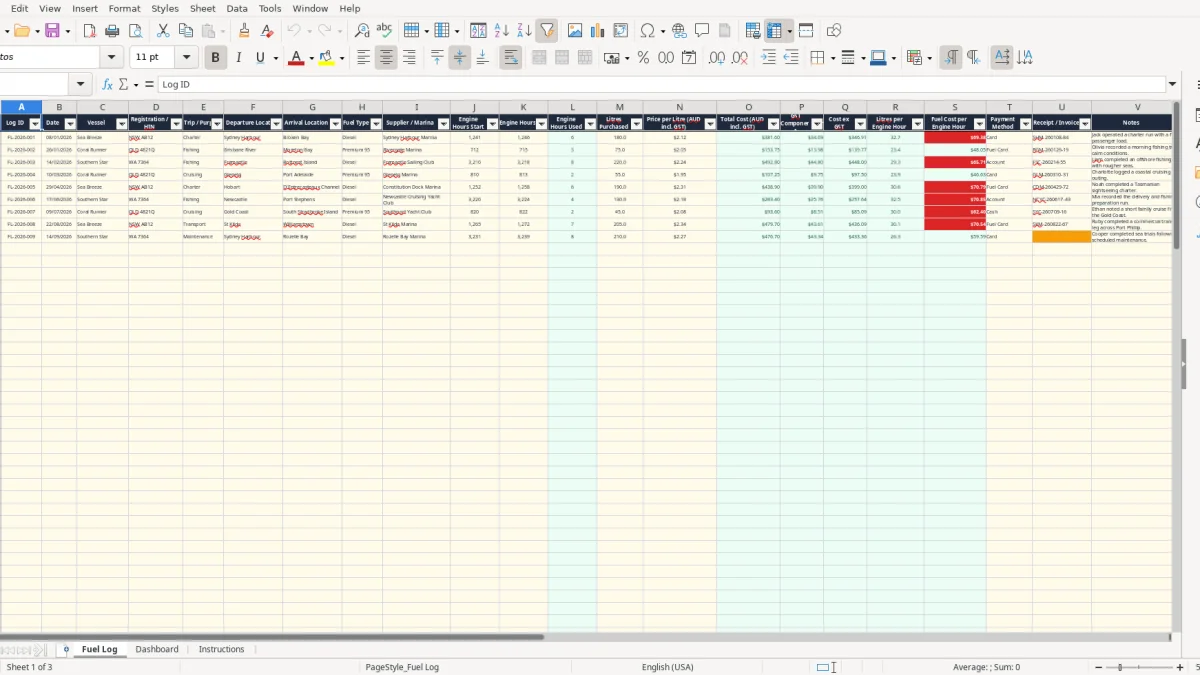
This boat fuel log Excel spreadsheet records each fuel purchase, vessel, trip, engine-hour reading, litres, GST-inclusive price and receipt number. It calculates total cost, GST, cost excluding GST and fuel efficiency, then summarises the results by vessel, month and fuel type on the Dashboard.
Use the Fuel Log sheet for one transaction per row. The workbook includes prepared rows through row 101, drop-down lists for trip purpose, fuel type and payment method, and alerts to help you spot missing receipts or unusual engine-hour entries.
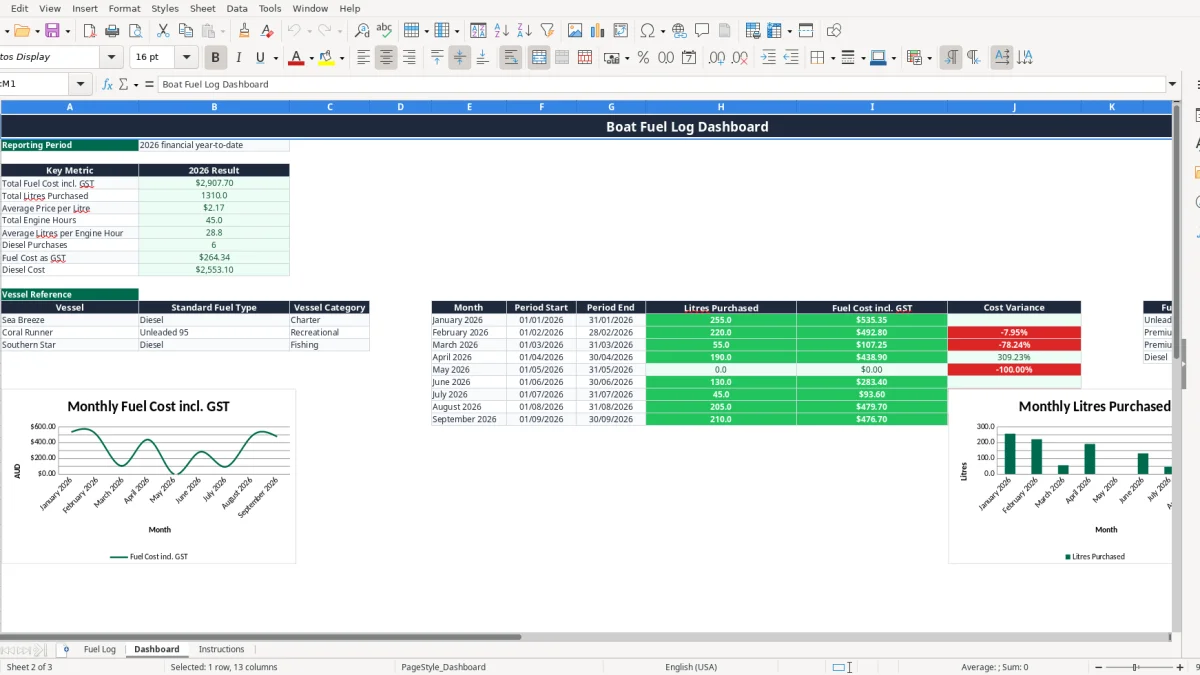
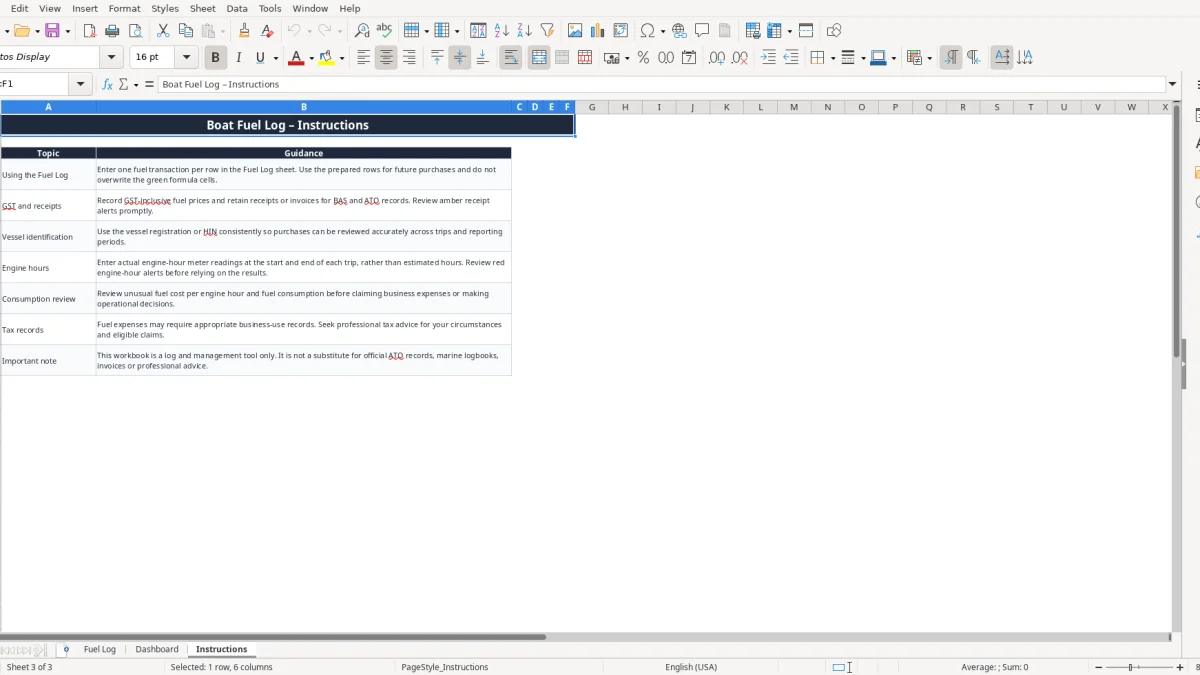
Image 1 shows the Fuel Log columns from Log ID through Standard Fuel Type (Reference). Image 2 shows the 2026 year-to-date Dashboard, including three charts, while image 3 contains the practical entry and record-keeping guidance.
A commercial charter operator, fishing business or marine transport operator can use this spreadsheet whenever a vessel refuels. The Fuel Log is set up for one transaction per row, with fields for vessel, registration or HIN, trip purpose, route, supplier or marina and payment method. That is more useful than keeping a pile of marina receipts with no link to the trip.
For example, a chippie who takes a work boat between coastal sites might record 120 litres at $2.15 a litre, giving a GST-inclusive fuel cost of $258.00. If the engine meter moves from 1,240.5 to 1,246.0 hours, the sheet calculates 5.5 hours used, 21.82 litres per engine hour and $46.91 fuel cost per engine hour.
A sole trader doing their own books usually updates the row at the marina, or enters the receipt on Friday with the week's other expenses. A bookkeeper supporting a small Pty Ltd can reconcile the entries to a fuel-card statement at month-end and use the Dashboard before preparing the quarterly BAS.
A volunteer treasurer at a fishing club may record fuel for a rescue boat separately from fuel for a competition vessel. The vessel reference area lists Sea Breeze, Coral Runner and Southern Star in the sample workbook, while the prepared rows allow future purchases to be added without rebuilding the layout.
A recreational owner may care mainly about the annual fuel bill and cost per outing. A charter operator needs to compare a 300-litre weekend run with ordinary trips, while a fishing operator may investigate why one vessel is using 35 litres per engine hour when its usual result is 25.
Image 1 shows the operational detail captured in each row. Image 2 turns those entries into year-to-date totals, monthly figures and fuel-type comparisons, so you can move from a receipt to a decision without manually adding every invoice.
Australian GST is generally 10%. The Fuel Log asks for the price per litre including GST, then calculates the GST component as total cost divided by 11. A $220.00 fuel purchase therefore produces a $20.00 GST component and $200.00 excluding GST, provided the purchase is taxable and the invoice supports the claim.
The Dashboard labels its main measure Total Fuel Cost incl. GST and separately reports the GST total. That is useful for review, but it does not decide whether a particular vessel expense is creditable. Private use, GST-free or incorrectly documented purchases still need to be assessed from the underlying records.
GST registration is generally required once Australian business turnover reaches $75,000 a year, or $150,000 for a not-for-profit. Most small businesses lodge a BAS quarterly; businesses above $20 million turnover generally lodge monthly. The spreadsheet can help organise fuel figures for that process, but the official BAS must be prepared from complete accounting records.
Keep fuel receipts or tax invoices for the ATO's five-year record-keeping period. The Instructions sheet specifically tells you to retain receipts and invoices, and to review the amber receipt alerts. For a tax invoice, check the supplier identity and ABN, invoice date, description, the words Tax Invoice where required, and GST details. GST should be shown separately on tax invoices over $82.50.
Record the vessel registration or HIN consistently, and describe the trip purpose rather than entering a vague note such as boat use. For instance, Fishing, Charter or Maintenance is more useful during a review than a blank purpose field. The workbook's own instructions warn that it is a log and management tool, not a substitute for official ATO records, marine logbooks or invoices.
Fuel used for mixed business and private boating should not automatically be treated as wholly deductible. A $1,100 quarterly fuel total may contain $660 of documented charter use and $440 of private use; only the supportable business portion belongs in business calculations.
For GST-registered boating businesses, a BAS statement template can help organise the quarterly GST totals before lodgement.
The most common failure I see is a fuel entry with litres and dollars but no receipt or invoice number. Six purchases of $180 each totals $1,080, yet without supplier evidence the bookkeeper has to spend an hour matching card transactions and may still be unable to support the GST component.
The Fuel Log includes Receipt / Invoice No. and Notes for this reason. Enter the marina receipt number while it is in front of you, then deal with any amber receipt alert before the weekly bookkeeping session. Do not assume a bank-feed description is enough to prove the fuel type, GST or vessel allocation.
If the start reading is 2,410.0 and the end reading is entered as 2,401.0, the calculated engine hours become negative and the efficiency results are meaningless. If one reading is left blank, the IF formula leaves Engine Hours Used blank rather than inventing a result, but the missing data still needs fixing.
Using estimated hours can also hide a mechanical or operational problem. A vessel that buys 180 litres over 6 hours uses 30 litres per hour; the same 180 litres over 9 hours uses 20 litres per hour. Treat that difference as a prompt to check the trip, load, speed and meter readings, not as proof that the engine has failed.
Typing Sea breeze, Sea Breeze and SEA BREEZE as separate vessel names fragments the review. The Dashboard's VLOOKUP reference expects the matching vessel name and can return Check vessel when it cannot find one. That can leave a genuine purchase without the expected standard fuel type.
Fuel type errors are costly in longer records. A 500-litre diesel purchase entered as Premium 95 will distort the fuel-type cost summary and can lead to the wrong operational comparison. Use the prepared validation choices, check the Dashboard totals against invoices, and correct the source row rather than manually altering calculated outputs.
For GST-registered boating businesses matching fuel receipts and tax amounts, a GST reconciliation template can provide a separate checking register.
The best time to capture a fuel transaction is when the receipt is issued. If that is impractical, set a Friday 15-minute entry routine and keep the receipts in date order. For a vessel making four trips a week, entering four rows at once is manageable; leaving 40 receipts until quarter-end is where errors and missing documents multiply.
At the end of each month, compare the Dashboard's monthly litres and fuel cost with marina statements and fuel-card totals. For example, if three refuels total 420 litres and $945.00 but the card statement shows $1,145.00, investigate the $200 difference before the next BAS review.
Check the charts for a change in fuel cost or volume, then investigate the source rows. The Dashboard uses formulas such as SUMIFS for monthly periods and SUMIF for fuel types, so a clean date and fuel-type entry matters more than manually editing the summary.
This workbook has prepared operational rows from 2 to 101, which suits a small fleet or a limited reporting period. Once you are regularly approaching 100 transactions, managing multiple staff entries, or needing supplier bills, bank reconciliation, maintenance costing and formal GST reporting together, move the bookkeeping into software such as Xero or MYOB and retain this log as a supporting operational record.
Do not overwrite the green formula cells to force a result. Correct the input row, keep a backup before major changes and use the Instructions sheet as the quick reference. A simple weekly routine will give you more reliable results than a detailed spreadsheet opened only at the end of the financial year.