Property Depreciation Excel Template – Free (2026)
23
Free download
GST reconciliation register with BAS summary and instructions for tracking sales, purchases, GST amounts and payment status.
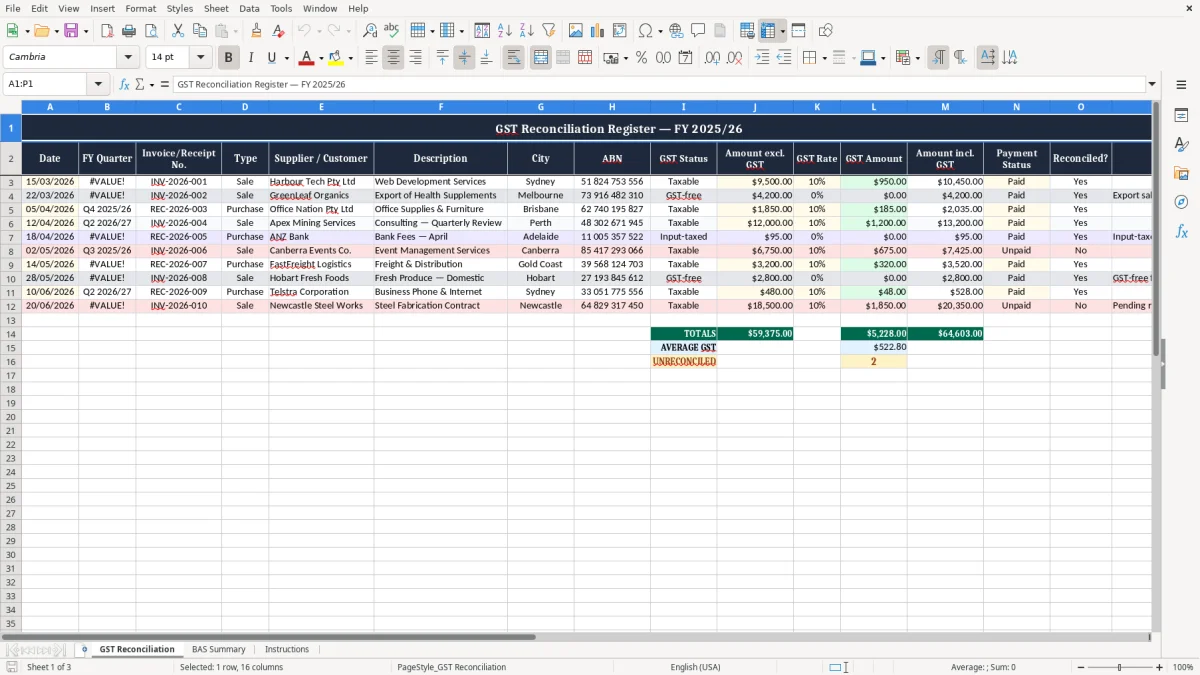
This GST reconciliation Excel template helps you track taxable sales, GST-free items, purchases, and payment status in one register. It includes three sheets: GST Reconciliation, BAS Summary, and Instructions.
Use it to line up your invoices and receipts before you lodge your BAS, so you can see the GST collected, GST paid, and what still needs checking. The workbook is set up for Australian businesses working through quarterly or monthly reconciliation.
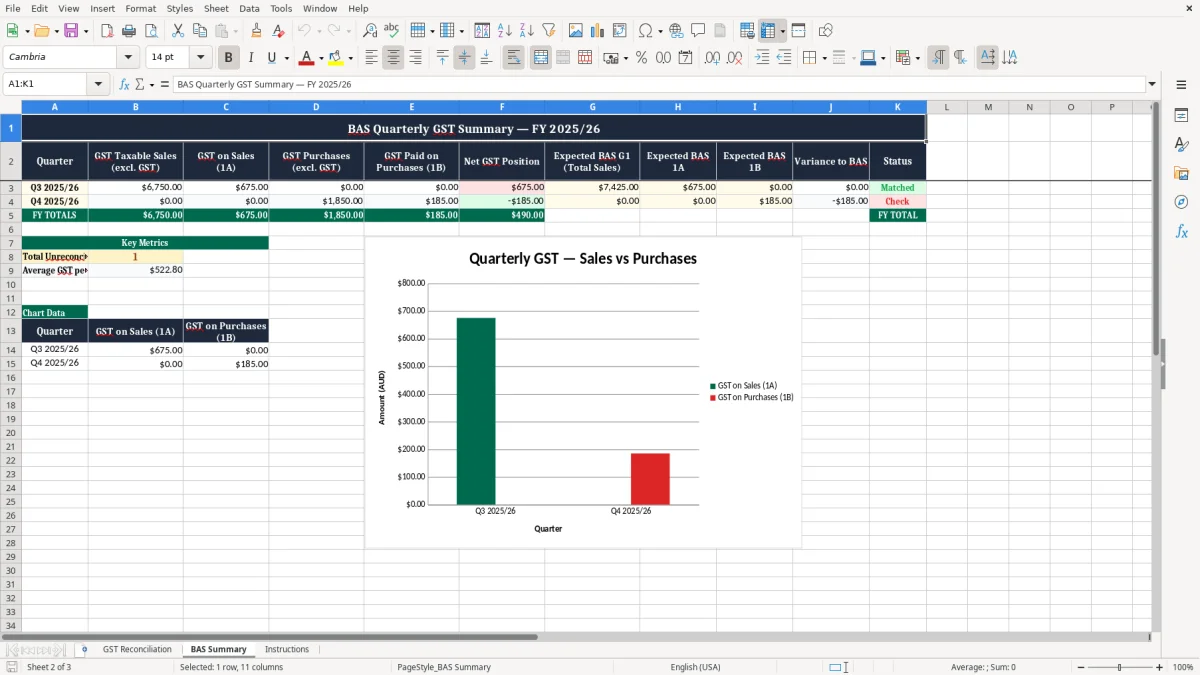
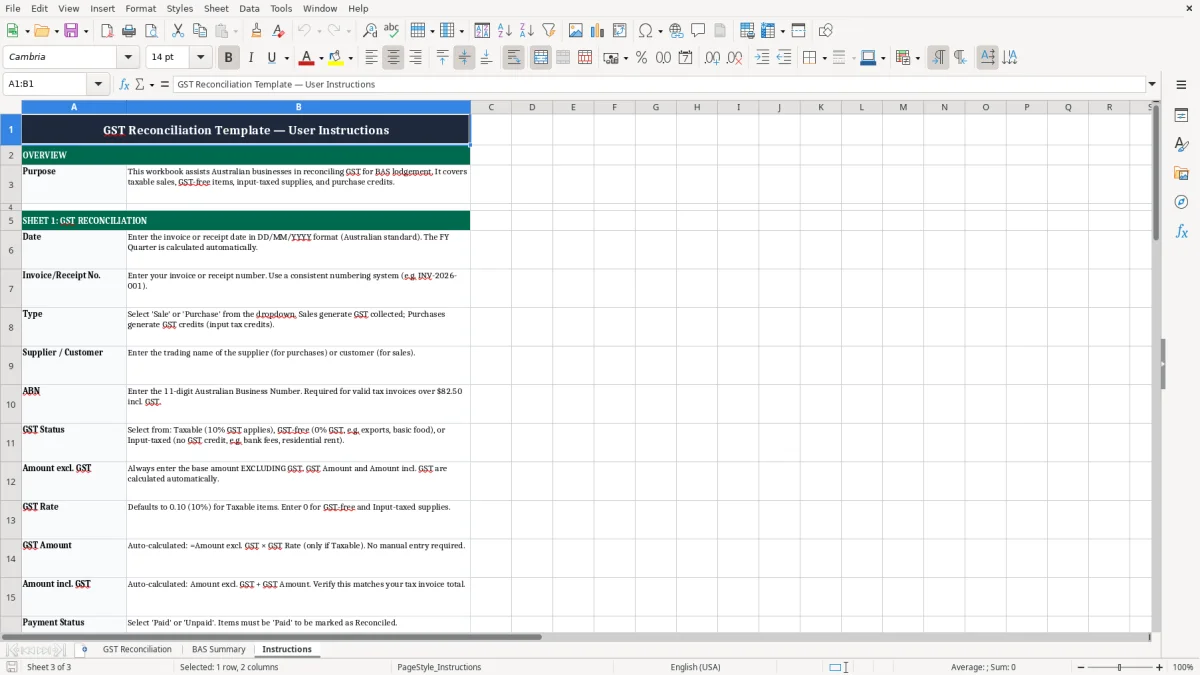
Image 1 shows the GST Reconciliation sheet with a structured transaction table, image 2 shows the BAS Summary sheet, and image 3 is the Instructions tab for setup and use.
A GST reconciliation spreadsheet is for the person who has to make the numbers line up before the ATO gets the BAS. In practice that is often a sole trader, a bookkeeper in a small Pty Ltd, or the office manager at a tradie business with 4 employees and a stack of invoices every week.
The need usually bites at the end of each quarter, when you are checking GST collected on sales against GST paid on bills and banked receipts. If you run a chippie business turning over $80,000 a quarter, one missed $2,200 invoice can move your BAS position enough to matter.
Most small businesses lodge quarterly, so the workbook becomes the last stop before you finalise the numbers. You can sort sales, purchases, GST-free items, and payment status in one place instead of flicking between the bank feed, supplier bills, and your email inbox.
A bookkeeper uses it to clean up coding before posting to the ledger. A business owner uses it to see whether the quarter is running hot or cold, especially if March has been a busy month and you are staring at 300 orders and a pile of receipts.
If you sell $15,000 of taxable goods and $4,200 of GST-free exports in the same month, the split matters straight away. The register keeps those lines visible so you do not treat every receipt like it carries GST at 10%.
The ATO expects you to keep records for 5 years, and this template is built around that reality. If you are registered for GST, the register needs to support your BAS figures with enough detail to show what was sold, what was bought, and how the GST treatment was applied.
Your tax invoice paperwork needs the supplier’s identity, the ABN, the date, a description of what was supplied, and the words Tax Invoice when required. For invoices over $82.50, GST must be shown separately if the supply is taxable, and that is exactly why the template separates amount excl. GST from GST amount and amount incl. GST.
You must register for GST once turnover hits $75,000 a year, or $150,000 for a not-for-profit. Most small businesses lodge BAS quarterly, while larger entities above $20 million turnover lodge monthly, so the FY quarter column helps you sort the register the same way the ATO expects to see it.
The standard GST rate is 10%. So a taxable sale of $9,500 has $950 GST included, while a GST-free export line or some basic food sales sit at 0% and should not be forced through the 10% rate.
If you are doing PAYG withholding or running payroll with STP, this register is not replacing those reports, but it does help keep the GST side clean. That means fewer adjustments when you reconcile bank deposits, supplier payments, and the BAS before lodgement.
The most common failure is leaving transactions unreconciled until the last week of BAS prep, then discovering a bank feed match is missing or coded to the wrong GST status. If you miss a $4,200 purchase invoice with $420 GST, that is not just a bookkeeping tidy-up issue — it is a straight cash flow hit because you have paid GST you may not claim properly.
Mixing taxable, GST-free, and out-of-scope entries is how a tidy spreadsheet turns messy fast. A $2,000 export sale treated as taxable can add $200 of GST that should never have been there, and if you repeat that across 12 lines you are $2,400 out before you notice.
If a supplier bill does not carry an ABN or enough detail, you can lose the support for the input tax credit. I have seen a small retail operator lose several hundred dollars in GST claims in one quarter just because receipts were stuffed in a glovebox and never matched back to the register.
Bank feeds are handy, but they do not tell you whether a receipt was for taxable goods, GST-free stock, or a private expense. If you reconcile only to the bank and not to the source document, you can end up with duplicated invoices, missing credits, and a BAS that needs fixing after it has already been lodged.
Late clean-up usually means 2 or 3 hours of digging for every hour it should have taken. For a small business that is $150 to $300 of labour at bookkeeper rates, plus the stress of trying to sort it out before the due date.
Bank feeds without a paper trail make source documents essential, and the ABN invoice Excel template keeps taxable sales, GST-free items, and invoice details in one clean record before BAS checking begins.
The trick is to tie the spreadsheet to a job you already do, not to another vague admin task. If you reconcile every Friday after the bank download or on the first business day after payroll, the workbook stays current and does not become a quarter-end rescue mission.
If you are handling a few hundred lines a quarter, Excel is usually fine. Once you are closer to thousands of rows, multiple users, or live bank feeds, it is time to move to Xero or MYOB and let the software do more of the heavy lifting.
Pair the review with something fixed, such as the end of the month or the BAS calendar reminder. A 20-minute check every week is easier than a 4-hour scramble at quarter end, and it gives you a cleaner set of figures before you lodge.
That same month-end review is also the right moment to line up PAYG withholding amounts before you lodge.