Rego Renewal Excel Template – Free (2026)
0
Free download
Compare Australian CTP and Green Slip quotes by insurer, state, charges, GST, total payable and policy term in a practical Excel workbook.
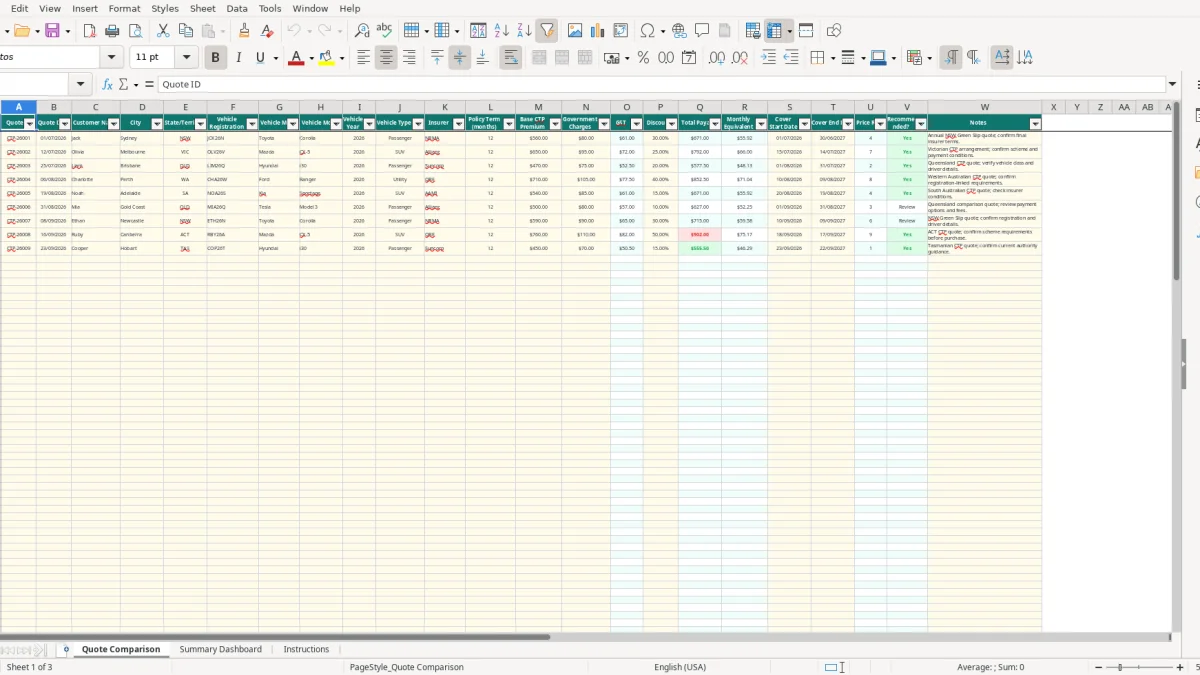
This CTP Green Slip comparison Excel spreadsheet records Australian vehicle quotes, including insurer, state, vehicle details, policy term, base premium, government charges, discounts, estimated GST, total payable and monthly equivalent. It also ranks quotes and summarises results by state and insurer.
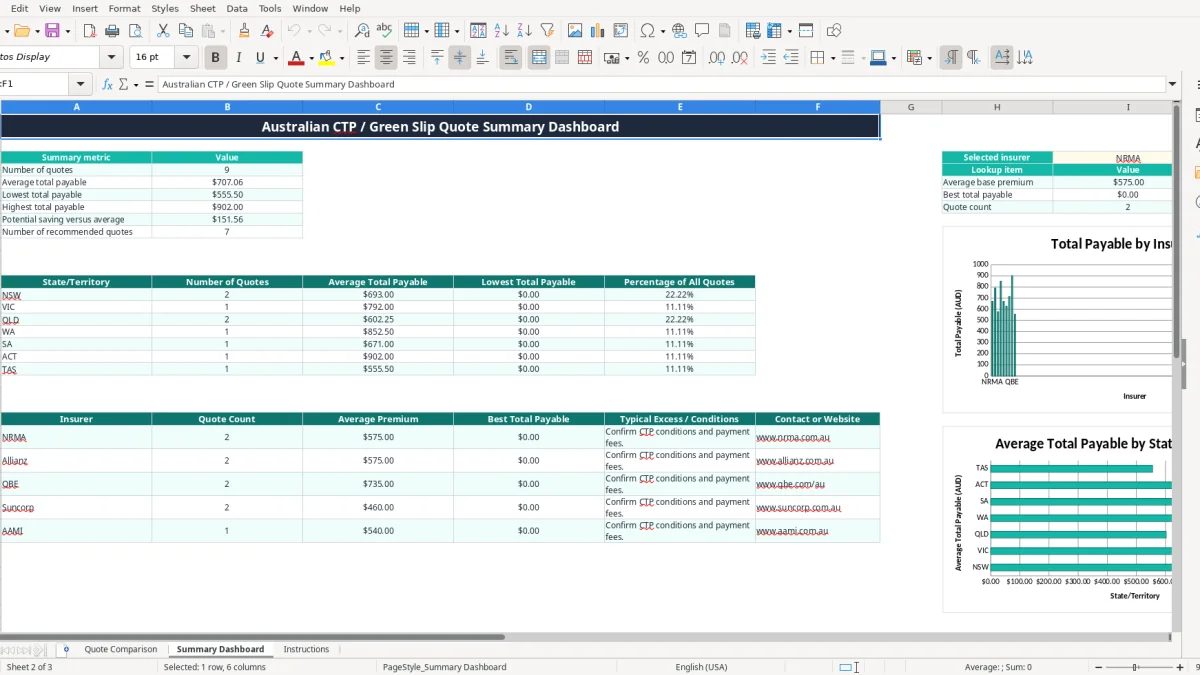
Use the Quote Comparison sheet for up to 109 prepared quote rows. Image 1 shows the input and calculation columns from Quote ID through Notes, while the Summary Dashboard in image 2 turns the entered quotes into averages, lowest and highest totals, insurer lookups and charts.
The workbook is useful for a household comparing renewal quotes, a motor dealer handling several registrations or an office manager keeping a fleet's CTP paperwork together. It is a comparison aid, not confirmation that a particular quote meets registration requirements.
A CTP Green Slip comparison spreadsheet is most useful when several vehicle quotes arrive with different labels or charge breakdowns. A household renewing two cars can put the NSW Green Slip offers side by side, while a motor dealer or fleet administrator can keep quote dates, registrations and cover periods together instead of searching through email attachments.
Take a NSW passenger vehicle renewal as an example. One entered quote has a $560 base premium, $80 in government charges and a $30 discount. The workbook estimates $61.00 GST and calculates total payable of $671.00, or $55.92 a month over 12 months. That gives you a consistent comparison figure, rather than comparing the base premium with another insurer's all-in price.
A small business with four vehicles might collect eight quotes across a renewal week. Entering each quote against its registration and insurer makes it easier to spot a wrong vehicle class, an expired quote date or a six-month term that looks cheaper only because it covers half the period.
The Quote Comparison sheet has columns from Quote ID and Quote Date through to Notes, with an auto-filter and frozen header row. Image 1 shows the practical working area: editable vehicle and price details sit beside calculated GST, total payable, ranking and recommendation results.
Image 2 shows the Summary Dashboard. It counts quotes, calculates average, lowest and highest totals, and reports potential saving versus average. The state table covers NSW, VIC, QLD, WA, SA, ACT and TAS, while the insurer table includes NRMA, Allianz, QBE, Suncorp and AAMI. Use the dashboard as a decision summary, then read the insurer's actual terms before paying.
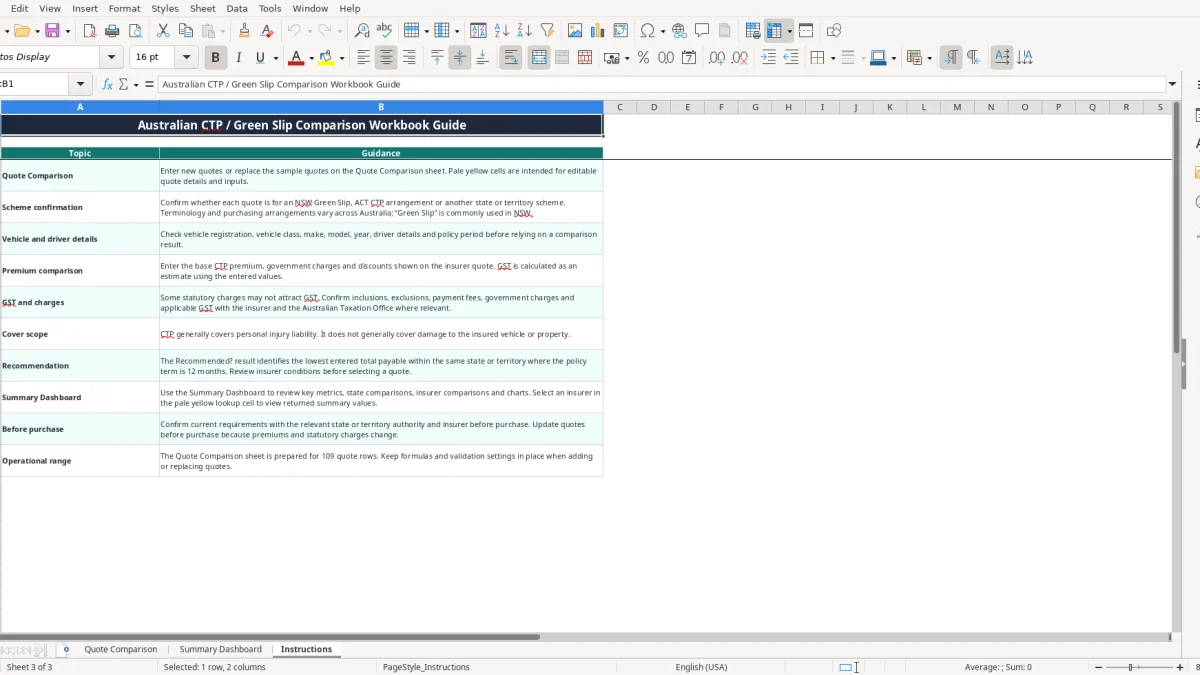
Australian compulsory third party arrangements are not identical across the country. In NSW, the product commonly called a Green Slip is compulsory CTP cover linked to vehicle registration. Other states and territories use different purchasing and registration arrangements, so the Instructions sheet specifically tells you to confirm whether the quote is for an NSW Green Slip, an ACT CTP arrangement or another scheme.
The workbook's GST formula applies an estimated 10% to base premium plus government charges less discounts. For example, $470 plus $75 less a $20 discount gives a GST estimate of $52.50 and total payable of $577.50. That is a spreadsheet calculation, not a ruling that every statutory charge is taxable.
Some government or statutory charges may not attract GST. The insurer's quote is the source document for inclusions and tax treatment. If the quote separates taxable and non-taxable components, enter the figures carefully and verify the workbook estimate rather than treating the 10% result as an official tax invoice calculation.
CTP generally responds to personal injury liability arising from a motor vehicle accident. It does not generally pay for damage to your own vehicle or property, so a cheaper Green Slip is not a substitute for comprehensive or third-party property insurance.
Keep the quote, registration details and purchase confirmation with your vehicle records. The workbook accepts dates from 01/01/2000 to 31/12/2100 and policy terms of 6 or 12 months. Before purchase, confirm requirements with the relevant state or territory authority and insurer, because premiums and statutory charges can change during 2026.
The most expensive comparison errors are usually not formula errors. They are mismatched vehicles, different policy periods and totals that include different charges. I have seen people choose a $480 figure because it looked cheapest, only to discover that another quote was for 12 months and the $480 offer was for six months or omitted a payment fee.
Check the registration, state or territory, vehicle type, policy term and cover dates before comparing price. A NSW passenger vehicle quote should not be ranked against a Victorian record simply because both have a similar base premium. The Recommended? formula only returns Yes for the lowest positive total in the same state or territory where the policy term is 12 months; otherwise it shows Review.
That condition prevents one common mistake, but it does not check the insurer's conditions or whether the input is genuine. If three quotes are entered for one state at $671.00, $690.00 and $720.00, the first may be flagged. A missing $25 charge, however, makes the result wrong by exactly $25 before any later decision is made.
Do not put the total quoted price into Base CTP Premium and then add government charges again. Enter the components separately: for a $650 base premium, $95 charges and $25 discount, the workbook calculates $72.00 estimated GST and $792.00 total payable. If you enter $792 as the base, the dashboard's averages and state comparisons become meaningless.
Another trap is treating the monthly equivalent as an instalment offer. It is simply total payable divided by the entered policy term: $671.00 divided by 12 is $55.92. It does not include finance costs, payment fees or a promise that the insurer allows monthly payment.
The easiest way to keep this CTP spreadsheet useful is to open it whenever a registration reminder or insurer renewal arrives. Enter the quote before filing the email, then enter competing offers as they come in. A 15-minute Friday review during a busy renewal month is more reliable than trying to rebuild every quote the day before registration is due.
Use the existing drop-downs for state, vehicle type, insurer and policy term. They reduce inconsistent entries such as NSW typed three different ways. Keep the calculated columns intact and use the filters on Quote Comparison to isolate one insurer, state or vehicle class at a time.
This file is well suited to a household or a small fleet with occasional quote comparisons. Its prepared operating range is 109 quote rows, which is plenty for a normal renewal register but not a full fleet-management database. Once you are tracking hundreds of vehicles, frequent policy changes, claims, reminders and accounting payments, move the operational record into software such as Xero, MYOB or a dedicated fleet system.
Even then, keep the workbook for a short tender exercise or annual price review. For example, comparing 20 quotes across four vehicles is manageable here; reconciling 300 active policies, cancellations and monthly payments is better handled by a system with user permissions, audit history and automated reminders.