Rego Renewal Excel Template – Free (2026)
0
Free download
Track rental bonds by property, tenant, state, authority, deadline and receipt number across Australian residential tenancies.
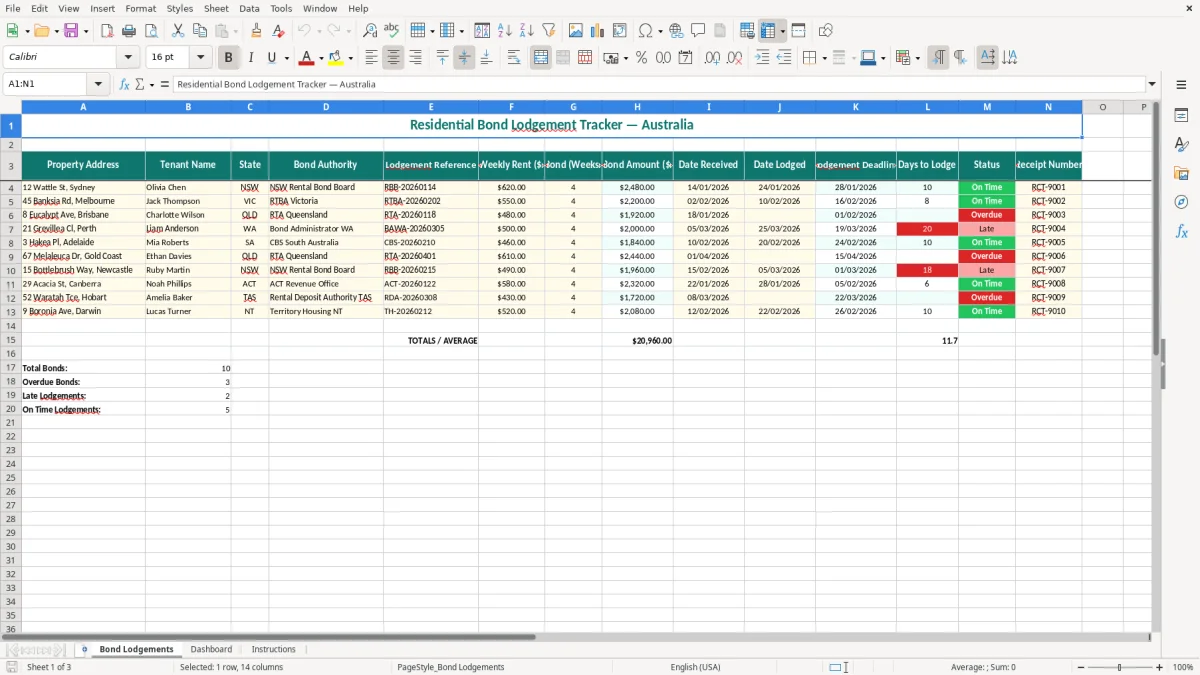
This bond lodgement tracker is an Excel spreadsheet for Australian property managers, landlords and office administrators to record each tenant bond from receipt through to authority lodgement. It includes 14 columns for property, tenant, state, authority, amounts, dates, deadlines, status and receipts.
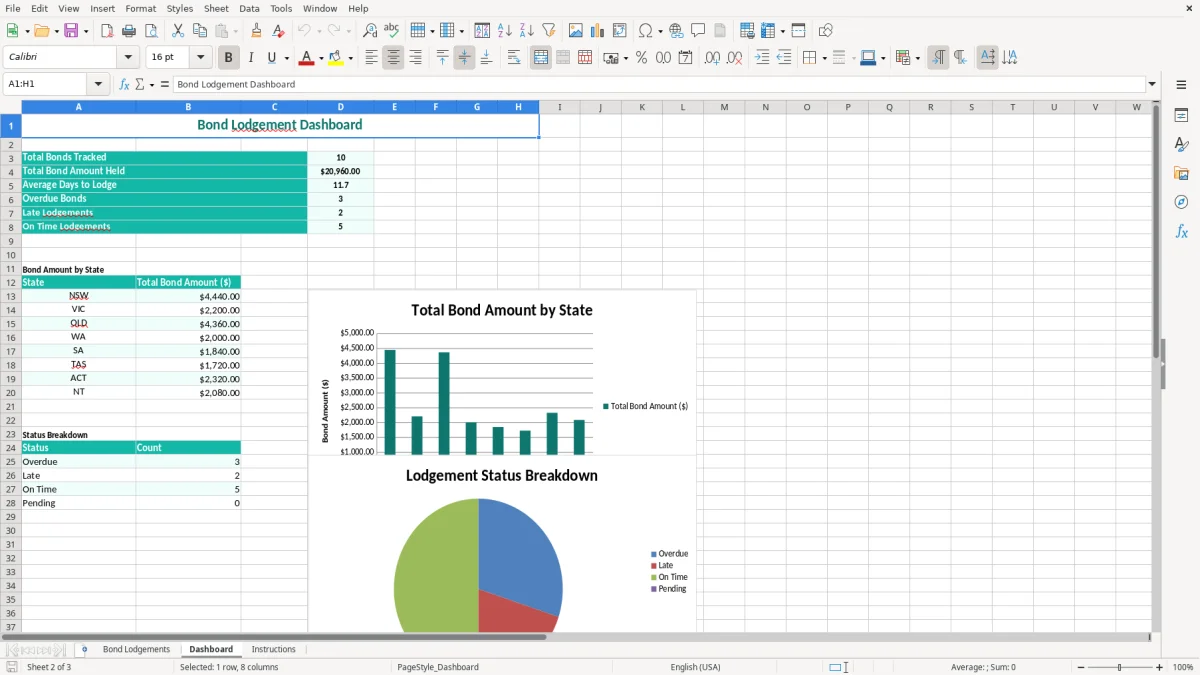
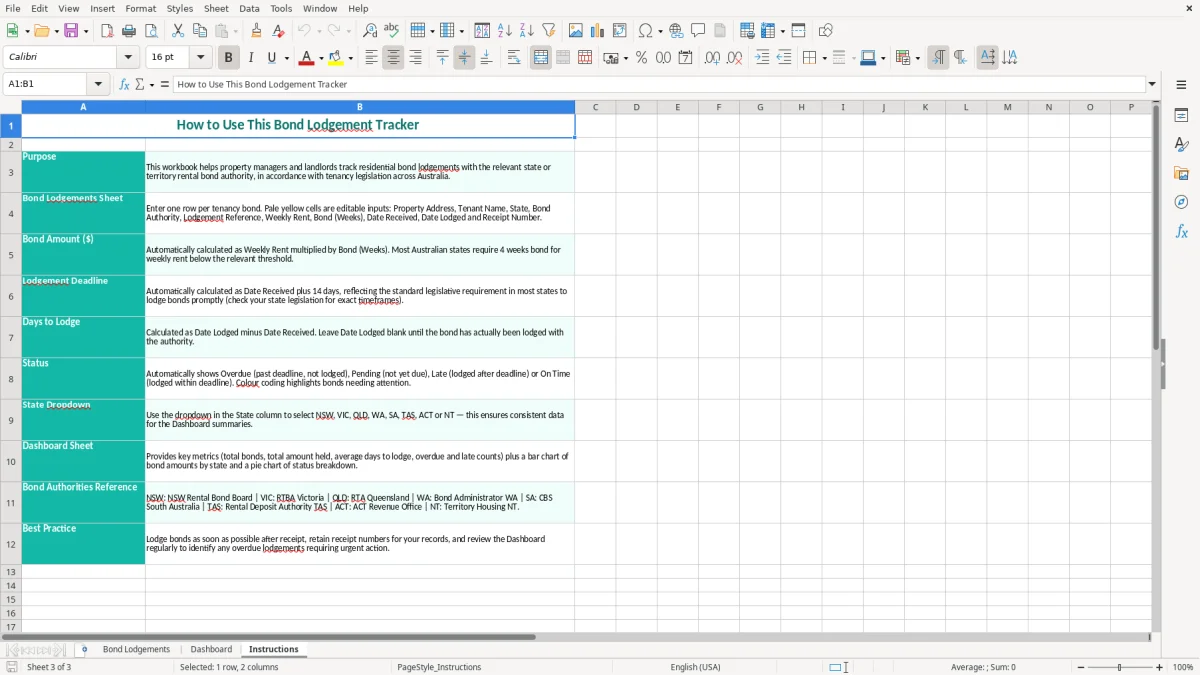
The Bond Lodgements sheet calculates the bond amount from weekly rent and bond weeks, then works out the days taken to lodge. The Dashboard gives you an at-a-glance view, while the Instructions sheet explains how to maintain the file. Image 1 shows the teal data-entry table, image 2 shows the dashboard, and image 3 shows the instructions.
A bond register is useful wherever several residential tenancies move through the office at once. A property manager may receive bonds for 40 apartments in a month, while a landlord with two houses may only need it at the start of a new lease. In both cases, the risky point is the gap between money arriving and the lodgement being confirmed.
A property manager can enter the address, tenant, state and authority as soon as the bond is received. For example, a Melbourne tenancy with weekly rent of $550 and a four-week bond produces $2,200 in the Bond Amount column. The receipt number can be added once RTBA Victoria confirms the submission.
A private landlord can use the same row-by-row process for a new tenant, a top-up or a transfer. Keeping the lodgement reference beside the address is more reliable than searching an email inbox months later, particularly when a tenant changes property during a busy leasing period.
The practical review point is the daily or twice-weekly trust-account routine, not just end of month. An office administrator at a four-person property agency can filter for blank Date Lodged cells before the next property-management meeting and hand a short follow-up list to the manager.
Image 1 shows the main register: the address and tenant fields run across the left, financial fields sit in the middle, and dates, status and receipt details finish the row. Image 2 provides the dashboard view, and image 3 sets out the intended instructions. Use the file as an operational register, while keeping the actual authority confirmation and trust records as supporting evidence.
Bond rules are set by the state or territory, not by one national rental-bond system. The relevant authority may be the NSW Rental Bond Board, RTBA Victoria, RTA Queensland, the Bond Administration service in Western Australia or the equivalent body in your jurisdiction. Select the correct authority for the tenancy rather than relying on the property manager's usual state.
The template's Lodgement Deadline formula adds 14 days to Date Received. That is a useful tracking assumption and makes an example received on 14/01/2026 display 28/01/2026, but it is not a universal Australian deadline. NSW, Victoria and Queensland have their own prescribed forms, online processes and timing rules, and the exact obligation can depend on who received the money and the tenancy circumstances.
Before using the deadline for compliance, check the current residential-tenancy legislation and the authority's 2026 guidance for the state involved. Keep the authority name and lodgement reference in the row so the source of the confirmation is clear. A spreadsheet reminder is not a substitute for submitting the bond through the official portal.
Enter the actual agreed bond weeks rather than assuming every tenancy is four weeks. A $480 weekly rent and four-week bond gives $1,920; if the agreement records a different lawful amount, the sheet should reflect that amount or the correct weeks used to calculate it.
Keep the lease, bond receipt, payment evidence, authority confirmation and any tenant signatures with the tenancy file. If you are holding trust money, your state property-agent and trust-account obligations still apply. The ATO record-keeping rule of five years relates to tax records; state tenancy and trust requirements may require a different retention period, so follow the longer applicable period for your file.
The most expensive mistakes usually happen in the handover between reception, the property manager and the person making the online submission. A payment arrives with a tenant's surname only, the row is created under the wrong address, and the authority receipt later cannot be matched. Fixing that can take an hour of emails for a transaction that took two minutes to record.
One common error is typing $2,480 into the bond amount while leaving weekly rent at $620 and bond weeks at 3. The figures then disagree, and the next person cannot tell whether the error is the payment, the lease or the spreadsheet. The formula-driven amount in this template gives you a visible cross-check: $620 multiplied by 4 equals $2,480.
Another is copying a previous row and leaving the old lodgement reference or receipt number. That can attach a new tenant's money to an old record. Check the address, tenant, reference and authority as a single group before marking Status as lodged.
Leaving Date Lodged blank is easy to overlook when the register is sorted by property address. A bond received on 03/03/2026 may sit behind completed rows until a tenant asks for confirmation. The Days to Lodge formula helps identify the gap, but only if the row is reviewed and the status is updated.
Do not delete an incomplete row to make the dashboard look tidy. Correct the entry, record the actual submission date and attach the receipt. A clean register with no evidence is weaker than a register showing a delayed lodgement and the follow-up taken.
The easiest way to keep this file alive is to attach it to an existing trust-account or new-tenancy task. Set aside 15 minutes at the end of each day that a bond is received, then do a second review every Friday for blank dates, unusual amounts and missing receipt numbers.
For a small portfolio, one workbook can work well. For a 300-property agency, split the workbook by portfolio or reporting period only if that makes ownership clear; a single giant file with several people editing it at once is more likely to produce duplicate rows and overwritten references.
Keep the existing headings unchanged so formulas continue to work, and use filters on State, Status and Date Received. If you extend the register, copy the last formula row carefully and check that the references move from row 4 to row 5 rather than continuing to point at the first tenancy.
Move to dedicated property-management software when you need tenant portals, automated authority integrations, audit trails, trust accounting or several users working simultaneously. Excel is a sensible register for a landlord or small office, but it should not become the system of record once manual controls are taking longer than the lodgements themselves.
That point also marks the move from a simple register to rental cash flow tracking, where ongoing income, expenses and arrears need their own routine outside the lodgement log.