Property Depreciation Excel Template – Free (2026)
79
Free download
Track farm fuel purchases, eligible litres, FTC rates and BAS quarter totals with an Excel workbook for Australian primary producers.
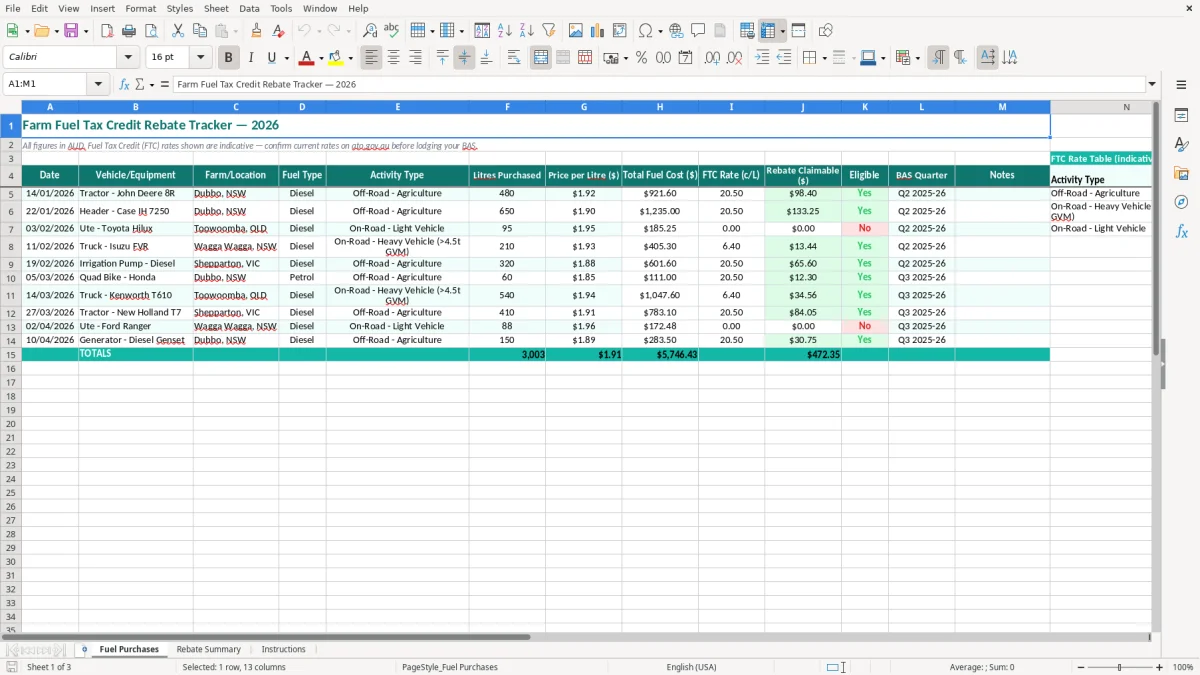
This farm fuel rebate Excel template records fuel purchases, equipment, farm locations, activity types, litres, prices and BAS quarters, then tracks eligible fuel and the claimable Fuel Tax Credit (FTC). It includes Fuel Purchases, Rebate Summary and Instructions sheets for Australian primary producers.
Use it to keep tractor, header, truck and ute purchases together instead of hunting through fuel dockets at BAS time. Image 1 shows the main entry sheet, with yellow input cells and teal column headings; image 2 summarises the rebate, while image 3 explains how to use the workbook.
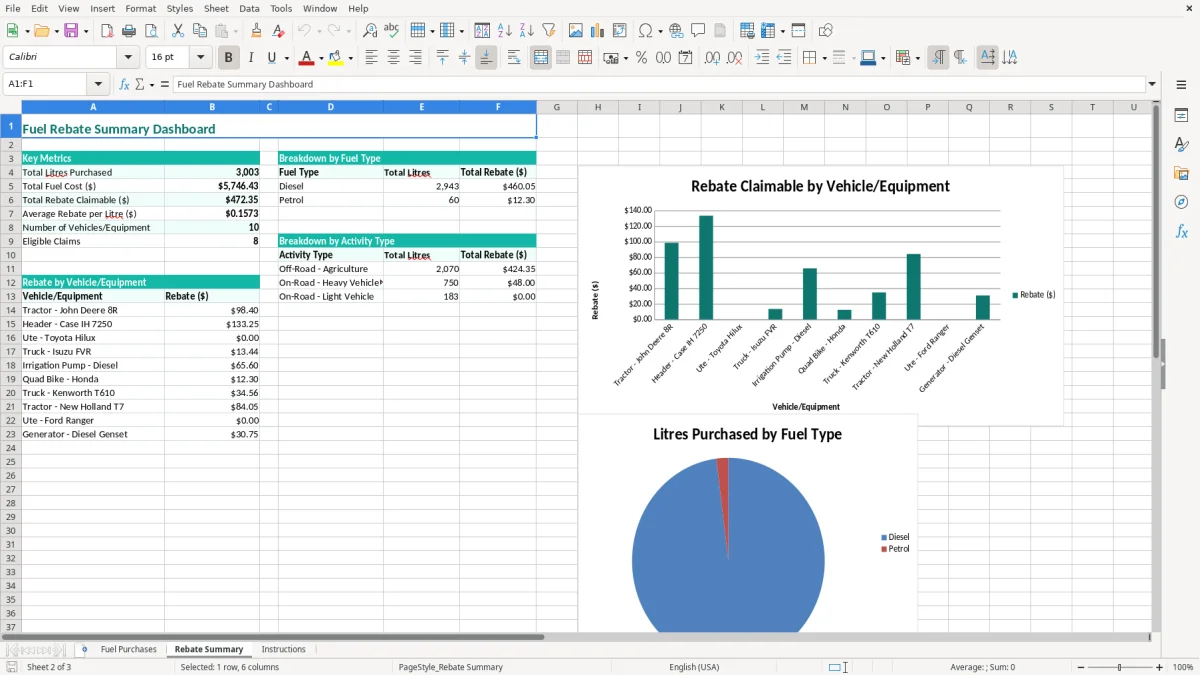
Farm owners, bookkeepers and station office managers usually update a fuel tracker when a docket arrives, not when the quarterly BAS is already due. That timing matters during seeding, spraying and harvest, when several machines may be fuelled on the same day and a single receipt can otherwise lose its connection to the job.
A cropping business near Dubbo might fill a John Deere tractor with 480 litres, then put 650 litres into a header a week later. Image 1 gives each purchase its own row and asks for the equipment, location, diesel activity and BAS quarter, so the bookkeeper can distinguish off-road agricultural use from a ute trip.
For a mixed farm, the Vehicle/Equipment and Activity Type columns are more useful than a simple monthly fuel total. A diesel purchase for a stationary pump, tractor or harvester can be assessed against its actual use, while a Toyota Hilux used on public roads is not automatically treated the same way.
A sole trader may update the file every Friday after reconciling the business bank account. A small Pty Ltd with a farm manager and an external bookkeeper can use the Notes column to explain a shared tank, a corrected docket or fuel allocated between two properties.
At quarter-end, the Rebate Summary sheet helps turn dozens of entries into a review list. If a farm bought 3,000 litres at an average $1.90 per litre, the fuel spend is $5,700; the credit is a separate calculation based on eligible litres and the correct rate, not a percentage of that spend.
Image 2 is most useful before the BAS is prepared and again after the claim is lodged. Image 3 provides the handover point for a new office manager, so the same entry method continues when the farm moves from winter cropping into a busy harvest period.
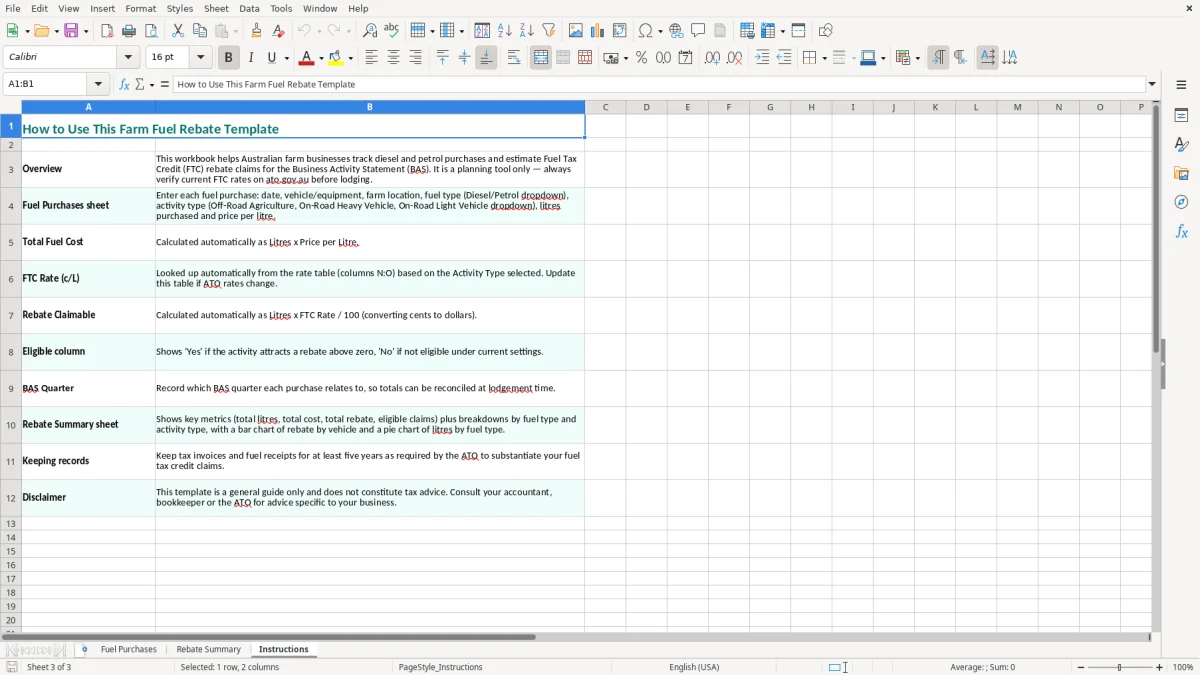
The ATO treats Fuel Tax Credits as a claim for eligible fuel use, not a general refund on every farm fuel purchase. You generally need to be registered for GST to claim, and you report the credit through your BAS. GST registration is normally required once business turnover reaches $75,000, but a business below that threshold may register specifically to access eligible fuel tax credits.
Fuel used off-road in agriculture, such as diesel burned by a tractor or header performing farm work, can qualify under the FTC rules. Fuel used by a vehicle on a public road is treated differently: a heavy vehicle may have a reduced credit after the road user charge, while an ordinary light vehicle such as a Hilux generally does not receive an FTC for public-road travel.
That is why the template includes Activity Type and Eligible rather than assuming all diesel is claimable. For example, 480 litres used by an agricultural tractor may be eligible, but 95 litres used by a light vehicle on public roads must not be included merely because the fuel was bought for the farm.
FTC rates are set in cents per litre and are indexed during the year. The workbook labels its rates as indicative, so check the current ATO fuel tax credit rate for the fuel type, use and purchase date before lodging. Do not use one rate for an entire financial year when purchases cross a rate-change date.
Most small businesses lodge their BAS quarterly. Record the purchase date and BAS Quarter together, retain tax invoices and fuel records for at least 5 years as required by the ATO, and keep evidence that supports the activity and location. If the supplier invoice is over $82.50 including GST, check it contains the required tax-invoice details before relying on it for GST input tax credits; that is separate from proving FTC eligibility.
That tax-invoice check sits alongside the usual ABN invoice details you need on supplier records before claiming GST input tax credits.
The costly mistakes I see are rarely caused by adding litres incorrectly. They happen when a business claims the right amount of fuel at the wrong rate, treats a road trip as agricultural use or cannot show which machine consumed the fuel. The spreadsheet helps expose those gaps, but the docket and usage evidence still carry the claim.
A farm may buy 2,000 litres into one bulk tank and use it across a tractor, generator and light vehicle. Claiming all 2,000 litres as off-road agriculture can overstate the credit. If 300 litres went into the ute for public-road travel, the eligible base may be 1,700 litres before applying the appropriate rate.
At an FTC rate of 20 cents per litre, that classification error would overstate the claim by $60. The dollar amount may look small, but repeated over four quarters creates a $240 correction and leaves the bookkeeper explaining the allocation.
The FTC is not a percentage of the fuel bill. A $1,920 purchase for 1,000 litres does not produce a $192 credit just because the fuel price is $1.92 per litre. The calculation is eligible litres multiplied by the applicable cents-per-litre rate, converted to dollars.
Entering 1.92 in the FTC Rate column instead of 19.2 cents can make a claim ten times too small or too large, depending on the formula. Keep the purchase price and FTC rate in separate columns, and write the unit clearly in your internal checking notes.
Fuel dockets entered twice are common when a farm card feed is imported and the paper receipt is later added manually. A duplicate 650-litre header purchase at 20 cents per litre creates an extra $130 claim, while a missing date can put a legitimate transaction in the wrong BAS quarter.
Before lodging, sort by date, compare the row count with the docket bundle and scan for repeated litres, supplier details or vehicle names. Correct the source row and note the change rather than silently deleting the original evidence.
A rebate file only works if someone opens it while the fuel information is still fresh. Set a 15-minute Friday routine: collect the week's dockets, enter each purchase, check the farm location and equipment, then put the receipts in a folder named for the BAS quarter.
Save a clean master copy, then use a new file or dated copy for each financial year. Protect formula cells if you add them, use data validation for Fuel Type and BAS Quarter, and apply conditional formatting to blank dates, negative litres or missing eligibility decisions.
At BAS time, export or print the Rebate Summary and retain it with the supporting dockets. Do not overwrite an old rate when a rate changes; add the new rate to the relevant purchase rows so the calculation remains reproducible.
This workbook is a practical fit for a sole trader or a farm with a manageable number of fuel transactions. If several staff enter fuel, multiple properties share bulk tanks, or the file has more than 10,000 rows, move the process into Xero, MYOB or another bookkeeping system with permissions and an audit trail, while keeping the spreadsheet as a review report.