Property Depreciation Excel Template – Free (2026)
23
Free download
Track PAYG withheld by employee, pay run and month, with totals for BAS prep and a simple instructions sheet.
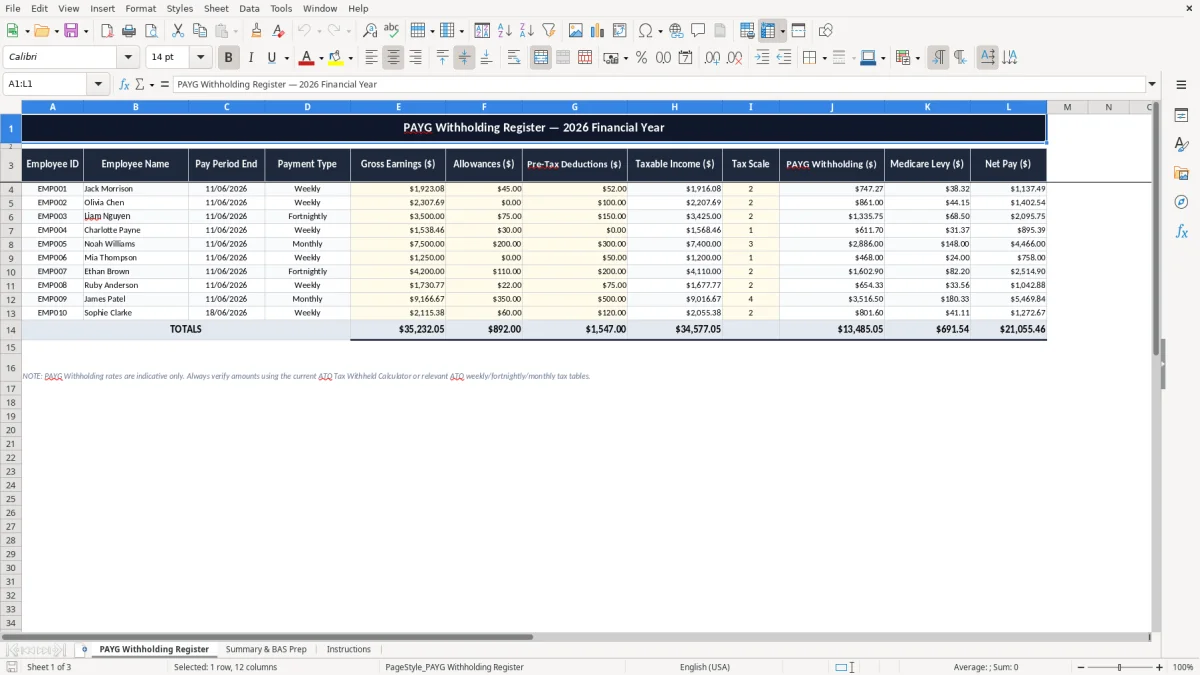
This PAYG withholding Excel spreadsheet is for tracking tax withheld from wages and pay runs in Australia, with a register, a BAS prep summary and an instructions sheet. It helps you total PAYG withholding quickly, check what was withheld, and keep the numbers ready for your BAS.
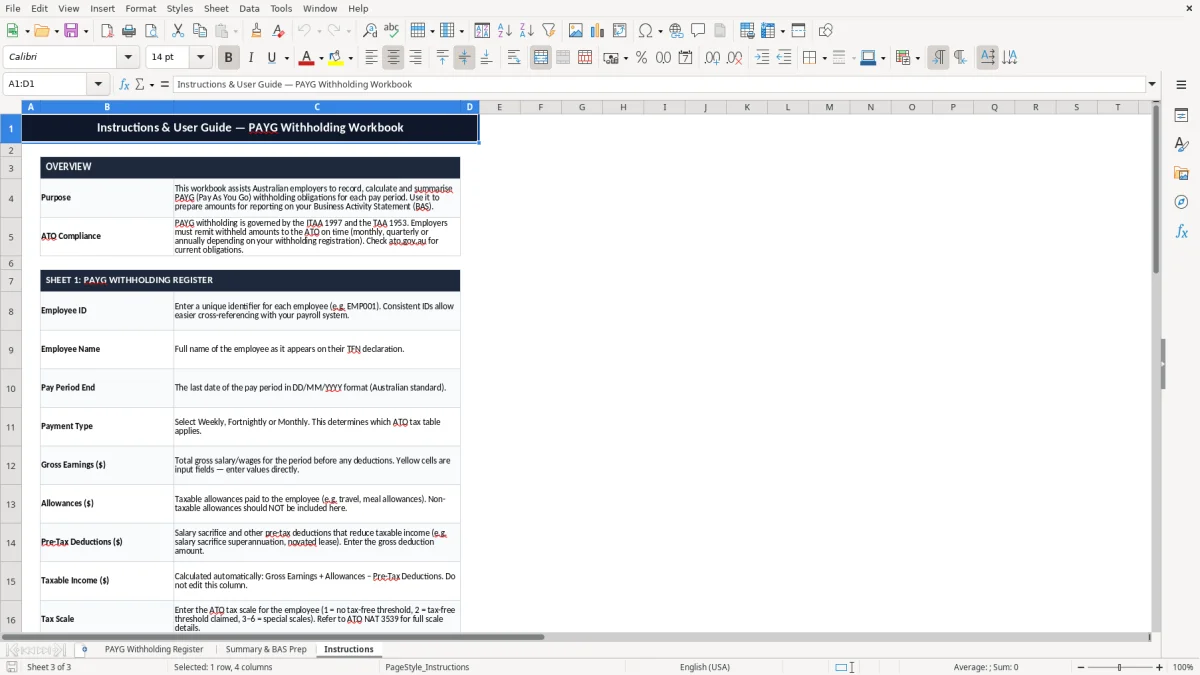
The workbook includes three sheets: PAYG Withholding Register, Summary & BAS Prep and Instructions. Use it if you run payroll for a small business, help with bookkeeping, or need a clean record before you lodge through the ATO.
It is set up for practical day-to-day use, not fancy reporting. You enter the pay details once, then the summary sheet pulls the totals together so you can see what has been withheld across the month or quarter.
This template suits the person who has to keep payroll moving without drowning in admin. In practice, that is often a sole trader with 1 or 2 staff, an office manager at a tradie business, or a bookkeeper in a small Pty Ltd who wants a clean PAYG withholding working paper before the BAS deadline.
Image 1, the PAYG Withholding Register, gives you a simple place to enter each pay run. You can see the register-style layout at a glance, which is handy when you are checking 4 employees on a fortnightly run or sorting through a month with 2 pay cycles.
If you pay 6 staff weekly, that is 312 pay lines across a 52-week year. A spreadsheet like this is usually easier than digging through payslips when you just need the withholding totals for the quarter or a quick year-to-date check.
For a bookkeeper, the value is the audit trail. You can keep the register beside the payroll reports and reconcile the withheld tax before the figures flow into STP and the BAS summary sheet.
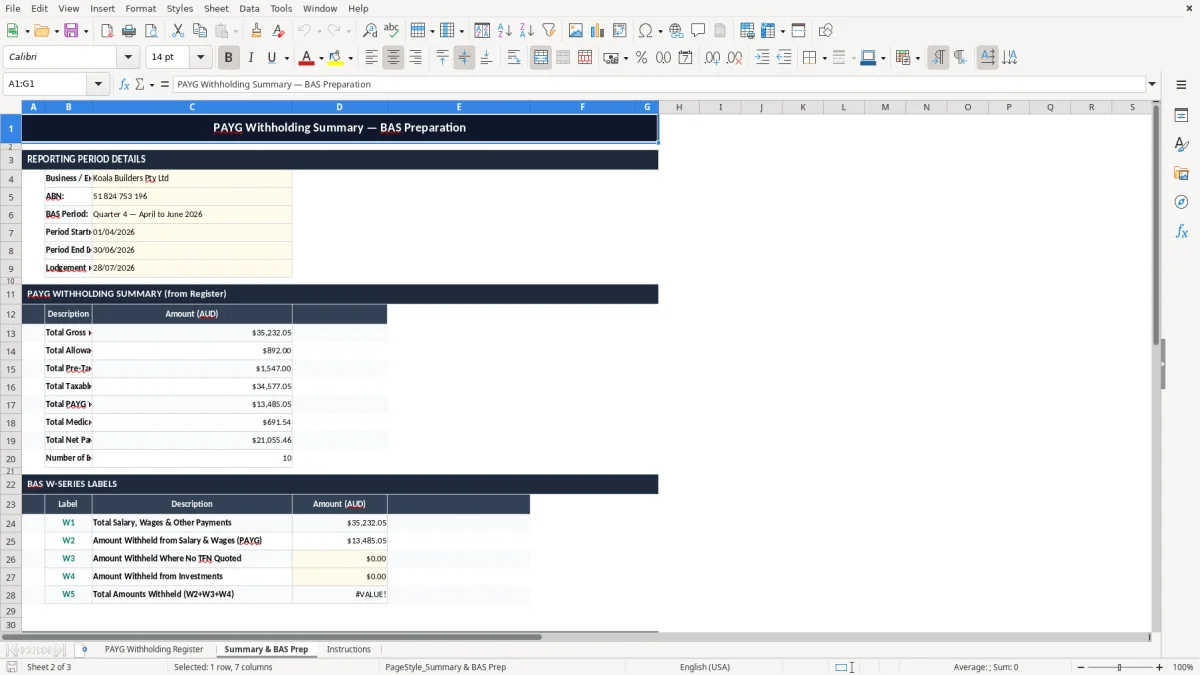
Image 2 shows the Summary & BAS Prep sheet, which is the one you use when it is time to total the period. If you withheld $1,125.00 in one pay cycle and $1,340.00 in the next, the summary gives you $2,465.00 without a manual add-up at the end of the month.
The ATO expects you to keep payroll records that support the amounts you report, and most business records must be kept for 5 years. That includes your withholding records, pay slips and the figures behind your BAS and STP reports.
Australian payroll also sits alongside PAYG withholding rules, which are reported through your business activity statement if you are registered for GST and withholding obligations apply. If your business withholds tax from wages, the records need to line up with the pay event, not just the end-of-quarter total.
Say your business withholds $780.00 from one weekly pay run and $910.00 from the next. That is $1,690.00 to track for the period, and the spreadsheet helps you check that the total matches your payroll software before you lodge anything.
The key practical point is traceability. If you ever need to answer a query from the ATO, you want to show who was paid, when the pay run happened, and how the withholding total was built up from the source figures.
That is why a spreadsheet is useful even when payroll software does the calculations. It gives you a separate working file for reconciliation, and it is much easier to review than a screen full of payroll journal lines after the fact.
That separate working file also sits neatly beside a BAS statement template when you need to reconcile withholding totals before lodging.
The common problem is not the tax rate itself; it is the paperwork around it. One missed pay run, one duplicated entry, or one employee amount typed as $1,250.00 instead of $1,520.00 can throw the whole period off and leave you chasing a difference at month-end.
That kind of error costs time first. If you have 20 payroll lines in a month and you spend 10 minutes fixing each mistake, you have burned more than 3 hours before you even get to the BAS review.
When the register does not agree with payslips, the problem usually shows up at reconciliation. A bookkeeper might find that the spreadsheet totals $4,880.00 withheld, but the payroll report says $4,730.00, which means $150.00 is sitting wrong somewhere in the record.
The other trap is leaving it all to quarter-end. Three months of dirty entries are harder to sort than one week of tidy ones, and that is how a simple register turns into a half-day cleanup right when you are trying to lodge.
Even with STP, people still need a working spreadsheet to check the numbers. Software can post data, but it will not stop you from entering the wrong employee code, the wrong withholding amount or a duplicate line that blows up your totals by hundreds of dollars.
The easiest way to make this stick is to tie it to an existing payroll task. If you already run payroll every Friday or every second Wednesday, update the register at the same time instead of leaving it for the end of the month.
If you are working with 26 fortnightly pay runs and 5 employees, that is 130 entry points across the year. A tidy process matters more than clever formatting, because you need a file that you can check in 2 minutes, not 20.
Once the business starts adding staff, allowances, leave loading or multiple pay types, spreadsheet tracking gets clunky. At that point, Xero or MYOB will usually handle the calculations better, while you keep the workbook as a backup and reconciliation check.
That backup workbook still pairs neatly with an ABN invoice format for contractors who bill outside payroll.