Caravan Park Booking Excel Free Template (2026)
8
Free download
Track car trips, odometer readings, tolls and parking for ATO logbook claims. Includes summary, GST and instructions sheets.
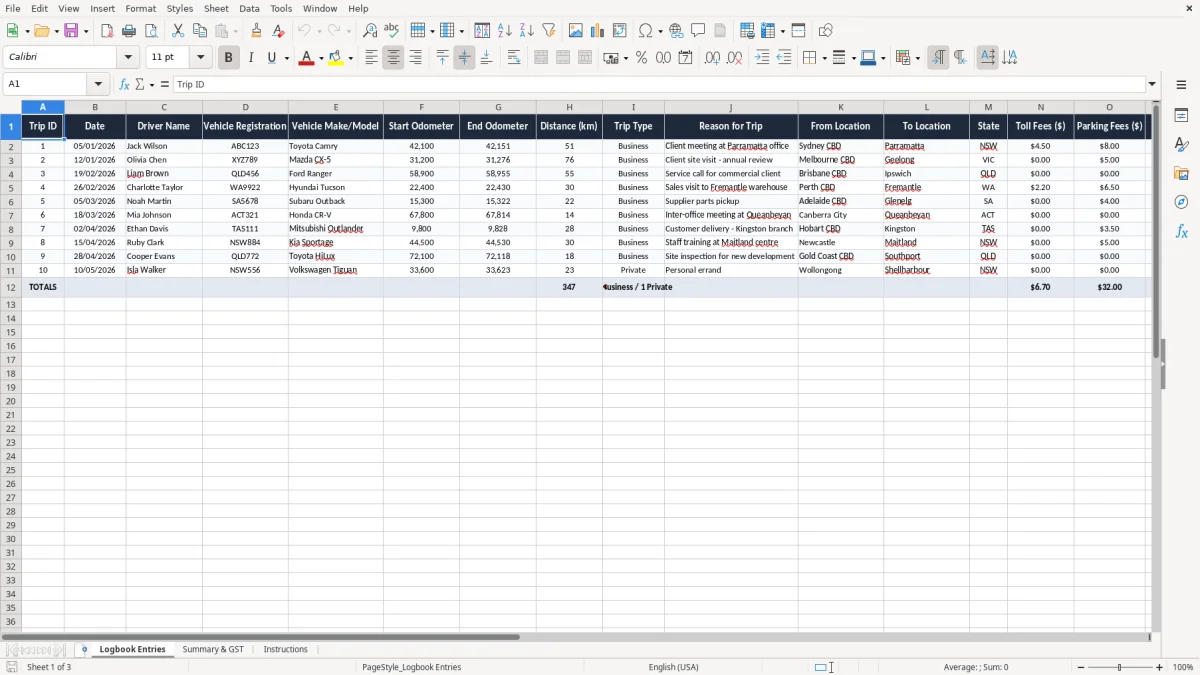
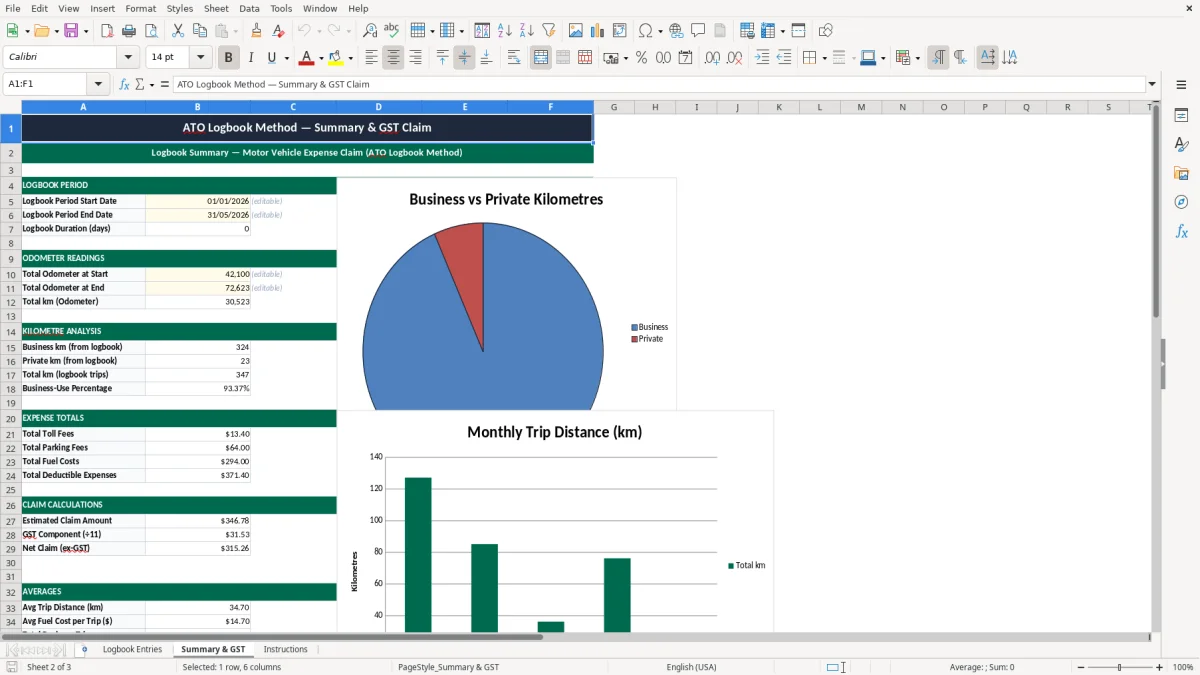
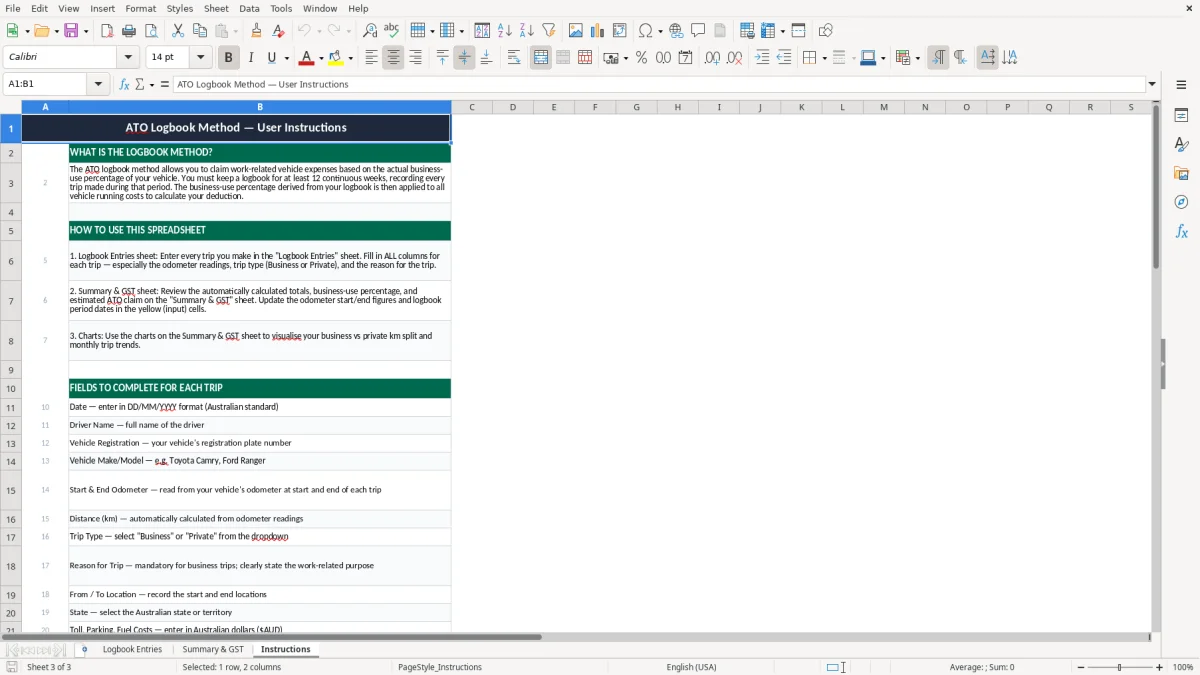
This ATO logbook method Excel spreadsheet tracks business car trips, odometer readings and trip costs so you can calculate your deductible motor vehicle claim. It includes a Logbook Entries sheet, Summary & GST sheet and an Instructions sheet.
Use it to record every work-related trip, total your business kilometres and keep the supporting details the ATO expects for the logbook method. The summary sheet pulls the numbers together so you can see your business-use percentage and the claimable amounts at a glance.
It is set up for Australian records, with dates in DD/MM/YYYY format, dollar fields for tolls, parking and fuel, and a clean layout you can fill in as you go.
A sole trader, contractor or employee using their own car for work can keep trip records in this Excel template instead of scribbling notes in a diary. It suits the person who does school runs, client visits and site jobs in the same week, then needs a clean trail for the tax return.
Take a tradie with 4 staff and one ute doing 18 work trips a week. If 12 of those are business-related and average 24 km each, that is 288 business kilometres a week, or about 14,976 km a year over 52 weeks.
This is handy when you have repeat travel: a bookkeeper visiting 3 client sites a month, a sales rep clocking 1,200 km in a fortnight, or a sole trader running between 2 suburbs all day. You can record the trip once and keep the route, purpose and costs together.
The logbook method is about more than a mileage total. You need enough detail to show the business pattern, so fields like from location, to location, state and notes matter when you are pulling together records for the ATO.
The logbook method is the more detailed car claim, and the ATO expects a continuous 12-week logbook to work out your business-use percentage. You then keep that percentage as the basis for claims, as long as your travel pattern stays broadly the same.
For car expenses, you are usually choosing between the cents-per-kilometre method and the logbook method. If you are doing 6,500 business km in a year and your actual running costs are $9,200, the logbook method can be better where your work use is high, because you can claim the business portion of real expenses rather than a flat rate.
Your record should show the date, destination, purpose and kilometres for each trip, plus the vehicle details and odometer readings. If a trip has parking or tolls, listing them separately helps tie the record back to the source receipt.
The ATO record-keeping period is 5 years, so a spreadsheet is only useful if you keep it with the supporting documents. If you use the logbook method through tax time, keep the workbook, receipts and any diary or calendar evidence together.
If the logbook method feels too detailed, compare it with this cents-per-kilometre log when deciding how to record business driving.
The most common mistake is missing the odometer numbers at the start and end of a trip. If you skip those, you lose the distance calculation, and a 40 km client run turns into a guess that is hard to defend if the ATO asks questions.
Another problem is mixing business and private travel without a clear note. A trip from home to the office is usually private, while a detour to a client site may be business-related, so if you record both as deductible you can overstate your claim by hundreds of dollars across a year.
If you miss just 3 trips a week at 18 km each, that is 54 km lost every week. Over 40 working weeks, you are short 2,160 km, and at a 85% business-use rate that can distort the final deduction by a meaningful amount.
Tolls, parking and fuel are often entered with the trip, but the bank transaction still has to line up with the date and location. When the receipt says $16.80 and the spreadsheet says $18.80, you spend time fixing a mismatch instead of lodging a clean return.
The easiest way to keep a logbook alive is to update it on the same day you fill up or finish a work run. If you wait until quarter-end or tax time, you end up trying to remember 30 trips from scraps of paper and phone maps.
If you are logging hundreds of trips a month, or you need live vehicle tracking across a fleet, it may be time to move to proper software. For one or two vehicles, though, this Excel file is usually enough to keep the logbook method tidy without adding another system to learn.