Bushfire Plan Excel Free Template – Australia (2026)
6
Free download
Plan Australian crop paddocks with fields for area, variety, dates, yield, costs, revenue, gross margin and status across three Excel sheets.
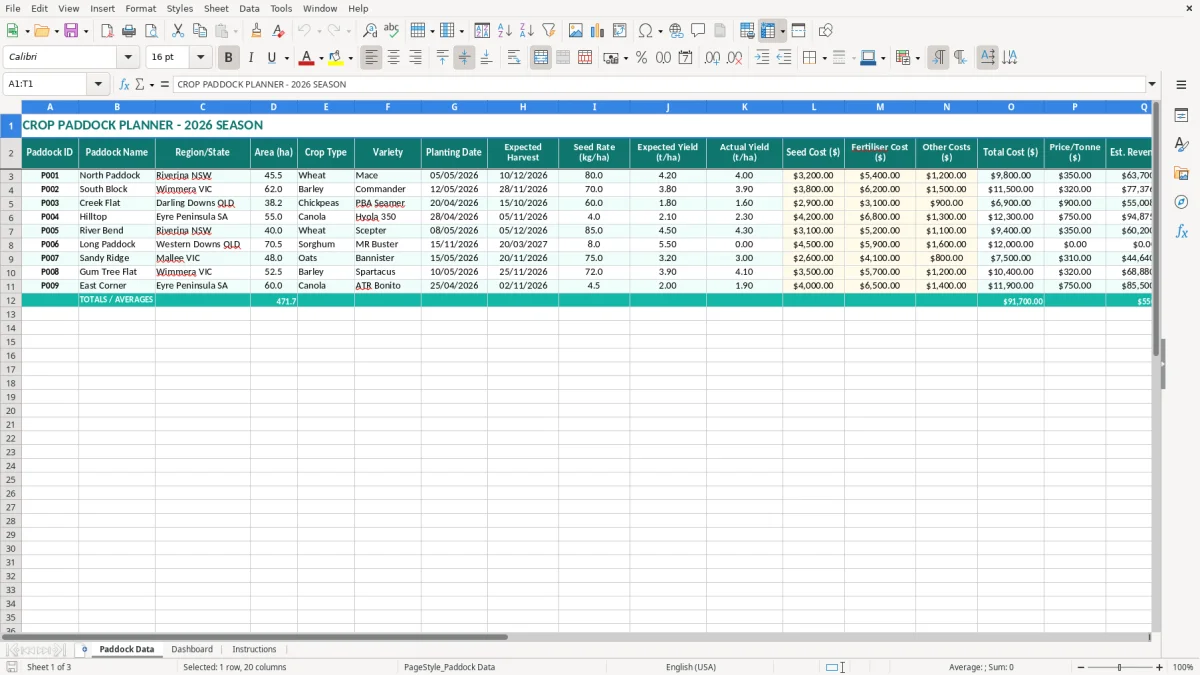
This crop paddock planner Excel template records paddock areas, crop varieties, planting and harvest dates, yield targets, costs, sale prices and margins for the 2026 season. It includes a Paddock Data sheet, a Dashboard for reviewing results and an Instructions sheet to help you set it up.
You can enter one row per paddock and compare expected performance with actual yield once harvest is complete. The layout suits broadacre farms, mixed farms and farm managers who need a practical seasonal view without building a spreadsheet from scratch.
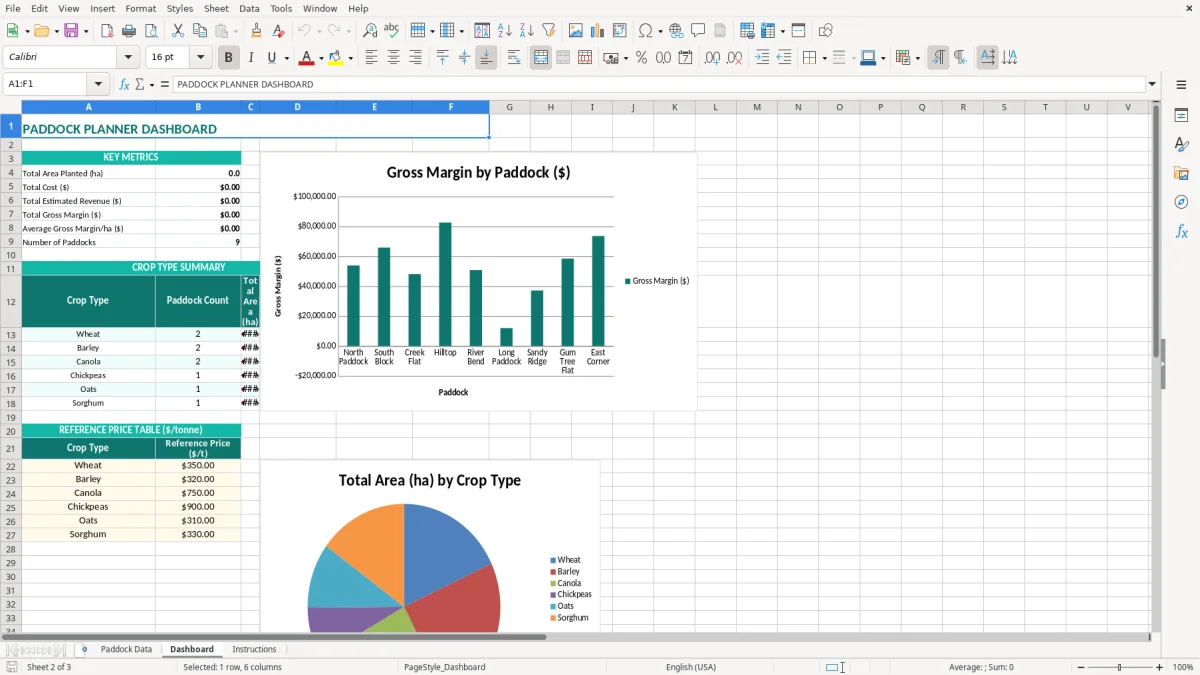
A crop paddock planner is most useful before the first seed goes in, when you are deciding which paddock gets which crop and whether the numbers stack up. A farm owner, agronomist or cropping manager can enter each block on Paddock Data, then return after spraying, fertilising and harvest to replace estimates with actual results.
Take a Riverina farm with four paddocks: 45.5 hectares of Mace wheat, 62 hectares of Commander barley, 38.2 hectares of PBA Seamer chickpeas and a 55-hectare Hyola 350 canola block. The workbook puts each one on a separate row, alongside the region, seed rate, expected yield, planting date and expected harvest.
That gives the farm manager one working list rather than separate notes in a ute, a contractor email and last year's spreadsheet. A 4.2 t/ha wheat estimate across 45.5 hectares represents 191.1 tonnes before harvest losses or quality adjustments, which is a useful starting point for revenue and storage planning.
An office manager or bookkeeper can update seed, fertiliser and other costs as supplier invoices arrive. The crop manager can leave the expected yield untouched and add actual yield at harvest, allowing the Dashboard to show whether the paddock performed as planned.
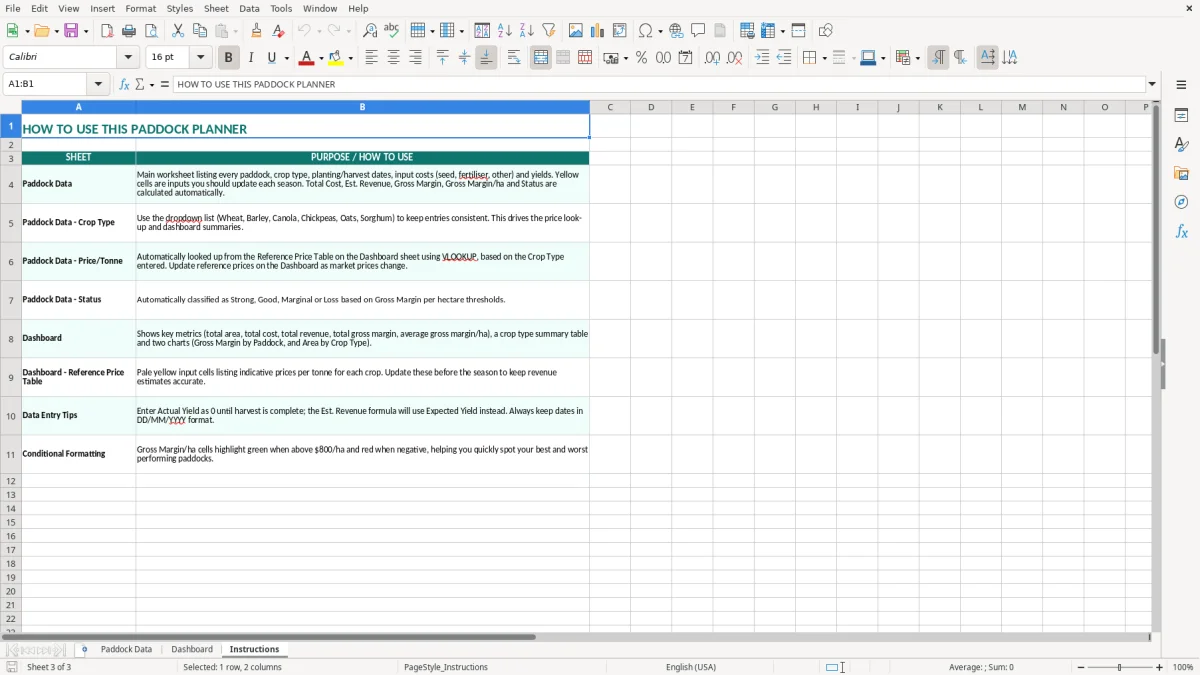
This is also practical for a family farm with several regions. A Darling Downs chickpea paddock and a Wimmera barley paddock should not be judged only by total dollars: gross margin per hectare makes the comparison more useful when block sizes differ. The Paddock Data sheet (image 1) keeps those calculations beside the source figures, while the Dashboard (image 2) provides the higher-level view. The Instructions sheet (image 3) is the reference point when someone else takes over data entry.
This spreadsheet is a planning and management tool, not a substitute for your farm accounting records or tax return. If the business is registered for GST, most taxable sales and purchases use the 10% rate, while some agricultural inputs and sales can have different GST treatment. Record the GST-exclusive cost in a margin calculation when you are entitled to an input tax credit, so the comparison is not distorted.
A seed invoice of $11,000 including GST is $10,000 before GST, with $1,000 potentially claimable as an input tax credit if the purchase is creditable and supported by a valid tax invoice. The planner's $10,000 cost should be allocated to the relevant paddock, while the invoice and GST amount remain in the bookkeeping system used for the BAS.
GST registration is generally required when business turnover reaches $75,000 a year, or $150,000 for a not-for-profit. Most small businesses lodge BAS quarterly; businesses with turnover above $20 million generally lodge monthly. A cropping business should reconcile the spreadsheet totals to the ledger before each BAS rather than treating the planner as the BAS itself.
The ATO expects business records to be kept for 5 years. Keep supplier invoices, grain buyer statements, contractor dockets, chemical records and evidence supporting the area and yield figures with the relevant financial records. The Australian financial year runs from 1 July to 30 June, but the template is labelled for the 2026 season and uses dates such as 05/05/2026 and 10/12/2026, so make sure your farm's season and reporting period are clearly separated.
For a Pty Ltd farm, the company is a separate legal entity registered with ASIC; its crop records should still reconcile to the company's accounts. Use a consistent policy for shared machinery, labour and freight. Allocating a $6,000 contractor invoice by hectares is usually more defensible than assigning the full amount to whichever paddock happened to be harvested first.
That same allocation discipline becomes even more important when a super fund workbook is used to separate contributions, expenses and investment transactions from the farm company’s records.
The biggest problem I see in crop spreadsheets is not a missing formula. It is a mixture of units and assumptions: one row uses GST-inclusive costs, another uses GST-exclusive costs, and a third uses a whole-farm invoice without allocation. The final margin can look precise while being wrong by thousands of dollars.
A grower may enter $3,200 of seed and $5,400 of fertiliser for a 45.5-hectare wheat paddock, but leave freight, spraying, repairs or agronomy in a general note. If $4,000 of additional costs are omitted, the reported gross margin is overstated by $87.91 per hectare. That can make a marginal paddock look like the best performer.
Do not enter the same contractor invoice in both Other Costs and the bookkeeping export. Double-counting $2,500 on a 50-hectare block reduces the reported margin by $50 per hectare. Pick one allocation method and retain the invoice reference outside the planner.
Expected Yield is a forecast, not a promise. If a 38.2-hectare chickpea paddock is forecast at 1.8 t/ha but delivers 1.6 t/ha, production falls from 68.76 tonnes to 61.12 tonnes. At $600 a tonne, that is $4,584 less revenue before quality discounts, even if costs remain unchanged.
Price per tonne also needs a clear basis. A quoted grain price may exclude freight, levies, storage or a quality deduction. Entering $350 when the net realised price is $330 over 191.1 tonnes creates a $3,822 revenue overstatement. Use the net price you can reasonably expect, then update it when the contract or buyer statement is final.
A planting date of 05/05/2026 and expected harvest of 10/12/2026 are useful only while they reflect the current plan. Rain can move sowing by three weeks, and a stale Status column can cause a contractor to work from the wrong paddock list. Update dates and status during the weekly farm meeting, not just at year-end.
A spreadsheet earns its keep when updating it takes less time than searching for the information elsewhere. Set a 15-minute appointment after the weekly farm meeting or contractor call. The person who knows the field activity should provide the update, while the office manager or bookkeeper enters costs and checks the figures.
Use Excel's filters to isolate a region such as Riverina NSW or a crop such as Wheat. If you add your own controls, data validation is worthwhile for Crop Type and Status because consistent labels keep Dashboard summaries accurate. Conditional formatting can flag missing actual yields after an expected harvest date, but test any added rule on a copy first.
Keep a dated backup before making major changes and avoid inserting columns into the middle of the supplied layout unless you understand the references. A monthly copy is sensible during a busy season; for example, save July 2026 and August 2026 versions rather than relying on one overwritten file.
Once you have several thousand transaction lines, multiple users, live inventory, contractor payments or automatic bank feeds, move the accounting records into software such as Xero or MYOB and keep this planner for operational crop analysis. For a farm with 20 paddocks and a few hundred cost entries a season, Excel remains a practical front-end, provided the totals are reconciled to the accounting system and the file has one clear owner.