Rental Ledger Excel – Free Template (2026)
373
Free download
Track property assets, effective lives, depreciation rates and yearly values with this Excel schedule for Australian rental property owners.
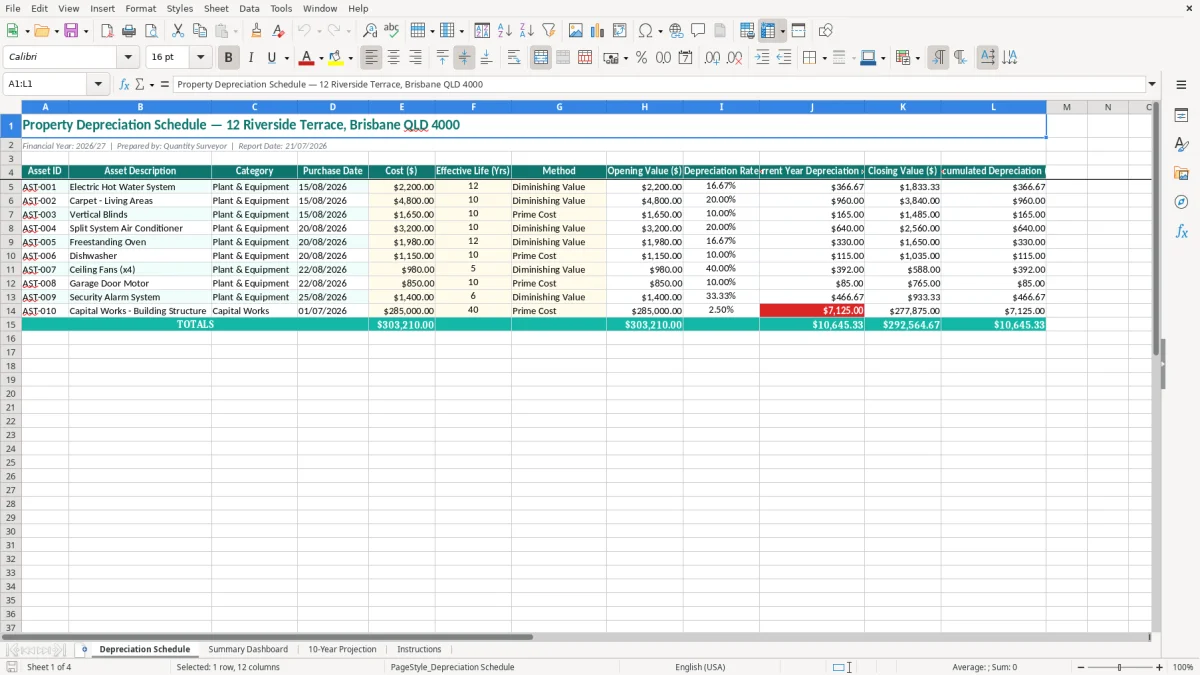
A property depreciation schedule Excel spreadsheet records each investment property's depreciable assets, effective life, method, opening value, current-year depreciation, closing value and accumulated depreciation. This template includes a detailed Depreciation Schedule, Summary Dashboard, 10-Year Projection and Instructions sheet.
Use it to organise figures from your quantity surveyor's report and see how building works and plant and equipment deductions may change over time. The workbook is set up for the 2026/27 financial year and displays Australian dates, dollar amounts and depreciation rates.
This spreadsheet is most useful when a rental property owner has a quantity surveyor's report but wants a workable record behind the tax figures. A sole trader with one Brisbane unit might open it after settlement, while a bookkeeper managing six properties may update it during the June month-end close. It is a working schedule, not a replacement for the report that establishes construction costs and asset lives.
Start with the property details and the assets identified in the report. In image 1, the Depreciation Schedule has a title for 12 Riverside Terrace, Brisbane QLD 4000, a 2026/27 financial year line and a 12-column table. The visible fields run from Asset ID and Asset Description through Category, Purchase Date, Cost ($), Effective Life (Yrs), Method, Opening Value ($), Depreciation Rate, Current Year Depreciation ($), Closing Value ($) and Accumulated Depreciation ($).
That structure lets you distinguish a $2,200 electric hot water system from carpet in the living areas rather than entering one unexplained annual amount. A new $12,000 kitchen renovation also needs to be identified by its nature and date; it should not simply be added to an old appliance row.
An office manager for a small property company can use the schedule after a replacement air-conditioner is installed, then send the invoice and date to the bookkeeper. For three properties with 40 assets each, checking 120 rows once a quarter is far easier than reconstructing the figures from bank transactions at tax time.
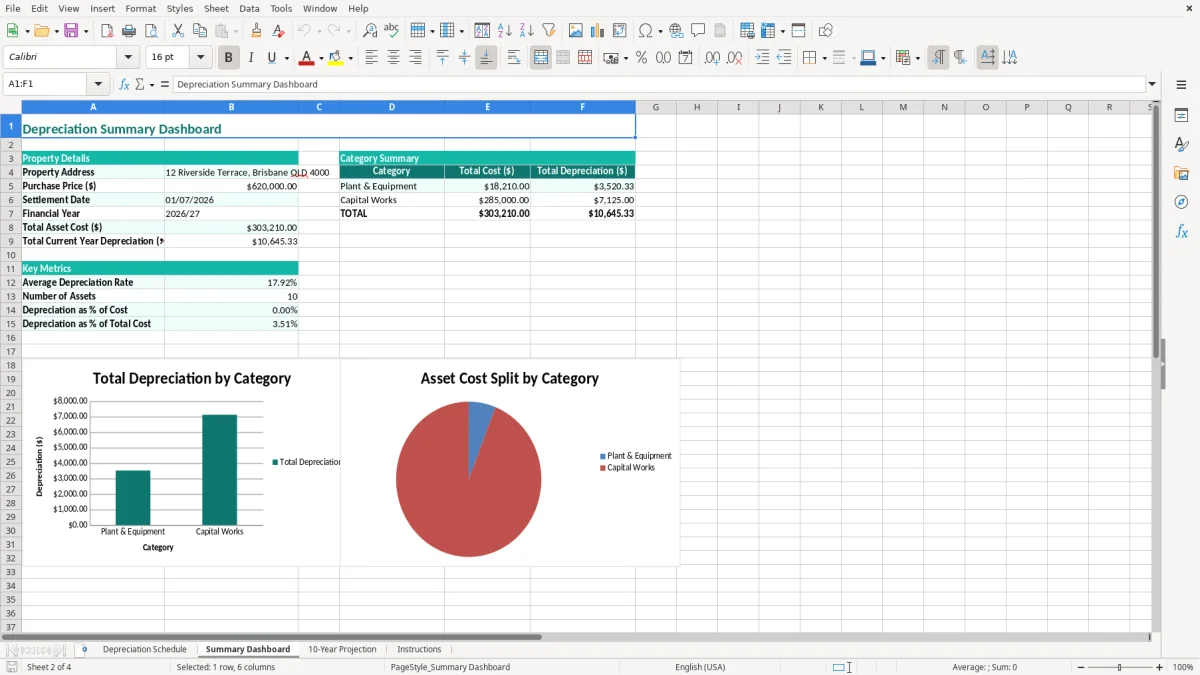
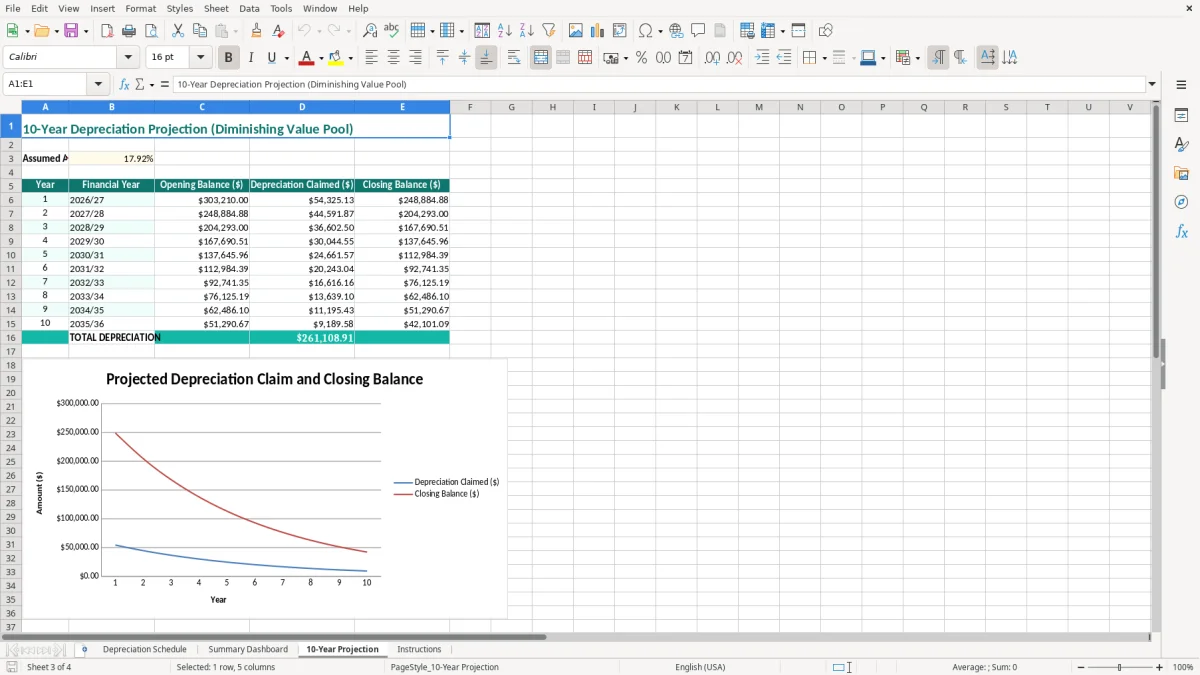
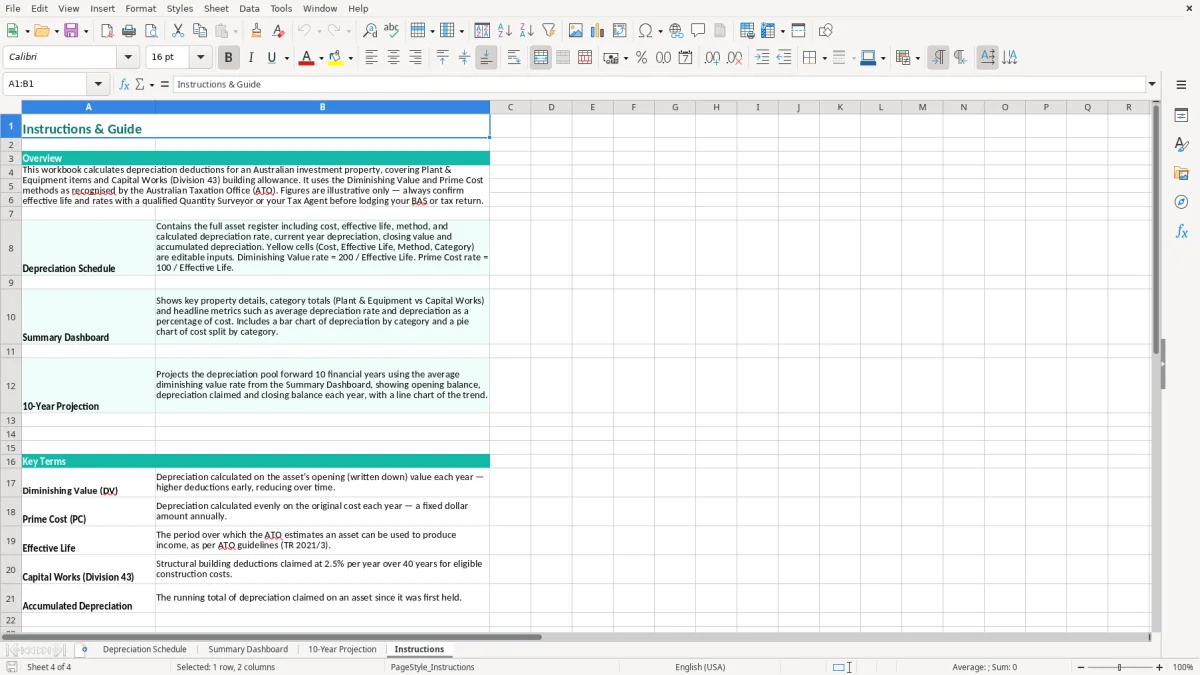
Image 2 shows the Summary Dashboard, which is intended for the property-level review rather than detailed entry. Image 3 shows the 10-Year Projection, useful when an investor is comparing a property with $18,000 of annual deductions in the early years against one with $11,000. Image 4 contains the Instructions sheet, so a new bookkeeper can follow the workbook's intended sequence instead of changing formulas or labels at random.
The same workbook structure also suits a sinking fund schedule, where the yearly review keeps contributions and future balances aligned instead of forcing a rebuild from bank records at budget time.
Australian rental property depreciation has two main parts. Capital works deductions generally fall under Division 43 of the Income Tax Assessment Act 1997 and are commonly claimed at 2.5% a year over 40 years for eligible residential construction. Plant and equipment deductions are decline-in-value claims under Division 40, with the effective life and method affecting the result.
Under the prime cost method, a $20,000 eligible asset with a 10-year effective life may produce a $2,000 annual deduction once the relevant timing rules are applied. Under diminishing value, the first year's deduction is usually larger and later deductions fall. The schedule's Effective Life (Yrs), Method and Depreciation Rate columns make that choice visible; they do not prove that an entered rate is correct.
For example, an asset bought for $2,200 with a 12-year effective life has a simple prime-cost rate of 8.33% before considering the date it was first used or any statutory limitation. A purchase on 15/08/2026 is not automatically a full-year claim in the 2026/27 financial year. Your calculation must reflect the days available for use and the asset's tax classification.
The Treasury Laws Amendment (Housing Tax Integrity) Act 2017 generally prevents individual owners from claiming Division 40 deductions for previously used plant and equipment in second-hand residential rental properties acquired after 9 May 2017. Exceptions include eligible corporate tax entities and some business premises. Capital works deductions can still be available when the legal requirements are met.
Keep the quantity surveyor's report, contracts, invoices, settlement statement and calculation records for at least 5 years under the ATO's record-keeping expectation. If the property is GST-registered, do not assume every property cost includes a recoverable GST credit: residential rent is generally input taxed, so the GST treatment of costs needs separate checking. The template is therefore best used as a controlled record of supported figures, with the ATO rules applied to each asset category.
The costly mistakes I see are rarely caused by Excel itself. They happen when an owner treats a purchase invoice as the tax answer, carries an old value into a new property, or changes a method without recording why. A neat spreadsheet can still produce a wrong deduction if the underlying asset classification is wrong.
A $30,000 bathroom renovation may contain eligible capital works, while a $1,500 freestanding appliance may be a separate asset. Putting the whole $31,500 into one plant-and-equipment line can create an overstated Division 40 claim. At a 10% assumed rate, that mistake could show a $3,150 deduction where only part of the cost belongs in that category.
The reverse error also costs money: putting every improvement into capital works can delay or remove a deduction that might otherwise be available under the correct rules. Review the Category column and retain the quantity surveyor's asset breakdown rather than combining rows to make the schedule shorter.
A property bought on 15/08/2026 is not the same as an asset installed and first used on 01/07/2026. If a $2,200 hot water system is entered as available for the whole year, the schedule may overstate the claim by roughly six weeks. A joint owner also needs the deduction split according to legal ownership, not according to who paid the invoice.
Another common trap is copying a previous owner's plant-and-equipment schedule into a second-hand residential property. After the 9 May 2017 restriction, an individual owner may not be entitled to those Division 40 deductions. A $4,000 appliance line copied without checking can therefore become a $4,000 tax-return adjustment, plus the time spent explaining it.
When an asset is replaced, sold or scrapped, leaving it active means depreciation continues after disposal. At year end, compare the Closing Value ($) and Accumulated Depreciation ($) columns with invoices and the fixed-asset records. A 15-minute quarterly check is far cheaper than rebuilding 80 asset rows after the tax return has already been prepared.
The schedule works best when you attach it to a routine you already have. For a rental owner, that is usually the monthly bank reconciliation; for a property bookkeeper, it is the last working day before the management accounts are issued. Do not wait until 30 June to remember whether a replacement appliance was installed in October or February.
Set aside 20 minutes after the rent and expense transactions are reconciled. Search the bank feed and property manager report for repairs, improvements and asset purchases, then record any new item in the Depreciation Schedule with its invoice date, cost and supporting document location.
At the end of March, June, September and December, compare the schedule totals with your fixed-asset register and tax workpapers. If the dashboard shows $18,450 of annual depreciation but the accountant's working paper shows $16,900, stop and investigate the $1,550 difference before it flows into the return.
One property and 30 to 100 assets is manageable when you control the file and keep a clean audit trail. Once you have 10 properties, frequent disposals, multiple owners or several people editing the same workbook, software such as Xero or MYOB can provide stronger access controls and links to the general ledger. Keep the signed quantity surveyor report regardless: software improves processing, but it does not establish the construction cost or legal eligibility of a claim.