Property Depreciation Excel Template – Free (2026)
79
Free download
Track hay, grain and silage purchases, costs, stock on hand, months of supply and reorder status across your Australian farm.
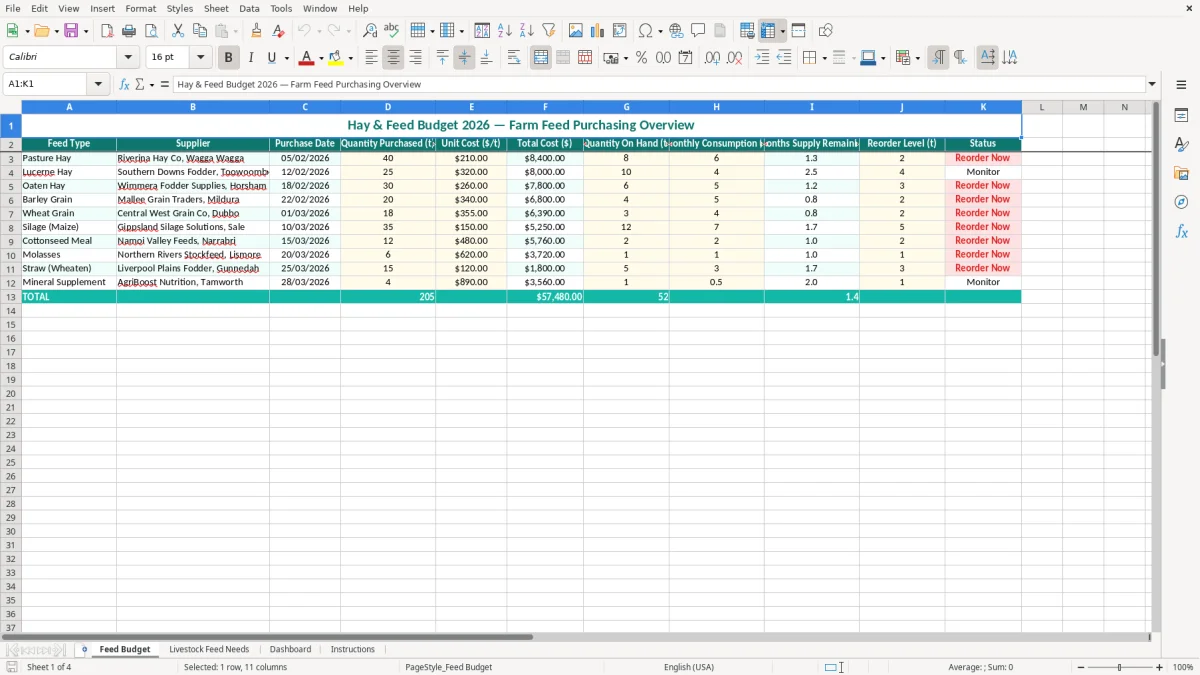
This hay and feed budget Excel spreadsheet tracks feed types, suppliers, purchase dates, quantities, unit costs, total spend, stock on hand, monthly consumption and reorder status. It includes a Feed Budget sheet, Livestock Feed Needs sheet, Dashboard and Instructions sheet for planning farm feed purchases in 2026.
Enter your hay, grain, silage and supplementary feed purchases in the yellow input cells. The workbook helps you see how many months of feed remain and which items are approaching their reorder level before a dry spell or busy feeding period catches you short.
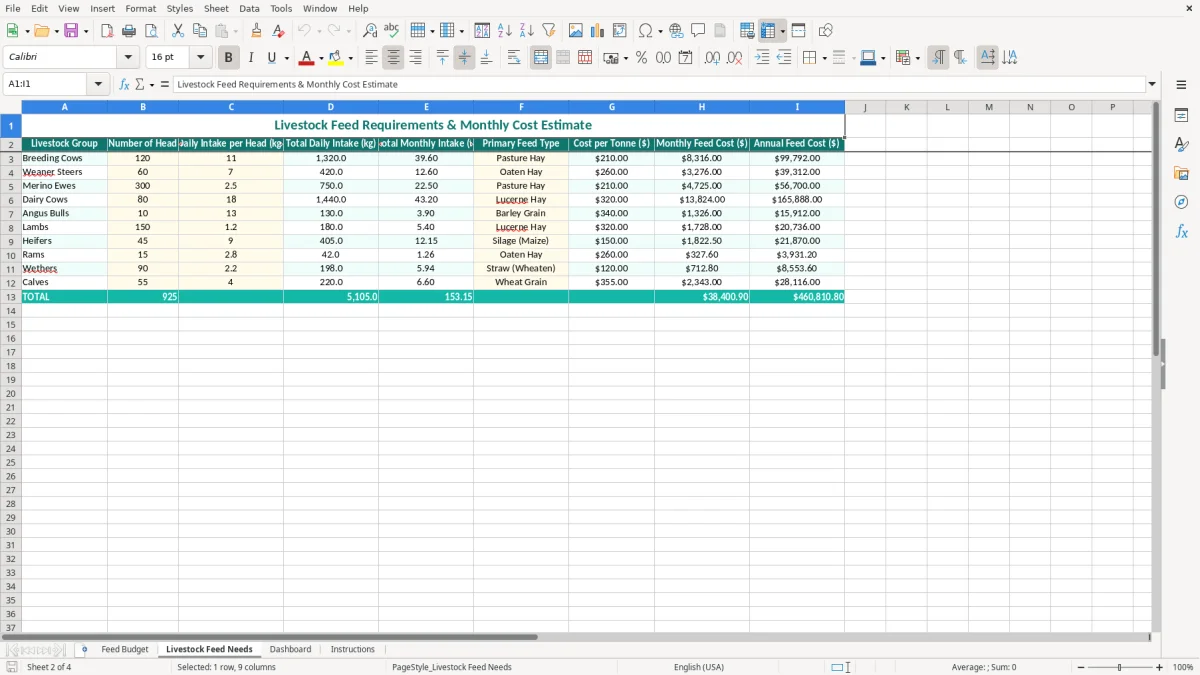
Feed budgeting becomes important when the paddocks stop carrying the stock, not just at the end of the financial year. A mixed farm manager may update the sheet after every fodder delivery, while an office manager records supplier invoices and the livestock manager updates consumption after a ration change.
For a cattle property in northern Victoria, the February purchase might include 40 t of pasture hay from a Wagga Wagga supplier at $210/t. That one line represents $8,400 before freight, and it is much easier to compare with a 25 t lucerne purchase at $320/t when both are stored in the same register.
The Feed Budget sheet (image 1) places Feed Type, Supplier and Purchase Date beside the quantities and costs. The second half of the table covers Quantity On Hand, Monthly Consumption, Months Supply Remaining, Reorder Level and Status, so you can move from what you bought to what remains without maintaining a separate notebook.
That layout suits a family farm where one person orders feed and another checks the silo, hay shed or bunkers. If 6 t of cottonseed meal remains and monthly consumption is 2 t, the workbook shows 3 months of supply. If the reorder level is 2 t, the stock is close enough to the trigger that the next supplier call should be planned.
The Livestock Feed Needs sheet (image 2) gives you a separate place to review feed requirements. Use it when a dry summer, a winter joining period or a lambing and calving run changes the expected demand; the purchasing register alone cannot explain why monthly consumption has increased.
A property feeding 120 cows may use 5 t of grain a month in a maintenance period and 8 t during a cold spell. Recording the new rate makes the months-supply figure useful rather than leaving it based on an old estimate. The Dashboard (image 3) then gives you a quicker visual check, while the Instructions sheet (image 4) provides the workbook guidance.
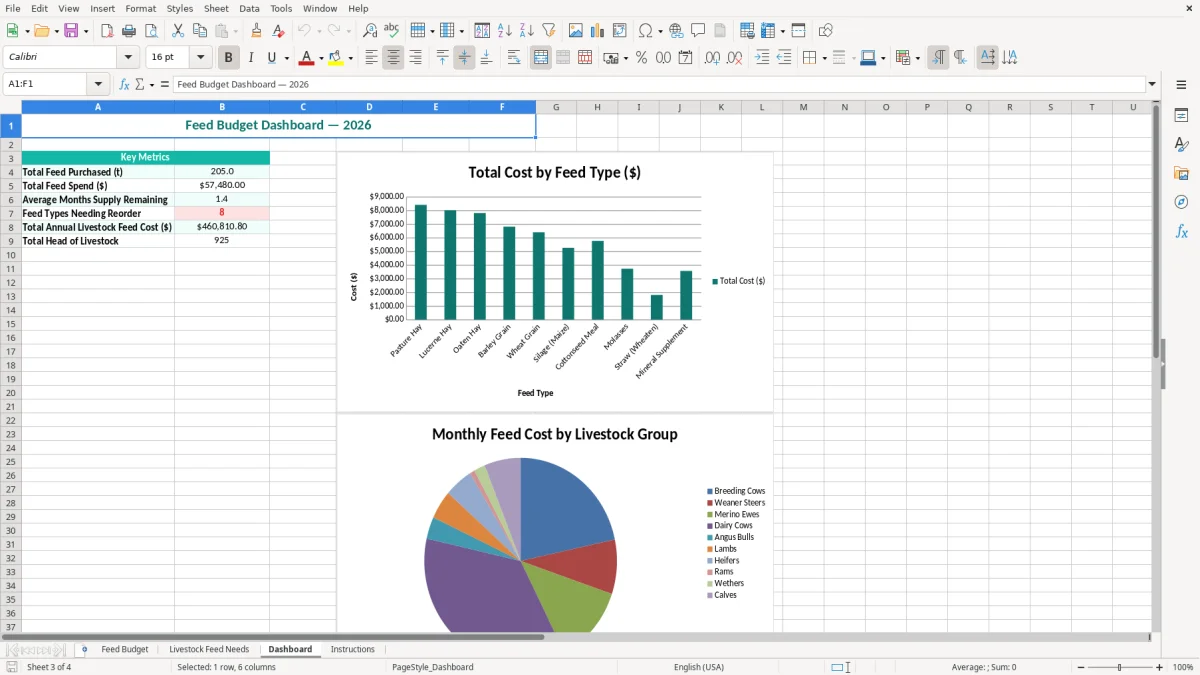
This spreadsheet is a management tool rather than a substitute for your farm accounting records. Keep supplier invoices, delivery dockets and freight charges with the bookkeeping file so the purchase total can be reconciled to the bank account and recorded correctly in the profit and loss or stock accounts.
For an Australian business registered for GST, most taxable feed purchases include GST at 10%. A $210/t hay price may be GST-inclusive or exclusive, so decide which basis you are using before entering the Unit Cost ($/t) column. If $8,400 is GST-inclusive, the GST component is $763.64; if it is $8,400 plus GST, the invoice total is $9,240.
Keep the supplier's tax invoice, ABN, purchase date, description, quantity, price and freight detail. The ATO expects business records to be retained for 5 years, and a spreadsheet row without the underlying invoice is a weak audit trail.
A proper tax invoice should identify the supplier and ABN and use the words Tax Invoice. For purchases over $82.50 including GST, GST should generally be shown separately. Entering Riverina Hay Co as the supplier is useful for planning, but attach the actual invoice to your accounting records or document storage.
Do not treat the Status column as a tax classification. Hay, grain, supplements and freight can have different GST treatment depending on the supply, and feed used for private livestock should not be claimed as a business expense. The practical position is to use this workbook for quantities, costs and purchasing decisions, then reconcile its totals to your accounting system.
Most small farm operators prepare a BAS quarterly. Before lodgement, compare the GST on eligible supplier invoices with the amounts recorded in bookkeeping software. For example, 10 purchases totalling $22,000 including GST contain $2,000 of GST, but only the business-use portion belongs in the input tax credit calculation.
If the farm has employees, this feed workbook does not calculate PAYG withholding, STP payroll or the 11.5% superannuation guarantee. Keep those obligations in the payroll system and use this file for feed purchasing and stock planning.
The most expensive errors I see are not usually arithmetic mistakes. They are stale stock figures, mixed units and purchases entered without freight, which make the farm look better supplied or cheaper than it really is.
Months Supply Remaining is only useful when Quantity On Hand and Monthly Consumption are current. If a farm has 12 t of grain and the sheet still says consumption is 3 t a month, it reports 4 months of cover. At 5 t a month after a cold snap, the real position is 2.4 months.
That 1.6-month difference can mean a rushed delivery, a higher spot price or a ration change at the worst time. Update consumption after a significant change in herd numbers, feed allocation or pasture conditions rather than waiting until the shed is nearly empty.
A 20 t barley purchase at $340/t is $6,800, while 18 t of wheat at $355/t is $6,390. The cheaper invoice total does not mean wheat is the cheaper feed, because the quantities and nutritional use are different. More importantly, entering one price per tonne and another price per bale makes the comparison invalid.
Use tonnes throughout this template. If 400 small square bales average 22 kg each, the approximate weight is 8.8 t; convert that before entering the quantity. Keep freight visible in your bookkeeping records, because a $260/t hay purchase plus $35/t freight has an effective delivered cost of $295/t.
Two people can enter the same delivery when the truck arrives and the invoice is later processed. A 30 t silage delivery duplicated at $150/t creates a false $4,500 cost and makes stock appear 30 t higher than it is.
Use the supplier, purchase date and delivery docket as a quick check before adding a row. Reconcile the register at month-end against invoices and physical stock. A 10% stock discrepancy on a 100 t hay inventory is 10 t; at $210/t, that is $2,100 of feed that needs explaining.
At month-end, the same invoice totals can be checked against tax records in a GST reconciliation sheet before the stock variance is explained.
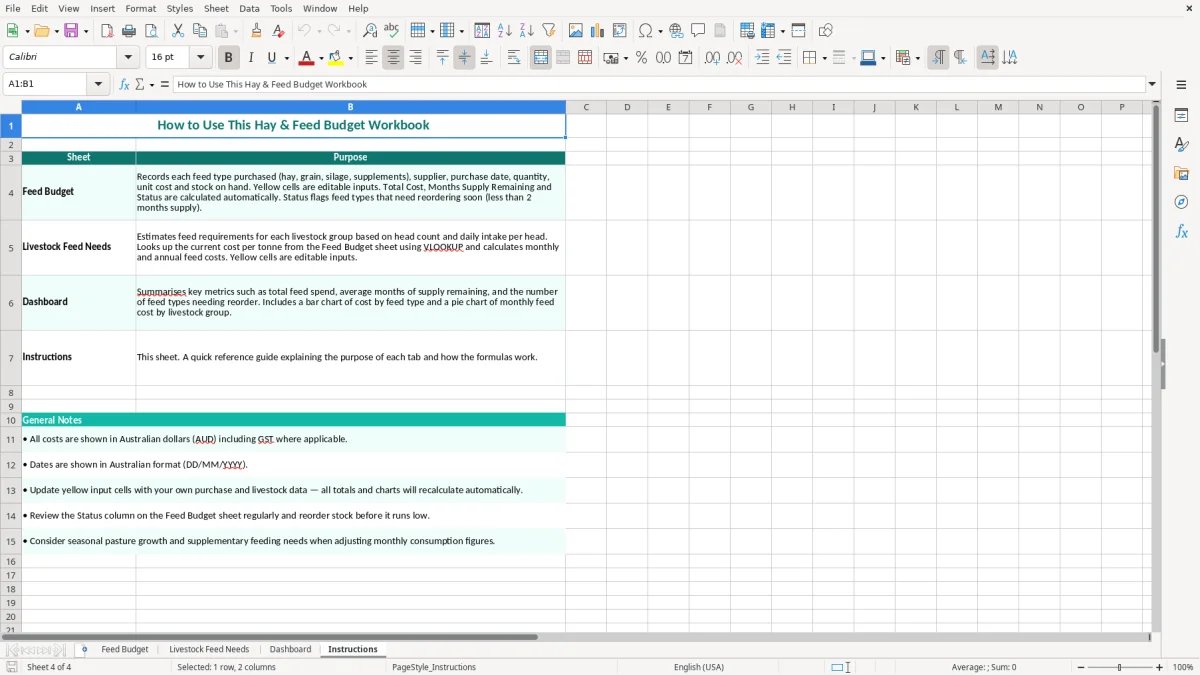
A feed budget works best when it is attached to an existing farm task. Set aside 15 minutes on the day deliveries are checked, then update the purchase row, invoice details in your bookkeeping system and the physical stock figure while the information is still fresh.
For example, if the farm normally uses 4 t of barley each month but the latest check shows 7 t, investigate the ration and livestock numbers before ordering another truck. A five-minute check can prevent a $6,000 purchase made on an incorrect assumption.
Use one spelling for each feed type, such as Lucerne Hay rather than alternating between lucerne, lucerne hay and lucerne bales. Keep all quantities in tonnes and all unit prices in $/t. Copying a prior row is quicker, but check the supplier, date and quantity so last month's details do not become this month's error.
Save a dated copy at the end of each month, such as Feed Budget July 2026, rather than overwriting every historical figure. If several people use the workbook, nominate one person to maintain the master file and keep the working copy in a shared location with version history.
This template is a good fit for a small property with a manageable number of feed lines. Move to farm management or accounting software when you need live stock movements across multiple paddocks, purchase orders, lot tracking, automated supplier invoices or more than one person editing at the same time.
For many farms, Excel remains useful alongside Xero or MYOB: the accounting system handles invoices and GST, while this workbook handles tonnes, consumption and reorder planning. That division is usually more reliable than forcing a general ledger to act like a feed inventory system.
That same split also keeps a separate fuel rebate tracker aligned with the accounting system, so tonnes, consumption and claimable diesel stay in their own records.