Nippers Attendance Excel Free Template – Australia (2026)
13
Free download
Free Australian award rate pay calculator in Excel. Enter checked rates, split overtime correctly and review wages, super estimates and input errors.
Use this Australian award rate pay calculator in Excel to organise checked hourly rates, split ordinary and overtime hours, and estimate wages plus super for up to ten shift records. The workbook includes a rate-profile sheet, a pay worksheet and a summary. You supply the correct award or agreement rates: the example dollar amounts are fictional and are clearly marked EXAMPLE ONLY until you replace and check them.
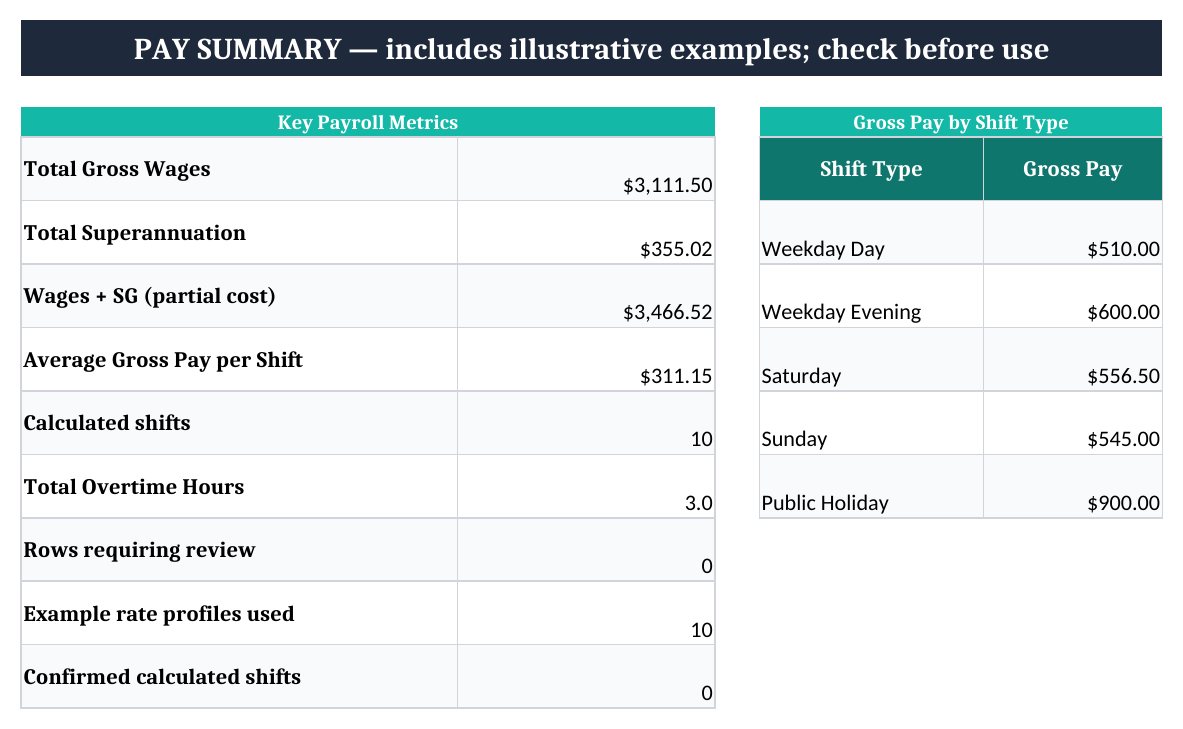
A job title alone is not enough to select a pay rate. Before entering a shift, establish the applicable award or agreement, classification, employment type, age or training arrangements where relevant, date and working conditions. Keep the supporting rate information beside your payroll records.
The Fair Work Ombudsman’s pay and wages guidance links to its Pay Calculator, pay guides, overtime, penalties and allowances. Use those tools to check the applicable rates. The spreadsheet does not identify an award or decide whether a shift attracts overtime.
Use effective hourly amounts
If the applicable rate already includes a casual loading, a weekend penalty or an all-purpose allowance, do not add that amount again. The overtime rate is a separate dollar input; the workbook does not assume a universal multiplier.
Column G is the total paid hours for that record. Column K is the overtime portion already included in G. The workbook subtracts K before calculating ordinary pay. For example, a ten-hour record containing two overtime hours has eight ordinary hours, not ten ordinary hours plus two extra hours.
| Component | Calculation | Amount |
|---|---|---|
| Ordinary pay | (10 total hours − 2 overtime hours) × $30 | $240.00 |
| Overtime pay | 2 hours × $45 | $90.00 |
| Extra allowance dollars | Separately checked amount in L | $20.00 |
| Gross pay estimate | $240 + $90 + $20 | $350.00 |
To reproduce this example, change the first record to G3 = 10, K3 = 2 and L3 = 20. Its illustrative profile already uses $30 and $45. The ordinary, overtime and gross pay cells should show the amounts above. These rates demonstrate the arithmetic only.
A shift with several ordinary or overtime rates needs separate records for the different rate segments. Give each record its own shift ID, divide the hours correctly and allocate extra allowances and qualifying earnings once. The worksheet does not work out overtime thresholds across a day, week or roster cycle.
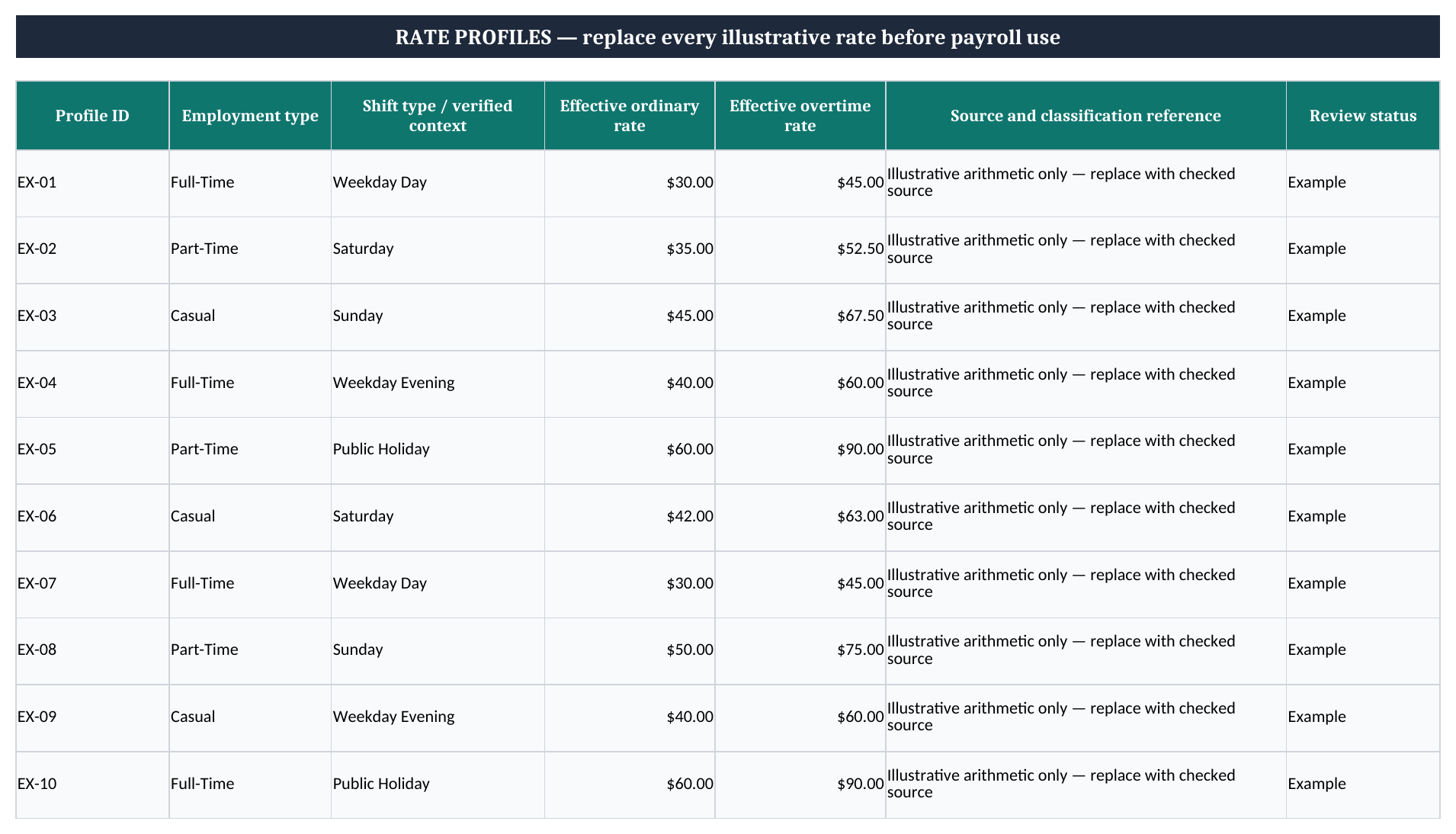
For the FY 2026–27 worksheet, column Q uses 12%. Column V holds the qualifying earnings you have verified and allocated to that record. The super estimate is V × Q, rounded to cents. Changing gross pay does not automatically change V.
The ATO’s Payday Super guidance describes the rules from 1 July 2026: SG is generally calculated at 12% of qualifying earnings, paid on payday and received by the fund within seven business days, subject to exceptions. Qualifying earnings and eligibility need to be checked; this workbook does not calculate caps, exceptions or receipt deadlines.
In the ten-hour example, leaving V3 at $240 produces a super estimate of $28.80 and wages plus SG of $378.80. That is an arithmetic demonstration, not a determination that $240 is the correct qualifying earnings for your worker. Enter the independently verified amount before using the result.
Wages plus SG is a partial employer cost. It excludes items such as payroll tax, workers compensation and other employment costs. It is also separate from take-home pay: PAYG withholding and employee deductions are not calculated. For checking actual fund receipts, use the superannuation contributions tracker.
Common causes of REVIEW include an unknown profile ID, an employment-type mismatch, a shift outside the profile’s effective dates, duplicate shift IDs, text in an amount field or overtime greater than total paid hours. A missing rate is different from an entered zero. Do not replace missing information with zero just to clear a warning.
The input check permits records of up to 24 paid hours as a technical boundary. That does not approve the duration of a shift or assess breaks, rest periods and maximum-hours obligations. Check those matters against the applicable arrangements.
The first chart shows individual shift records; repeated employee names are not automatically combined into one employee total. The shift-type summary uses the five supplied contexts. Keep those context labels consistent when replacing a profile. Filters change which rows you see, not the summary’s calculation range.
The prepared capacity is ten shifts in rows 3:12 and ten rate profiles in rows 4:13. More records require extending lookups, formulas, validation, duplicate checks, totals and charts together. Keep a fresh copy for each working period so replacing inputs does not erase the supporting calculation you used earlier.