Nippers Attendance Excel Free Template – Australia (2026)
13
Free download
Calculate Australian annual leave loading, leave payments, superannuation estimates and PAYG with this practical Excel template.
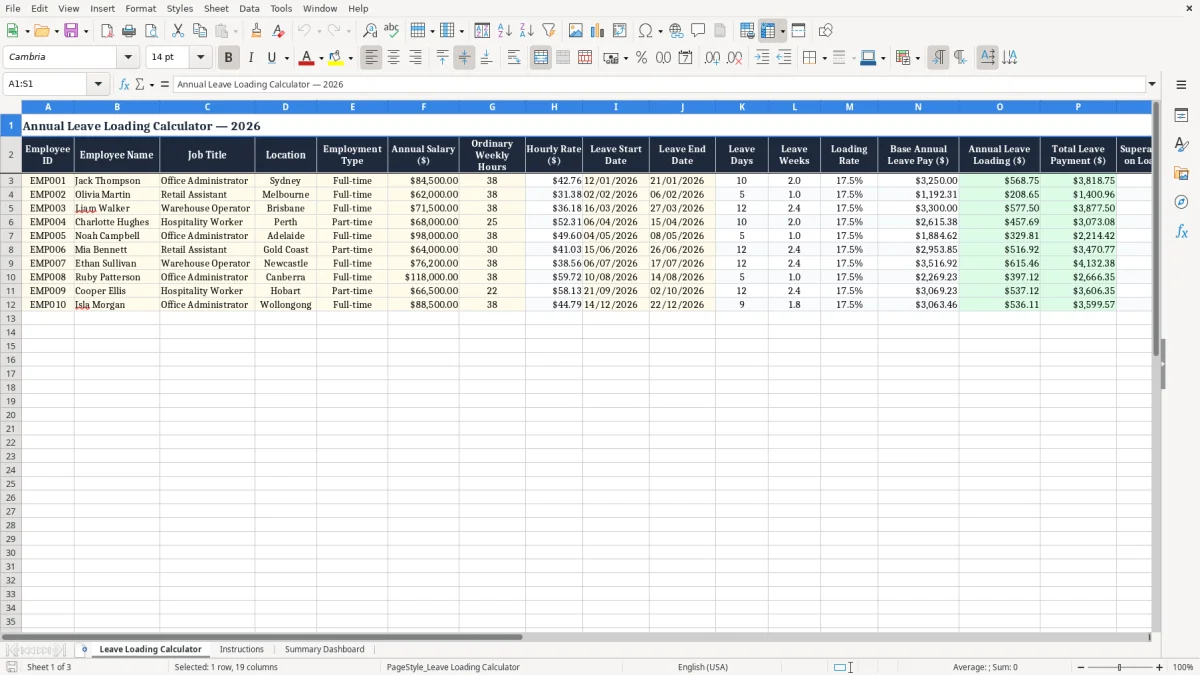
Use this annual leave loading Excel template to estimate annual leave payments for Australian employees. Enter employee details, annual salary, ordinary weekly hours, leave dates and the applicable loading rate to calculate base annual leave pay, annual leave loading, total leave payment, estimated superannuation on loading and estimated PAYG withholding. The workbook is suitable for Australian employers, payroll teams, HR professionals and small business owners who need a clear, repeatable way to review leave costs across multiple employees.
It includes sample 2026 employee data and can be adapted to your own payroll process. Because annual leave loading depends on the applicable modern award, enterprise agreement, employment contract or workplace policy, always verify the assumptions before processing a payment.
Replace the sample employee records with your own information, then enter each employee's annual salary, ordinary weekly hours, leave start date, leave end date and applicable loading rate. Review the calculated hourly rate, leave days, leave weeks, base annual leave pay, annual leave loading and total leave payment. Check the estimated superannuation on loading and PAYG withholding figures as review estimates only, because the correct treatment can depend on current rules and individual payroll circumstances.
Use the Review Status column to record whether the row has been checked against the employee's award, enterprise agreement, contract or workplace policy. For part-time, irregular-hours, shiftwork or unusual termination situations, confirm the calculation method with a qualified payroll or employment adviser before relying on the result. Save the completed workbook securely because it contains employee and pay information.
Annual leave loading is an additional payment that may be made when an eligible Australian employee takes annual leave. It is intended to recognise circumstances in which an employee could otherwise receive less than their usual earnings while away from work, although the reason and calculation can differ between employment arrangements. Annual leave loading is not automatically available to every employee and is not governed by one universal percentage.
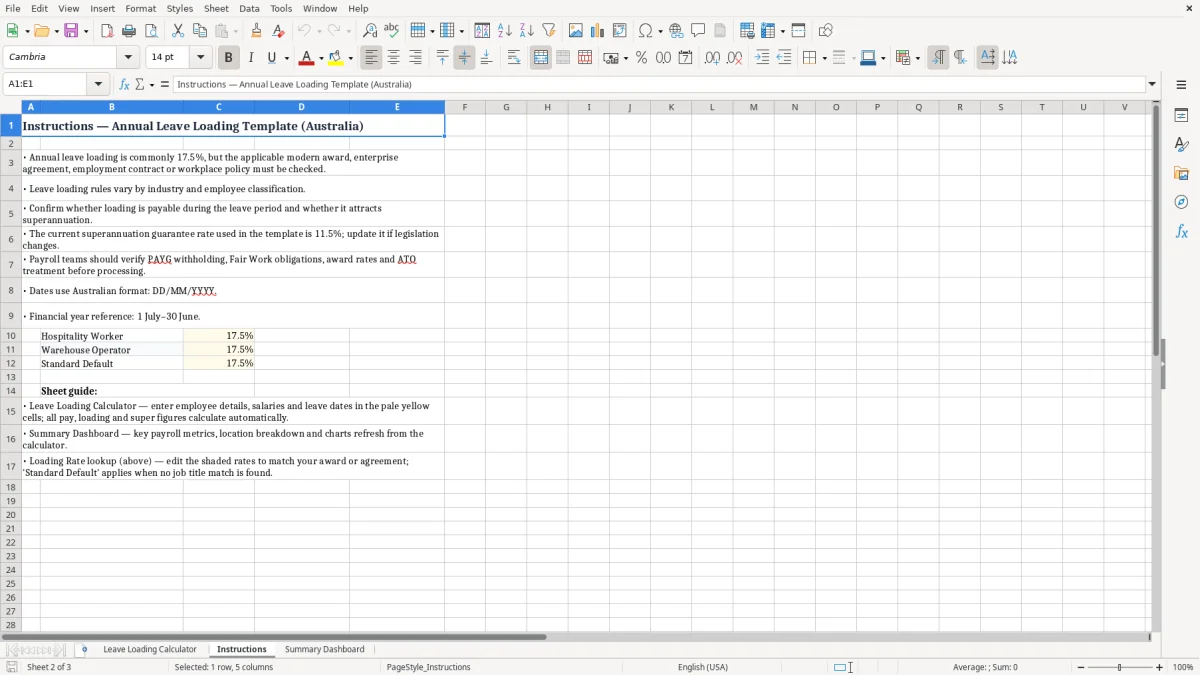
The entitlement may be created by a modern award, enterprise agreement, employment contract or workplace policy. Some arrangements use a percentage of ordinary annual leave pay, while others refer to specific components of pay or define different rules for particular industries and occupations. This makes it important to identify the correct instrument before entering a rate in the spreadsheet.
A common example is 17.5%, but that figure must not be applied automatically. The relevant award or agreement may provide a different rate, a different payment base or conditions about when loading is payable. It may also contain rules for shiftworkers, higher duties, allowances, part-time employees or employees taking leave in separate periods.
The template helps organise the information and produce consistent estimates, but it does not determine entitlement. Review the employee's classification, ordinary hours, leave balance and applicable industrial instrument before approving payment.
For current guidance, consult the Fair Work Ombudsman, the text of the relevant award or agreement, your payroll system documentation and a qualified adviser where needed. Keeping a record of the source used for the loading rate can make later payroll checks and employee questions easier to manage. This simple control is particularly useful when a business employs people under different awards or workplace arrangements.
That control becomes even more useful when payroll must compare multiple classifications, where an award pay calculation tool keeps the correct rate source alongside each employee record.
The workbook is structured around employee data, leave dates and payment assumptions. Annual salary and ordinary weekly hours are used to estimate an hourly rate, while leave start and end dates support an estimate of leave days and leave weeks. The applicable loading rate is then applied to the relevant base annual leave pay to estimate annual leave loading.
The total leave payment combines the estimated base amount and loading amount. The workbook also includes fields for estimated superannuation on loading and estimated PAYG withholding so payroll teams can flag related items for further review.
These figures should not be treated as definitive calculations in every situation. Annual leave payment rules can depend on the employee's ordinary hours, pay cycle, leave balance, award wording, agreement terms, salary arrangements and whether other payments are included or excluded. The calculator is most useful as a transparent planning and checking tool.
Enter one row for each employee and review the formulas after replacing the sample data. Confirm that dates are entered in Australian dd/mm/yyyy format and that the leave period matches the employee's approved leave request.
Check whether the template's approach to leave days and weeks matches your payroll system, especially for employees who work non-standard patterns. Before finalising a payment, compare the result with payroll software and the applicable employment instrument.
Document any manual adjustment in a separate note or controlled payroll record. This approach helps preserve an audit trail and reduces the risk of applying a familiar percentage or formula when the employee's actual conditions require a different method.
Document any manual adjustment in a separate note or controlled payroll record, and for non-standard shift patterns the next check is the swing roster schedule.
This annual leave loading spreadsheet can support payroll preparation, leave cost forecasting and internal review. Start by confirming the employee's identity, job title, location and employment type, then check annual salary and ordinary weekly hours against current payroll records.
Enter approved leave dates and confirm that the dates do not include public holidays, rostered days or other excluded periods unless your payroll process handles them in the intended way. Next, enter the loading rate supported by the relevant award, enterprise agreement, employment contract or policy.
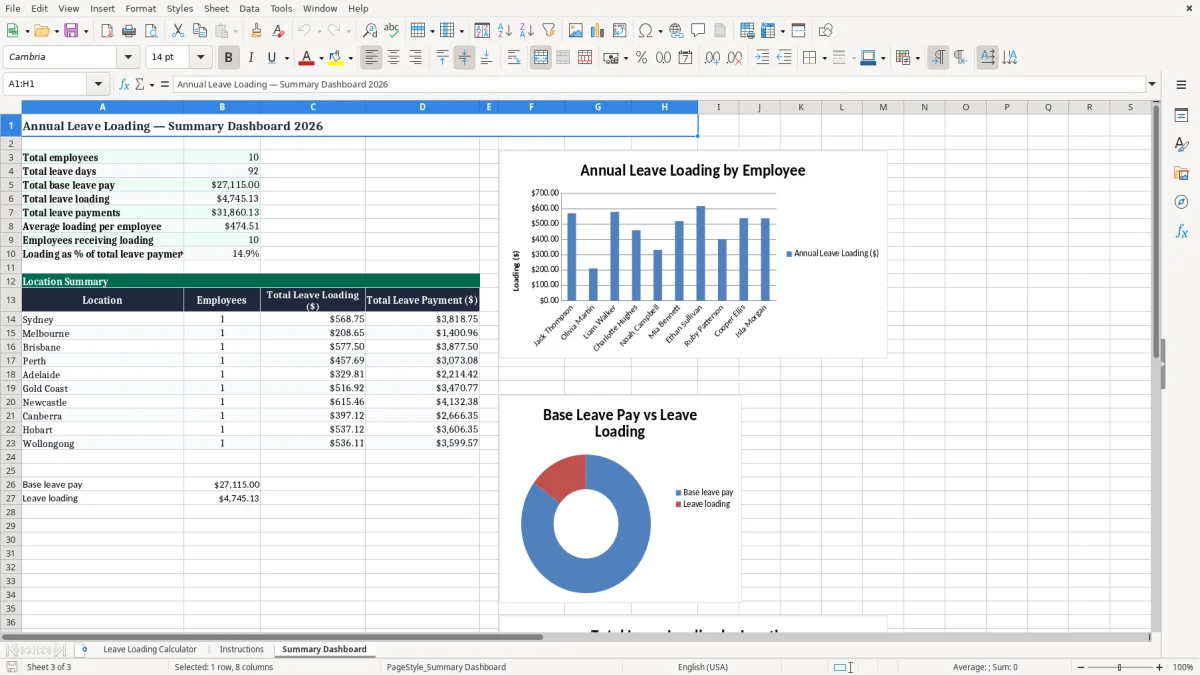
The calculated columns provide a consistent view of hourly rate, leave duration, base annual leave pay, loading and total payment. Use the Review Status column to mark rows as pending, checked or requiring clarification. A review status is especially helpful when several employees have different awards, classifications or loading rules.
For part-time employees, ordinary weekly hours may vary from one employee to another, so do not copy a full-time assumption across the entire sheet. Irregular-hours and shiftwork arrangements may also require a more detailed assessment than a simple salary and hours calculation.
Keep the workbook access-controlled because it includes personal and remuneration information. Save a dated version before making major changes, and reconcile the final figures against payroll reports before payment.
The spreadsheet can also help managers estimate the cost of upcoming leave, but budget estimates should be refreshed when salaries, hours, leave dates or entitlement rules change. If an employee questions the result, use the recorded assumptions and source document to explain the calculation and refer complex issues to a qualified payroll, tax or workplace relations professional.
Annual leave loading can have related superannuation and taxation considerations, but the correct treatment is not always identical to the calculation shown in a simple spreadsheet. Whether a payment forms part of ordinary time earnings, and therefore whether superannuation is payable, can depend on the nature of the payment, the circumstances in which leave is taken and current Australian requirements.
PAYG withholding also depends on factors such as the employee's pay frequency, tax declaration, tax tables, other earnings, bonuses and individual circumstances.
For these reasons, the superannuation and PAYG columns in this template are estimates for review rather than a substitute for payroll software or professional advice. Employers should check current ATO guidance, superannuation obligations, applicable tax tables and payroll procedures before processing a payment.
Industrial compliance is equally important. Confirm the employee's classification, leave entitlement, loading percentage, payment base and any special conditions in the current modern award, enterprise agreement, contract or policy.
Do not assume that a 17.5% loading applies to every employee, and do not assume that a loading payment has the same superannuation treatment in every context. Keep evidence of the source used for each rate and calculation method, including the date reviewed. If the spreadsheet result differs from payroll software, investigate the assumptions rather than simply selecting the higher or lower figure.
This workbook is a planning and review tool, not legal, tax, industrial relations or payroll advice. Obtain professional guidance for disputes, unusual employment arrangements, back payments, termination payments or complex leave calculations.