Nippers Attendance Excel Free Template – Australia (2026)
13
Free download
Free superannuation contributions tracker Excel template for FY 2026–27. Compare expected amounts, fund receipts, outstanding balances and entered deadlines.
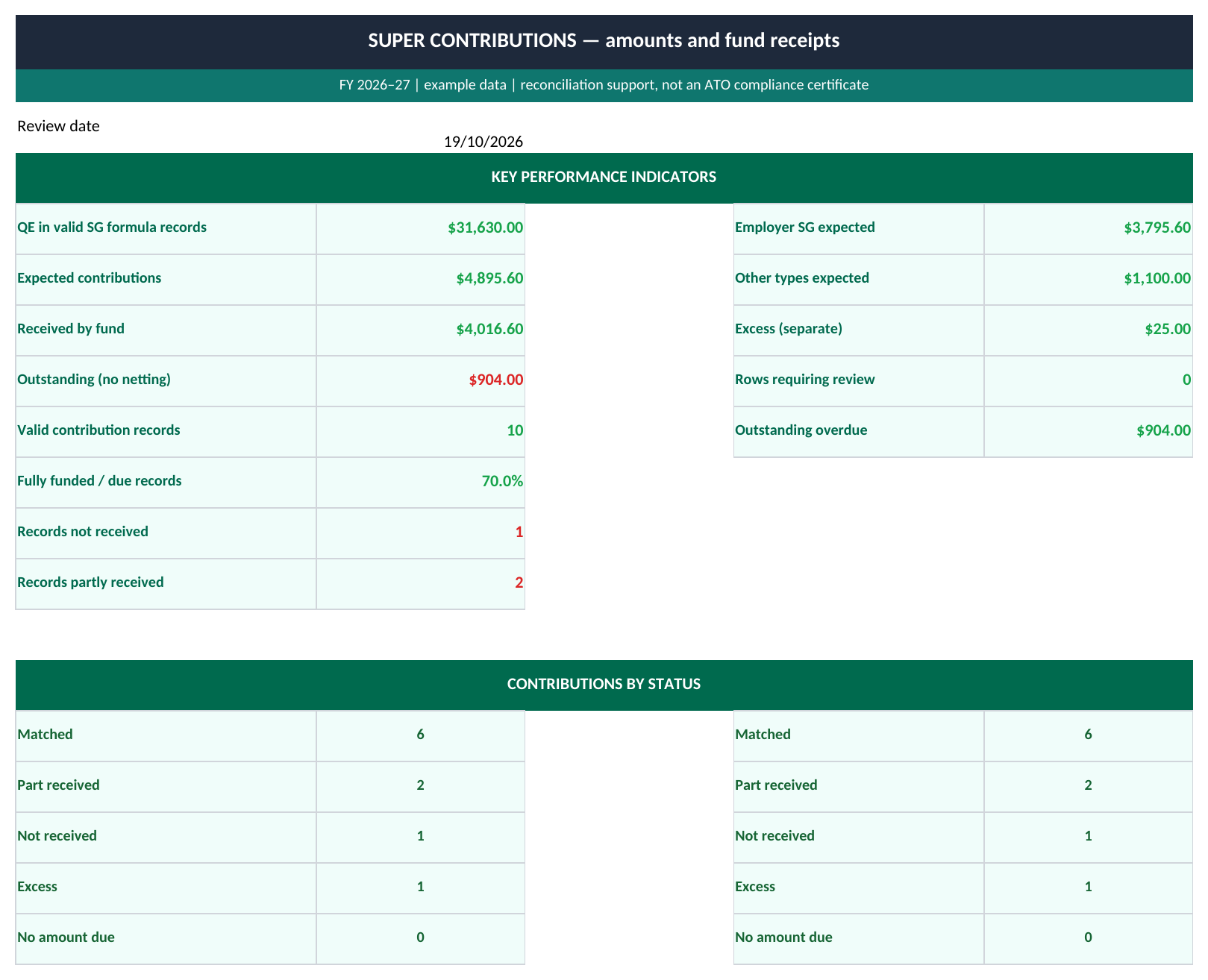
Use this superannuation contributions tracker in Excel to compare expected contributions with amounts actually received by the fund. It has 100 prepared records, separate employer SG and other contribution types, and a dashboard that keeps outstanding amounts separate from excess receipts. The FY 2026–27 version uses a 12% standard SG calculation on qualifying earnings you verify, or an independently checked amount you enter yourself.
The ATO’s Payday Super guidance sets out the changes from 1 July 2026: SG is generally 12% of qualifying earnings and is paid on payday, with fund receipt within seven business days unless an exception applies. Check the current requirements and the correct earnings base for your employee before completing the tracker.
The file records payday, the amount received by the fund, the last receipt date and a receipt deadline you have verified as separate fields. A transfer leaving the employer’s bank is not, by itself, evidence that the fund received and matched the contribution.
The workbook does not calculate public-holiday calendars, extended deadlines, contribution caps or super guarantee charges. Its date comparison uses the deadline you enter. Keep the payroll and fund evidence that supports that date and the amounts.
| Contribution | Basis to use | Expected amount |
|---|---|---|
| Employer SG using checked QE | QE x rate | Verified qualifying earnings × 12%, rounded to cents. |
| Employer SG with an independently checked amount | Verified amount | The amount entered in P, for a situation already assessed outside the file. |
| Salary Sacrifice | Verified amount | The agreed contribution amount entered in P. |
| Voluntary Contribution | Verified amount | The independently checked contribution amount entered in P. |
Salary sacrifice and voluntary contributions are not calculated by multiplying an earnings figure by the SG percentage. Keep those amounts separate from employer SG. The tracker also does not decide whether a contribution arrangement is valid or whether a cap or exception applies.
For the first example, verified qualifying earnings of $4,250 at 12% give expected SG of $510. The salary-sacrifice example instead uses an agreed $250. Changing an unused earnings field on a Verified amount record will not change that agreed contribution.
Qualifying earnings need checking
Do not assume that the gross wage, the old OTE field or the amount of a bank payment is automatically the correct QE input. Verify the earnings components and any relevant eligibility or limits before using QE x rate.

| Record | Expected | Received | Outstanding |
|---|---|---|---|
| SC-001: employer SG | $510 | $510 | $0 |
| SC-003: salary sacrifice | $250 | $200 | $50 |
| SC-004: employer SG | $804 | $0 | $804 |
The outstanding formula is MAX(expected − received, 0). Excess uses the reverse difference, also with a floor of zero. These are calculated record by record before being totalled.
Across all ten supplied examples, outstanding contributions total $904 and excess receipts total $25. The excess does not reduce the outstanding total to $879. You still need to resolve the particular employee, fund and contribution records that remain underfunded.
Column L shows the signed difference, received minus expected, as an extra reconciliation aid. A negative value means the record is under the expected amount. Use the dedicated Outstanding and Excess columns for the action totals rather than summing signed differences and losing the individual gaps.
The second sample is Matched but Received late: its $612 is fully received, while the receipt date is later than its entered deadline. A full dollar match does not establish an on-time payment. An underfunded record becomes Outstanding overdue when the review date is later than the entered due date.
For a partly received aggregate, the tracker shows the total received and its latest receipt date. Keep the separate receipt transactions and dates in your supporting records. The sheet cannot establish which instalment arrived by the deadline or calculate the legal consequences of a late or incomplete payment.
The input checks look for duplicate IDs, duplicate employee/payday/type/fund combinations, missing amounts, text in numeric fields, invalid dates and inconsistent receipt information. A positive received amount needs a receipt date; a zero receipt should leave that date blank. Future paydays or receipts beyond the review date are flagged.
Use one aggregate record per employee, payday, contribution type and fund. If two payments settle the same contribution, update the aggregate received amount and last receipt date and retain both receipts. Do not add a second identical expected contribution just to record the second payment.
The headline totals and status chart cover all 100 prepared rows, 2:101. The expected-versus-received chart displays the first ten contribution records only. Its labels are contribution IDs, not a complete employee summary. Filtering the log does not restrict the dashboard totals.
For more than 100 records, extend formulas, duplicate checks, validation and summary ranges together. This file supports reconciliation; it does not submit STP, make super payments or prepare a tax return. For an earlier check of wages and a separately verified SG estimate, see the award rate pay worksheet.