Caravan Park Booking Excel Free Template (2026)
8
Free download
Track P&C fundraisers, targets, GST expenses, net funds, volunteers and hours with a dashboard for Australian school committees.
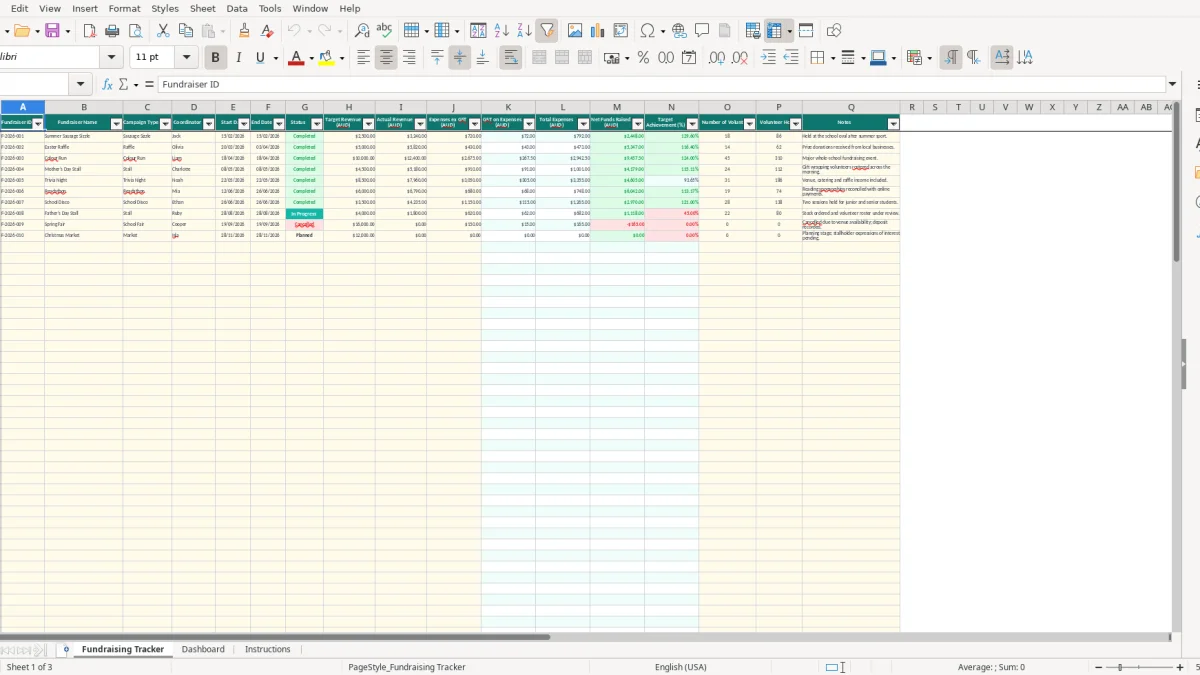
This P&C fundraising tracker Excel template records each school fundraiser, its target, revenue, expenses, GST, net funds raised, volunteers and hours. It includes a 100-row Fundraising Tracker, a summary Dashboard with three charts, and an Instructions sheet for Australian school committees.
Image 1 shows the Fundraising Tracker with fields from Fundraiser ID and Fundraiser Name through to Campaign Type, Coordinator, dates, status, AUD amounts, volunteer data and notes. Sample rows include a sausage sizzle, Easter raffle and colour run, while the prepared rows can be replaced or completed with your own activities.
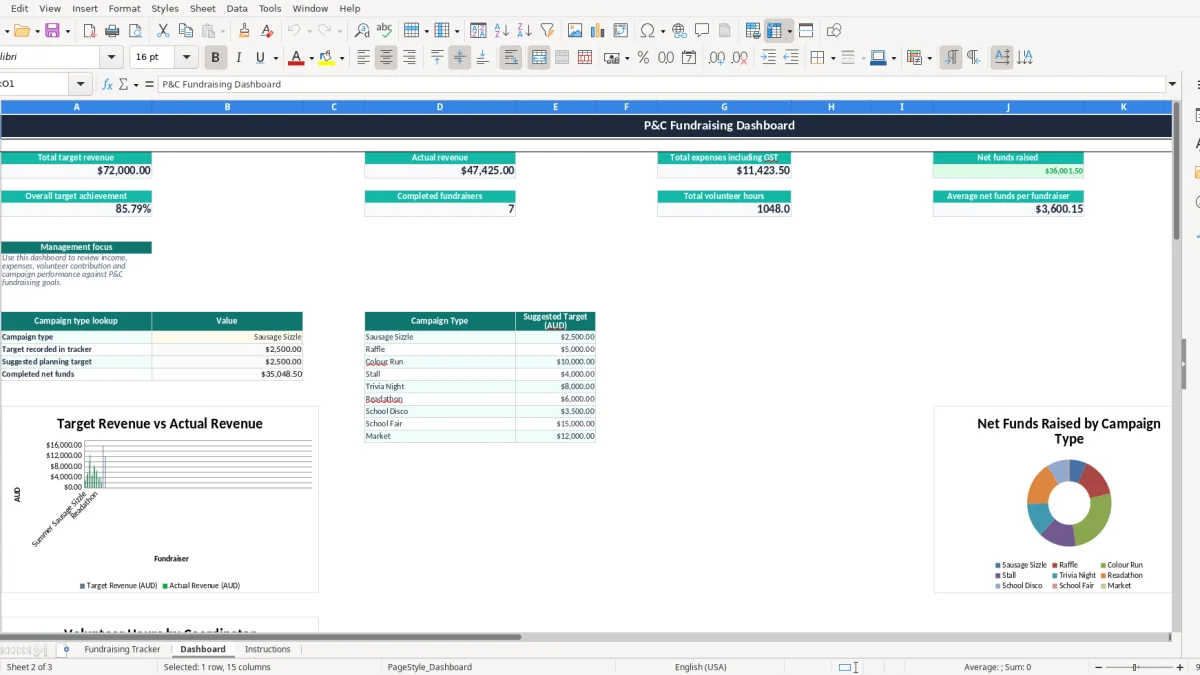
Image 2 shows the P&C Fundraising Dashboard. It summarises target revenue, actual revenue, expenses including GST, net funds, target achievement, completed fundraisers, volunteer hours and average net funds per fundraiser. Image 3 contains the instructions for entering records and checking the GST treatment.
A school P&C treasurer usually reaches for a fundraiser tracker when the committee is planning the term ahead, closing an event or preparing a report for the monthly meeting. The office manager may enter the event details, while a volunteer coordinator records hours and the treasurer checks the money against the bank account.
The Dashboard includes suggested planning targets for nine campaign types. A sausage sizzle is set at $2,500, a raffle at $5,000, a colour run at $10,000 and a school fair at $15,000. These are planning prompts, not guaranteed results or budget approvals. Select a type in the Dashboard lookup and compare its suggested target with the target recorded for the fundraiser.
For example, a committee planning a trivia night might enter an $8,000 target, nominate a coordinator and mark it Planned. Once ticket sales, sponsorship and costs are known, the treasurer can update actual revenue and expenses rather than relying on a rough estimate in meeting minutes.
After a school disco, the committee can mark the row Completed only after checking ticket income, EFTPOS or online settlements, cash banking and supplier invoices. A fundraiser with $5,820 revenue and $430 expenses ex GST records $43 GST and $473 total expenses, leaving $5,347 net funds under the workbook calculation.
The tracker also captures 14 volunteers and 62 hours for one activity. That matters when the committee compares a high-revenue event with a low-cost event that required much less volunteer effort. A colour run raising $9,457.50 net after calculated expenses may look strong, but 310 volunteer hours gives the committee a fuller picture of the workload.
At month-end, the treasurer can use the Dashboard figures for target revenue, actual revenue, total expenses including GST, net funds and completed fundraisers. Keep the underlying receipts and approvals with the P&C records; the spreadsheet is a management aid, not a substitute for the committee's governance process.
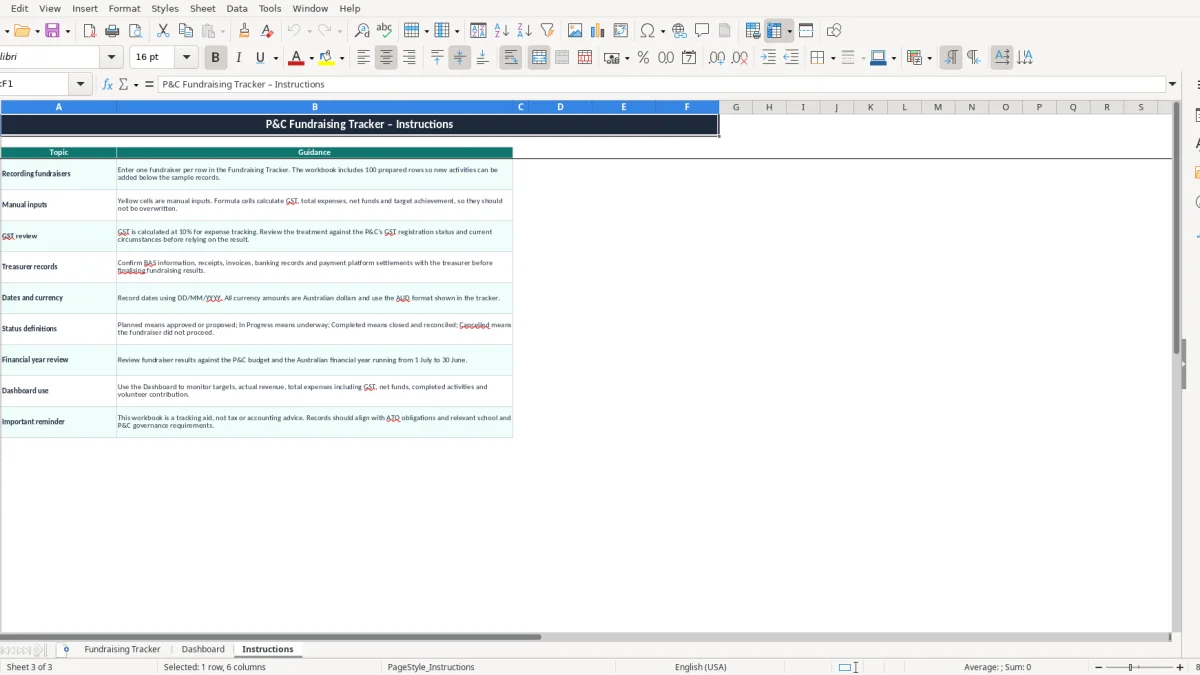
The workbook applies a 10% GST calculation to the Expenses ex GST column. If you enter $1,000.00, the formula produces $100.00 in GST on Expenses and $1,100.00 in Total Expenses. That calculation is useful for planning, but the Instructions sheet correctly tells you to review the treatment against the P&C's GST registration status and current circumstances.
GST registration is generally required once annual turnover reaches $75,000, or $150,000 for a not-for-profit. A school P&C should confirm whether it is registered and whether a particular purchase or fundraising receipt is taxable, GST-free or outside the P&C's taxable activity before using the calculated amount in a BAS.
Basic food can be GST-free, while catering, equipment hire, entertainment and other supplies may have different treatment. Do not assume every sausage-sizzle cost has 10% GST. Review the supplier's invoice, including the supplier's ABN and tax invoice details, and enter only the amount the committee has decided is appropriate for its records.
The ATO generally expects business and tax records to be kept for 5 years. For a fundraiser, retain invoices, receipts, cash-up sheets, bank deposit records, online payment reports, prize-donation correspondence and approval minutes alongside the tracker's Fundraiser ID.
Most small organisations that lodge a BAS do so quarterly. The Australian financial year runs from 1 July to 30 June, so a P&C reviewing its annual results should check which fundraiser income and expenses belong in each period, rather than simply using the date of the committee meeting.
For a $2,500 sausage sizzle with $720 expenses ex GST, the workbook shows $3,240 revenue, $792 total expenses and $2,448 net funds. The treasurer should reconcile those numbers to the actual bank movement and supporting documents before presenting them as final. The Dashboard is designed for review; it does not prepare or lodge a BAS.
If the P&C is GST-registered, a GST reconciliation register can help line up fundraiser receipts, invoices and GST amounts before the quarterly figures are reviewed.
The costliest errors I see in school committees are rarely complicated Excel problems. They are small gaps between the event cash-up, the bank settlement, the supplier invoice and the number eventually reported to the committee. A $240 difference on one event can become several thousand dollars across a busy school year.
A raffle may collect $5,820, but that is not the amount available for a playground project. If expenses ex GST are $430, the workbook calculates $43 GST and $473 total expenses, giving $5,347 net funds. Reporting $5,820 as funds raised overstates the result by $473.
The same issue occurs when a payment platform pays the bank $2,970 after fees even though families paid $3,000. If the fee is not recorded as an expense and the settlement is treated as revenue, the reconciliation will not agree. Record the gross amount and the relevant cost using the P&C's bookkeeping policy and supporting report.
Columns K to N contain formulas through row 102. Typing over one formula can leave a single fundraiser with no GST, total expense or achievement result while every surrounding row still looks correct. That error is easy to miss when a committee member copies figures into a report manually.
For example, entering $10,000 target revenue and $12,400 actual revenue should show 124.00% target achievement. If the percentage is typed as 24% or replaced with a dollar amount, the Dashboard's average achievement becomes misleading.
A school fair that nets $8,000 from 45 volunteers and 310 hours is not directly comparable with a stall that nets $2,000 from 6 volunteers and 18 hours. Without the volunteer fields, the committee may choose the larger event again without recognising the labour, fatigue and supervision required.
Finally, leaving an event as Completed before the cash, invoices and online settlements are checked creates false confidence. The practical fix is to use Completed as a close-out control, then match the row to evidence before relying on the Dashboard total.
A spreadsheet only helps when someone owns the update. The simplest arrangement is for the fundraiser coordinator to send the treasurer the cash-up, invoices and volunteer count within 3 business days of the event. The treasurer then updates one row and checks the calculated result before the next P&C meeting.
Attach the update to a routine that already happens, such as the Friday banking check or the monthly committee agenda. Planned and In Progress rows can be reviewed before the meeting; Completed rows can be reconciled after the final payment clears.
At each meeting, check target achievement, net funds, completed fundraisers and volunteer hours together. If three events produce $12,000 net funds from 600 volunteer hours, the committee can compare that workload with a proposed event expected to produce $3,000 from 40 hours before committing volunteers.
Keep a dated copy after each monthly close rather than endlessly changing the only file. When the P&C has multiple bank accounts, several people editing at once, more than 100 active activities or a need for detailed receipt-level GST coding, move the bookkeeping into software such as Xero or MYOB and retain this tracker for planning and committee reporting.
For P&C committees also coordinating canteen volunteers, a school canteen roster can keep recurring shifts and volunteer contacts separate from the fundraiser tracker.