Caravan Park Booking Excel Free Template (2026)
8
Free download
Calculate Australian property commissions, GST, vendor proceeds and agent payouts with a three-sheet Excel template for agencies and agents.
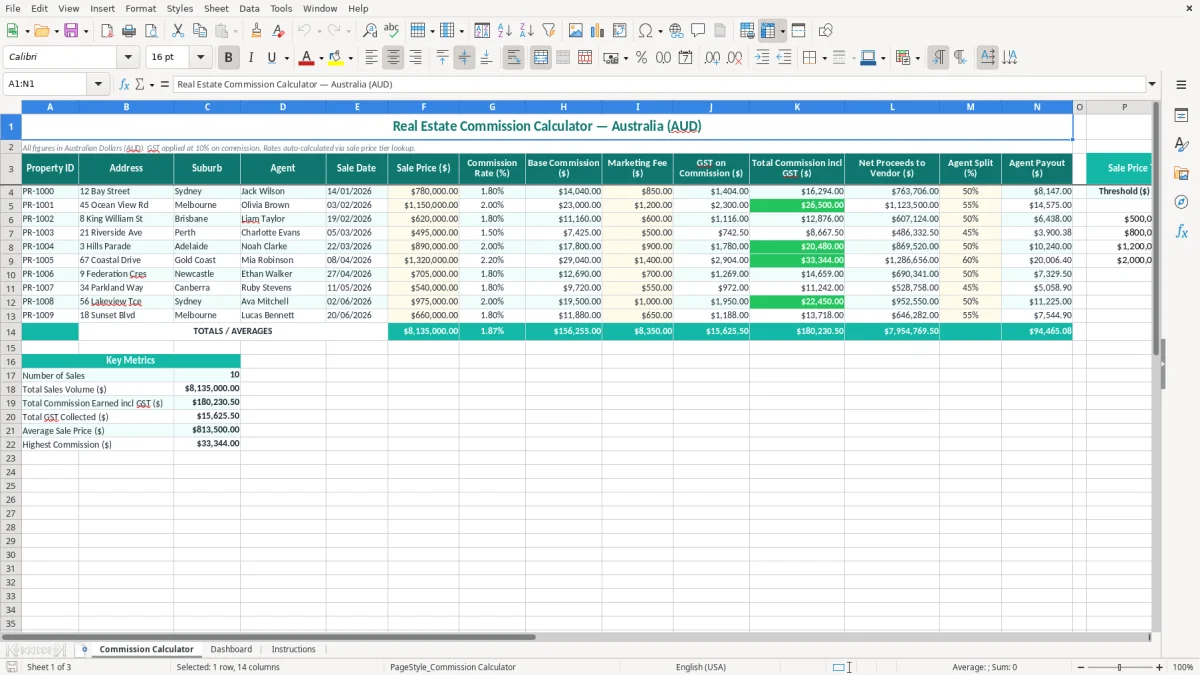
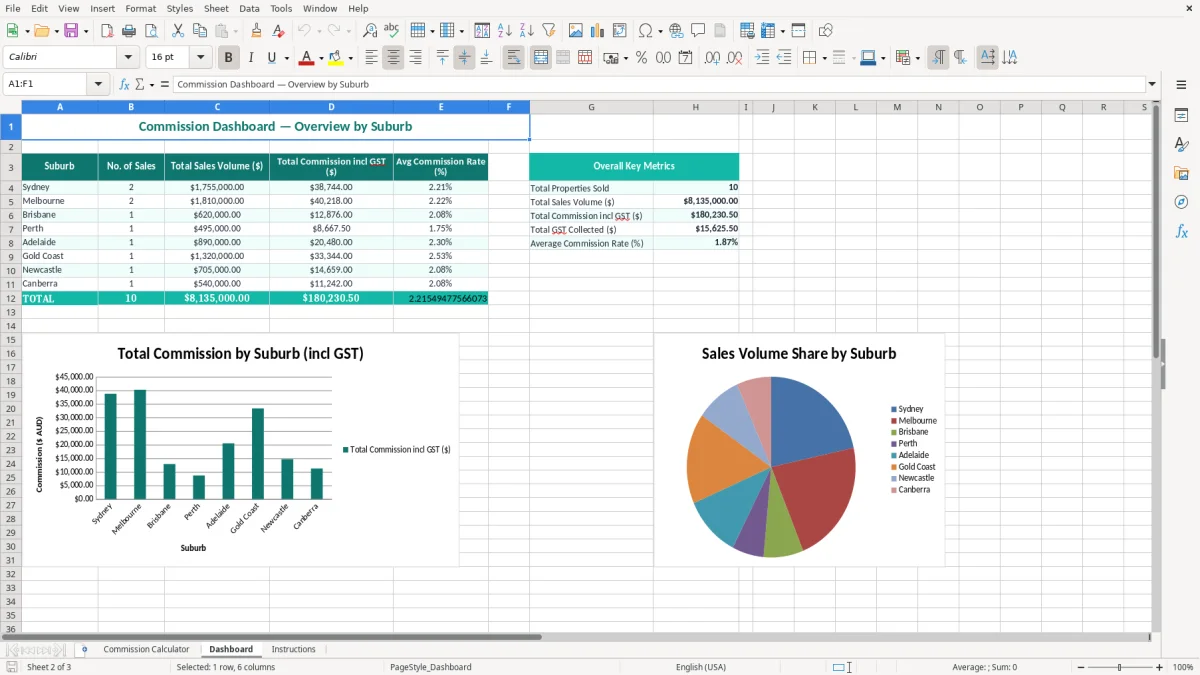
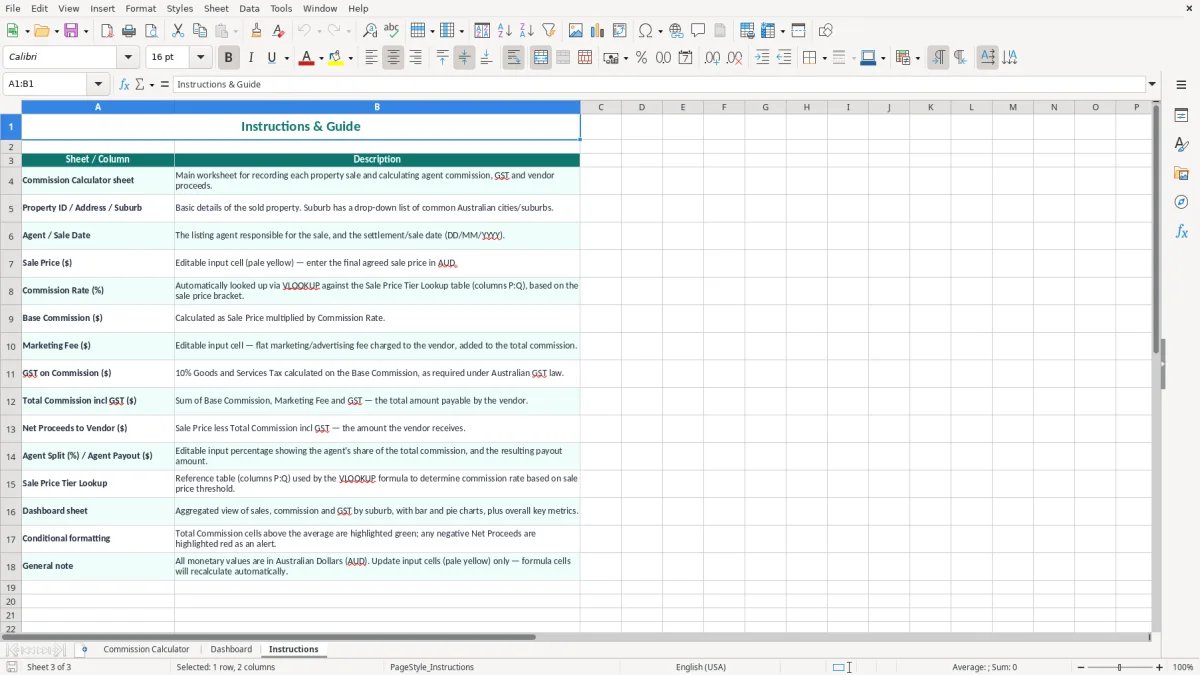
This real estate commission calculator Excel template calculates commission, marketing fees, 10% GST, vendor net proceeds and agent payouts in Australian dollars. It includes a Commission Calculator sheet with property and agent fields, a Dashboard for visual summaries, and an Instructions sheet to guide setup.
Enter each property once and let the spreadsheet calculate the result from the sale price, commission-rate tier and agent split. It suits an Australian real estate office tracking listings, settlements and commissions without rebuilding the same calculation for every sale.
A small real estate agency usually needs this spreadsheet at three points: when a listing is won, when the property sells and when the commission is checked before the agent is paid. The Commission Calculator sheet keeps those events together, rather than leaving the sale price in one file and the agent split in another.
An office manager can enter the Property ID, address, suburb, agent and sale date, then record the sale price and marketing fee. For example, a $780,000 sale at a 2.20% commission rate produces a $17,160 base commission. GST of $1,716 makes the commission $18,876 including GST, before considering how your agency agreement treats marketing costs.
The Agent Split (%) column then turns the office result into a payout calculation. At a 60% split, the agent payout on $17,160 is $10,296. That gives the principal a quick reasonableness check before the pay run, while the vendor proceeds column shows $761,124 if only the commission is deducted from the sale price.
A sales agent can use the file to test a proposed listing or compare the effect of a price change. A bookkeeper in a small Pty Ltd can use it after settlement to match the calculated commission to the agency's invoice, bank receipt and profit and loss records.
Image 1 shows the Commission Calculator sheet: the 14 columns run from Property ID and Address through to Agent Payout ($), with yellow input cells and teal headings. Image 2 shows the Dashboard, which is intended for reviewing the calculated activity visually, while image 3 is the Instructions sheet for the setup and use notes.
This is most useful for an agency with a manageable number of completed sales, such as 20 to 50 settlements a month. If you have 300 listings and several offices, use the template as a review tool rather than treating it as the only source of payroll or accounting records.
The template applies GST at the standard Australian rate of 10% on commission. A $12,500 base commission therefore creates $1,250 GST and a total commission of $13,750. The calculation is for the agency's taxable commission supply; it is not a substitute for checking the agency agreement, invoice and actual GST treatment.
A registered business issuing a tax invoice needs its business identity and ABN, the words Tax Invoice, the invoice date, a clear description and the GST amount where required. For taxable sales over $82.50, GST should be shown separately. Keep the spreadsheet with the listing agreement, settlement statement, tax invoice and payment evidence for 5 years, consistent with the ATO record-keeping period.
Most small businesses lodge a BAS quarterly. The agency should reconcile commission income and GST collected to its accounting records before lodgement; businesses with turnover above $20 million generally lodge monthly. The spreadsheet's GST figure is a calculation aid, not an automatic BAS label or lodgement.
Do not quietly fold every marketing cost into the commission rate. The file has a separate Marketing Fee ($) column, which helps you compare the agency invoice with the vendor's agreed charges. For instance, on a $900,000 sale at 2%, base commission is $18,000 and GST is $1,800; a $1,100 marketing fee must be checked separately against the signed authority and invoice.
Agent payouts also need payroll or contractor treatment checked. If the agent is an employee, PAYG withholding, Single Touch Payroll (STP), award obligations and superannuation may apply. The superannuation guarantee is 11.5% in 2026 for eligible ordinary time earnings, paid to a complying fund at least quarterly. The spreadsheet calculates the split, but it does not calculate PAYG or super.
After reconciling commission income and GST collected, a BAS statement workbook can help organise the quarterly figures before lodgement.
The most expensive errors usually happen after the sale price changes. An agent may enter the original listing estimate of $850,000 instead of the settled price of $875,000. At 2%, that understates base commission by $500 and GST by $50, creating a $550 difference on one transaction.
Tiered rates are another trap. A user may overwrite the returned Commission Rate (%) because a nearby row used a different percentage, or type 2.5 instead of 2.5%. A rate error from 2% to 2.5% on a $1 million sale changes base commission by $5,000 and GST by $500. Check the rate against the signed agency agreement, not memory.
Marketing fees are often double counted. If $1,200 has already been included in an invoice total but is also entered as a separate fee, the vendor proceeds can be understated by $1,200. The same problem appears when a cancelled listing remains in the table and is included in a monthly dashboard total.
Entering 70 in a split field that expects a percentage can produce an implausible payout, while entering 0.70 can produce a payout of less than a dollar if the formula expects 70%. Test one known result: $15,000 base commission at a 60% split should return $9,000 before any separate payroll treatment.
Do not use the Net Proceeds to Vendor ($) figure as a settlement statement without checking deductions such as mortgage payout, rates, conveyancing and adjustments. It is a commission calculation, not a full settlement account.
Finally, keep a control total. If five settled properties show base commission of $86,400, compare that total with issued tax invoices and bank receipts. A missing row, duplicate Property ID or wrong sale date can otherwise survive until the quarterly BAS or month-end reconciliation.
A GST reconciliation register can help match taxable sales, purchases, invoices and receipts when investigating differences in the commission control total.
The spreadsheet works best when updating it is attached to an existing agency task. Set aside 15 minutes after the weekly sales meeting to add new sale dates, confirmed prices and marketing fees, then complete a second check after settlement. This is more reliable than trying to reconstruct six weeks of deals before the BAS deadline.
For example, an office with 12 settlements averaging $16,000 base commission has $192,000 of base commission to review. A 10-minute check per property takes 2 hours, but it can identify a single $3,000 rate or split error before payment.
Protect formula cells, limit editing to the yellow input areas and keep one master copy. Add a consistent naming convention such as 2026-07 Commission Register, then save a read-only month-end version. Use SUM to tie visible totals to your accounting report, and use filters on Sale Date or Agent when investigating a payout.
Once the agency has several offices, thousands of rows, frequent split changes or live payroll integration, move the master record into software such as Xero or MYOB. Keep this Excel template for scenario testing and management review, not as a replacement for a controlled commission or payroll system.