Payroll & HR

Australian Award Rate Pay Calculator Excel Template

Estimate Australian award wages, penalty rates, overtime and gross pay with this practical Excel calculator template.

2026-08-02
401 Downloads
4.8/5 Average rating
Download template

This Australian Award Rate Pay Calculator Excel Template helps employers, payroll teams and employees estimate hourly pay using illustrative award classifications, employment types, penalty rates and overtime multipliers. Enter the relevant work details and the workbook calculates estimated ordinary pay, penalty pay, overtime pay and total gross pay in Australian dollars. The workbook includes a Pay Calculator sheet for inputs and results, an Award Rates sheet containing the illustrative rate table, and a Summary Dashboard for reviewing the main pay components.

The included rates are demonstration values and may not reflect current legal minimums. Always verify classifications, rates, loadings, allowances, penalty periods and overtime rules against the applicable modern award and Fair Work Ombudsman guidance before using results for payroll or compliance decisions.

Screenshot 1: Pay Calculator tab - Excel template award rate pay calculator excel template australia
Figure 1: Worksheet "Pay Calculator"

The key benefits of this Excel template

  • Estimate ordinary, penalty and overtime pay in Australian dollars.
  • Review the relationship between award classifications, employment types and hourly rates.
  • Separate ordinary hours, penalty hours and overtime hours for clearer checking.
  • Use a central Award Rates sheet to maintain illustrative rates and calculation assumptions.
  • Review key pay totals through a simple summary dashboard.
  • Support payroll preparation, employee discussions and preliminary pay checks without complex manual formulas.

Step-by-step guide

Open the Pay Calculator sheet and enter the employee name and pay period dates. Select the applicable award classification and employment type from the available options, then enter ordinary hours, penalty hours and overtime hours worked. Review the automatically populated base hourly rate, penalty percentage and overtime multiplier.

Check the calculated ordinary pay, penalty pay, overtime pay and estimated gross pay. Use the Summary Dashboard to review the overall result and compare the main pay components.

If the workbook is being adapted for real payroll use, first replace the illustrative entries on the Award Rates sheet with verified current information and update any lookup or validation ranges required by the workbook. Confirm all assumptions against the relevant Australian modern award before relying on the calculation.

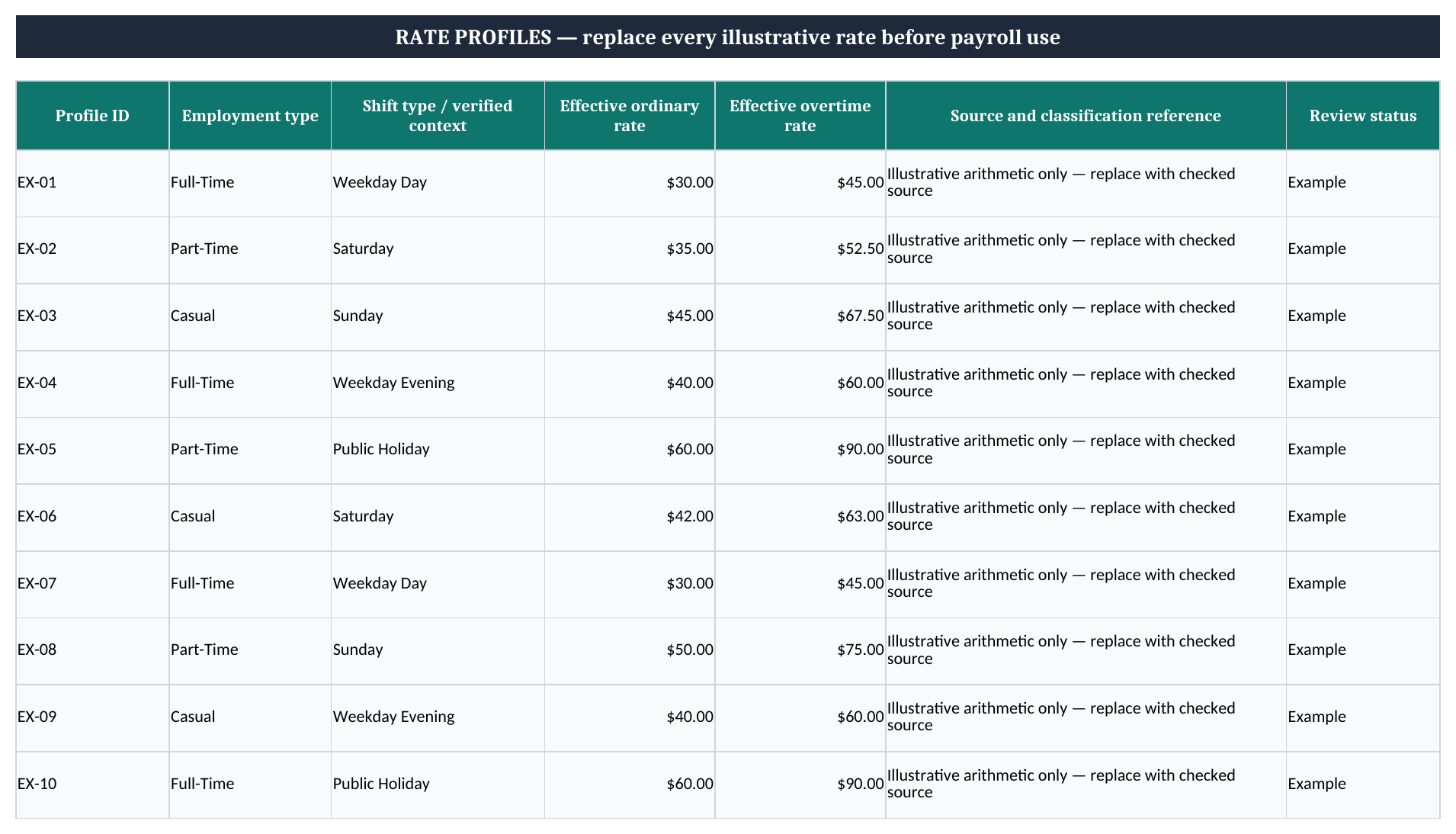
Screenshot 2: Award Rates tab - Excel template award rate pay calculator excel template australia
Figure 2: Worksheet "Award Rates"

What is included

Illustrative award classifications for retail and hospitality employment examples.
Employment type fields covering full-time, part-time and casual examples.
Base hourly rate, standard penalty percentage and overtime multiplier columns.
Input cells designed to distinguish editable assumptions from calculated results.
Estimated gross pay breakdown covering ordinary, penalty and overtime components.
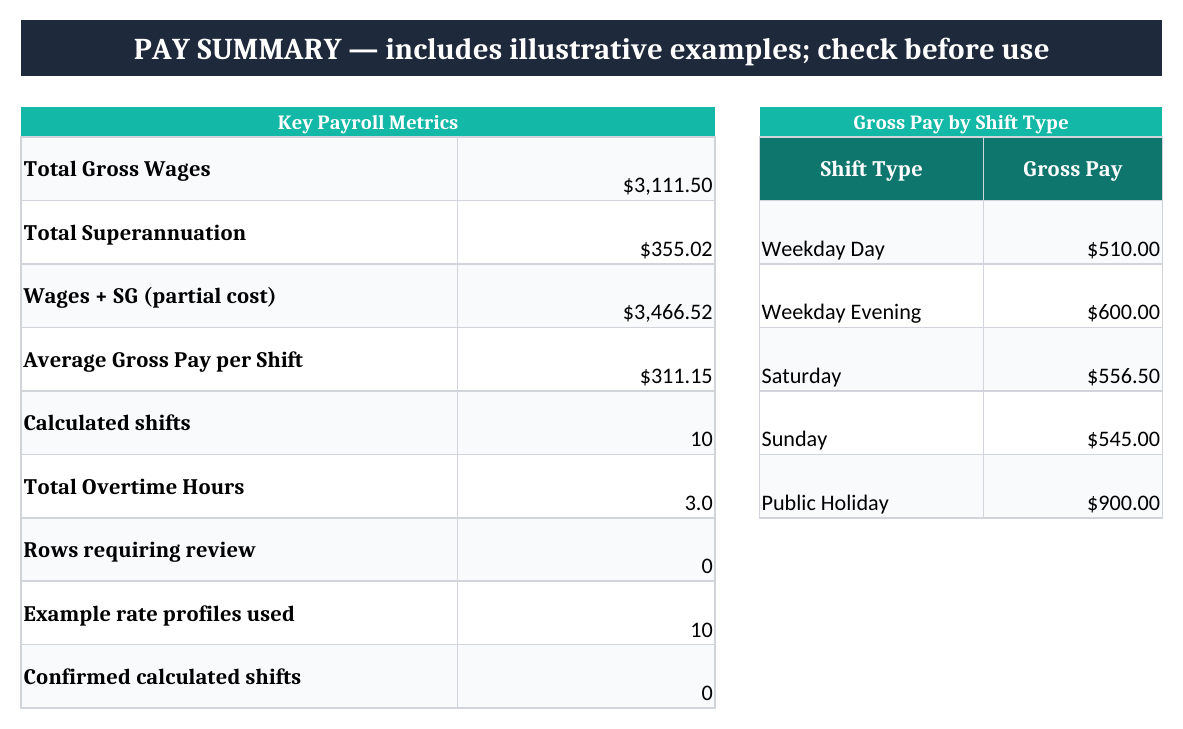
Summary Dashboard for a concise visual review of calculated pay information.
AUD currency formatting and Australian date formatting using DD/MM/YYYY conventions.

What the Australian award rate calculator does

Australian employment awards can include different minimum rates for industries, occupations, classifications and employment arrangements. This Excel template provides a practical starting point for estimating pay from those inputs. The Pay Calculator sheet brings together the selected award classification, employment type, ordinary hours, penalty hours and overtime hours.

It then presents the base hourly rate, applicable penalty percentage and overtime multiplier used in the estimate. Separating these components makes it easier to see how a total has been built rather than relying on one unexplained figure.

The workbook is suitable for preliminary payroll checks, employee pay discussions, budgeting and education. It can help a user compare an illustrative retail or hospitality classification, see the effect of additional hours and identify whether penalty or overtime work contributes to the result. The Summary Dashboard provides a quick review of the main amounts, while the Award Rates sheet keeps the assumptions visible and easier to update.

The template does not interpret every rule in an Australian modern award. Actual pay may depend on the day and time worked, public holidays, shift arrangements, age, qualification, location, minimum engagement rules, breaks, allowances, annualised wage arrangements or an enterprise agreement. The included 2026 figures are illustrative examples supplied for demonstration and should not be treated as confirmed legal minimums.

Before using the workbook for payroll, verify each classification and rate with the applicable current award and official Fair Work Ombudsman information. This approach preserves the convenience of an Excel calculator while recognising that award compliance requires current, context-specific information and careful review.

Screenshot 3: Summary Dashboard tab - Excel template award rate pay calculator excel template australia
Figure 3: Worksheet "Summary Dashboard"

How to calculate ordinary, penalty and overtime pay

The template uses a clear component-based approach. Ordinary pay is calculated by multiplying ordinary hours by the selected base hourly rate. Penalty pay is estimated by multiplying penalty hours by the base hourly rate and the applicable penalty percentage.

Overtime pay is estimated by multiplying overtime hours by the base hourly rate and the overtime multiplier. Estimated gross pay is then the sum of ordinary pay, penalty pay and overtime pay. These formulas make the calculation transparent and easy to inspect in Excel.

Users should enter hours in the appropriate category rather than placing every hour into ordinary time. For example, work performed during an applicable penalty period may need to be recorded as penalty hours, while hours that meet the relevant overtime conditions should be recorded as overtime hours.

The correct treatment depends on the award and circumstances. A penalty percentage and an overtime multiplier are different inputs; one should not be substituted for the other without checking the governing rule.

This simplified structure does not automatically calculate every possible combination of rates. It does not include tax, PAYG withholding, superannuation, leave accruals, deductions, allowances, reimbursements, unpaid breaks, minimum engagement periods or complex rostering rules. It also does not decide whether a particular shift qualifies for a penalty or whether additional overtime conditions apply.

Review the source award before entering hours and assumptions. If a verified rate table contains separate Saturday, Sunday, public holiday, evening or shift-work rates, the Award Rates sheet may need additional rows and calculator fields. Keeping a written note of the source and effective date for each updated rate can make later checks more reliable.

Those source notes also line up neatly with a roster tracking sheet when shifts, allowances, and penalty periods need to be checked against the same effective-date record.

Using the award rates sheet for Australian payroll estimates

The Award Rates sheet is the central reference area for the workbook. Its columns identify the award classification, employment type, description, base hourly rate, standard penalty percentage, overtime multiplier and explanatory notes.

The example rows include retail and hospitality classifications with full-time, part-time and casual examples. These entries show how a lookup table can support a calculator; they are not a complete list of Australian awards or classifications.

To adapt the workbook, identify the current modern award that covers the employee and confirm the precise classification. Check whether the worker is full-time, part-time or casual and whether a casual loading applies. Then verify the ordinary minimum rate, relevant penalty provisions and overtime rules for the specific work pattern.

Some awards contain separate provisions for weekends, public holidays, late-night work, split shifts, minimum engagements and allowances. A single standard penalty field cannot represent every possible scenario, so extra rows or additional calculator fields may be needed for a more detailed implementation.

When updating rates, retain the description and notes so users can understand the source assumption. Record the effective date and review the data validation lists and lookup formulas if classifications are added or renamed. Test the workbook with simple known examples after making changes.

Because award rates and conditions can change, a previously checked workbook may become outdated. This template should therefore be treated as an estimating and review tool rather than a permanent compliance record. For an actual payroll process, use current official information, retain supporting records and obtain professional advice when the coverage or calculation is uncertain.

Important limitations and responsible use

This award rate pay calculator is designed to support estimates, not replace a payroll system, award interpretation or professional advice. The result is only as accurate as the classification, employment type, hours, rate and loading entered by the user.

An incorrect classification can produce a materially different result even when the spreadsheet formulas operate correctly. The workbook also assumes that the user has already determined which hours belong in ordinary, penalty and overtime categories.

The template calculates estimated gross pay only. It does not calculate income tax, PAYG withholding, superannuation, leave payments, deductions, reimbursements or other payroll obligations. It also does not automatically account for allowances, annualised salaries, enterprise agreements, salary sacrifice, time off in lieu, minimum payments, breaks or special conditions.

These matters may affect the amount payable and should be considered separately. Casual loading and penalty treatment can vary, so an illustrative casual row must not be applied automatically to every casual employee.

For responsible use, compare the selected classification with the current modern award, confirm the effective date of every rate and keep a record of the source used. Check whether work occurred on a weekend, public holiday, evening or other period with a different rule. Review the calculation before issuing a payslip or making a payment.

If there is uncertainty about award coverage, classification, overtime, allowances or underpayment risk, consult the Fair Work Ombudsman or a suitably qualified payroll, accounting or employment relations adviser. Updating the Award Rates sheet with verified information can improve the workbook, but it does not guarantee compliance. Treat the dashboard and calculated totals as a convenient review summary, not legal confirmation of an employee's entitlements.

That review is a good time to reconcile the pay run against a superannuation tracking sheet so the contribution amounts recorded for each employee match the final wages processed.

Frequently asked questions about this template

Download
File format Excel (.xlsx)
Compatible software Excel, Google Sheets, LibreOffice
Price Free
Download now