Caravan Park Booking Excel Free Template (2026)
8
Free download
Car log template for cents per km claims with odometer, business use, rate and claim amounts for Australia.
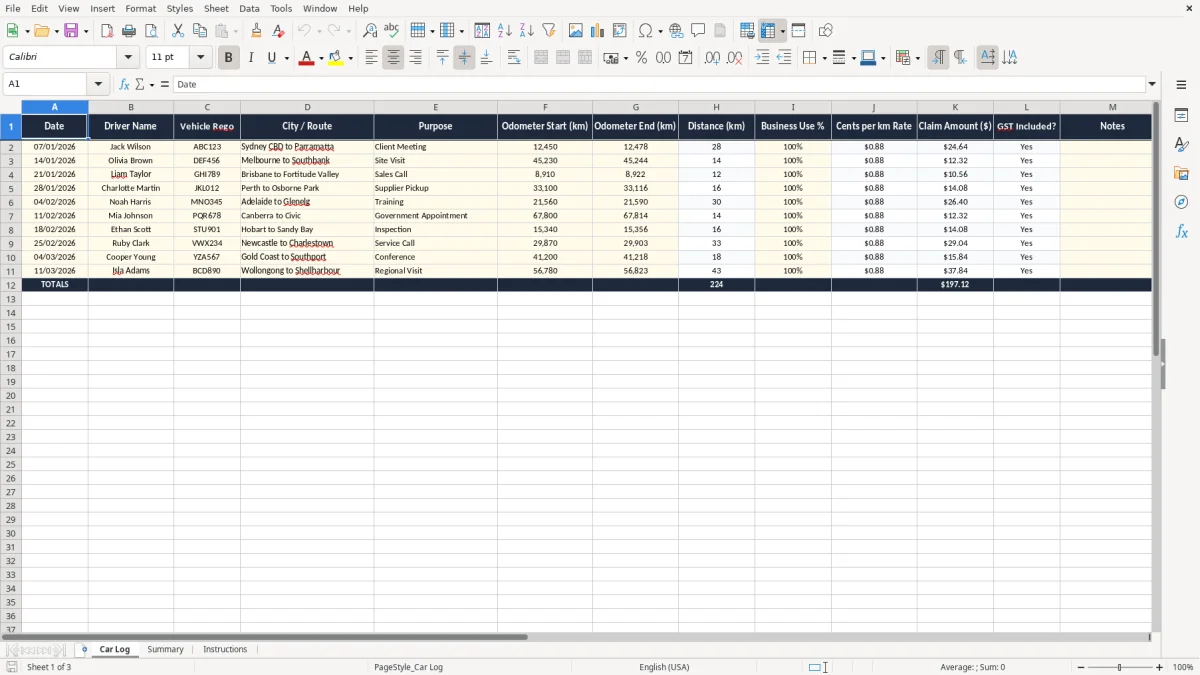
This cents per kilometre log Excel template tracks business driving in one place, with date, driver, vehicle rego, route, odometer readings, business use percentage, rate and claim amount. It is built for Australian tax records and helps you work out car claims without a messy pile of receipts.
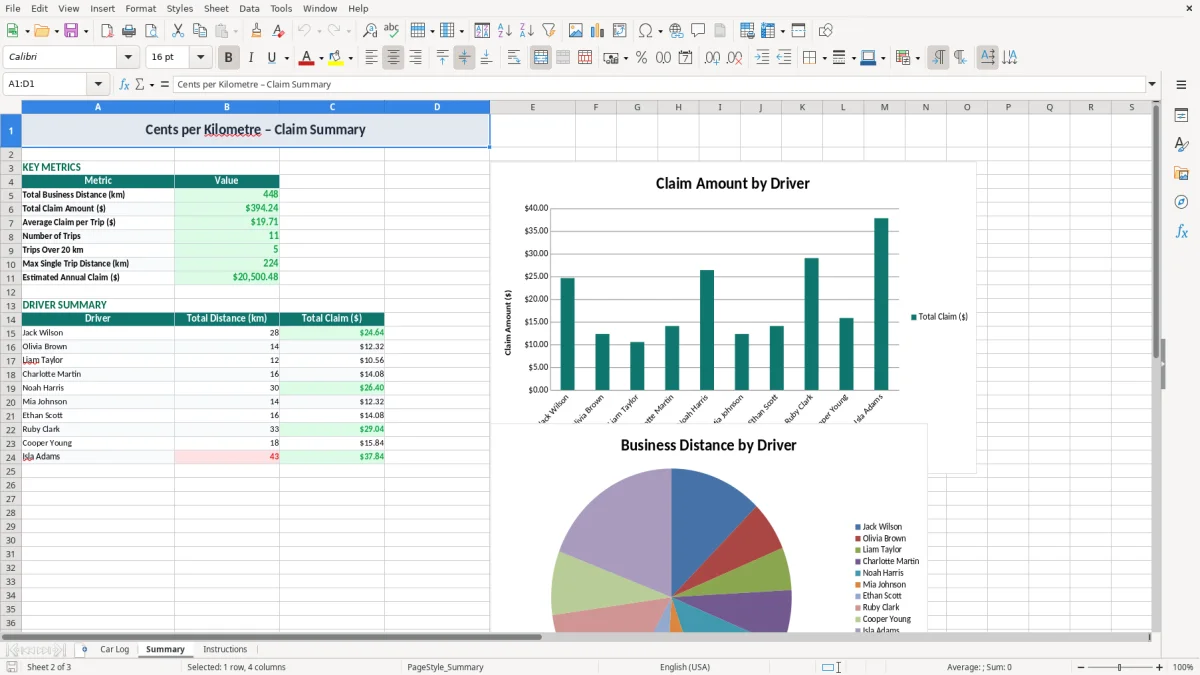
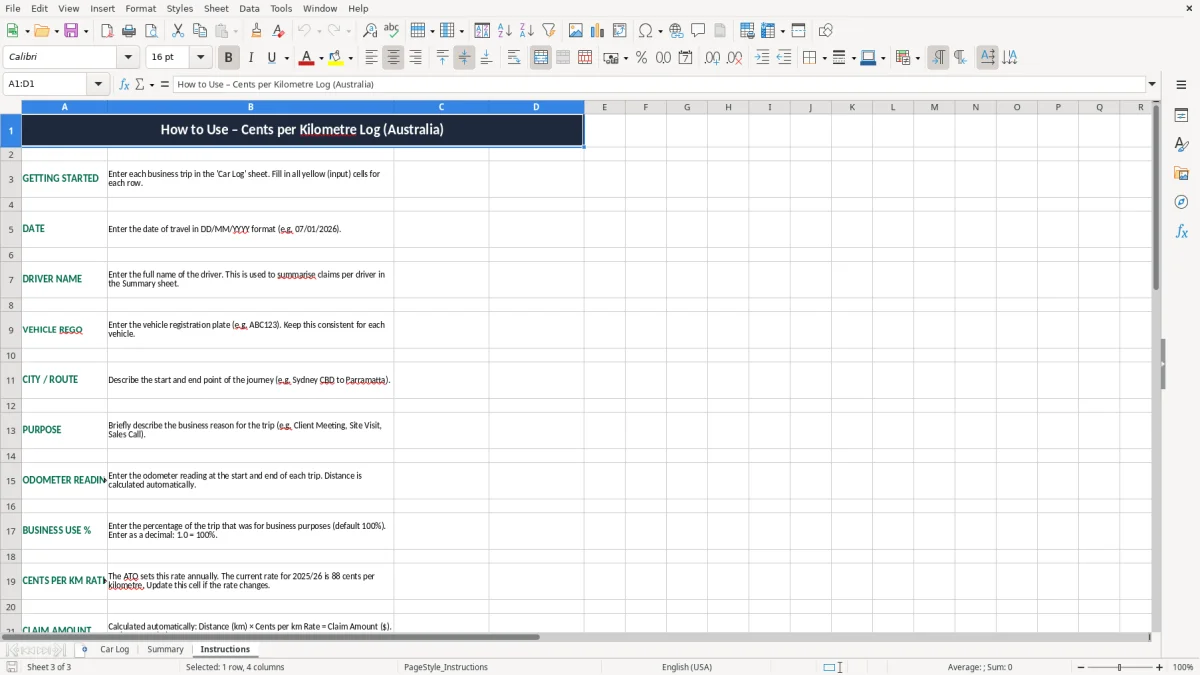
You can use the Car Log sheet to record each trip, the Summary sheet to total your claims, and the Instructions sheet to see how to enter data. The layout is simple enough for a sole trader, office manager or treasurer to keep moving without fuss.
It suits anyone who needs a clean record for income tax or a job-related claim, especially where you want a quick annual total and a clear audit trail. The template keeps the numbers visible so you can sort it out at tax time without redoing the log from scratch.
This template is for the people who actually have to keep the car records: sole traders doing their own books, a bookkeeper in a small Pty Ltd, or an office manager running a few vehicles for a tradie business. It is useful at tax time, after a few months of mixed private and business driving, or when the accountant asks for a clean log for the financial year.
Image 1 shows the Car Log sheet, which is set up for repeated trip entry rather than one-off claims. You can see the date, driver name, vehicle rego, route, purpose, odometer start and end, distance, business use percentage, cents per km rate, claim amount, GST flag and notes.
Say you drive 22 work trips in a month at an average 14 km each. That is 308 km of recorded business travel, and a log like this makes the total visible without hunting through diary notes or phone maps.
For a chippie with 4 employees, the value is even clearer because different drivers can be recorded in the same sheet. A small team doing site visits, deliveries and supplier runs can keep one consistent format instead of three different notebooks and a half-finished spreadsheet.
The Summary sheet is the part most people use when they want the annual number fast. If you have 45 trips averaging $12.40 each, you are looking at a claim of about $558.00 before you file your return or hand the records to your bookkeeper.
That makes it useful for anyone who wants the claim total ready before 30 June, rather than spending a weekend reconstructing kilometres from memory. It is a practical record, not just a calculator.
The ATO’s cents per kilometre method is capped at 5,000 business kilometres per car per financial year. For 2026, the rate is 88 cents per kilometre, so the maximum claim under this method is $4,400 per car if you reach the full 5,000 km.
This is the easy method compared with the logbook method, which needs a 12-week logbook and keeps track of all running costs. If your work travel is modest and you want less admin, the cents per km method is usually the cleaner choice because you do not need petrol receipts, rego, insurance and servicing split out line by line.
The ATO expects you to keep enough detail to show the work nature of each trip. That means the date, destination or route, purpose, and a reasonable basis for the kilometres you claim; if the trip is 18 km from Sydney CBD to Parramatta for a client meeting, that should be visible in the log.
Keep your records for 5 years from when you lodge the return. If you are ever asked to justify a 4,200 km claim, a spreadsheet with dated trips and odometer readings is far better than a rough total written on the back of a receipt.
The cents per km rate is designed to include running costs rather than reimburse every dollar separately. So if you have 3,800 km of business travel, the claim at 88 cents is $3,344.00 — simple to calculate, easy to explain, and well within the 5,000 km limit.
If you are using the car for a business that is registered for GST, remember this method does not create a separate GST claim on the mileage itself. It is an income tax deduction method, so the cleaner your logs, the less time you spend untangling it later.
If the logbook method suits your driving better, compare the required trip records and business-use calculation in this ATO logbook method spreadsheet.
The biggest problem is missing odometer readings at the start or end of a trip. If you write down only the destination and a guessed distance, you can end up overstating a 12 km run as 20 km, which is enough to throw out the whole claim pattern across dozens of trips.
Another common issue is mixing private and business trips without a clear rule. If a ute gets used for school drop-off, shopping and three site visits in the same day, a sloppy log can make a 60 km day look like 60 km of work when only 24 km was actually business travel.
That sort of mistake can cost you more than a few dollars. A 2,000 km claim overstated by 15% is 300 km, which at 88 cents is $264.00 of deduction that may not stand up if the ATO looks closely.
It also creates a reconciliation headache later on because the totals no longer match your diary, fuel stops or appointment records. I have seen clients spend hours rebuilding a year of trips from Google Maps history because the original spreadsheet was missing purpose fields.
The column order in this sheet forces you to think through each trip the same way every time: who drove, where they went, why they went and how far they travelled. That consistency reduces double entry and makes it easier to check for odd numbers, like a 5 km trip with a 120 km claim amount.
The notes column is handy for evidence, but it should stay short and factual. If you need a stronger paper trail for unusual travel, you are better off attaching the job sheet, delivery run or appointment list to your working papers.
The spreadsheet works best when you use it on a fixed day, not whenever you remember. Most people do it at the end of the week, alongside the pay run, the invoicing batch or the BAS prep, because the trips are still fresh and the numbers are easier to verify.
If you are logging 25 trips a month, the whole update might take 10 to 15 minutes once you get into the rhythm. That is far easier than reconstructing 300 km of travel from memory at tax time.
Once you have multiple vehicles, staff reimbursements or linked expenses, a spreadsheet can start to feel stretched. If you want automatic bank feeds, better reconciliation and a full profit and loss, it is probably time to move to Xero or MYOB and keep the spreadsheet as a backup only.
Until then, this template is a clean middle ground: quick to enter, easy to review and simple enough that people actually keep using it after the first fortnight.