Bushfire Plan Excel Free Template – Australia (2026)
6
Free download
Job sheet template for electricians with labour, materials, GST, invoice, status and payment tracking across 3 sheets.
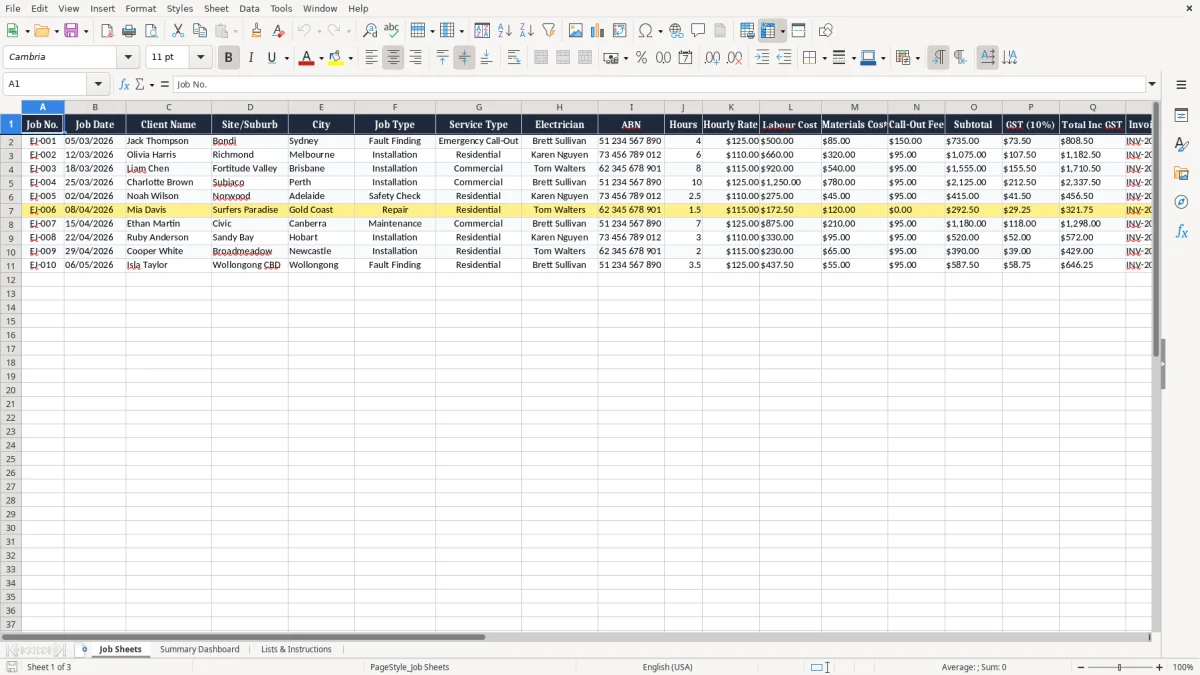
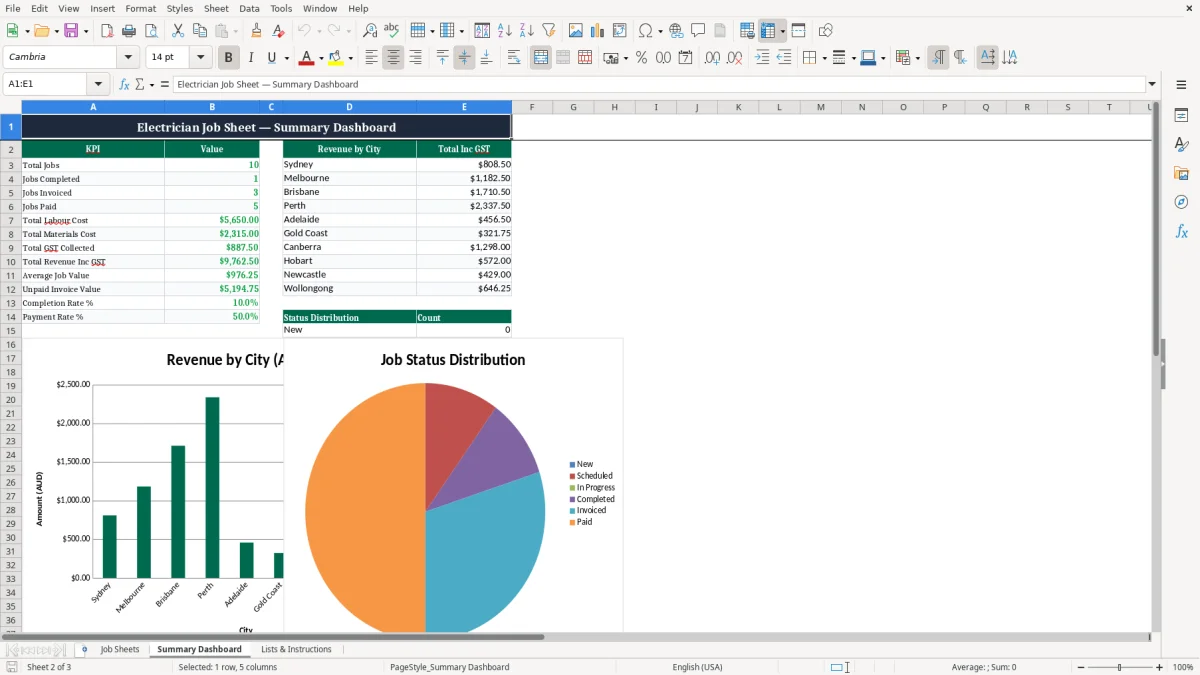
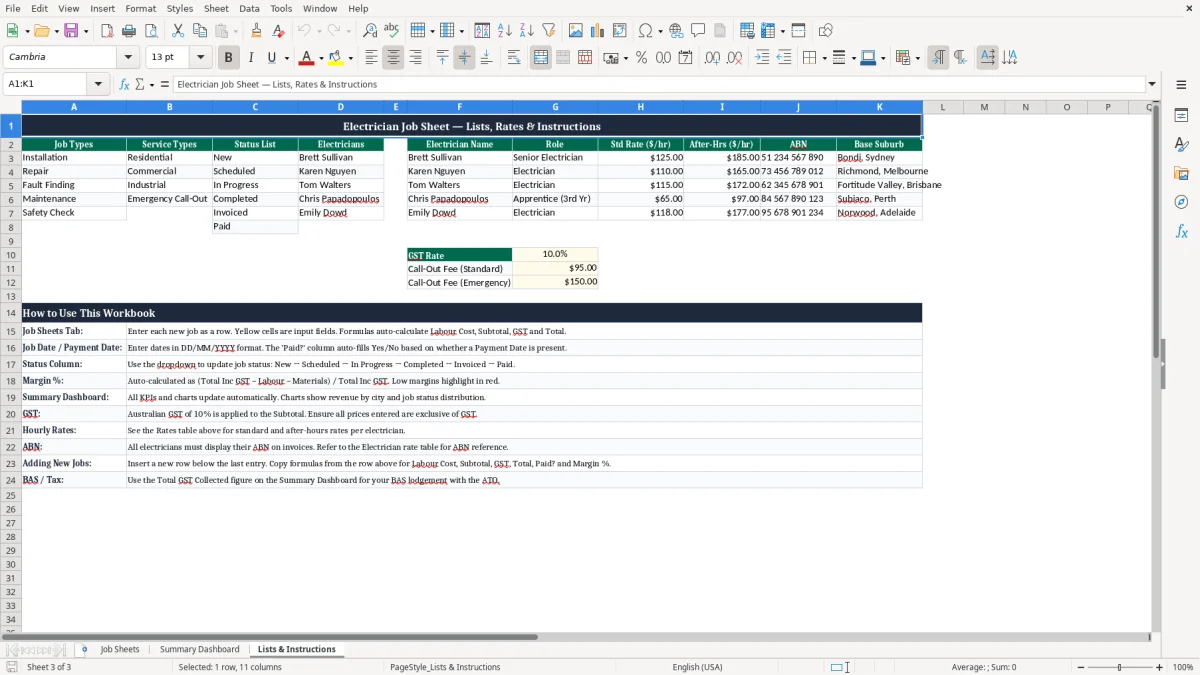
This electrician job sheet Excel template helps you record each job, calculate GST, track invoice status and keep on top of payments. It includes a job sheet, a summary dashboard, and a lists and instructions tab for fast entry.
Use it for service calls, installations, fault finding and maintenance work. You can log the client, site, hours, hourly rate, materials, call-out fee, invoice number, paid date and margin in one place.
If you are quoting, invoicing or chasing overdue work, this keeps the job history tidy and gives you a quick view of labour and cash flow.
This template is for the people who actually have to keep the jobs moving: a sole trader sparky, a small Pty Ltd with 4 employees, or an office manager trying to match site work to invoices. If you are doing 10 jobs a week, even a simple spreadsheet saves you from chasing through texts, delivery dockets and half-finished quotes.
Image 1 shows the Job Sheets tab with columns for job number, date, client, site/suburb, city, job type, service type, electrician, ABN, hours, hourly rate, labour cost, materials cost, call-out fee, subtotal, GST, total inc GST, invoice number, status, paid date, margin and notes. That layout suits real-world electrical work: one row for a $180 call-out, another for a $2,400 switchboard changeover, and another for a $6,500 EV charger install.
If you are flat out during the week, you can log the job as soon as the ute rolls back to the depot. A 4-person crew doing 60 jobs a month can turn a messy notebook into a proper record without moving to full accounting software straight away.
The paid flag and payment date make it easier to see which invoices are still open. If you have $18,000 in unpaid jobs at month end, that is real cash flow pressure, not just admin noise.
Because hours, hourly rate, labour and materials sit together, you can compare the job cost to the invoice total without doing mental maths. That matters when you are pricing emergency call-outs, after-hours work or a day of residential installs where labour and materials need to be separated cleanly.
That same separation makes payroll easier too, especially when super needs to be tracked alongside labour costs in a super contributions log.
If you are registered for GST, the template’s 10% GST column matches the Australian rate. GST registration becomes required once turnover hits $75,000 a year, or $150,000 for not-for-profits, so many electrical businesses outgrow manual notes fast and need a cleaner way to track taxable sales.
For invoices over $82.50, the ATO expects GST to be shown separately on the tax invoice, along with your identity and ABN, the words “Tax Invoice”, the date, and a clear description of what you supplied. In practice, that means a $1,250 labour invoice with $320 materials should show the taxable amount and the GST amount, not just one lump sum.
Most small businesses lodge BAS quarterly, while larger businesses lodge monthly once turnover goes above $20 million. This spreadsheet gives you the figures you need for BAS labels, and the ATO record-keeping rule is simple: keep your business records for 5 years.
The margin % column is not just a nice extra. If a job comes in at $1,650 revenue and $1,420 in direct cost, you are only left with $230 before overheads, which is not much buffer once you factor in fuel, insurances and time on the road.
If you have employees, you still need to deal with PAYG withholding, STP reporting and superannuation guarantee. In 2026 the super rate is 11.5%, so a full-time electrician on $85,000 a year costs at least $9,775 in super on top of wages, before you even count leave and workers comp.
The biggest mess I see is missing or partial job data. If the materials line is blank on a $960 service call, you will understate the job cost and overstate profit, then wonder why the bank account is tight even though the work looks busy.
Image 1 makes it obvious where the mistakes happen: a blank ABN, no invoice number, or a payment date left empty. One missed invoice at $1,320 inc GST is a direct hit to cash flow, and if you are chasing 25 overdue jobs the admin burden can chew up half a day.
If you charge $110 an hour but forget to add the 1.5-hour call-out minimum, you can drop $55 straight off the gross margin on a small job. Over 40 short jobs a month, that is more than $2,000 leaking out the door.
When status is not updated from “Invoiced” to “Paid”, the debtor list becomes junk. I have seen businesses think they had $8,000 outstanding when the real figure was $14,500 because three payments had been received but never marked off.
If labour and materials are mixed into one number, you cannot see which jobs are actually making money. A switchboard upgrade might look fine at $3,200 total, but once you separate $1,450 of materials and $1,100 of labour cost, the return may be a lot thinner than you thought.
The job sheet is not the final step. You still need reconciliation against invoices and the bank, otherwise a paid job can sit open for weeks and your profit and loss will not match reality.
The trick is to use the sheet at the same moment every time, not when you feel like it. For a lot of sparkies, the best habit is to update it at the end of the day before the ute is locked up, or straight after the Friday pay run.
Data validation and fixed lists help keep job types and service types consistent, which makes the summary cleaner. If you have 20 rows marked “installation” and 20 more marked “instal”, your totals are still there, but your reporting is messy.
If you are pushing past 300 jobs a month, need live debtor chasing, or want automated invoicing and bank feeds, it is time to look at Xero or MYOB. Excel is great for control and visibility, but once the job count starts breaking 1,000 rows a year, proper accounting software usually saves more time than it costs.
At that stage, a job quoting sheet is the next place to tighten up pricing before the workload grows beyond what Excel can comfortably track.