Bushfire Plan Excel Free Template – Australia (2026)
6
Free download
Record Australian fishing trips, species, weights, bag-limit checks and catch summaries with this practical Excel template.
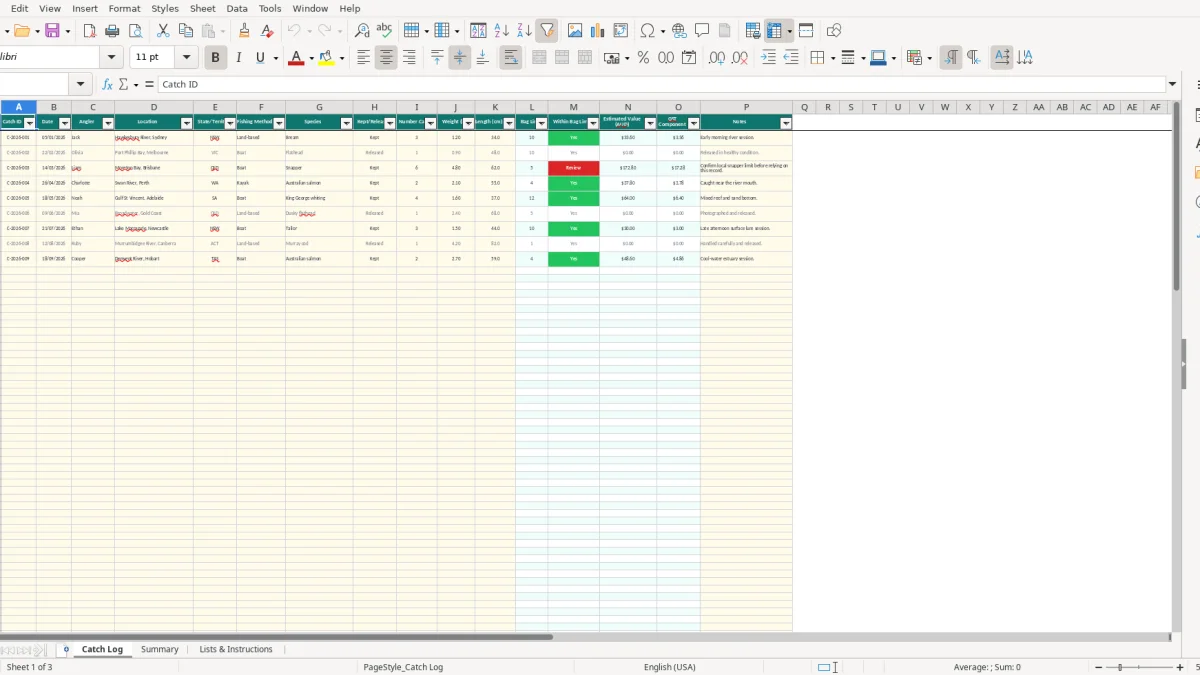
This fishing catch Excel template records Australian fishing trips, anglers, locations, species, catch status, quantities, weights and lengths. It includes a Catch Log for up to 100 prepared entries, automatic bag-limit checks and estimated values, plus a Summary sheet with species, status and location analysis.
Use it after each session to keep a consistent record for recreational fishing, club activities, family trips or small fishing operations. The workbook includes three sheets: Catch Log, Summary, and Lists & Instructions, with sample records from NSW, VIC and QLD already shown.
A recreational angler can use this fishing catch Excel template straight after a session, while a fishing club secretary can consolidate records from several members. It suits a Saturday boat trip, a school or community fishing program, or a regular survey where the same species and locations are recorded repeatedly.
The Catch Log has fields for the angler, location, state or territory and method, so a club can distinguish a boat trip in Moreton Bay from a land-based session on the Hawkesbury River. Image 1 shows the 16-column entry layout, including species, status, measurements, bag-limit results and notes.
For example, the populated sample records three bream caught at the Hawkesbury River, one released flathead at Port Phillip Bay and six kept snapper at Moreton Bay. Those examples show the intended level of detail, but they are sample data rather than a complete legal catch history.
A club running 12 monthly outings with 15 members could create 180 observations over a year, exceeding the 100 prepared rows in this workbook. For that volume, save separate workbooks or extend the formulas carefully rather than assuming unused rows are unlimited.
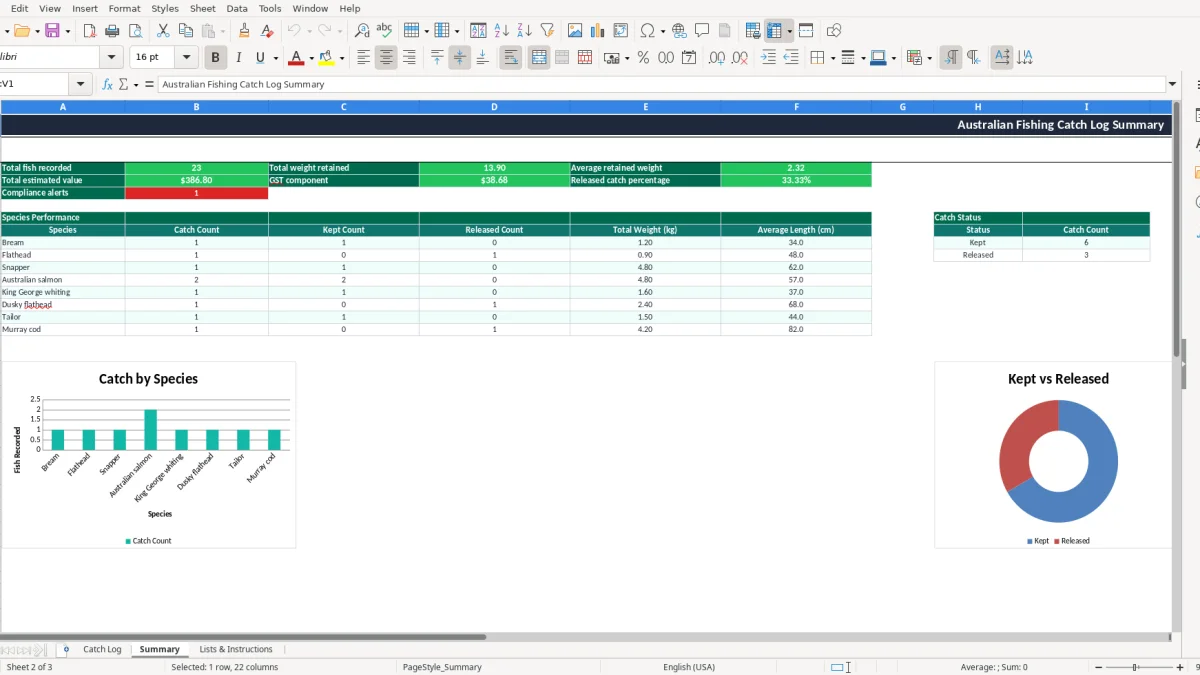
The Summary sheet, shown in image 2, turns the entries into species performance, catch-status and location views. That gives a volunteer treasurer or committee member a quick count without manually adding every paper record.
Fishing rules in Australia are administered by state and territory authorities, and bag, size, seasonal and possession limits can change by species and location. A number in this spreadsheet is therefore an operational prompt, not a licence to keep fish. Check the current authority rules for the waterway before relying on a result.
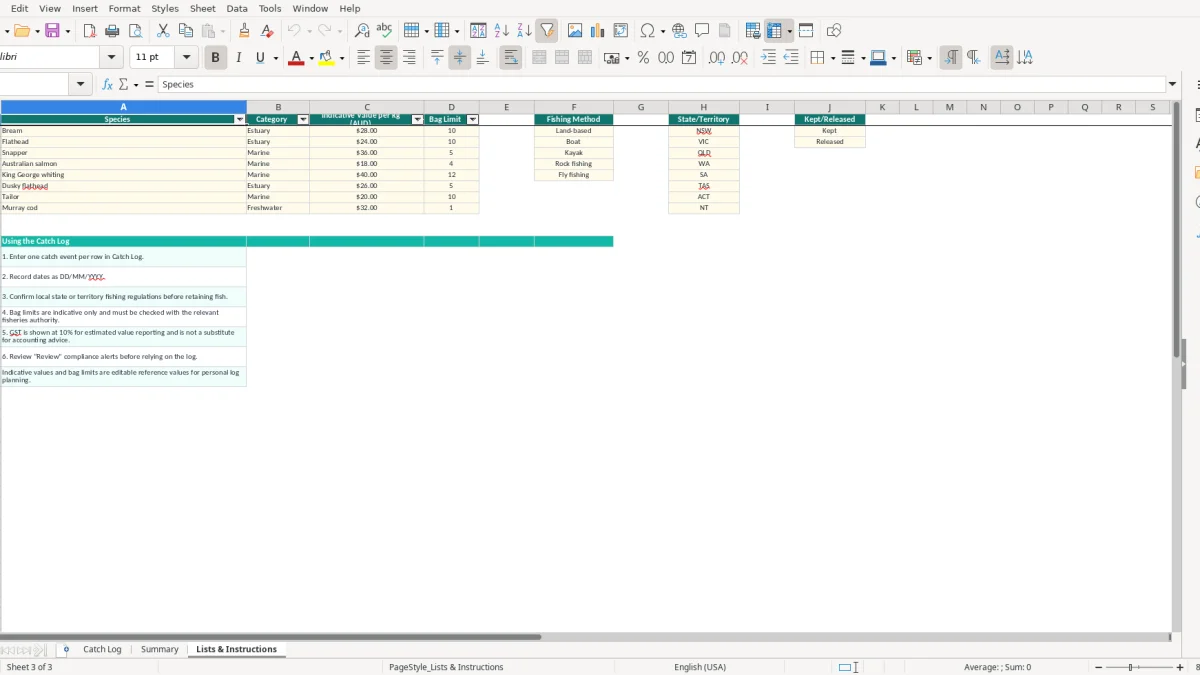
Lists & Instructions includes eight species, indicative values per kilogram and example bag limits. For instance, it lists bream at $28.00 per kilogram with a bag limit of 10, snapper at $36.00 with a limit of 5, and dusky flathead at $26.00 with a limit of 5. These are workbook reference values, not universal Australian limits.
The Catch Log retrieves the listed limit with VLOOKUP. If six snapper are entered against a listed limit of five, the Within Bag Limit? formula returns Review. That flag is useful because it tells you to verify the local rule, but it does not determine whether the catch is lawful.
The estimated value is a notional calculation: 4.8 kg of kept snapper at $36.00 per kilogram produces $172.80, and the workbook calculates a $17.28 GST component at 10%. This does not make a recreational catch a taxable sale or establish that GST is payable.
For a registered business, GST registration generally applies at $75,000 annual turnover, or $150,000 for a not-for-profit. Keep this workbook’s value field separate from a BAS record, invoice or tax invoice, and retain business records for 5 years where the ATO rules require it.
The most damaging error is treating a spreadsheet flag as the current fishing rule. A sample limit of five snapper may be outdated, area-specific or different during a closure. If a crew records six fish and does not investigate the Review result, the problem can become a compliance issue rather than a simple data error.
Estimated value uses Weight (kg), not grams. Entering 1,200 instead of 1.2 turns a $33.60 bream estimate into $33,600 at the workbook’s $28.00 per kilogram reference value. The decimal validation allows values up to 500, so a careless unit entry can still be accepted.
Length has the same practical risk. The workbook records centimetres, but it does not calculate a minimum legal length or identify a species-specific size rule. A 34 cm bream and a 34 cm snapper are not interchangeable records, even though both are numbers in the Length (cm) column.
If a released flathead is marked Kept, its weight feeds the retained-weight and estimated-value calculations. If a kept fish is marked Released, the Summary understates retained catch. One incorrectly marked 2.5 kg fish at $36.00 per kilogram changes estimated value by $90.00 and affects the GST Component by $9.00.
Another common failure is overwriting formulas in columns L to O. Those columns calculate bag limits, review status, estimated value and GST for rows 2 to 101. Paste values only into the input columns, and keep a backup before making structural changes.
The easiest routine is to enter the record before you put the fishing gear away. A two-minute entry after each trip is more reliable than trying to reconstruct 10 sessions at the end of the month from memory, especially when several anglers fished different locations.
Image 1 shows freeze panes at the header and an auto-filter across the Catch Log, which makes it easier to find a species, location or status. Image 2 shows the Summary formulas and three charts; check it after a club outing or at month-end rather than waiting until the end of the financial year.
The file has 100 prepared operational rows and no Excel table. If you regularly record 25 entries a week, you will use those rows in about four weeks. At that point, save an archive and extend the formulas carefully, or move to software such as Xero or MYOB only if the records are part of a broader business bookkeeping process.
Keep Lists & Instructions controlled by one person. Changing an indicative value from $28.00 to $32.00 changes every later lookup that uses that species, so note the date and reason for any reference update.
For boat-based trips, pair the catch entry with a separate boat fuel log when you need to track fuel purchases, engine hours and receipts.