Property Depreciation Excel Template – Free (2026)
79
Free download
Tracks dividend dates, franked amounts, franking credits and tax notes across Dividends, Summary and Tax Notes sheets.
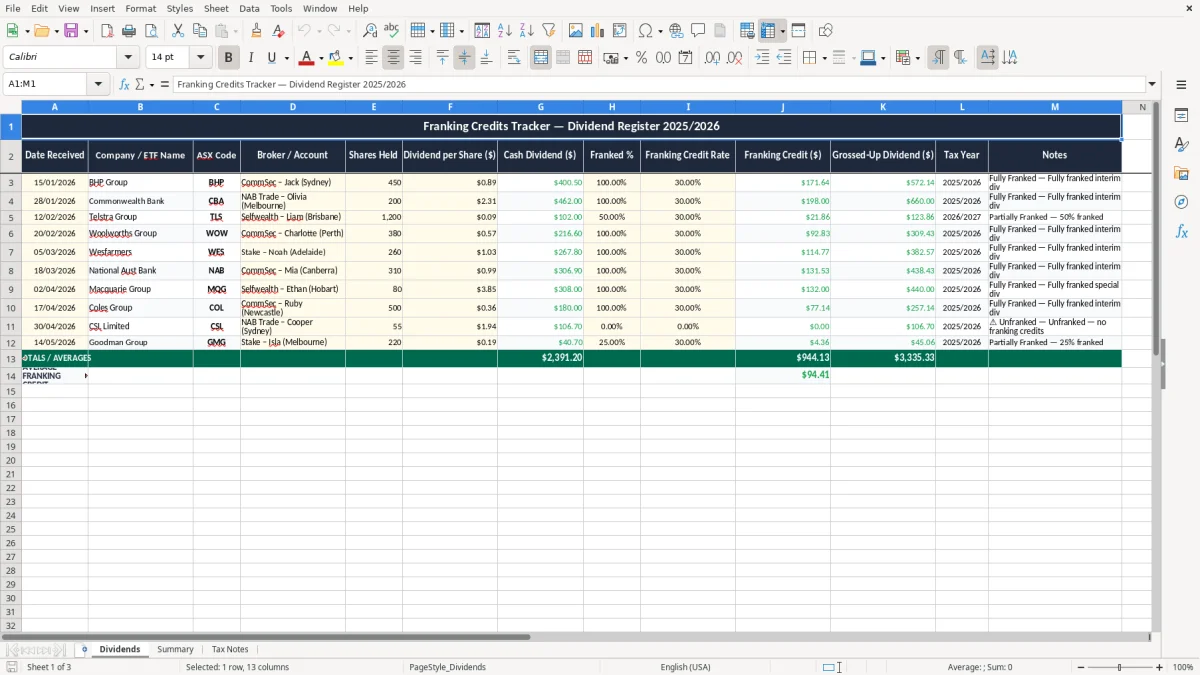
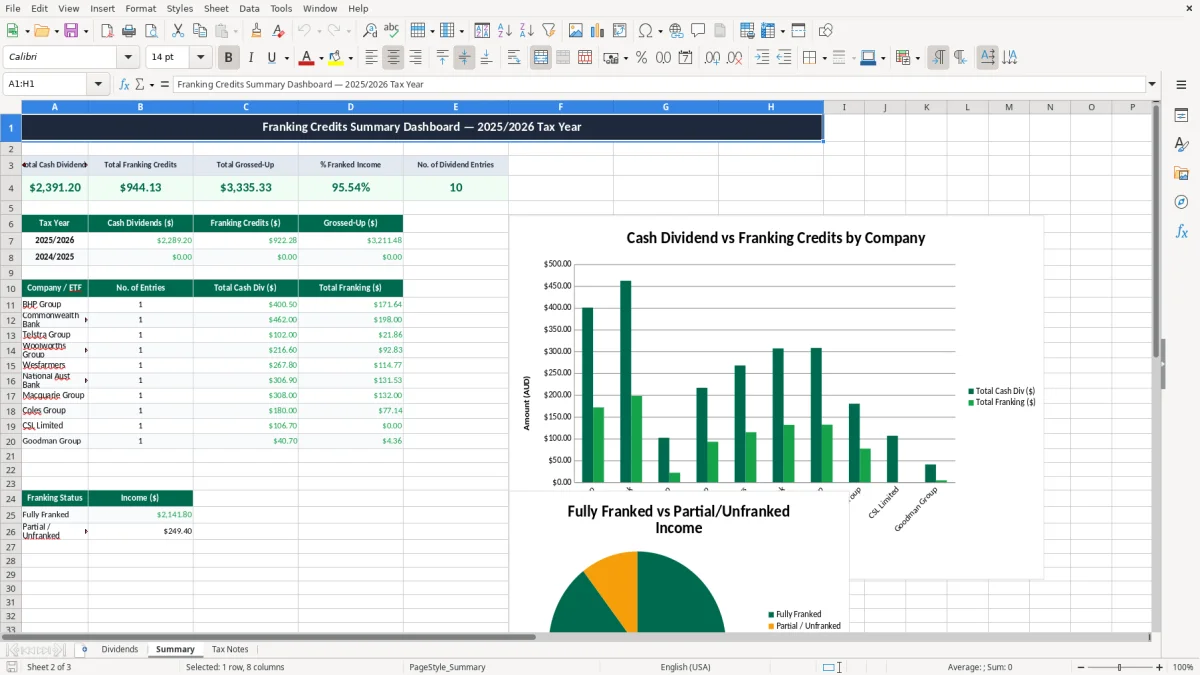
This franking credits tracker Excel template records dividend payments, franking percentages and tax notes in one place. It includes Dividends, Summary and Tax Notes sheets so you can see cash received, franked income and credits at a glance.
It suits shareholders, ETF investors and self-managed super fund trustees who want clean records for tax time. You can line up each dividend with the franking credit attached, then use the summary sheet to total the numbers without manual sorting.
The layout is built for real tracking, not just note-taking. You enter each payment once, keep the ATO details close by, and have a tidy trail for reconciliation when your return is due.
This spreadsheet is for anyone who receives franked dividends and wants the records tidy before tax time. In practice that means a retiree with a portfolio of bank shares, a sole trader who also holds ETFs, or an SMSF trustee trying to line up distributions with the annual return.
The Dividends sheet in image 1 gives you a single place to record the payment date, company or ETF name, ASX code, shares held, cash dividend and franking credit. If you own 4 holdings and each one pays quarterly, you are only entering around 16 rows a year, but those 16 rows can save a lot of hunting through broker PDFs later.
The Summary sheet in image 2 is where you turn individual dividend lines into totals you can actually use. That is handy when you are comparing bank deposits against distribution statements, or checking whether a franked amount has been grossed up correctly for your return.
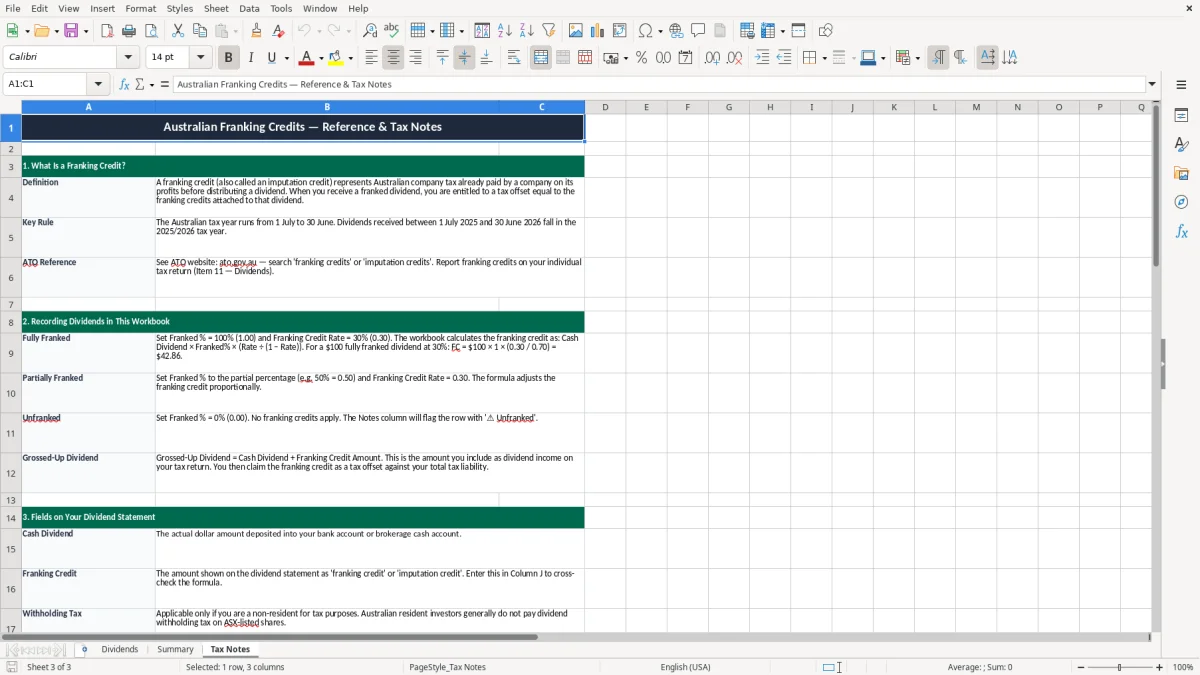
The Tax Notes sheet in image 3 is useful when a payment is not a plain dividend. A return of capital, a DRP entry or an ETF distribution with multiple components is much easier to explain later if you write the note down now rather than relying on memory in June.
The ATO does not ask for one special franking credit form, but it does expect records that support the numbers in your return. Keep the dividend statements, broker reports and this workbook for 5 years, because that is the standard retention period for tax records.
If a dividend is franked, you need the franked amount and the attached credit recorded correctly so the grossed-up income is right. For example, a $700 cash dividend fully franked at 30% carries about $300 of franking credit, which gives you $1,000 of assessable income before any offsets are applied.
On a fully franked dividend, the franking credit is the tax already paid by the company. At a company tax rate of 30%, a $70 cash dividend can carry $30 of credit, so the grossed-up amount is $100; that is the figure that flows into your tax calculation.
Keeping the register in Excel is practical if you only have a handful of holdings, but it still gives you a proper audit trail. If you ever need to explain an amount to the ATO, the date, ASX code and note fields make it much easier to show how you got there.
The biggest mistake is mixing up cash received with the franked amount. If you record a $500 dividend as taxable income without adding the credit, you understate the grossed-up figure; if you add the credit twice, you overstate income and may pay too much tax.
Another common problem is missing reinvested distributions. A DRP entry can look like no cash moved through your bank account, but the dividend still exists for tax purposes, so leaving it out can throw your totals off by hundreds of dollars across a year.
With a portfolio paying 12 dividends a year, a single missed $85 payment is annoying but fixable. Miss three or four lines and you can end up reconciling broker statements for an hour or more, especially if one ETF pays monthly and another only pays twice a year.
Special distributions are where records fall apart. If you do not note whether a payment included capital gains, foreign income or a return of capital, you can waste time later matching figures from old statements and PDF reports just to explain one line.
Those records are the same figures you later need for a withholding schedule.
The easiest way to keep using the file is to tie it to a job you already do. Many people update it on the same day they check their brokerage account or file paperwork for their quarterly BAS, so it becomes part of the month rather than another task to remember.
If your portfolio gets large, the spreadsheet may start to feel slow or messy. Once you are juggling dozens of holdings, corporate actions and managed funds, software like Xero-linked investment tools or broker reporting may be a better fit than manual entry.