Nippers Attendance Excel Free Template – Australia (2026)
13
Free download
Roster mining crews, shifts, swing dates, labour costs, travel, accommodation, allowances, super and fatigue checks in Excel.
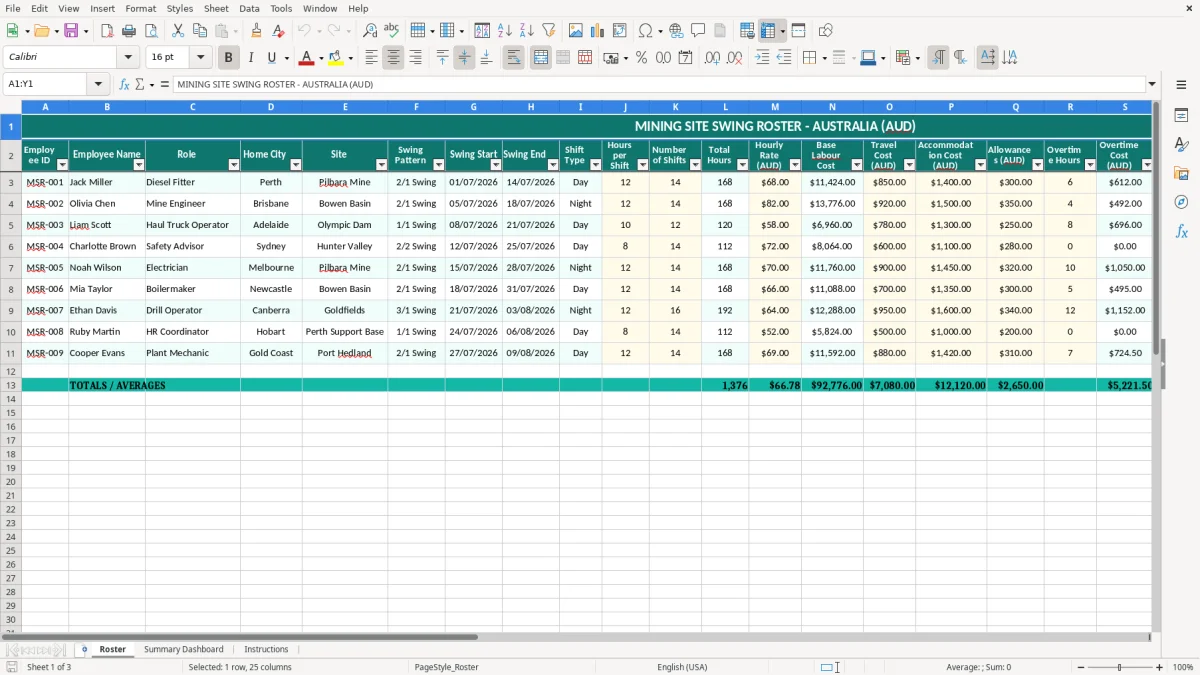
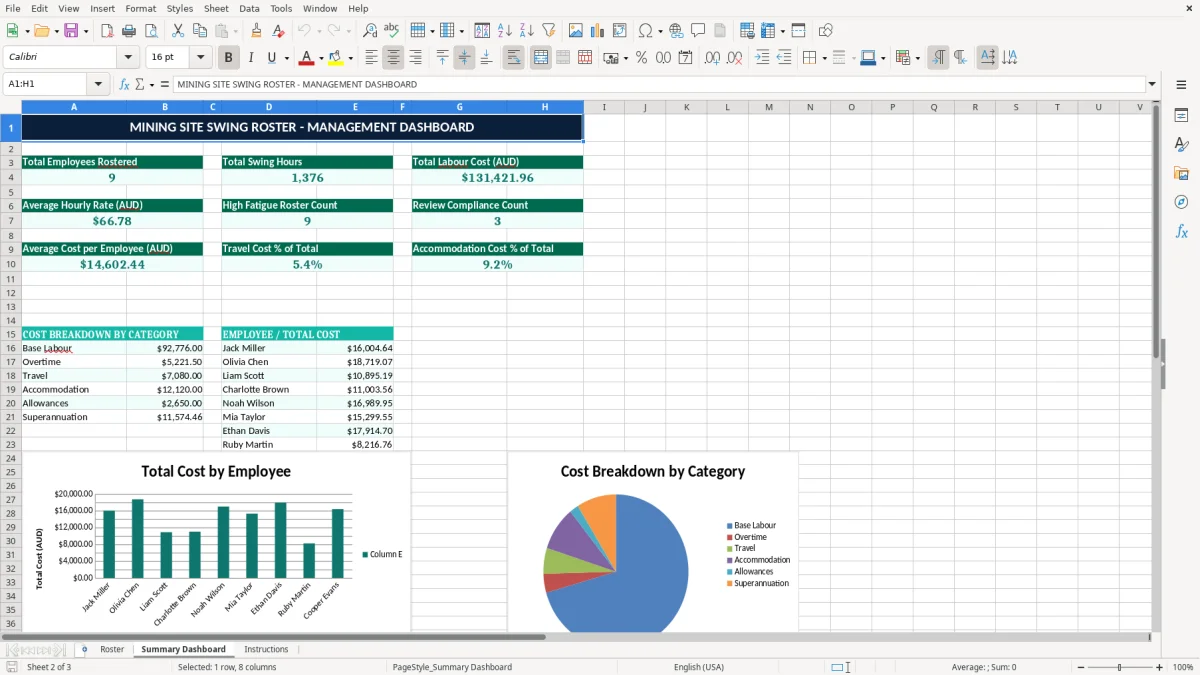
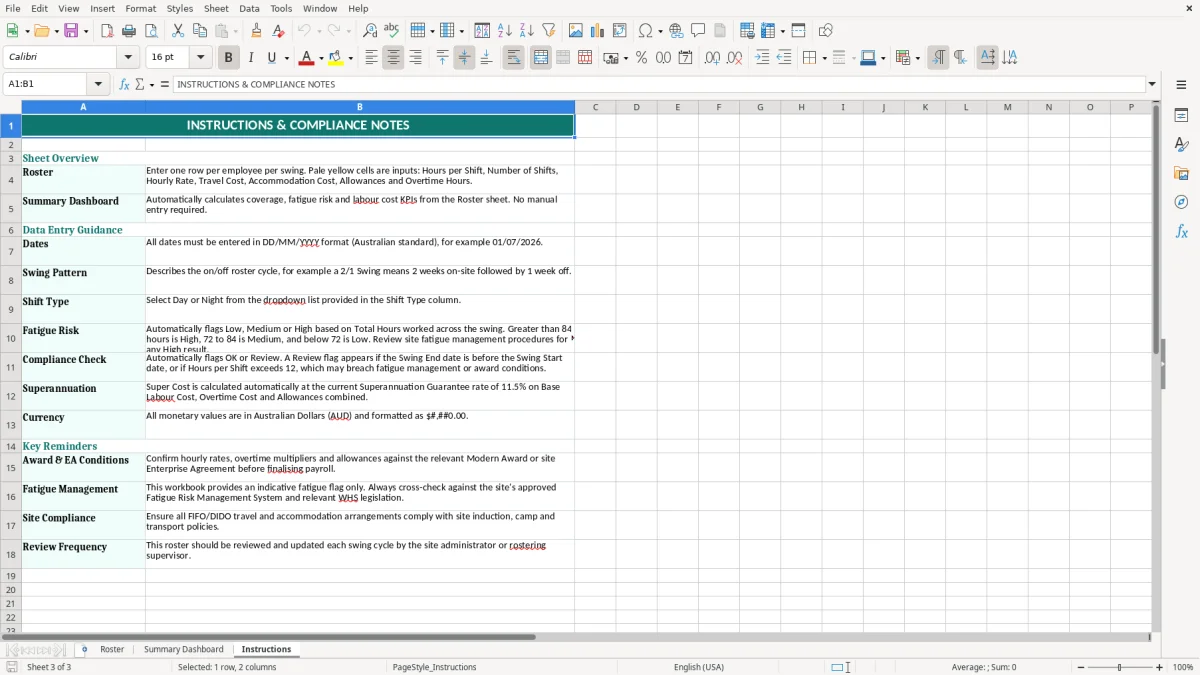
This Excel swing roster template tracks mining site shifts, swing dates, labour costs and compliance checks in one workbook. It includes a Roster sheet, a Summary Dashboard and an Instructions sheet.
Use it to plan 2/1 swings, record hours, add travel and accommodation costs, and total up superannuation and overtime for each worker. It is set up for Australian sites and costs in AUD.
The template is handy for a roster coordinator, site admin or small mining contractor who needs a clear view of who is on site, what each swing costs, and whether fatigue or compliance issues are starting to build.
A mining site roster is usually handled by the site admin, roster coordinator or operations manager at the point where swings, flights and camp beds all have to line up. The pressure comes hard at the start of a 2/1 or 3/1 cycle, when a single change can affect travel bookings, room allocations and labour cost for the whole fortnight.
A chippie with 4 employees on a remote site might have two on days and two on nights, with each worker costing $850 a day before you add allowances and super. A small contractor can quickly be looking at more than $47,600 for a 14-day swing if accommodation is $180 a night and travel is $300 per worker.
This workbook is built around the swing pattern, start date, end date and shift type, which is exactly how mining rosters are managed in practice. If you are rostered for 12-hour shifts across 14 days, the difference between 14 shifts and 13 shifts is not small — that is 12 hours of labour, plus overtime and super, that can shift your site cost by well over $1,000.
The Summary Dashboard is useful when you are comparing crews across a month, especially if one crew is running heavier overtime than the others. For example, if Site A has 18 workers on swing and Site B has 11, you can see quickly whether travel, camp costs or overtime are pushing the budget off target.
Once your roster turns into payroll, the numbers have to line up with Fair Work, PAYG withholding and STP reporting. If the employee is paid for ordinary hours, overtime or allowances, those amounts need to be recorded properly so the payslip matches the roster and the payroll file.
The superannuation guarantee rate is 11.5% in 2026, and it is paid to a complying fund quarterly. If a fitter earns $3,200 for a swing, the employer super amount is $368, which is not optional and should sit alongside wages in your labour cost view.
The ATO expects business records to be kept for 5 years, which includes rosters, time records and payroll support. If you are using this spreadsheet to back up a pay run, keep the source roster, the approved changes and the final export together so the trail is easy to follow.
Mining work often involves long days and fatigue-sensitive scheduling, so the roster should show enough detail to explain why a person worked a particular swing. If someone is on 12-hour shifts for 14 days straight, that is 168 hours on site, and you want the file to show the hours, overtime and any loadings clearly before the pay run goes through.
The biggest problems in mining rosters usually come from cost items being left out, dates being entered wrong, or a swing being pushed one day too far. A missed accommodation line at $180 a night for 10 people is a straight $1,800 understatement, and that is before you touch flights or meals.
If overtime is not recorded separately, a roster that looked like $22,000 for the week can easily become $26,000 once the extra hours are counted at penalty rates. That kind of miss causes bad decisions — you approve another crew change, but the site is already over budget.
Another common failure is stacking swings too tightly, especially when a relief worker gets added at the last minute. If one worker finishes on Friday and is booked for another 14-day swing starting Monday, you may save a flight, but you can also create a fatigue and compliance problem that is much more expensive to fix later.
One wrong start date can send the wrong hours into payroll, and that can trigger an underpayment or an overpayment that takes hours to unwind. If 8 employees are paid from a bad roster and each correction takes 20 minutes, you have already burned more than 2.5 hours of admin time on one mistake.
That same payroll cleanup is where a superannuation contributions tracker becomes useful, because correcting one roster mistake often means checking whether the right contributions were calculated on the corrected pay.
The easiest way to keep this spreadsheet alive is to tie it to an existing job, such as the weekly pay run or the Monday site planning meeting. If the roster is updated at the same time every week, it is far less likely to get lost in a desktop folder after two swings.
For a small contractor with 10 to 25 workers, this workbook is usually enough if one person owns the roster and payroll is handled separately. Once you are juggling multiple sites, live leave balances, complex award rules and more than a few hundred shifts a month, that is when Xero, MYOB or a dedicated workforce system starts to make more sense.
Once you are juggling multiple sites, live leave balances, complex award rules and more than a few hundred shifts a month, the next step is a FIFO roster tracker that keeps every shift and approval in one place.