Property Depreciation Excel Template – Free (2026)
79
Free download
Cash flow tracker for tradies with GST columns, payment status, sample data and a dashboard.
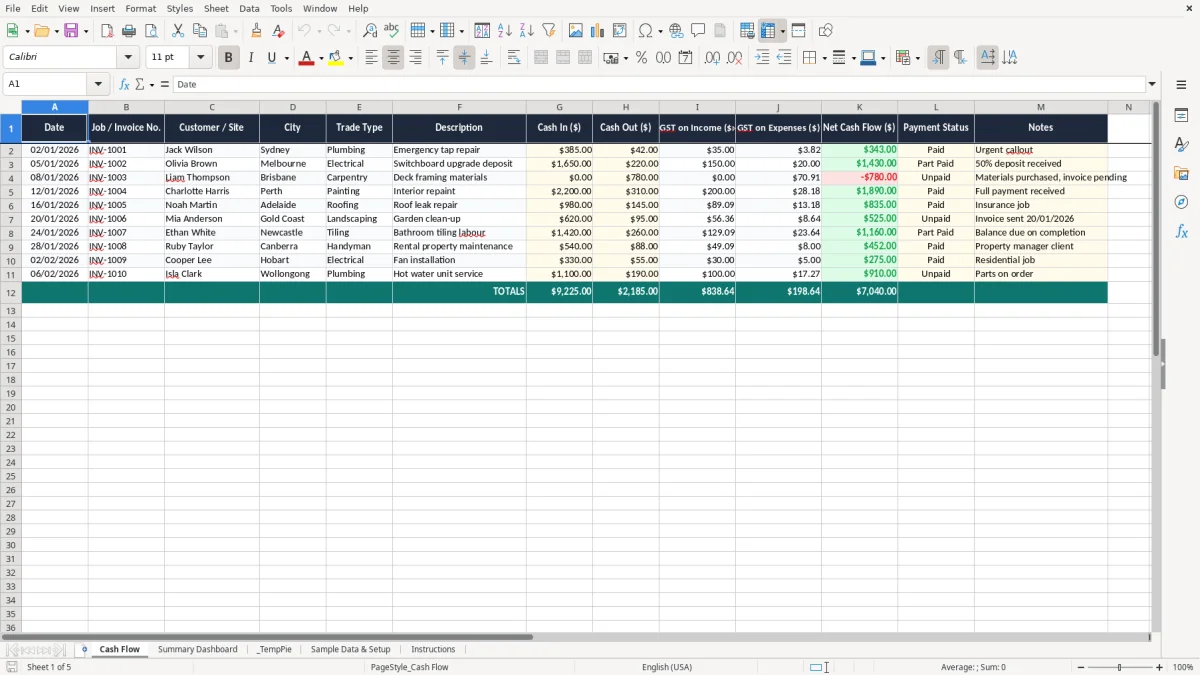
This cash flow Excel template helps tradies track money in, money out, GST on sales and expenses, and what is still unpaid. It includes a Cash Flow sheet, a Summary Dashboard, sample data, setup and instructions.
Use it to keep on top of weekly jobs, invoice timing and cash flow before a BAS deadline or pay run. The workbook is set up for Australian tradie bookkeeping, with date, customer, trade type, GST and payment status fields already built in.
The dashboard gives you a quick view of total cash in, cash out, net cash flow and GST position. That makes it easier to see whether the business is actually collecting enough cash to cover wages, fuel, materials and tax.
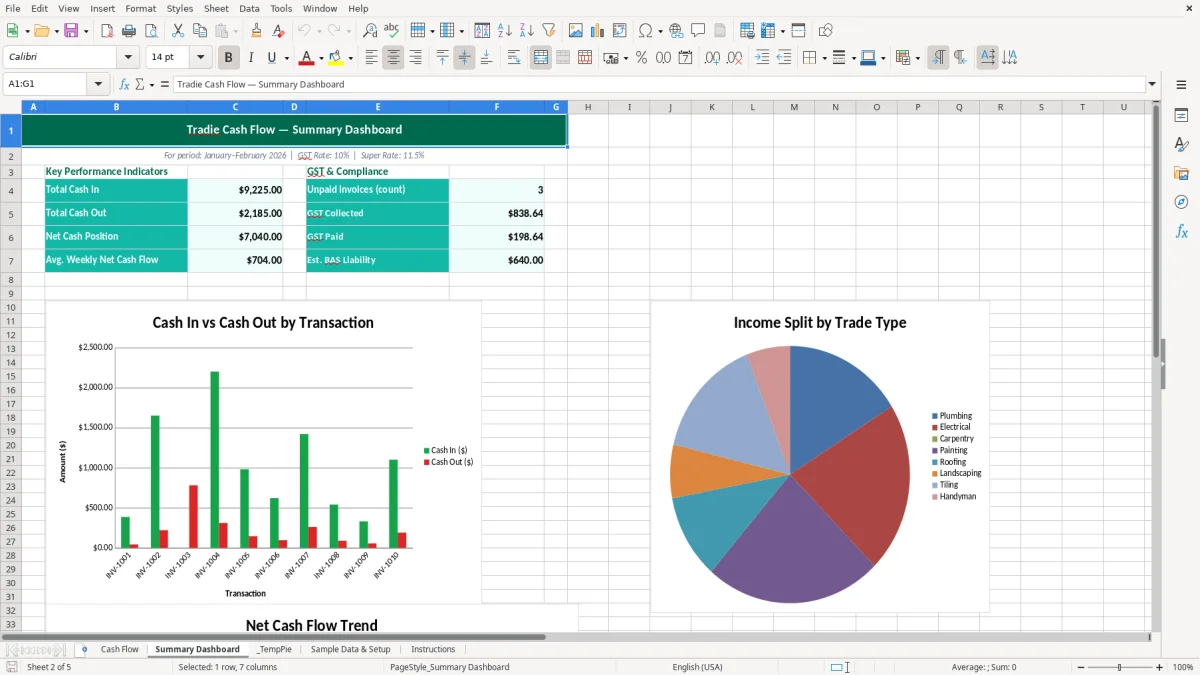
A sole trader electrician, a small plumbing crew or an office manager in a joinery business can use this spreadsheet to keep an eye on money between jobs. It is especially useful when you have 20 jobs this week, 2 are still unpaid, and wages or materials are due before the next customer payment lands.
The Cash Flow sheet suits the daily reality of trade work: deposits, progress payments, supplier bills, fuel, and the odd emergency callout. If you are running 4 employees and invoicing 40 jobs a month, the sheet gives you a simple way to see whether the business is ahead or behind before Friday payroll.
Tradie cash flow is rarely smooth. One week you might collect $18,500, then spend $7,200 on materials, $2,400 on subcontractors and $1,100 on diesel before the next round of invoices is paid.
This template lets you record each movement as it happens, which is better than waiting for the end of the month and trying to rebuild it from a pile of receipts. It also gives you a clear place to note the customer, site and trade type, so you can sort the data later if you need to follow up a slow payer.
It suits sole traders, partnerships and small Pty Ltd businesses that still want a fast spreadsheet rather than full accounting software. If you are a chippie quoting on a $14,000 fit-out, a plumber handling 12 callouts a week, or a landscaper juggling deposits and supplier bills, this is the sort of sheet that keeps the wheels turning.
That same recordkeeping becomes the basis for a BAS tracking sheet when it is time to sort sales, GST and expenses into figures you can use later.
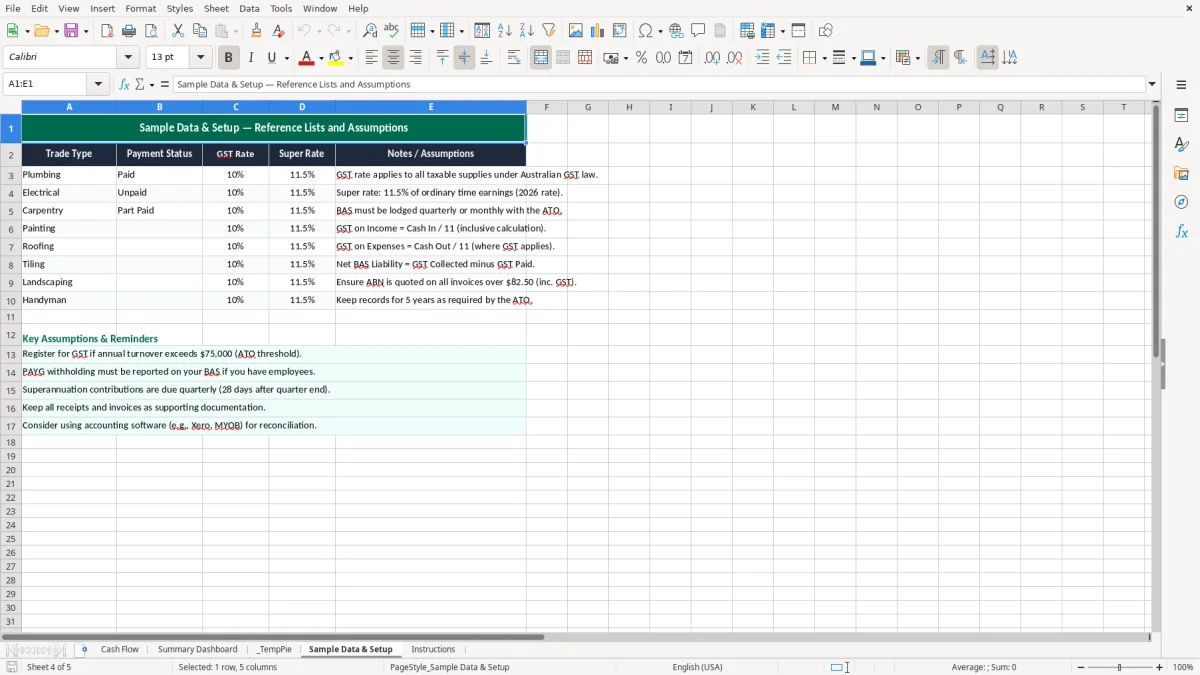
The ATO expects you to keep business records for 5 years, so a cash flow sheet like this is useful evidence when you are matching income, expenses and GST. If you are registered for GST, the standard rate is 10%, and you generally register once turnover hits $75,000 a year, or $150,000 for not-for-profits.
That matters in a tradie job when you invoice $1,100 including GST. The GST component is $100, which should be visible in your records so you can tie it back to your BAS and your bank deposits.
Most small businesses lodge BAS quarterly, while larger businesses can be on monthly cycles once turnover is above $20 million. If you are a small tradie business with a busy quarter, the spreadsheet helps you see whether the cash in the bank is actually enough to cover the GST you have collected and the GST you may claim back on materials.
For example, if you invoice $22,000 including GST in March and spend $8,800 including GST on supplies, your GST collected is $2,000 and your input tax credits may be $800. That leaves a net GST position to watch before lodgement, rather than finding out at the last minute.
Cash flow and taxable profit are not the same thing. A job paid this week may improve cash flow straight away, but if you bought the materials last month on credit, the profit and loss effect can sit in a different period.
Keeping cash in, cash out, and GST columns in the same workbook makes reconciliation easier when you compare the spreadsheet to the bank account and the BAS. It is a simple way to stay across the numbers without overcomplicating the books.
The biggest problem is usually timing. You finish a job, send the invoice, and assume the money will be there in 7 days, but the customer pays in 30 days and your fuel card still comes out of the bank this Friday.
That gap can be enough to cause bounced direct debits, late supplier payments or a scramble for wages. If your weekly outgoings are $9,500 and only $6,800 comes in, you are already $2,700 short before GST, tax and super are even considered.
A common mistake is leaving Payment Status blank and never reviewing overdue amounts. If you have 18 open invoices at an average of $1,250 and even 3 of them drift 30 days late, that is $3,750 tied up in your debtors for no good reason.
That kind of gap can force you to use the business overdraft or delay buying materials for the next job. It is not unusual to lose another hour or two each week simply chasing up who has paid and who has not.
Another trap is thinking a busy month means healthy cash flow. You can be busy enough to turn over $48,000 and still run short if you have just paid a $12,000 supplier bill, a $4,500 subcontractor invoice and a quarterly tax bill.
This is where the spreadsheet helps you see the pattern early. If you record the actual cash movements, you can spot the months where the business looks busy on paper but is not generating enough free cash to keep moving.
Vague descriptions such as “materials” or “work” do not help much when you need to check a disputed invoice or reconcile a bank feed. A clear note like “bathroom rough-in - Randwick” or “switchboard upgrade - Blue Mountains” saves time later and cuts down on head-scratching.
That detail matters when you are trying to sort out whether a payment belongs to one site or another, or when the bookkeeper has to match 50 transactions at month end. A spreadsheet that is too loose usually costs more in cleanup than it saves in entry time.
The easiest way to keep this workbook alive is to tie it to something you already do, like the Friday pay run or your BAS prep. If you update it once a week for 15 minutes, you will usually stay ahead of the mess instead of trying to fix 6 weeks of transactions in one go.
For a tradie business, that rhythm works better than a big end-of-month tidy-up. By the time you have 30 or 40 rows to enter, you are more likely to miss a payment status or leave an expense in the wrong place.
If you are pushing past a few hundred rows a month, or you need live bank feeds, invoice reminders and payroll integration, it is time to move to proper software such as Xero or MYOB. That usually becomes the better choice once you have a larger team, frequent part-payments, or a bookkeeper working in the file.
For a single tradie or small crew, though, this spreadsheet is a solid middle ground. It gives you enough structure to track cash flow properly without the overhead of a full accounting system.
That middle ground still leaves payroll tax obligations to track, so a PAYG withholding sheet is the next step for keeping employee deductions separate from day-to-day cash flow.