Property Depreciation Excel Template – Free (2026)
79
Free download
BAS register for sole traders with GST, GST-free amounts, BAS codes, payment status and quarterly tracking.
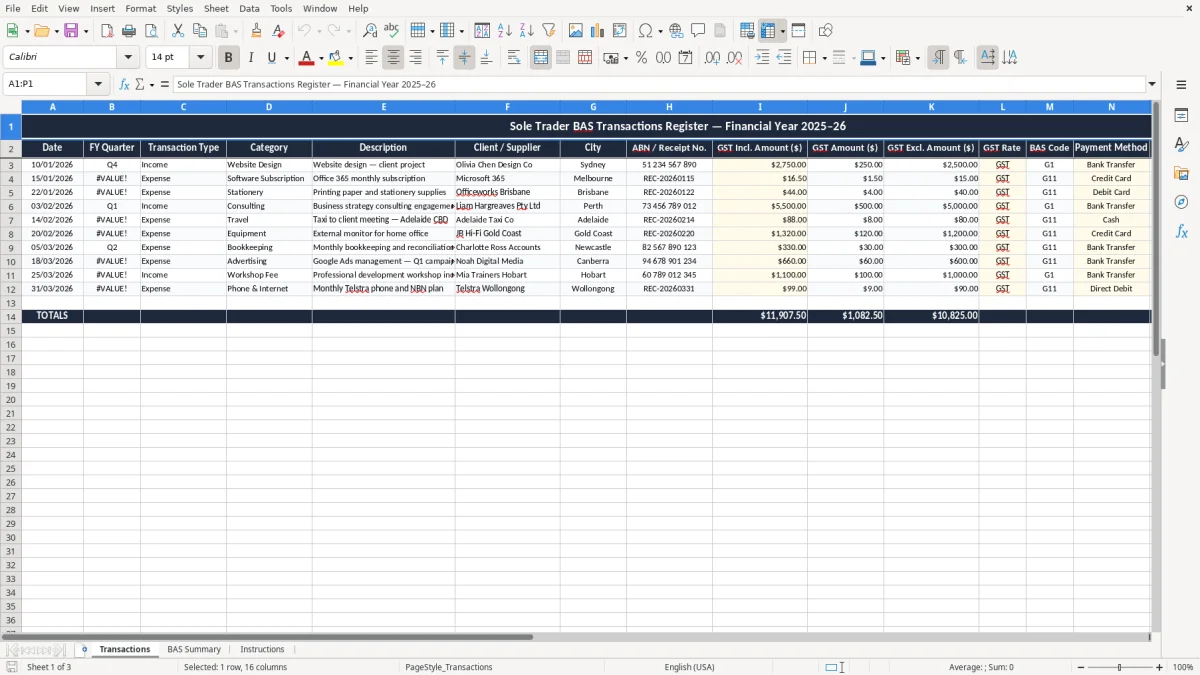
This Sole Trader BAS Excel spreadsheet is a simple register for tracking GST taxable sales, expenses, BAS codes and payment status in one place. It includes a Transactions sheet, a BAS Summary sheet and an Instructions sheet so you can sort out your quarterly numbers without chasing receipts.
Use it to keep your reconciliation tidy through the quarter, then pull the figures you need for your BAS. The layout is built for a sole trader who wants a clean paper trail and a quick view of what is owing before the ATO deadline hits.
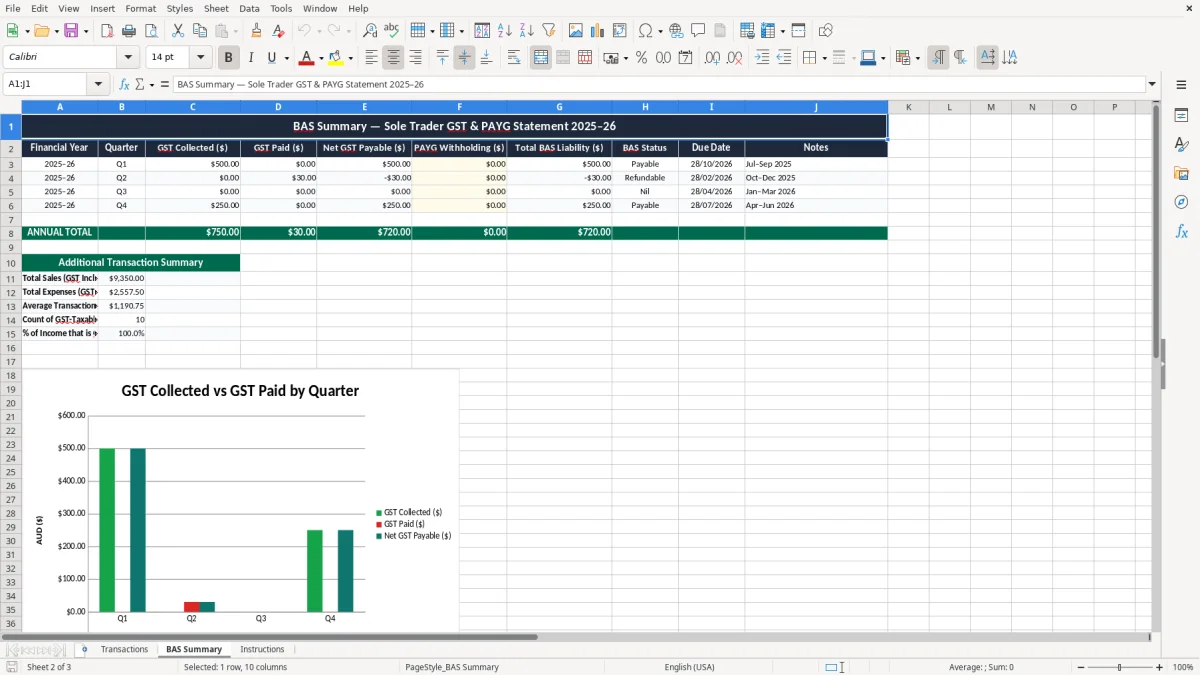
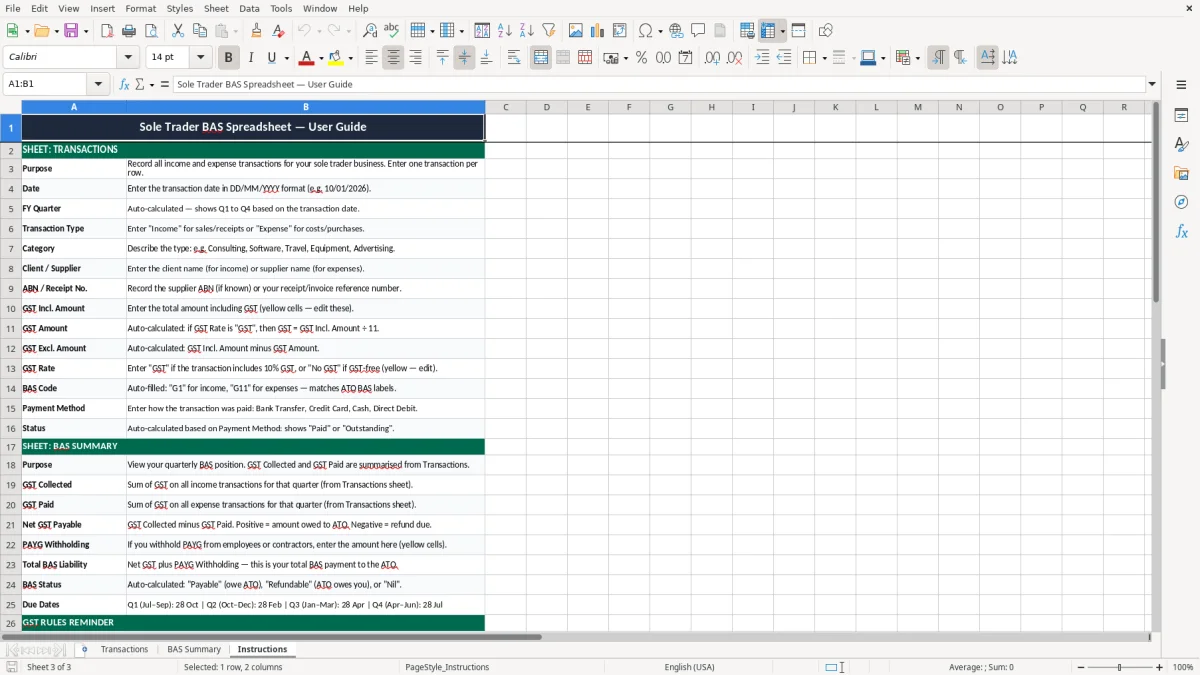
Image 1 shows the transaction register, image 2 shows the BAS summary dashboard, and image 3 gives you the setup notes. If you are lodging yourself through myGov or giving records to a bookkeeper, this keeps the numbers easy to check.
A sole trader usually opens this spreadsheet when the quarter starts and keeps adding income and expenses as they land. That matters because a BAS lodgement is often due quarterly, and waiting until the last week means you end up digging through bank feeds, receipts and emails all at once.
Image 1 is the Transactions sheet, and it is set up for that day-to-day work. You can log a $275.00 invoice, a $16.50 software subscription, or a $48 fuel receipt, then tag each line with the right BAS code and payment status.
If you are a chippie, plumber, designer or gardener, you usually do not need a full accounting system on day one. This spreadsheet gives you enough structure to keep the profit and loss trail straight without paying for software you are not yet using properly.
Image 2 shows the BAS Summary sheet, which is where the quarter starts to make sense. Instead of scanning 80 rows one by one, you get the totals in one place so you can see whether your GST collected is running ahead of your GST credits.
For example, if you invoice $18,000 plus GST in a quarter and buy $4,400 of GST-inclusive supplies, you are not looking at the same outcome as a quarter with only $6,000 of sales. The sheet helps you see that difference early, before you lodge and then need to fix it later.
The ATO expects you to keep records that explain your BAS figures, and the rule of thumb is to keep those records for 5 years. That means your invoices, receipts, bank statements and working papers should line up with the numbers you report, not just sit in a folder with no structure.
For GST, Australia uses a 10% rate on taxable supplies, and you generally register once your turnover reaches $75,000 a year. If you are a not-for-profit, the registration threshold is $150,000, which is why the BAS trail matters even before you get to scale.
The register includes GST-inclusive amount, GST amount, GST-exclusive amount and BAS code so you can sort taxable sales from other items. That is useful when you have a $1,100 invoice, because the GST part is $100 and the base amount is $1,000, and you want that split to stay consistent.
If you issue invoices, the tax-invoice rules also matter. A valid tax invoice needs your identity, your ABN, the words Tax Invoice, the date and a clear description of what was sold, and GST must be shown separately on invoices over $82.50.
Image 3 gives you the setup notes so you can keep the sheet aligned with those rules from the start. That saves time when you are checking the quarter against your bank and preparing your BAS through myGov or business software.
That quarter-end check naturally leads into a GST reconciliation sheet, where the invoices, bank entries and BAS figures can be matched before you lodge.
The biggest mistake is mixing GST-inclusive and GST-exclusive amounts in the same line without a clear check. If you enter a $220 receipt as the full expense and then also claim $20 GST again, you have doubled up and your BAS will be wrong by $20 on that one line alone.
Another common problem is ignoring cash flow timing. A sole trader can show a healthy quarter on paper, then hit trouble when $8,800 of invoices are still unpaid and the GST on those sales is sitting in the bank account waiting for the next lodgement.
Miss one invoice for $2,750 including GST and you have left out $250 of GST collected. If that happens across four or five sales, you can be out by more than $1,000 before you even notice, and the fix takes time plus a recheck of the whole quarter.
Receipts without an ABN, no GST shown, or no clear payment status also cause grief at reconciliation. I have seen sole traders spend two hours hunting a $19.95 receipt because the supplier name was missing from the bank export and the note field was blank.
The other trap is using the spreadsheet like a storage box instead of a working register. If you wait until the BAS due date and then try to enter 60 transactions in one sitting, the chance of a typo in the GST rate or quarter code goes way up.
The easiest routine is to update the register once a week and tie it to an existing task, like your bank reconciliation or Friday invoicing. If you leave it for the quarter end, the job gets bigger than it needs to be and you lose the clean trail that makes BAS work simple.
If you are already processing 200 to 300 transactions a month, or you need payroll, super and STP as well, that is usually the point to move into Xero or MYOB. Until then, this spreadsheet is a solid middle ground for a sole trader who wants control without a full accounting stack.
As your transaction volume grows, the next practical step is a tax invoice with GST format for issuing compliant bills alongside your BAS records.