Nippers Attendance Excel Free Template – Australia (2026)
13
Free download
Free FIFO roster tracker Excel template with 100 swing records. Separate travel, leave and site days, check overlaps and review roster pay estimates.
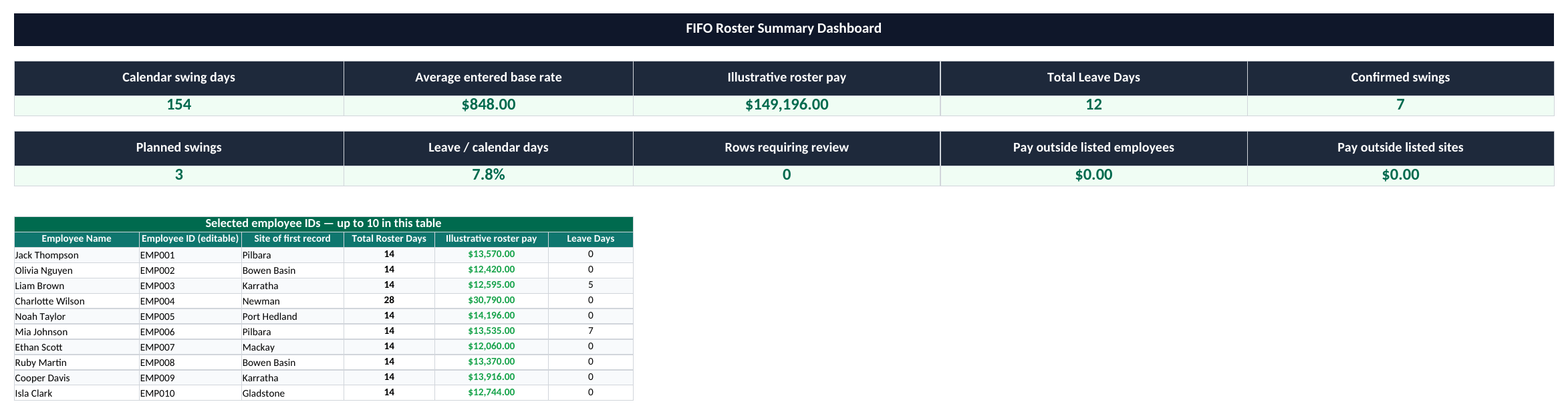
Keep your crew’s swings, travel days and leave in one place with this FIFO roster tracker Excel template. It has 100 prepared swing records, an employee and site summary, and charts for planning. The pay estimate separates base-paid days, site allowances and travel allowances, so you can see what each amount covers. Start with the fictional examples, then replace the dates, people and rates with your own checked information.
In this workbook, a swing is an inclusive calendar window from Roster Start to Roster End. That window includes site work, travel and leave taken during the swing. Days off after the swing are outside it. This definition matters: adding travel again to a window that already includes travel would inflate the roster length.
| Measure | Example | What it means |
|---|---|---|
| Calendar swing days | 5–18 January 2026 = 14 days | Both the start and end date count. |
| Travel days | 2 | Travel days within that 14-day window. |
| Leave days | 0 | Leave within the same window. |
| Site work days | 14 − 2 − 0 = 12 | The remaining days available for site work. |
| Base-paid days | 14, entered manually | The days paid at the base daily rate under this fictional arrangement. |
The day categories are exclusive in this planning model. A day cannot be counted once as travel and again as a full site-work day. If you need partial-day travel, hourly time sheets or several allowance rules within one day, use a more detailed record and adapt the calculation before relying on it.
Write the units in your pattern label: “14 days on / 7 off” is clearer than “14&7”. Expressions such as 2:1 often refer to weeks. The pattern column is descriptive only; changing it does not generate dates, rest days or a repeating calendar.
The workbook uses four separately entered components. Base-paid days are a manual input because travel and leave pay depend on the arrangement. Site allowance applies to site work days, while travel allowance applies to travel days.
| Component | Calculation | Amount |
|---|---|---|
| Base pay | 14 paid days × $850 | $11,900 |
| Site allowance | 12 site work days × $125 | $1,500 |
| Travel allowance | 2 travel days × $85 | $170 |
| Other pay | Entered separately | $0 |
| Illustrative roster pay | Sum of the four components | $13,570 |
If the same arrangement paid the base rate for only 12 days, changing Base-paid days to 12 would reduce the estimate to $11,870. The travel allowance still remains $170. This makes the assumption visible instead of treating all calendar days as automatically paid.
The Fair Work Ombudsman’s allowance guidance explains that entitlements depend on the relevant award or agreement and circumstances. Check the applicable rates and eligibility for each worker. The spreadsheet does not calculate overtime, penalties, leave entitlements, PAYG or super, and its roster pay result is not a complete payroll calculation.

A confirmed swing can include leave. The workbook no longer decides that someone is “active” simply because their leave entry is zero. Cancelled swings remain in the log for reference but do not contribute to operational day or pay totals.
Two records for the same person
Non-cancelled date windows for one employee must not overlap. If one swing ends on 18 January and another starts on 18 January, both include that day and both are flagged. Use the actual dates; do not rename the employee to hide a clash.
The example swing from 10 February to 9 March is counted in February’s start-month summary. That is useful for comparing swing starts, but it is not a February payroll accrual or daily occupancy report. Move A37 to the first day of the six-month period you want to inspect.
The checks for pay outside the listed employees and sites help reveal amounts not covered by those smaller tables. Use unique employee IDs in the selected-ID table so one worker is not listed twice. The overall totals still cover all valid records, including people or sites outside the displayed lists.
Leave rate is leave days divided by calendar swing days. It is not a leave balance or the percentage of employees taking leave. The status chart counts valid Planned, Confirmed and Cancelled records; cancelled records remain visible there even though they are excluded from operating totals.
The sheet filter only changes the visible rows. It does not make the dashboard recalculate for a filtered crew. For a separate report without changing formulas, save an appropriate working copy and verify its contents. Keep personal information to what the roster needs; an internal employee ID is enough to identify the record.
For more than 100 swings, expand the formulas, overlap checks, filters and summary ranges together. For pay components that need hourly rates, the award rate pay worksheet can help organise independently checked amounts, but neither file determines the worker’s legal entitlements.