Property Depreciation Excel Template – Free (2026)
79
Free download
Track rent due, payments, balances and tenant details across four Excel sheets for Australian landlords, property managers and investors.
A rental ledger Excel template is a spreadsheet for recording rent charged, payments received, payment dates and outstanding balances for each tenancy. This Australian template includes a Rental Ledger, Tenant Summary, Dashboard and Instructions sheet, giving landlords and property managers one place to track residential rent.
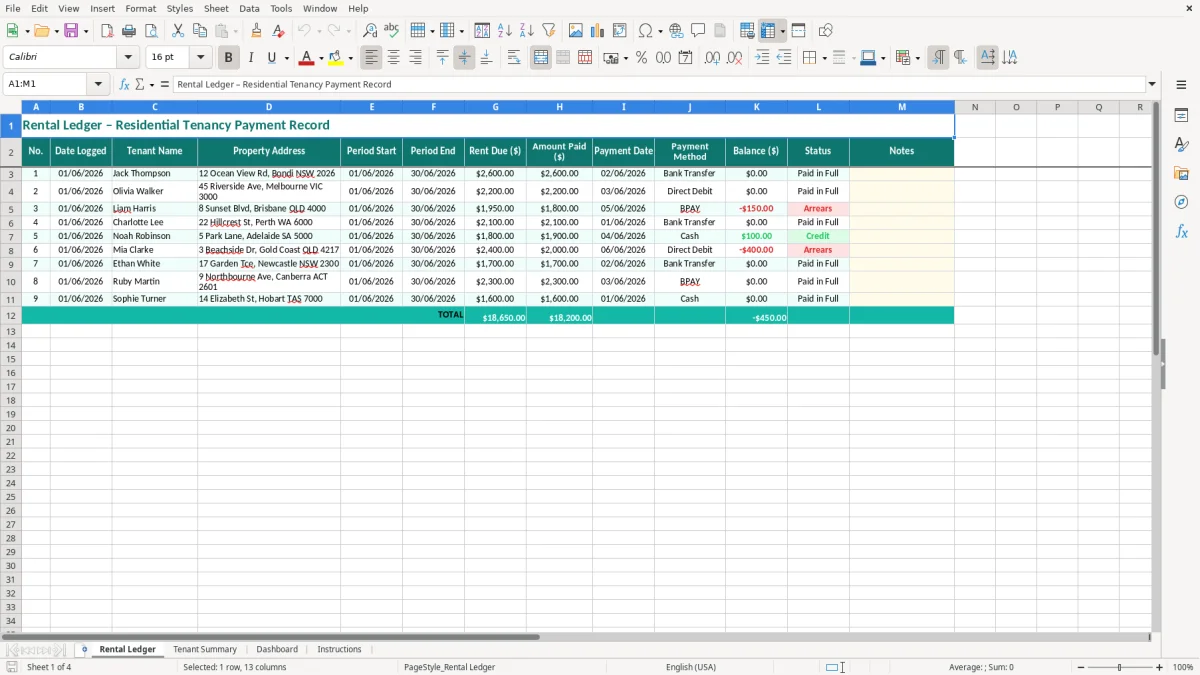
The main ledger records the tenant, property address, rental period, rent due, amount paid, payment method, balance and status. The sample entries use Australian addresses, dollar formatting and DD/MM/YYYY dates, so you can replace them with your own tenancy records.
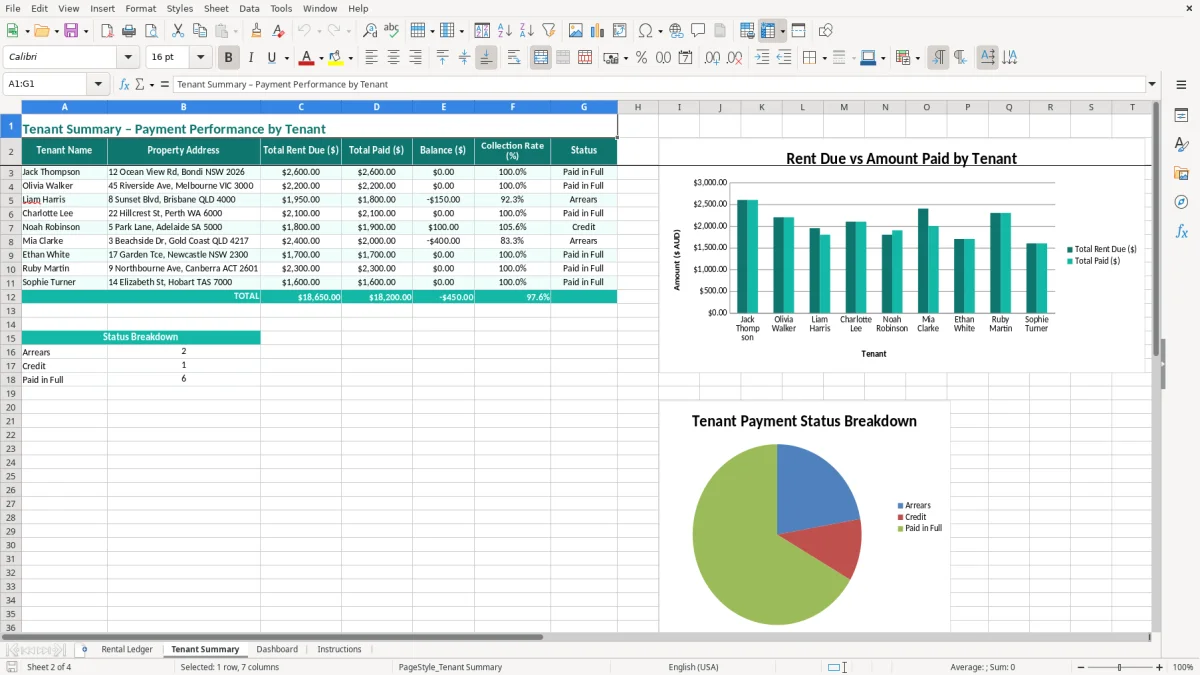
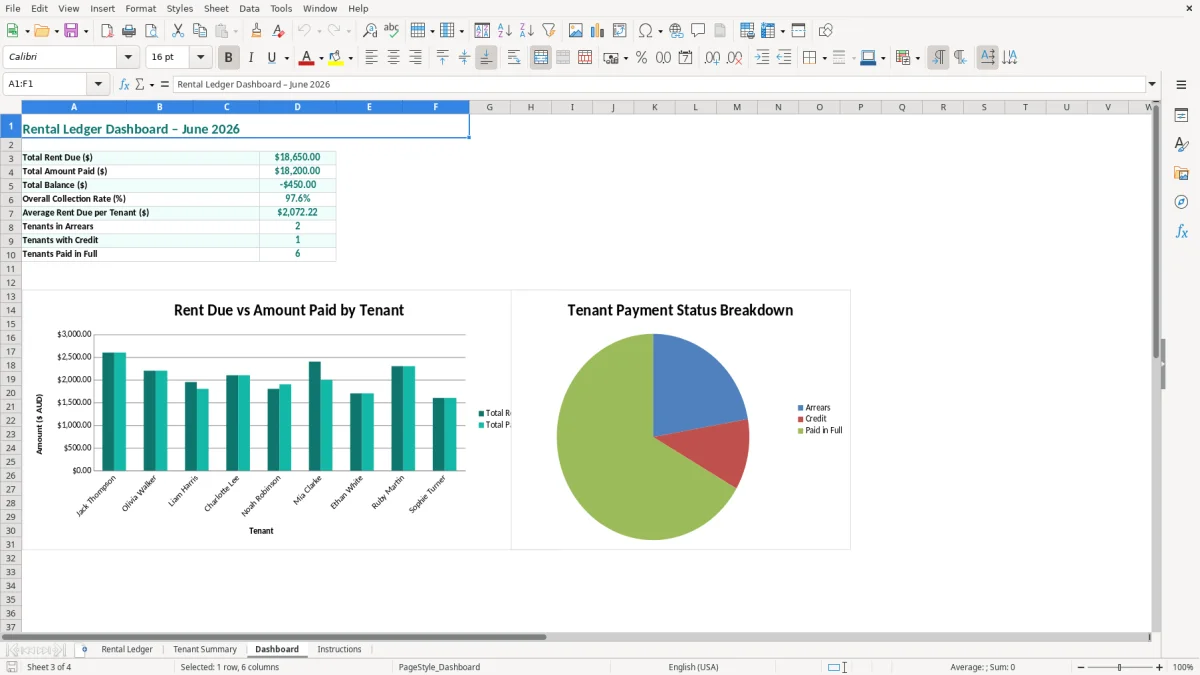
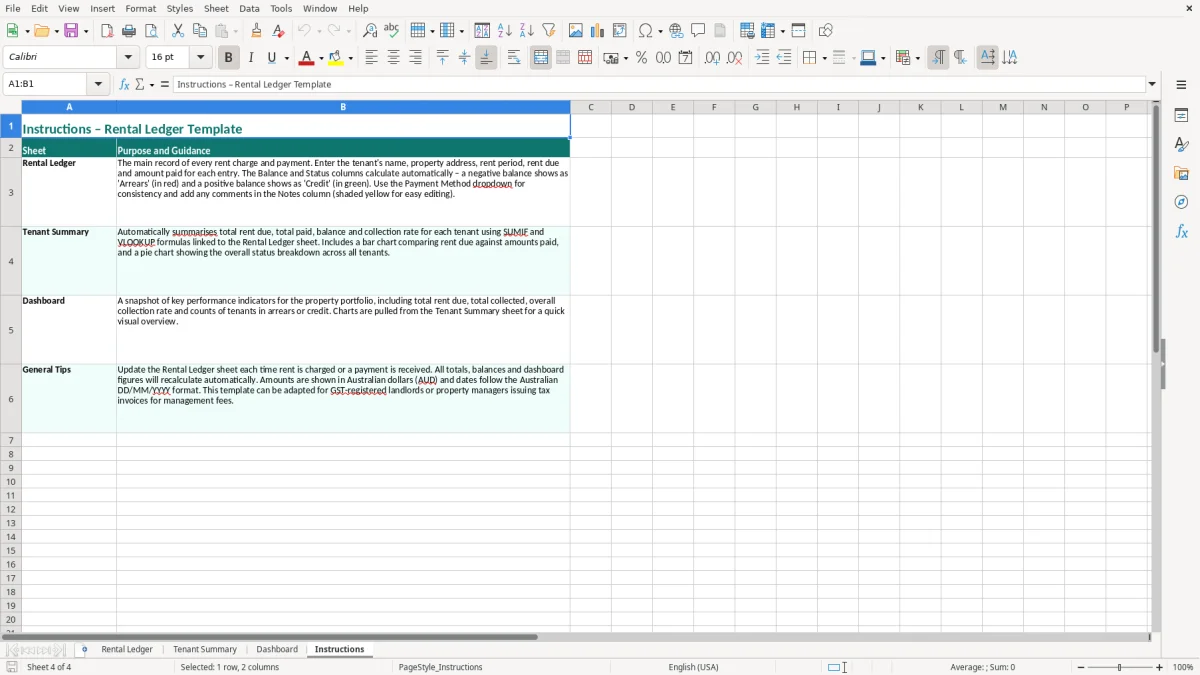
Image 1 shows the Rental Ledger with its 13-column payment record. Image 2 shows the Tenant Summary, while images 3 and 4 cover the Dashboard and Instructions sheets.
A private landlord often opens the ledger when a scheduled payment lands in the bank account. If a tenant pays $650.00 each week, the landlord can enter the period covered, payment date and method immediately rather than trying to reconstruct six weeks of transactions at tax time.
This is especially useful when one owner has properties in different suburbs or states. Image 1 shows the practical layout: the tenant and property address sit beside the rental period, while Rent Due ($), Amount Paid ($), Payment Date, Payment Method, Balance ($), Status and Notes keep the financial detail together.
A small property-management office can use one row per rent period for each property, then review the Tenant Summary before contacting a tenant or owner. For example, 12 properties with four-weekly rent creates roughly 156 payment rows in a year, which is much easier to filter than a folder of separate spreadsheets.
The office administrator can enter a payment after the daily bank reconciliation and use Notes for a repayment arrangement or a part-payment. A tenant owing $300.00 against $1,200.00 due is visible as a short-paid period, rather than being hidden in a total for the month.
At month-end, compare the Amount Paid column with the property bank account and investigate any unmatched item. At the end of the Australian financial year on 30 June, the ledger gives your accountant or bookkeeper a clear starting point for rental income records, without confusing rent with the bond.
The Dashboard is useful for a quick owner review, while the Instructions sheet helps a volunteer administrator or family member follow the same entry process each time. For a sole owner with two tenants, five minutes after each payment is usually safer than a two-hour catch-up before the income tax return.
The same tenant payment trail also makes it easy to prepare a GST invoice record when rent is billed through a business or registered property entity.
Ordinary residential rent is generally GST-free in the sense that it is input taxed: the landlord does not add the 10% GST rate to normal residential rent and cannot claim GST credits for expenses connected with that rental income. A residential rental ledger should therefore record the agreed rent, not invent a GST component.
That treatment is different from commercial premises or some short-stay arrangements. A $650.00 weekly residential payment is recorded as $650.00 received. It is not turned into $715.00 by adding 10% GST merely because the landlord has an ABN or is registered for GST on another business activity.
The ATO expects records supporting rental income and deductions to be kept for five years from the date the relevant tax return is lodged, although some records can need to be retained longer when an asset or ownership position is still relevant. Keep this workbook with bank statements, lease agreements, invoices, rates notices and loan-interest records.
The ledger supports the income figure but does not replace the lease or a bank reconciliation. If the workbook shows $31,200.00 received for the year but the bank deposits total $30,550.00, investigate the $650.00 difference before using the figure in the tax return.
Residential tenancy law is state and territory based. For example, NSW uses the Residential Tenancies Act 2010, Victoria uses the Residential Tenancies Act 1997 and Queensland uses the Residential Tenancies and Rooming Accommodation Act 2008. Those laws and their regulations govern rent records, receipts, notices, access and disputes in each jurisdiction.
Use this Excel file as an internal tracking record, not as a substitute for a state-required form or an official bond record. A $2,000.00 bond should be handled through the relevant state or territory bond authority process, separately from the rent ledger. Check that your payment history and any receipt you give the tenant agree exactly.
The most common problem I see is entering the bank date as the rental period. A payment received on 03/06/2026 might cover rent from 01/06/2026 to 30/06/2026; if you enter both as June dates without distinguishing them, the history becomes difficult to explain when a tenant queries arrears.
Duplicate entry is another quiet one. If a $2,600.00 transfer is entered once on the day it appears in the bank feed and again when the remittance email is filed, the ledger can falsely show the tenant $2,600.00 in credit. That can lead to an incorrect arrears notice or an owner being paid out too much.
A part-payment needs its own clear note. If $900.00 is paid against $1,200.00 due, recording $900.00 without the $300.00 balance makes the row look complete to a rushed reviewer. The same issue occurs when rent rises from $600.00 to $630.00 and the old amount is copied into every new row.
For a four-employee tradie business, a missed payroll entry can be corrected in the next pay run; a rental arrears error can affect notices and a tribunal file. The practical position is to keep the agreed rent and the actual payment visible, rather than overwriting history to make the balance look tidy.
Bond money is not ordinary rental income, and a repair invoice is not a rent payment. Combining a $2,000.00 bond, $1,500.00 rent receipt and $450.00 plumbing expense in one total produces a number that is useless for both tenancy administration and the property’s profit and loss.
Another failure is leaving a tenant or address blank on a copied row. With three properties, a $750.00 payment assigned to the wrong address can take hours to unwind. Before filing the month, match every row to the bank statement and lease, then use the Notes column to explain adjustments rather than deleting the original evidence.
The easiest routine is to update the ledger when you reconcile the property account, not when you remember. Set aside 15 minutes each Friday or on the day rent is normally collected, enter the new payment, and compare the total with the bank statement before closing the workbook.
For a landlord receiving $2,600.00 and $2,200.00 from two properties each month, the expected total is $4,800.00. A quick check against the bank makes a missing payment or duplicate row obvious while the transaction is still easy to find.
This template works well for a small portfolio where one person enters and reviews the records. Once you have several hundred rows, multiple users, automatic owner statements, trust accounting or frequent arrears notices, a property platform or bookkeeping system is safer than relying on manual copying.
Excel remains useful as an export and checking tool, but software such as Xero or MYOB is better for bank feeds and the broader accounts when the ledger is no longer the only record. Keep the spreadsheet as a controlled supporting file rather than letting several unlinked copies circulate by email.