Bushfire Plan Excel Free Template – Australia (2026)
6
Free download
Manage Australian holiday rental bookings, availability, guests, income, commissions, GST and payments with this practical Excel template.
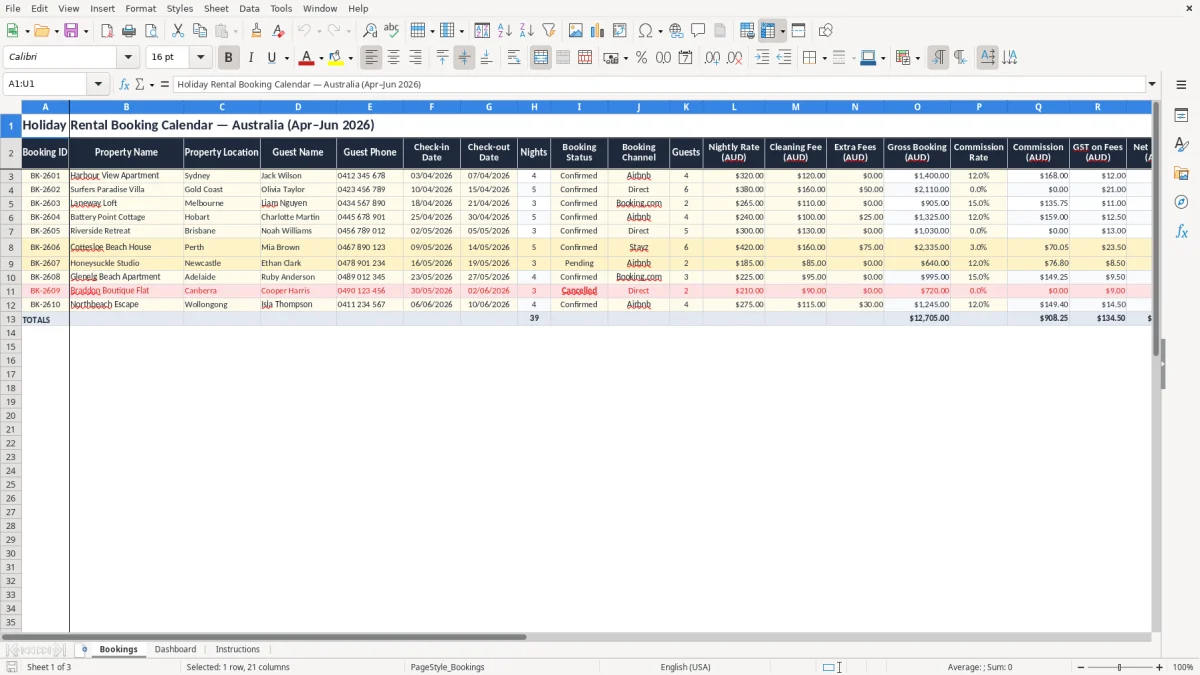
Organise short-term accommodation reservations with a practical Excel booking calendar designed for Australian holiday rental owners, hosts and property managers. Record each stay, monitor availability, calculate nights and track expected income in Australian dollars.
The workbook is set up for April to June 2026 and uses the Australian DD/MM/YYYY date format. It can help you manage one property or maintain a simple register for several apartments, houses, cabins or coastal rentals.
Enter one reservation per row, beginning with a unique booking ID, property name, location and guest details. Add the check-in and check-out dates using DD/MM/YYYY, then enter the number of guests and applicable pricing information. The nights field is calculated from the stay dates, while the income fields help summarise the expected booking result.
Select or enter a booking status, booking channel and payment status so the register remains easy to filter and review. Use the notes column for arrival instructions, linen requirements, maintenance reminders or special requests. Before relying on GST or commission amounts for reporting, confirm the applicable treatment for your business and booking platform.
Save a backup copy regularly, particularly when the workbook contains guest contact details. If you manage several properties, use consistent property names and locations so that sorting and filtering produce reliable results. Review upcoming check-ins and check-outs frequently, update cancellations promptly and reconcile payment information against your platform statements or bank records.
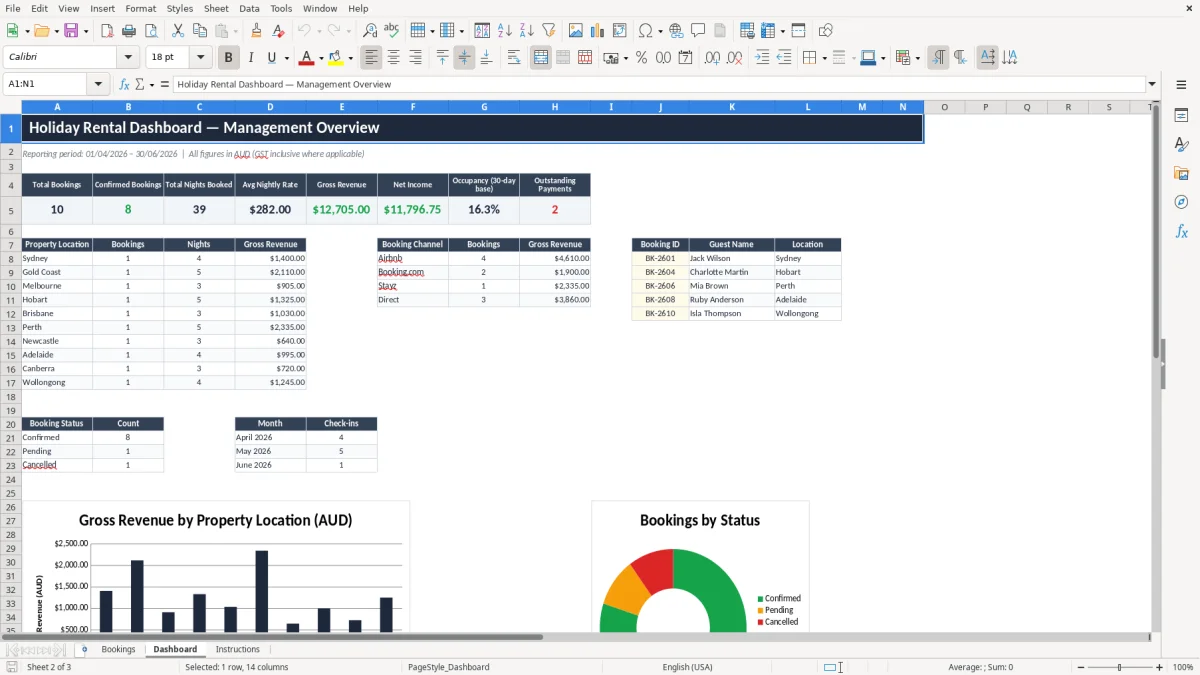
A reliable holiday rental booking calendar gives hosts a clear view of occupied, upcoming and completed stays. This Australian Excel template provides a central register for reservations across apartments, houses, cabins and other short-term accommodation.
By recording check-in and check-out dates in a consistent format, you can review availability before accepting a new enquiry and reduce the risk of overlapping reservations. The booking register is suitable for an individual holiday-home owner as well as a property manager overseeing multiple locations.
Use the Property Name and Property Location columns to distinguish homes in Sydney, Melbourne, Brisbane, Perth, regional areas or popular coastal destinations. Each row represents one booking, making the information straightforward to filter, sort and update.
You can review upcoming arrivals, identify departure dates and add operational notes for cleaning, maintenance or guest access. The template is set up for April to June 2026, but the structure can be adapted for other periods by adding rows or changing the title.
Consistent data entry is important. Use the same spelling for each property, enter dates as DD/MM/YYYY and update cancellations as soon as they are confirmed. A calendar spreadsheet is not a replacement for a channel manager or formal booking platform, but it is a useful, flexible overview for hosts who want a simple offline record.
Keep the workbook backed up and restrict access when it contains guest names and phone numbers. Reviewing the register before confirming a new reservation can help you coordinate availability across direct enquiries and external booking channels.
If your accommodation business includes powered sites or cabins, a caravan park booking register can provide fields for site numbers, deposits, extras and balances alongside this holiday-home calendar.
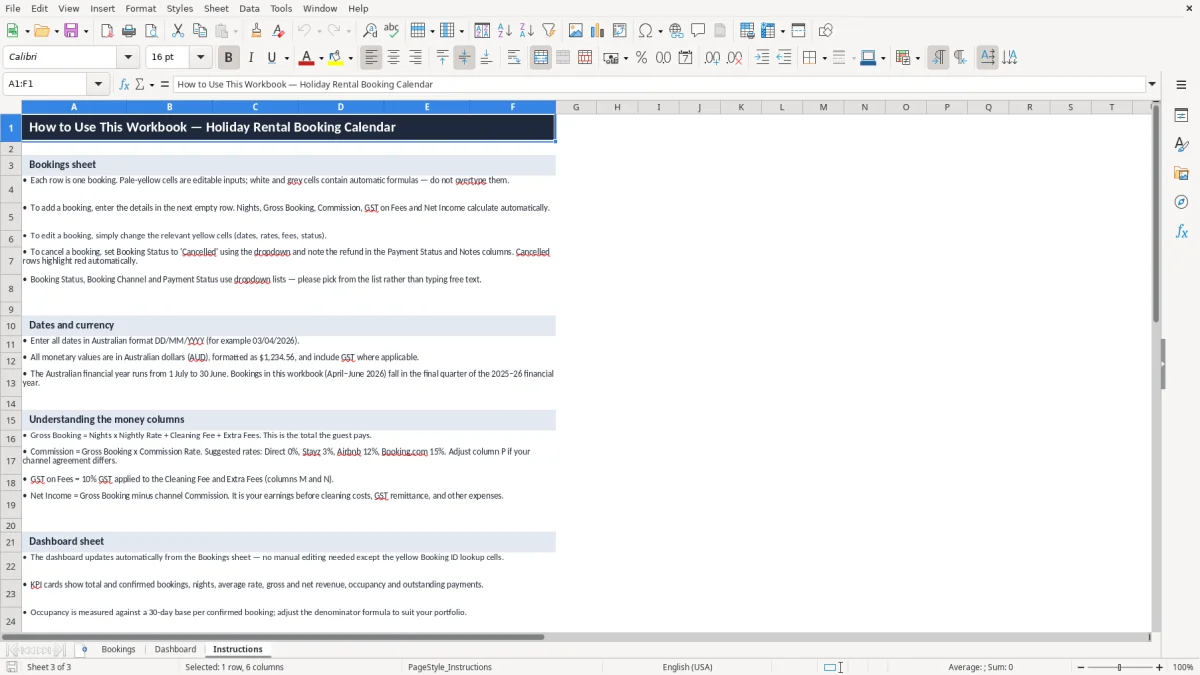
Holiday rental income often includes more than a nightly rate. Cleaning charges, extra fees, booking-platform commissions and GST treatment can all affect the amount a host expects to receive. This Excel spreadsheet brings those items together so each reservation has a practical financial summary in Australian dollars.
Enter the nightly rate, cleaning fee and extra fees for a booking, then review the calculated gross booking amount. Add the commission rate that applies to the relevant booking channel to estimate commission costs.
The template also includes a GST on Fees field and a Net Income field to support internal tracking. These figures are designed for planning and record keeping rather than replacing accounting advice. Commission structures differ between direct bookings, Airbnb, Booking.com, Stayz, agents and other channels.
GST obligations can also depend on factors such as registration, business structure, the nature of the accommodation and the treatment of particular charges. Confirm the correct approach with a qualified Australian tax or accounting professional.
The spreadsheet can help you compare booking channels, identify unpaid amounts and estimate the financial contribution of individual stays. Payment Status values such as Unpaid, Deposit Paid, Part Paid, Paid or Refund Due can make follow-up easier. For stronger records, reconcile the workbook against invoices, platform statements and bank transactions.
Keeping income information beside stay dates also helps you plan cleaning, maintenance and cash flow around busy periods. Use clear notes when a fee is waived, refunded or collected separately, and review calculations before using them in formal financial reporting.
A useful holiday rental booking calendar needs to support daily property operations as well as date tracking. This template includes fields for the guest name, phone number, property, location, number of guests and booking channel.
These details can help you prepare for arrivals, coordinate cleaners and respond to guest enquiries without searching through separate documents. The Booking ID column provides a simple reference for matching a row with a confirmation email, platform reservation or invoice.
Booking Status values may include Enquiry, Pending, Confirmed, Checked In, Completed and Cancelled. Keeping these values consistent makes it easier to filter the register and focus on action items. The Notes column provides space for practical information such as late arrival arrangements, accessibility requests, pet details, linen requirements, key collection instructions or a reminder to inspect a property after departure.
Avoid placing unnecessary sensitive information in the workbook, and protect the file with appropriate storage and access controls. If you manage multiple properties, use standard names and locations throughout the register. This prevents separate spellings from splitting results when you sort or filter.
The spreadsheet can be used alongside a digital calendar, booking platform or accounting system. It is especially useful as a simple operational overview for hosts who prefer an editable Excel file or need a consolidated record across several channels.
Review the register regularly, mark completed stays accurately and update guest or property details when circumstances change. You may also use the notes area to record cleaning coordination, maintenance follow-up or owner-use dates, provided those entries are relevant and handled securely. A consistent process helps keep operational information current without making the workbook unnecessarily complicated.
An Excel-based holiday rental booking calendar is a flexible starting point for organising short-term accommodation in Australia. It can suit a single coastal holiday home, a city apartment, a regional retreat or a small portfolio of rental properties.
The template uses a clean layout with familiar spreadsheet fields, so you can begin entering reservations without learning specialised software. Dates use the Australian day/month/year convention, while financial columns use AUD formatting.
This helps keep booking records understandable when working with local guests, cleaners, owners and service providers. The workbook is most effective when it is updated as part of a regular routine.
Add new enquiries promptly, confirm dates before accepting bookings, record deposits and payments, and review the next arrivals and departures before each turnover. At the end of a reporting period, compare gross bookings, commissions, fees and net income with your platform reports or accounting records.
You can extend the register for future months, add rows for new properties or adapt the status lists to match your workflow. Remember that this is a planning and record-keeping template, not legal, tax or financial advice.
Australian accommodation rules, council requirements, insurance conditions and GST obligations may vary by location and business circumstances. Check relevant requirements independently and obtain professional advice where needed.
With consistent updates and sensible backups, the spreadsheet can provide a straightforward overview of occupancy activity, guest information and expected rental income. It can also give owners a convenient starting point for discussing booking performance with cleaners, co-hosts, accountants or property managers. Keep a master copy, use clear file names and record the date of major updates so that the information remains easy to audit and maintain.