Nippers Attendance Excel Free Template – Australia (2026)
13
Free download
Australian casual loading pay Excel template for hours, overtime, gross pay, superannuation, PAYG estimates and employer costs.
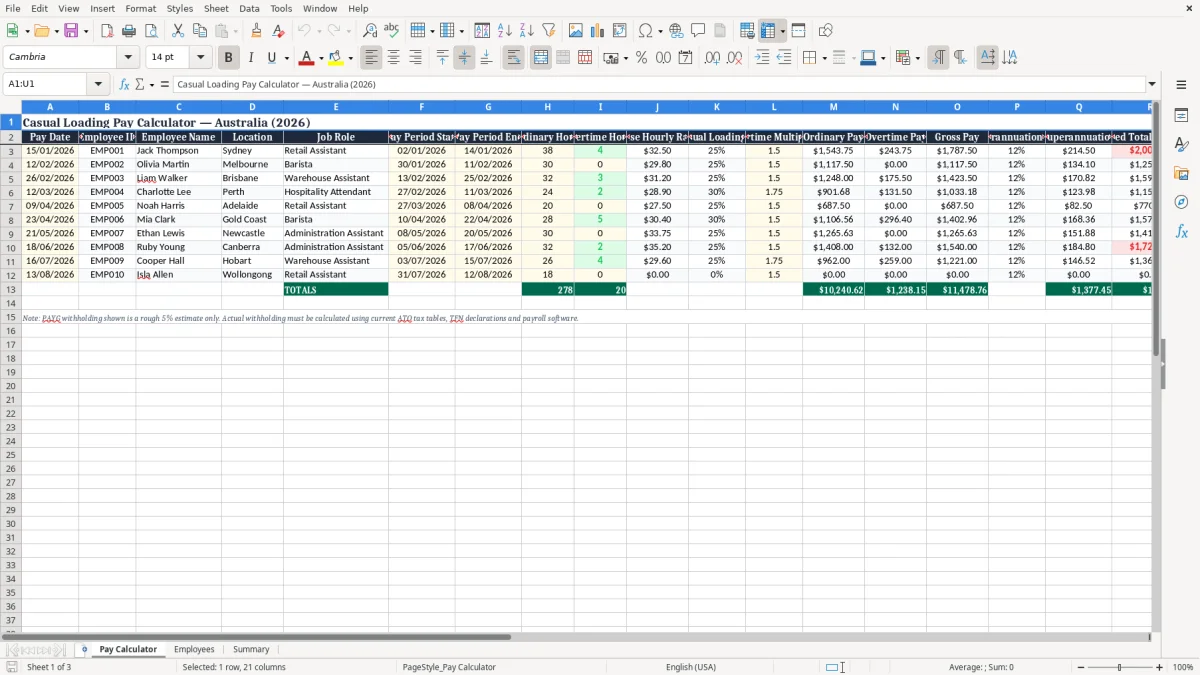
Calculate estimated casual employee pay in Australia with a practical Excel template for recording pay dates, employee details, ordinary hours, overtime, base rates, casual loading and employer costs. The workbook helps employers, payroll administrators, bookkeepers and small businesses organise payroll inputs and review key calculations in one place.
It includes example employees from several Australian locations and fields for modern award information, while allowing you to replace the sample data with your own records. Use the results as a transparent payroll estimate, then confirm rates, classifications, tax and superannuation obligations before processing payment.
Open the Pay Calculator sheet and replace the sample employee records with your own payroll information. Enter the pay date, employee ID, employee name, location and job role, then specify the pay-period start and end dates in DD/MM/YYYY format. Record ordinary hours and overtime hours from approved timesheets.
Enter the applicable base hourly rate, casual loading percentage, overtime multiplier and superannuation rate. Review the calculated ordinary pay, overtime pay, gross pay, superannuation, estimated total employer cost, PAYG withholding estimate and net pay estimate. Use the Notes column to identify the relevant modern award, enterprise agreement, classification, penalty rate or payroll assumption.
Before relying on the figures, compare the inputs with current Fair Work Ombudsman guidance, the employee's award or agreement, current Australian Taxation Office withholding schedules and current superannuation requirements. The workbook is intended for estimates and planning; final payroll should be checked by a suitably informed employer, bookkeeper, accountant or payroll professional.
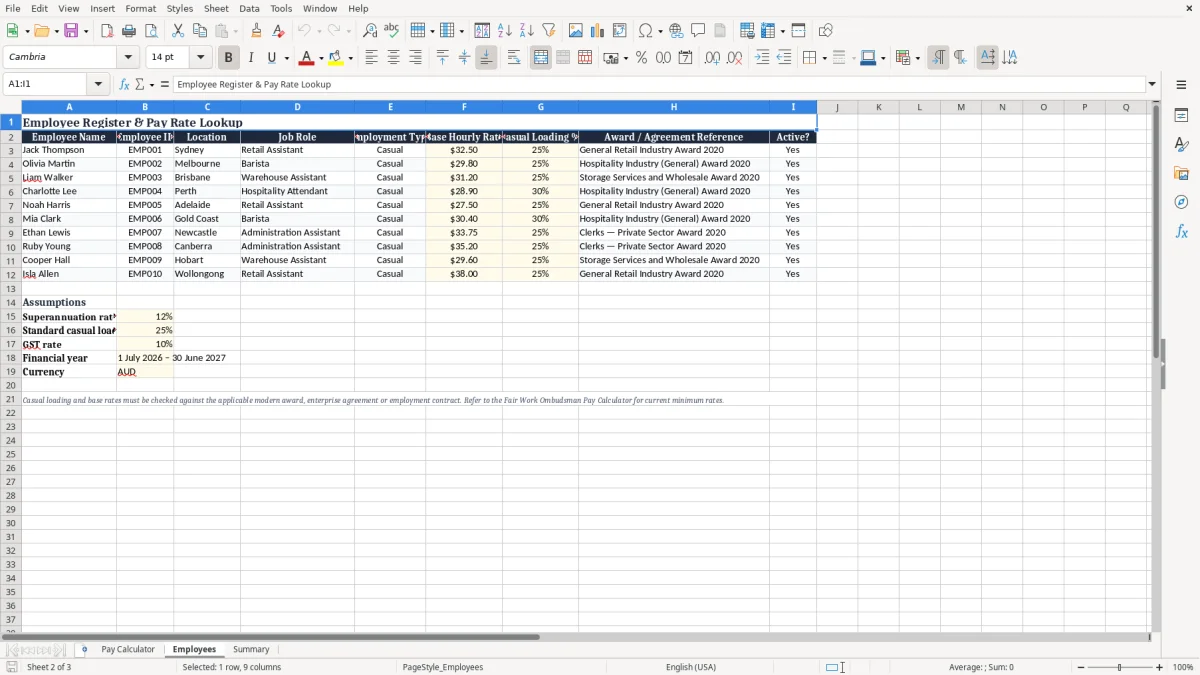
Casual loading is an additional amount commonly paid to eligible casual employees in Australia because casual employees generally do not receive some paid leave entitlements available to permanent employees. A frequently encountered loading is 25 percent, but the correct percentage depends on the relevant modern award, enterprise agreement, employment contract and circumstances of the work.
Some awards use different rates for particular classifications, times, days or arrangements, and some rates may already include loading. This is why an Australian casual loading pay spreadsheet should provide an editable loading field rather than assume one universal rate.
The template uses the entered base hourly rate and casual loading percentage to help estimate a loaded ordinary rate. For example, a base rate of $30.00 with a 25 percent loading produces an indicative loaded rate of $37.50 before overtime, weekend, public holiday or other penalty treatment. The calculator then separates ordinary hours and overtime hours so the employer can review the components of estimated pay.
The spreadsheet is useful for budgeting, checking timesheets and preparing information for payroll, but it does not decide which award or rate applies. Employers should verify the employee's classification, minimum rate, casual status, penalty provisions, allowances and overtime rules before payment.
Fair Work requirements and award rates can change, so current official guidance should be checked. A payroll professional can also confirm whether the selected calculation method is suitable for the business and employee.
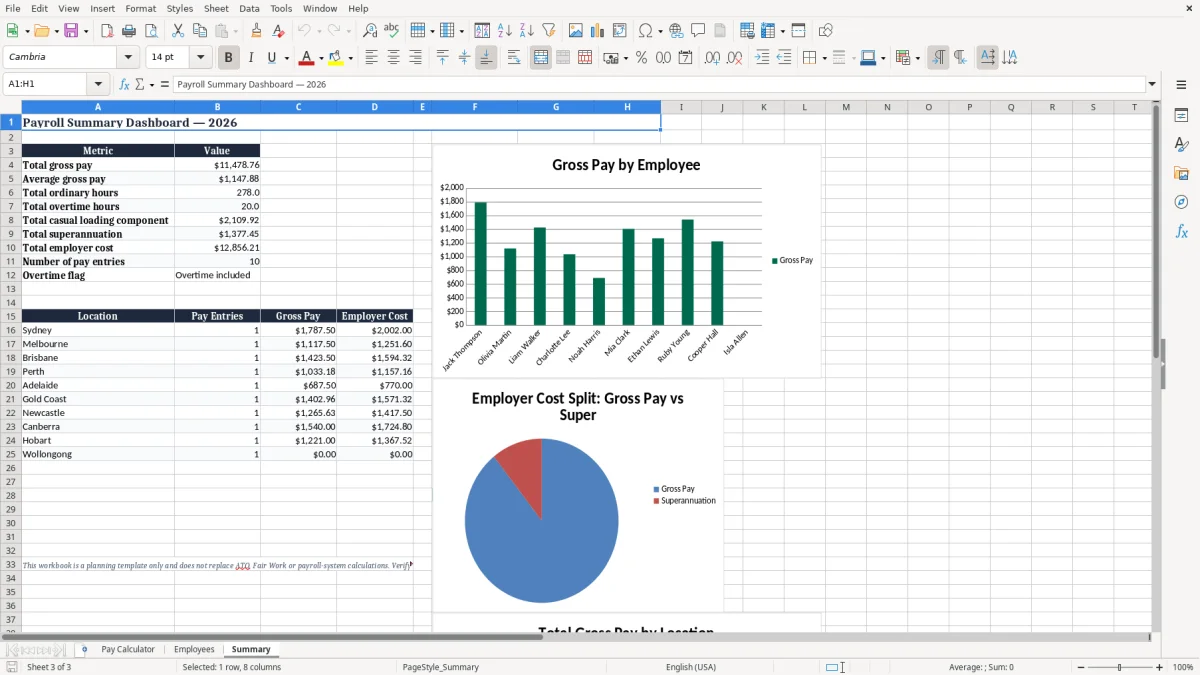
The Excel template is organised around information normally needed for a preliminary casual payroll calculation. Each row can represent an employee and pay period, with fields for pay date, employee ID, name, location, job role, period dates, ordinary hours, overtime hours, base hourly rate, casual loading and overtime multiplier.
This structure makes it easier to compare records across employees and retain notes about the source of each rate.
The core estimate starts with the base hourly rate and applies the entered casual loading percentage. Ordinary pay is based on ordinary hours and the loaded rate. Overtime pay is based on overtime hours, the loaded rate and the entered overtime multiplier.
Gross pay combines ordinary and overtime pay. The workbook also includes a superannuation rate, a superannuation estimate, an estimated total employer cost, a PAYG withholding estimate and a net pay estimate.
These calculations are designed to be clear and reviewable rather than replace a full payroll system. The overtime multiplier is configurable because awards and agreements can apply different rules. Penalty rates, allowances, breaks, public holidays, leave, salary sacrifice and other payroll matters may require additional treatment.
PAYG withholding is also an estimate because the correct amount depends on pay frequency, tax declarations, tax-free threshold claims, study or training loan debts and other employee circumstances. Check all outputs before processing a payment or reporting payroll.
Those extra payroll items are often tracked separately, so the next step is a penalty rates roster for the shifts and public holidays that need special treatment.
Small businesses and payroll teams can use this casual loading pay Excel template to create a consistent first review of casual wages. Start with approved timesheets and confirm that the employee details match the payroll record. Enter the pay period and separate ordinary hours from overtime hours.
Then check the base rate and casual loading against the relevant award, enterprise agreement or employment arrangement. If the employee worked evenings, weekends, public holidays or unusual shifts, record the applicable assumption in the Notes column and verify whether an additional penalty or special rule applies.
The employer-cost view can assist with budgeting because it places gross pay and estimated superannuation together. It can help a business compare labour costs across locations such as Sydney, Melbourne, Brisbane, Perth, Adelaide or the Gold Coast. The workbook also provides a convenient place to document roles such as retail assistant, barista, warehouse assistant or hospitality attendant, although the job title alone does not determine the correct legal classification or rate.
Use a new row for each relevant employee and pay period, and retain supporting timesheets and approvals. Protect or version the completed workbook if it forms part of an internal payroll process.
Before finalising wages, reconcile the spreadsheet with payroll software, current tax tables and superannuation settings. Keep records in accordance with Australian workplace and taxation requirements, and obtain professional advice where the award, classification or calculation is uncertain.
Before finalising wages, reconcile the spreadsheet with payroll software, current tax tables and superannuation settings, then check the award rate calculation for the correct classification and rate.
A casual pay estimate should be reviewed against the rules that apply to the particular employee and work performed. Confirm whether the person is correctly engaged as a casual and whether the relevant award or enterprise agreement contains a specific casual loading.
Check the classification and current minimum rate, because a job title or location does not by itself establish the correct pay rate. Review overtime, weekend, evening, public holiday, shiftwork and split-shift provisions, along with allowances, meal payments and other entitlements.
Superannuation should also be checked carefully. The rate entered in the workbook must be current, and the earnings included in the calculation may depend on ordinary time earnings rules and the nature of the payment.
PAYG withholding should be calculated using current Australian Taxation Office schedules and the employee's tax declaration. The spreadsheet's PAYG and net pay fields are estimates only and should not be treated as an official tax calculation.
The template does not account automatically for every possible payroll situation. It does not replace award interpretation, payroll software, timesheet approval or professional advice. Keep evidence supporting hours, rates and adjustments, and update the workbook when official rates or workplace arrangements change.
Fair Work Ombudsman and ATO resources are useful starting points, but complex matters should be referred to a qualified payroll adviser, accountant or employment specialist. Reviewing these checks before payment helps reduce underpayment, incorrect withholding and inaccurate employer-cost estimates.