Nippers Attendance Excel Free Template – Australia (2026)
13
Free download
Free school canteen roster Excel template for Australian schools, with volunteer contacts, shift status, training checks and dashboard reporting.
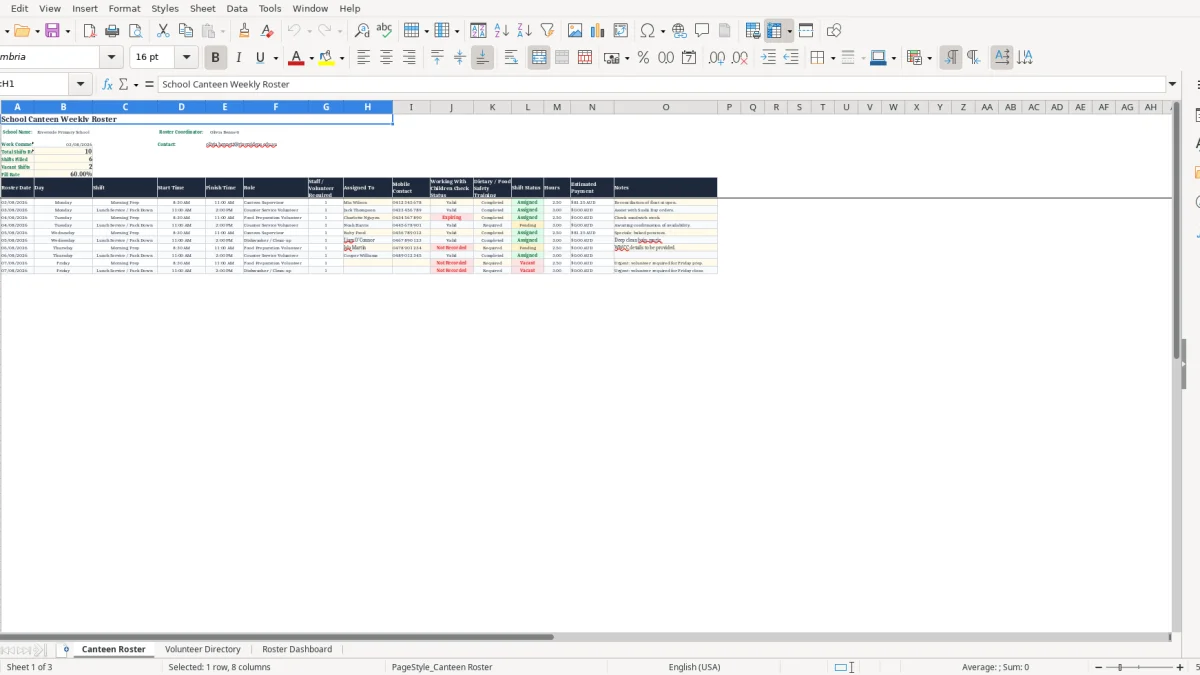
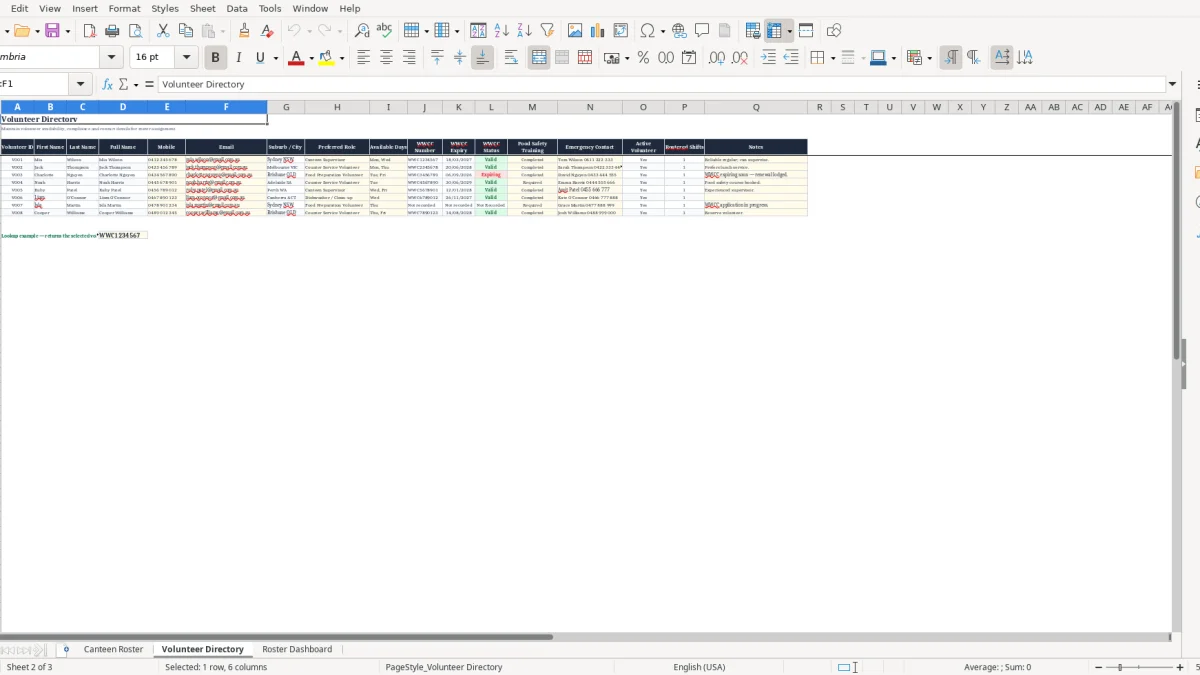
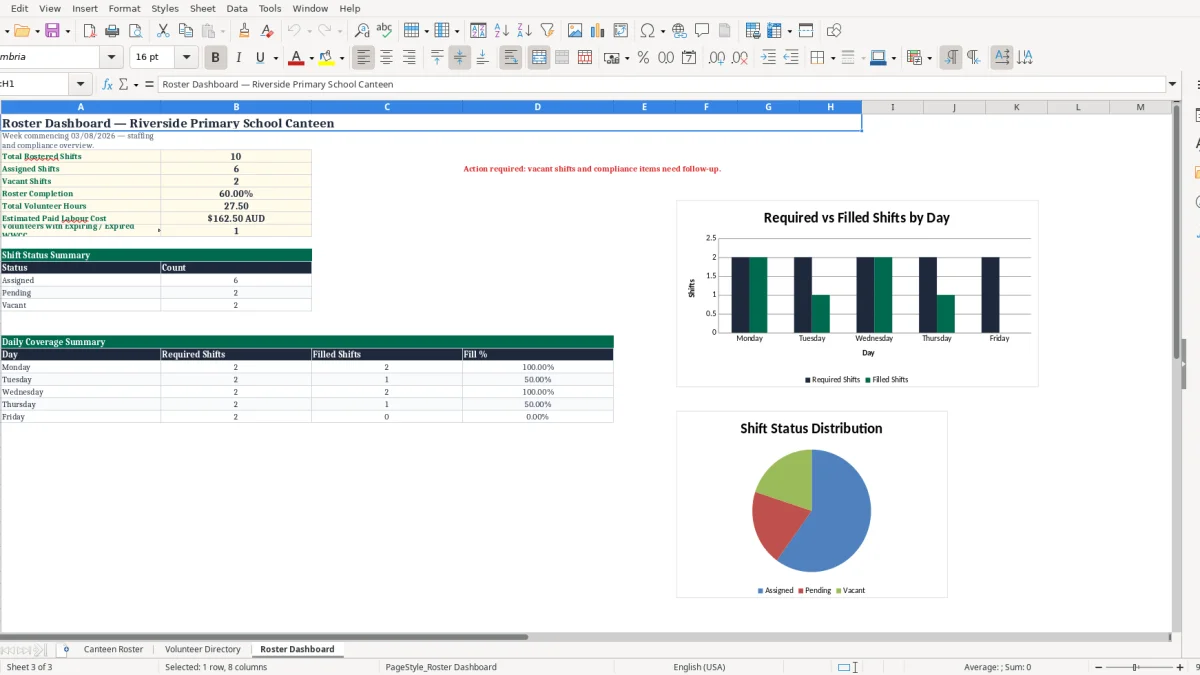
This school canteen roster Excel template helps Australian schools schedule weekly canteen shifts, assign volunteers, record mobile contacts and check food safety or Working With Children Check details. It includes a Canteen Roster sheet, Volunteer Directory and Roster Dashboard to track filled, vacant and required shifts.
The Canteen Roster sheet gives the coordinator one clear weekly working page instead of a string of emails, handwritten lists and last-minute phone calls. Image 1 shows the roster layout, including dates, shift times, roles, assigned people, training details, hours, payment estimates and notes.
Use it for a P&C-run canteen, a school-employed service or a small volunteer team that needs a reliable record of who is on duty. No worries: update the yellow input cells, check the dashboard, then send the final roster to your volunteers.
A school canteen roster is usually owned by the P&C treasurer, canteen convenor or school administration officer, but it only works when the people on the floor can read it quickly. A weekly sheet is particularly useful for a volunteer-run primary school canteen where the team changes from Monday to Friday and the lunch rush is fixed.
Take a primary school that opens the canteen 5 days a week with two service periods: food preparation from 9:00 am to 11:00 am and counter service from 11:00 am to 1:30 pm. That is 10 shifts to cover, which is exactly the sort of workload shown in image 1.
If each shift needs 2 volunteers, the coordinator needs 20 volunteer placements, not merely 10 names. A roster showing 16 Assigned entries and 4 Vacant entries gives a 80.0% fill rate, so the coordinator knows on Thursday afternoon that four replacement calls are still needed.
Some school canteens use a mix of a paid supervisor and parent volunteers. The office manager can put the paid supervisor into the Assigned To column, record a 5.5-hour shift from 8:30 am to 2:00 pm, and use Estimated Payment as a planning figure while payroll is processed separately.
For a small school with one supervisor working 25 hours a week at $31.00 per hour, the weekly wage estimate is $775.00 before on-costs. Keep the roster for staffing coverage; do not treat the estimated figure as a payslip or payroll record.
At the start of term, before sports carnivals or around a special lunch day, volunteer demand can jump sharply. A school processing 250 lunch orders on a Friday may schedule three prep volunteers, three counter volunteers and one runner rather than its ordinary two-person service team.
The practical position is to roster by actual job and time block, rather than write one broad entry saying canteen volunteer. Clear roles let a new helper see whether they are washing produce, packing orders, serving students or cleaning benches, and they make handovers much less messy.
That same job-by-job detail also suits a FIFO roster tracker when volunteers rotate through prep, serving and cleanup across different shifts.
A roster is not the document that proves every compliance obligation, but it is a useful operational check before a person starts a shift. The template has fields for Working With Children Check status and dietary or food safety training, so the coordinator can identify missing information before service begins.
Schools and their volunteers must meet the child-safety screening requirements that apply in their state or territory. Record the check status in the roster or Volunteer Directory, then keep the actual clearance number, expiry date and verification evidence in the school or P&C's secure personnel records rather than on a roster circulated to every helper.
For example, if 12 people are listed for next week's shifts and 2 have a status marked Pending, do not quietly put them into counter service with students. Assign the 10 cleared people first and fill the remaining 2 placements with cleared replacements or adjust the operating plan.
Food Standards Australia New Zealand's Food Standards Code requires food businesses to handle food safely. A school canteen serving chicken wraps, dairy products and prepared salads needs practical controls: clean hands, separation of raw and ready-to-eat food, correct chilling and clear allergen communication.
The training column is useful for identifying who can confidently handle allergen-sensitive orders or supervise preparation. A volunteer who has only done counter service should not be left alone to prepare 40 special-diet lunches without an experienced food handler available.
Mobile contacts and child-safety information are personal information. Keep the Excel file in the school-approved shared drive with access limited to the canteen coordinator and authorised office staff, rather than emailing the complete directory to 30 volunteers.
Use the published roster for names, times and duties only where possible. The sensible approach is to keep contact details in the Volunteer Directory for the coordinator's use, while sending volunteers a stripped-back weekly schedule that does not expose unnecessary personal data.
The costly roster failures are rarely complicated. They happen when a volunteer cancellation is missed, a shift is counted as covered even though two people were required, or the person rostered for a food-handling task has not been checked by the coordinator.
A common trap is marking Friday counter service as Assigned because one name appears against it, even though the service needs 2 people. If the school has 300 orders and one volunteer must serve, collect payments and answer student questions alone, the queue lengthens and lunch distribution runs late.
Set up separate rows for each required placement or state the required headcount clearly in Staff / Volunteer Required. For a 2-person counter shift, record Counter 1 and Counter 2; that turns one vague green status into two visible coverage decisions.
At 7:15 am, a text saying I cannot make it is manageable only if the coordinator has a current replacement list. If a parent has changed numbers and the directory still holds the old mobile, 20 minutes can disappear before the first useful call is made.
Check the directory once a month and after every volunteer sign-up event. A team of 18 volunteers with even 3 out-of-date contacts is not a team of 18 available people when an urgent replacement is needed.
The Estimated Payment column can help a P&C budget a paid shift, but it does not calculate PAYG withholding, leave, penalty rates or superannuation. In 2026 the superannuation guarantee rate is 12% of ordinary time earnings for eligible employees, so a $775.00 weekly wage estimate may carry $93.00 in super before other employment costs.
Use proper payroll software and STP reporting for employees. The roster should confirm who worked and for how long; payroll must apply the relevant Fair Work award, approved timesheets and withholding rules.
The best time to prepare next week's roster is before the current week ends. Make it a 20-minute Thursday task: check vacancies, confirm the Friday absences, then send the following week's schedule before volunteers make other plans.
A 10-shift week with 2 placements per shift takes far less time to maintain when names are confirmed in one block than when the coordinator sends 20 separate texts on the morning of service. The dashboard is useful here because it gives a quick coverage view without scanning every row.
Use the same role names each week, such as Prep, Counter, Runner and Clean-up. Consistent labels make the dashboard and filters more useful, while entries such as counter, serving and till person split the same task into three different categories.
Use the status fields honestly: Vacant until a person has said yes. It is better to show a 70.0% fill rate on Thursday than claim 100.0% and discover on Friday that three people thought they were only backups.
Excel is a good fit for a school with 10 to 30 regular volunteers and one weekly roster. When you have 80 volunteers, multiple event rosters, recurring availability, automated reminders and payroll integration, move the scheduling work to dedicated software and retain this workbook as a simple export or contingency record.
At that point, the weekly roster template becomes the right place to keep the export, while the scheduling and reminders move into dedicated software.