Bushfire Plan Excel Free Template – Australia (2026)
6
Free download
AFL tipping ladder Excel workbook for Australian competitions, with match results, tipster rankings, accuracy, margins and a dashboard for 100 entries.
This AFL tipping ladder Excel template tracks up to 100 tipsters across 9 rounds, calculates correct tips, accuracy, ladder points and margins, and summarises the competition on a dashboard. It includes Match Results, Tipping Ladder, Dashboard and Instructions sheets for an Australian 2026 footy pool.
Enter each match's round, date, venue, teams and final scores on Match Results, then select one club per round for each tipster. The workbook calculates the winning team, winning margin, result status, position, form and competition statistics without needing to rebuild the formulas.
An AFL tipping ladder spreadsheet suits the person who runs a workplace pool, the office manager at a tradie business, a club volunteer or a group of mates who want a clear result after every round. You can use it before the first bounce to collect tips, then return after the weekend to enter final scores and refresh the ladder.
A four-person electrical business might have 12 staff tipping from Brisbane, Sydney and Melbourne. The organiser enters the fixtures and results once, while each tipster receives one selection for every round. A footy club treasurer can use the same layout for a social competition without mixing tipping records into the club's bookkeeping.
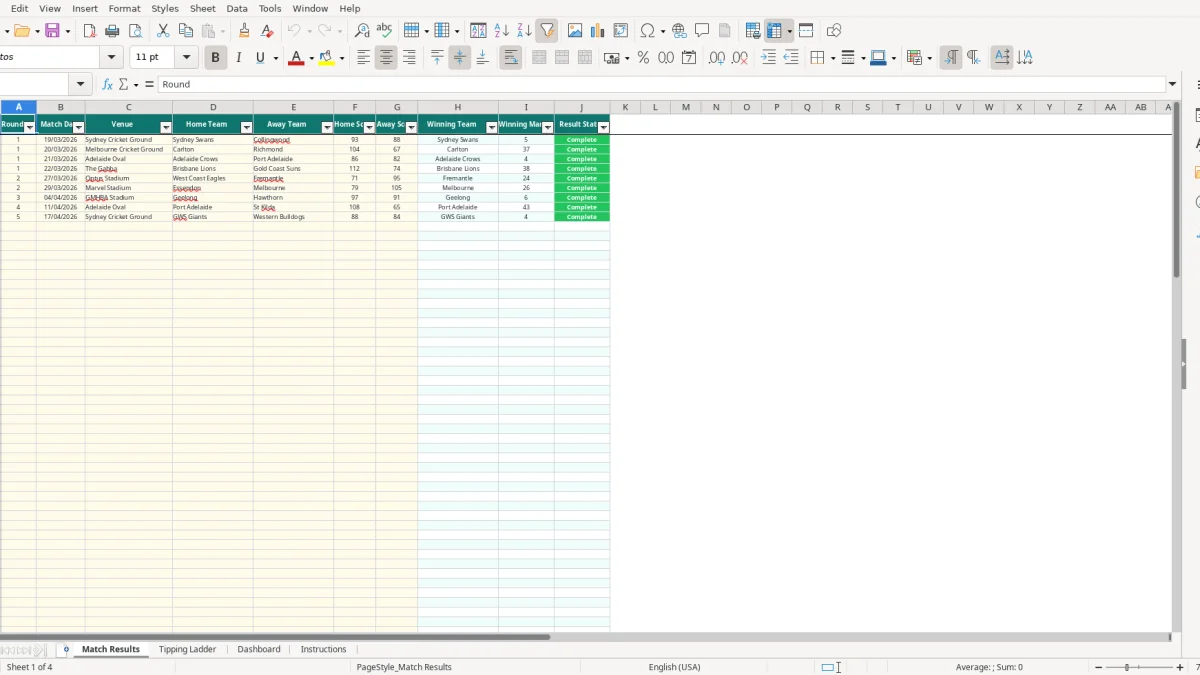
The workbook has four named sheets. Match Results (image 1) shows ten columns from Round and Match Date through Winning Team, Winning Margin and Result Status. It includes prepared rows to 101, a filter on A1:J101 and freeze panes at A2, which makes a long fixture list easier to work through.
On Thursday, enter or confirm the upcoming match details. Tipsters then use the yellow input cells on Tipping Ladder to choose clubs for Round 1 through Round 9. The supplied validation list helps prevent spelling differences such as Sydney Swans versus Sydney Swans with an extra space.
After the final siren, entering 93 for Sydney Swans and 88 for Collingwood produces Sydney Swans as the winner and a 5-point margin. A tipster who selected Sydney Swans receives one Correct Tip and one Ladder Point; a blank score keeps the match Pending rather than awarding a result.
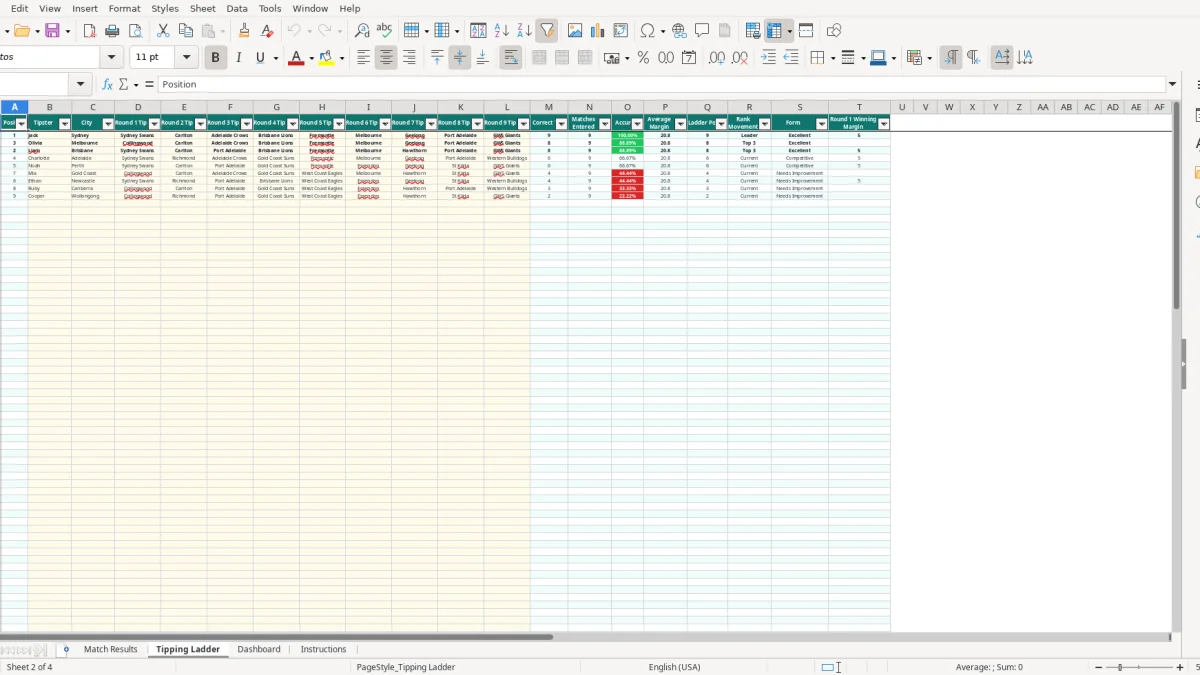
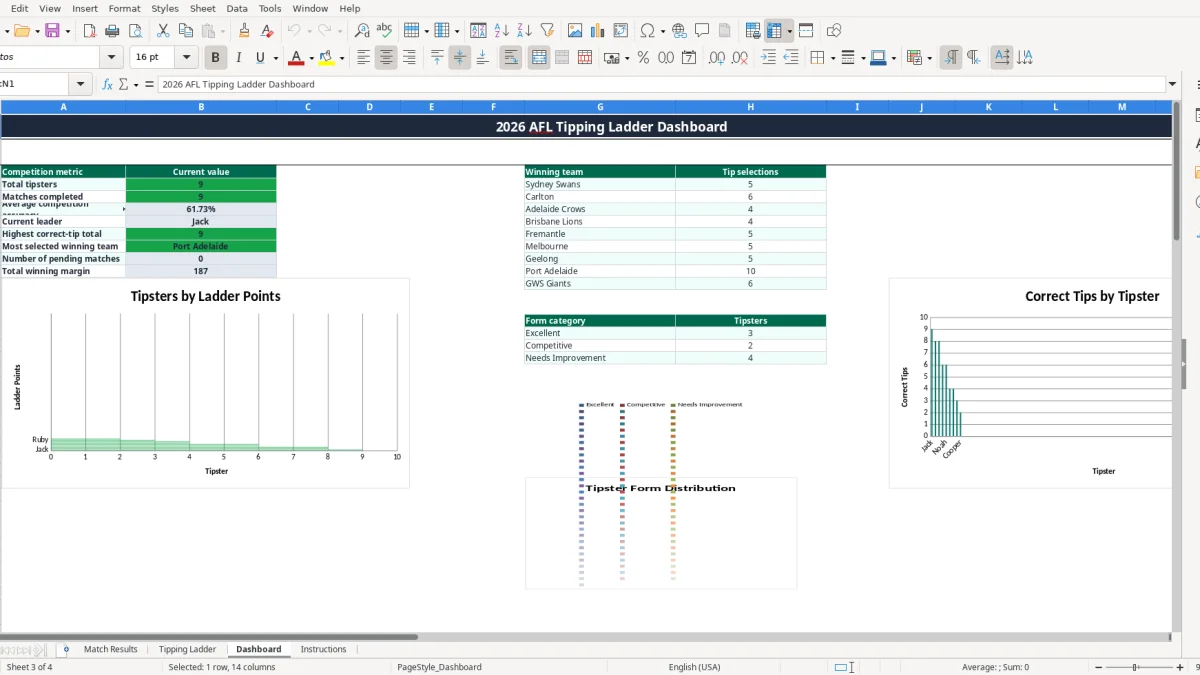
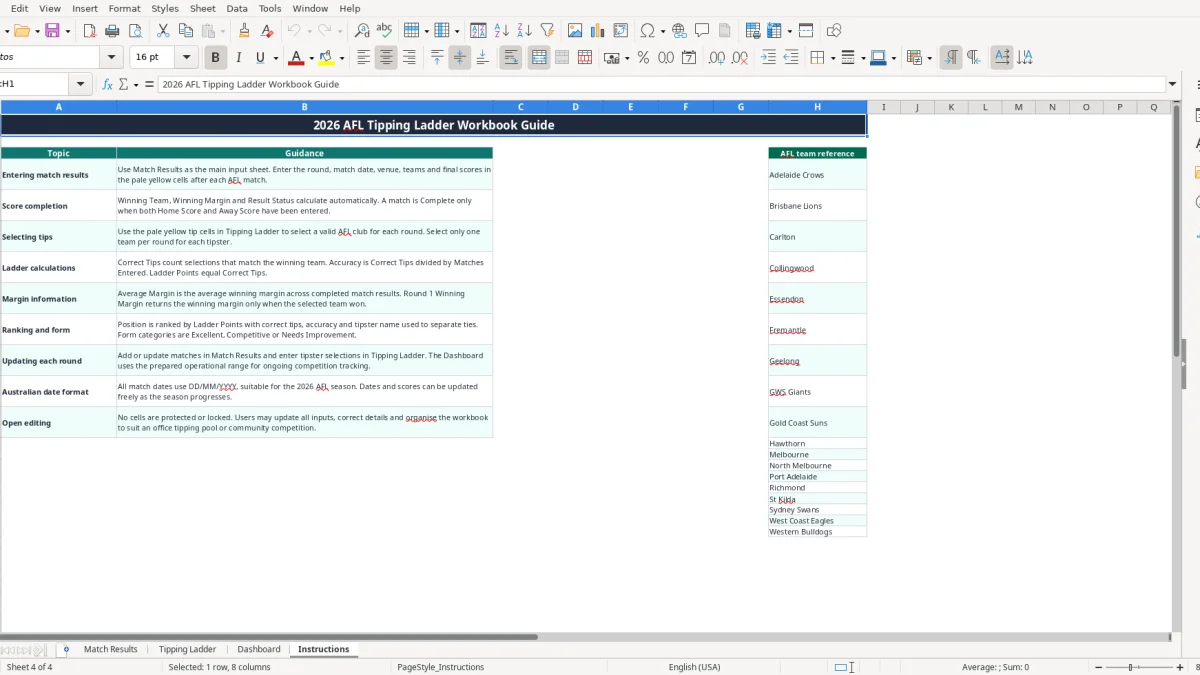
Tipping Ladder (image 2) provides 20 columns, including Accuracy and Form. Dashboard (image 3) summarises total tipsters, completed matches, average competition accuracy and the current leader, while the leaderboard charts make it practical to share results at the Monday meeting. Instructions (image 4) gives the entry rules and lists the AFL team reference.
If your group also runs a separate rugby league pool, the NRL tipping tracker uses a comparable match, score and leaderboard structure without mixing those records into the AFL ladder.
An AFL tipping pool is usually a private competition rather than a GST or BAS reporting system, so the workbook does not calculate tax, prizes or betting liabilities. You still need a clear written scoring rule before the season starts. This template's built-in position logic gives one Ladder Point per Correct Tip, while Accuracy is Correct Tips divided by Matches Entered.
For example, if a tipster selects 7 winners from 9 entered matches, the workbook shows 7 Correct Tips, 9 Matches Entered and 77.78% Accuracy. The formula ranks Ladder Points first, then uses correct tips, accuracy and tipster name to separate ties. It does not calculate a separate margin bonus or a countback prize.
That is an important technical position: keep the scoring rule simple unless your group has agreed to a different system in writing. If you promise one point per winner, changing to margin points halfway through the 2026 season will make the existing ladder misleading.
Tipster names and cities are personal information. If a workplace or club shares the Dashboard publicly, use first names or agreed display names rather than publishing unnecessary details. The Privacy Act 1988 and Australian Privacy Principles are relevant when an organisation collects and shares personal information, particularly if the file is emailed beyond the original group.
Keep a separate note of entry fees, prize payments and the competition rules if money is involved. For instance, 40 entrants paying $10 creates $400 to reconcile; the workbook records tipsters and outcomes, but it does not contain an entry-fee ledger, payment register or prize calculation.
Match Results uses the Australian DD/MM/YYYY format. Enter a final score only when the match is complete, because a score of 0 is accepted as a valid whole number from 0 to 250. A blank Home Score or Away Score leaves the result Pending, so the organiser can distinguish an unfinished fixture from a genuine low score.
The biggest problems in a footy pool are rarely complicated Excel errors. They are late tips, inconsistent team names and results entered against the wrong round. One incorrect row can change every tipster's Correct Tips count and create an awkward argument when the prize is decided by a single point.
If one result is typed as GWS instead of GWS Giants, COUNTIF will not match the tipster's valid selection. A competition with 30 tipsters could then lose up to 30 expected scoring matches from one spelling error. The team validation lists on Match Results and Tipping Ladder are there for a reason: select from the list instead of free-typing club names.
Similarly, entering a Round 2 score into a Round 1 fixture can give every participant a result against the wrong tips. The sample includes Sydney Swans 93, Collingwood 88 and Carlton 104, Richmond 67. Treat those as examples to verify, not permanent results if your competition uses different fixtures or needs corrections.
Typing only one score leaves Result Status as Pending and Winning Team blank. If an organiser manually types over the calculated cells, the sheet may appear complete while the underlying result is not linked to both scores. Enter both final scores in F and G and let the formulas calculate the winner and margin.
A common practical failure is entering a tip after the match has started. The workbook does not record a timestamp or lock a selection, so your competition needs a separate closing rule. For a 9-round pool with 20 tipsters, one late selection can affect 180 possible tip cells over the season if people begin changing old rounds.
Blank tip rows are prepared through row 101, but they are not automatically valid entrants until a Tipster name is entered. Accuracy is a percentage of entered selections, not a percentage of all season matches. Someone with 2 correct tips from 2 entered has 100.00% accuracy, but that is not equivalent to someone with 8 from 9.
Do not treat Average Margin as a personal performance score: the formula uses the average of completed match margins across Match Results. A 27-point average margin describes the competition's completed games, not necessarily the margins of a particular tipster's selections.
The easiest way to keep an AFL tipping spreadsheet alive is to attach it to two fixed moments: a tips deadline before the first match and a results update after the last match. A five-minute Monday check is more reliable than trying to reconstruct nine matches and dozens of selections at the end of the month.
For example, a pool with 18 tipsters and 9 rounds has up to 162 tip cells to review. A quick filter and a consistent deadline will save far more time than checking each person's messages individually.
Match Results has a filter across A1:J101 and Tipping Ladder has one across A1:T101. Filter Result Status to Pending when chasing scores, or sort the ladder by Position after the formulas recalculate. The yellow cells are the practical entry areas; calculated columns such as Position, Correct Tips and Form should be left alone.
There are no protected cells, so keep a clean master copy before reorganising columns or changing formulas. The Dashboard (image 3) contains three charts and prepared leaderboard data, but it is not a button-driven reporting system. Excel recalculates the linked formulas when the input values change.
This spreadsheet is a good fit for a pool of up to 100 named tipsters and 9 tipping rounds. Move to shared competition software or a system such as Xero or MYOB only for unrelated business records; those accounting platforms are not designed to manage AFL selections. For a larger pool, live mobile tips, locked deadlines or automatic fixture imports, use dedicated tipping software rather than adding more fragile formulas to this file.