Bushfire Plan Excel Free Template – Australia (2026)
6
Free download
Plan Australian backyard crops, planting dates, harvests, costs and yields with a three-sheet Excel planner for home gardeners.
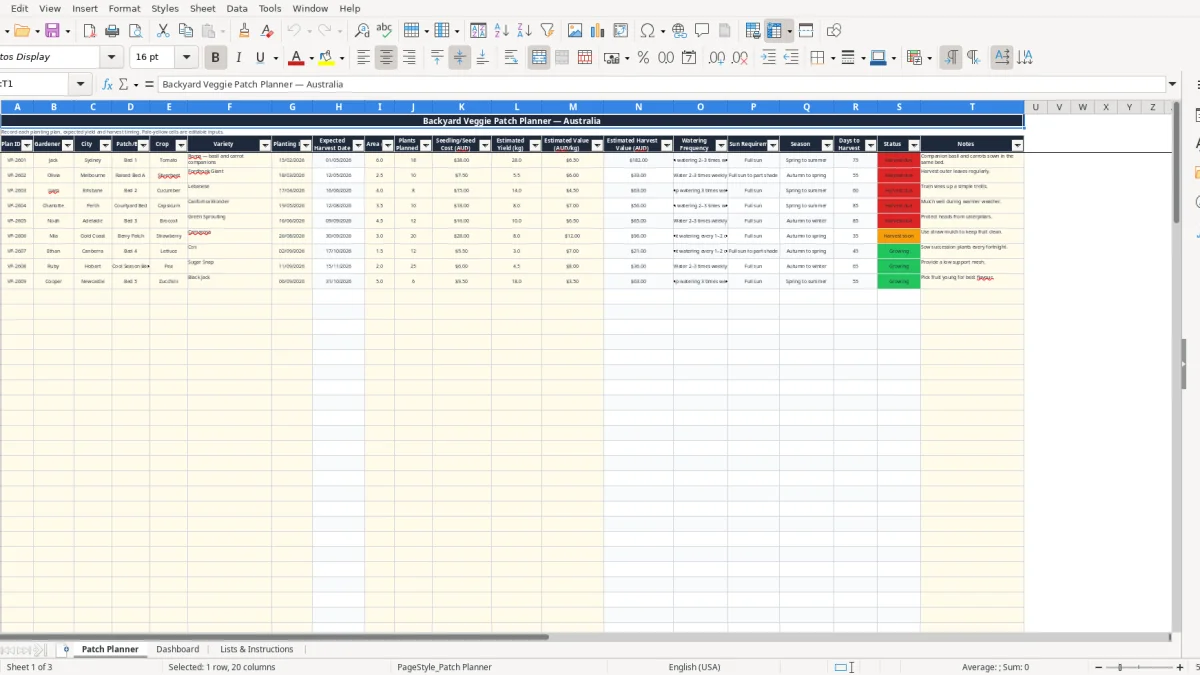
This backyard veggie patch planner Excel spreadsheet records each crop, variety, bed, planting date, area, plant quantity, seed cost, estimated yield and harvest value. It also calculates expected harvest dates, days remaining and growing status, with Australian season, watering and sun information built in.
The workbook has three sheets: Patch Planner, Dashboard, and Lists & Instructions. Enter your garden details in the pale-yellow input cells, then use the dashboard to compare planned costs, estimated yield, harvest value and return on cost across up to 100 prepared planting rows.
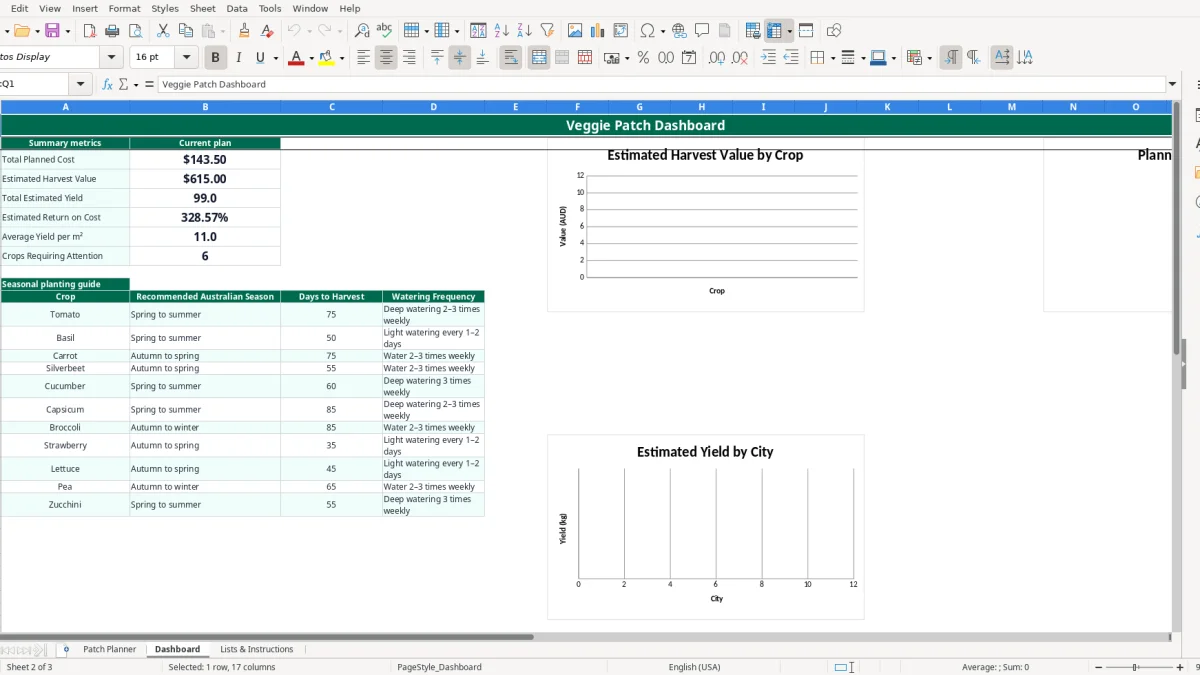
A backyard veggie patch planner suits anyone who wants more than a rough list on the fridge. A household in Sydney can use it when laying out a new raised bed, while a gardener in Melbourne may use it at the start of autumn to choose silverbeet and carrots. The city field lets you record whether a plan belongs to Sydney, Melbourne, Brisbane, Perth, Adelaide, Gold Coast, Newcastle, Canberra or Hobart.
On the Patch Planner sheet, image 1 shows one row for Jack's 6 m² Bed 1. He has planned 18 Roma tomato plants, $38.00 of seedling or seed cost, 28 kg of estimated yield and a $6.50 value per kilogram. The formula calculates an estimated harvest value of $182.00, before any labour or equipment costs.
That level of detail is useful when you have several beds competing for space. An office worker with a 2.5 m² raised bed might compare 10 silverbeet plants with a cucumber trellis, rather than planting both without considering area or expected yield.
The gardener, city and patch or bed columns make the file workable for a household, community garden group or school garden. One person can enter planting plans while another checks the Dashboard before the weekend watering and harvesting round.
The workbook is also useful at the start of a busy season. If you enter four crops across four beds, the expected harvest dates and status labels give you a practical forward view. This is a planning aid, not a guaranteed harvest forecast: weather, pests, soil and watering will change actual results.
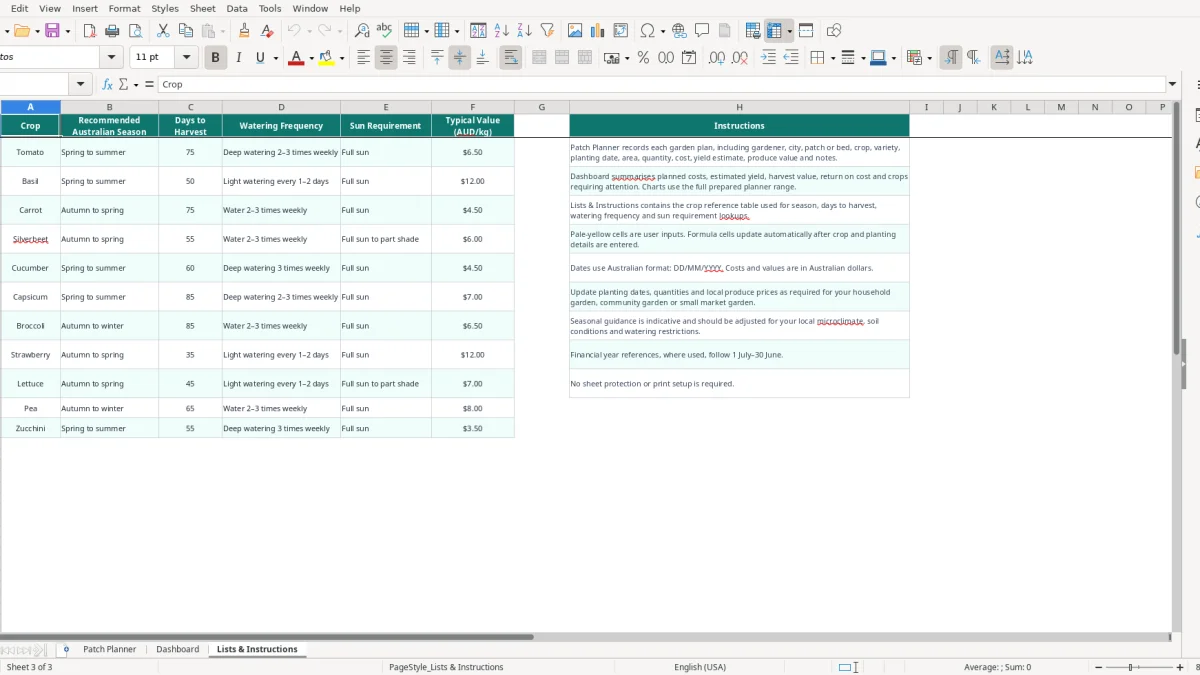
The Lists & Instructions sheet, shown in image 3, provides the Australian crop reference used by the planner. It includes recommended season, days to harvest, watering frequency, sun requirement and typical value in AUD per kilogram. The reference includes crops such as tomato, basil, carrot, silverbeet, cucumber and capsicum.
When you select Tomato in the Crop column, VLOOKUP returns Spring to summer, 75 days to harvest, Deep watering 2–3 times weekly, Full sun and a typical value of $6.50 per kilogram. If you plant 28 kg of estimated tomatoes, the workbook calculates $182.00 of estimated harvest value.
The same calculation is used for expected harvest timing. A tomato planted on 15/02/2026 with 75 reference days produces an expected harvest date 75 days later. The Status formula then compares that date with TODAY(), marking the crop Harvest soon when it is within 14 days.
Australian growing conditions vary sharply between Hobart, Brisbane and Perth, so treat the reference seasons as planning guidance rather than a horticultural guarantee. A crop listed as Spring to summer may need a different planting window in your microclimate, and the workbook lets you record your actual date and variety.
The template records costs and produce value in Australian dollars, but it does not claim to calculate profit. Estimated harvest value is yield multiplied by value per kilogram; it does not subtract water, compost, tools, labour or pest-control costs. For a realistic comparison, record those extra costs separately.
The biggest problem with a veggie plan is false precision. A row can show 28 kg of tomatoes at $6.50 per kilogram, or $182.00 of estimated value, but that is an estimate rather than cash in the bank. If disease cuts the crop by 30%, the practical value falls to about $127.40 before considering the $38.00 planting cost.
Expected Harvest Date is driven by the planting date and the reference days to harvest. Entering a transplant date when you meant the seed-sowing date can shift a 75-day tomato estimate by several weeks. The workbook cannot know whether a seedling was already four weeks old when planted, so use Notes to explain unusual timing.
Seedling or Seed Cost is an AUD amount for the plan, Estimated Yield is kilograms, and Estimated Value is AUD per kilogram. If you enter $6.50 as 6.5 kilograms, the Dashboard will still calculate a number, but that number will be meaningless. A sensible check is to ask whether 18 plants producing 28 kg is plausible for the variety and season.
Another common issue is leaving the Crop field blank while filling in other numbers. The lookup columns remain blank, so no expected harvest date or status appears. Select a crop first, then check that the returned season, watering and sun fields look sensible.
Finally, do not treat the Estimated Return on Cost as a net margin. If planned cost is $60.00 and estimated harvest value is $240.00, the Dashboard shows a 300% return on cost calculation, but it excludes labour and ongoing garden expenses. Use it to compare planting plans, not as a promise of savings.
The spreadsheet works best when you update it at a fixed time rather than trying to reconstruct the garden months later. Set aside 10 minutes on the day you buy seedlings or sow seeds. Enter the planting date, quantity, cost and bed immediately, then add the variety and any trellis or companion-planting detail in Notes.
For example, if you have 12 active rows and spend 2 minutes checking each one, a 24-minute Sunday review is enough to update dates, notes and estimates. That is more reliable than waiting until the end of the season and guessing which bed produced what.
This workbook is well suited to a home garden or small shared patch with up to 100 prepared planner rows. If you are managing a commercial market garden with thousands of plantings, batch traceability, staff tasks, irrigation records and sales invoices, move to dedicated farm or inventory software rather than stretching the spreadsheet.
Keep a backup before making major changes, and avoid overwriting formula columns H and N through S. Pale-yellow cells are intended for inputs; calculated cells should be left intact so the Dashboard continues to work.